

Market development funds (MDF) are money you, the vendor, give a channel partner to spend on marketing and selling your product. You don’t need partner software to run them. With five partners, or with thirty, a single page of rules will do, plus a request that somebody approves before a dollar is spent and a link from each funded activity to the deals that partner registers in your CRM, which is the setup we’d build for a vendor that size with no PRM.
What MDF is, and where co-op funds fit
The letters stand for market development funds. Plenty of vendors say marketing development funds, and nobody will correct you, it’s the same program. Who pays? You do. Either the partner spends first and you reimburse against proof, or the supplier’s invoice comes straight to you.
Impartner’s wording is that MDF covers marketing resources and other support a vendor makes available to its partners so they can raise awareness of its products and generate demand for them (Impartner: What are MDF funds?). On an ordinary working day that looks like an email from a reseller asking whether you’d put some money toward a webinar. Or a local event, or a paid campaign. They run it. The bill lands on your desk.
A quick check before you read on. If you searched for MDF because a big cloud or hardware vendor is offering you funds as its partner, you’re getting the view from the other side of the table here. We wrote this page for the vendor who hands the money out, and if you are still deciding whether to sell through partners at all, our piece on channel sales vs direct sales for a small team comes first.
MDF money is discretionary. You decide, request by request, who gets it, and no partner has a balance waiting by default. It also looks forward, since you’re paying for an activity that should produce deals next quarter.
Co-op funds are usually earned. Oracle’s Siebel PRM documentation says co-op program credits are incentive-based while MDF program credits are discretionary (Oracle Siebel PRM: Adding a credit to a program account). In an accrual setup the partner builds up a balance from its own results (a percentage of its revenue, say) and later draws on that balance for approved marketing (Oracle Siebel PRM: Creating market development funds).
Why should a small vendor care which model it runs? Because the model decides who you can support. Accrual sends most of the money to your biggest reseller, the one who needs it least. With proposals, a brand-new partner who has a good idea and no sales history can still ask. PartnerStack makes the same point and notes that many channel managers are moving to proposal-based programs, where all partners can pitch for funds regardless of revenue or tenure (PartnerStack: What are marketing development funds).
Who gets MDF: rules that fit on one page
Write the rules before the first partner asks. If you don’t, the first request becomes the precedent, and guess who sends it. Usually the loudest partner you have.
One page is enough. It has six questions to answer.
- Who can apply? We’d require a signed partner agreement and at least one registered deal in the last two quarters. Partners in their first 90 days get an exception, since they’ve had no time to register anything yet.
- The activity types you fund, by name. Events, webinars, paid campaigns, content in the partner’s language.
- What you refuse. Staff salaries. General brand advertising that never mentions your product. Anything already spent before approval, however tidy the receipt looks.
- How much, meaning a cap per request and a cap per partner per quarter. If you want co-funding, write down the share the partner pays itself.
- Expiry. An approved request that nobody has claimed by a fixed date returns to the pool.
- Proof, which is the part your accountant will ask about. That’s an invoice, evidence that the activity happened, and the list of leads or registered deals that came out of it.
Those thresholds are examples, so set your own. The test for the finished page is short. Can your partner manager say yes or no after one reading? Can a partner predict the answer before applying?
We do hold one position firmly, and it’s that deal registration should be a condition of the fund. A partner who takes marketing money and never registers a deal leaves you with nothing to measure.
From request to claim in five steps
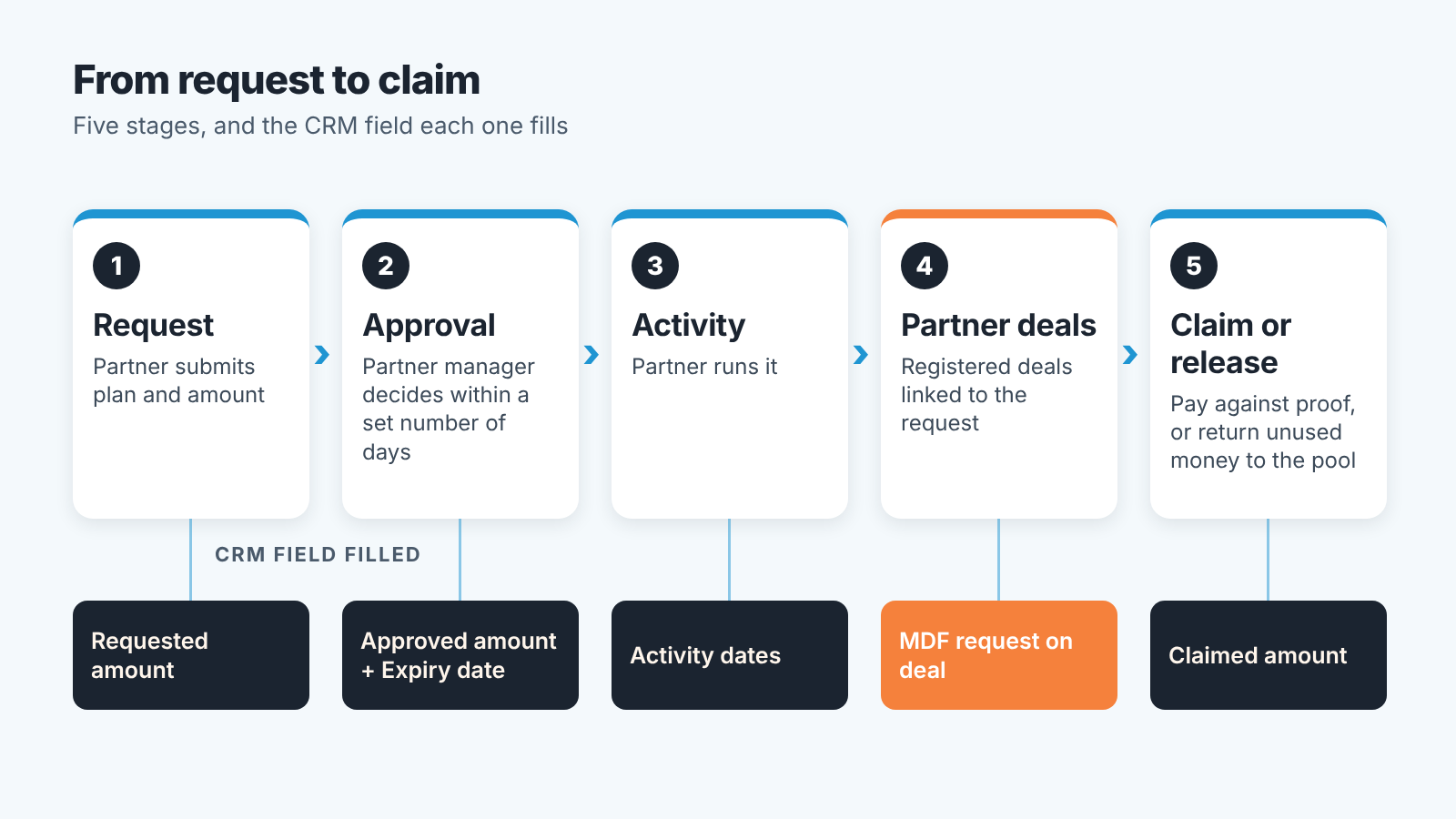
It starts with a request from the partner. Keep the form short. What will they do, and when? What does it cost, how much of that are they asking from you, and what do they expect back in registered deals? A web form that creates a record in your CRM is enough.
Then somebody approves it, and we mean one named person with a deadline for the answer. Honestly, slow approvals kill partner marketing plans faster than small budgets do. An event date won’t wait for your inbox. When you approve, record the approved amount and the expiry date, and tell the partner both in writing (an email is fine).
Third, the partner runs the activity. You have one job while that happens, which is making sure the leads from it get registered as deals under that partner. Already registering partner deals in your CRM? Then the process stays the same. If you don’t, the setup in tracking partner-sourced deals without a PRM is written for Salesforce and the logic carries over to any CRM.
Step four is the one most programs skip. Every deal that came out of the funded activity gets linked to the request. Leave the link out, and when the owner asks what the money bought, all you can say is that there was a webinar and the partner thought it went well.
The claim comes last. The partner sends proof, you pay or reimburse, and you record the claimed amount. And if the expiry date passes with no claim? The money goes back to teh pool and the request is closed as expired. Put that on a schedule, because approvals nobody released make your fund look spent while it’s sitting idle.
The fields to add to your CRM
Where does the request record live? Depends on your CRM. If your plan has custom objects, use one. If it doesn’t, a separate pipeline does the job: each “deal” in it is an MDF request, and the stages are Requested, Approved, Activity done, Claimed, Expired. For a small program we’d pick the pipeline even when a custom object is on offer, because the partner manager gets a board and stage reports for free.
The request record needs seven fields.
- Partner. Everything groups by partner account, so it’s filled the moment the request arrives.
- Activity type goes in at request too. Later on you’ll want to put events next to paid campaigns and compare.
- Requested amount. Nobody acts on it this week, but over a few quarters it shows how much real demand the fund has.
- Approved amount and expiry date, two fields, both set at approval. One is your commitment. The other drives the release of unused money.
- Activity dates. Fill them once the partner has run the thing, they open the attribution window.
- Claimed amount, at claim. That’s your real spend.
Number eight isn’t on the request at all. It sits on the partner deal, a lookup called MDF request, and it’s filled when the partner registers the deal. Every report further down reads from it.
Can one deal point to two requests? No. One request only, or the same revenue gets counted twice. The deal also has to be registered after the activity started, and inside a window you write into the policy (two quarters, for example). Was the partner already working that deal in March? Then it doesn’t belong to a webinar held in June.
Are your partners resellers who buy from you and sell on? Then decide who the customer on the deal is before you add any of this. We went through it in reseller and end-customer deals in Pipedrive, and for distributors, what a distributor is and how to record its deals is in a separate article.
Measuring return: partner pipeline against spend
Count deals. Leads from a partner event are easy to report and almost impossible to verify. A partner can come back from a booth with two hundred badge scans and not one conversation among them, and you’d never tell from the spreadsheet they send over. With a registered deal you can. It has an owner, an amount, a stage and a close date, all in your own system.
You need three reports.
The fund balance per partner is the everyday one: approved, claimed, still open, and expiring in the next 30 days. Bring it to the weekly partner call.
Second, requests by stage, with their age. Which approvals are waiting on you? Which activities finished weeks ago and still have no claim? Both show up here.
The third is the one the owner wants to see. Per request and per partner, it puts claimed spend next to the registered pipeline and the won revenue from linked deals.
Here’s how you’d read that third report, with made-up numbers. You approve $4,000 for a partner’s regional webinar. Over the next two quarters the partner registers six linked deals worth $60,000 in total. Two of them close, for $18,000. Pipeline to spend is 15 to 1, and won revenue to spend is 4.5 to 1. In the next row is a second partner, who claimed $4,000 for a trade show booth and has registered one deal that’s still in the first stage. Who gets the next $4,000?
Don’t judge too early, though. If your partner deals take four months to close, a request from last month has no won revenue yet, and pipeline is the only fair number.
All of this assumes the partner deals underneath are in decent shape. Deals with no next step, old close dates, or amounts nobody updated will inflate the pipeline figure and flatter the fund. We build SalesBond, a sales management layer on top of the CRM a team already uses. Its free CRM audit looks at the last 30 days of your CRM and sends a PDF report covering deal health, money at risk and the pipeline bottleneck, with a second PDF a week later showing what changed. The audit doesn’t read your MDF requests. It tells you whether the deals you’re about to count are alive. Check your CRM with SalesBond.
Why partners leave MDF unused
Unused funds come up in nearly every piece about MDF. What we found most useful lately is evidence about the reason.
It’s Omdia research that Channel Dive reported on July 23, 2026. More than 40% of partners weren’t sure which MDF-supported activity delivered the greatest impact on their business. More than half of the channel firms surveyed said vendors failed to provide adequate marketing resources (Channel Dive: Partners leave MDF money on the table and can’t say why). The same article describes larger partners building marketing teams and ways to measure campaigns, while smaller ones work with limited resources and little visibility into what delivers results.
Sound familiar? If you’re a small vendor, it probably does. Your partners are mostly small firms where the owner sells and nobody does marketing. Hand that owner a fund with a form attached and you’ve asked for a plan they have no time to write.
So we’d do most of the planning for them. Offer two or three ready activities with a fixed price and your materials included, and a request comes down to picking one and a date. Answer every request within a few working days. After the activity, send each partner its own numbers from the third report. A partner who has seen that the the webinar produced six deals will ask again. Oh, and remind partners about expiry a month ahead.
When a PRM tool is worth it
How long does the CRM setup hold? As long as one person can read every request. After that it starts to strain. Partners want to see their own balance and request status without emailing you. Or finance has to check receipts for claims in volume. Or you end up running funds in several currencies and regions, each with different rules. Those are portal and workflow problems, and PRM vendors built their MDF modules for exactly these.
Our advice is to run two quarters in the CRM before you buy anything. By then you’ll know your real request volume and which fields you needed. And the vendor demo becomes a comparison against something that already works.


