
A distributor is a company that buys products from a manufacturer in bulk, holds them in stock and resells them to resellers, dealers or end buyers. It pays you for the goods and earns its margin on the resale. For a sales owner the practical question comes one step later: which company is the customer in your CRM, the distributor that pays your invoice or the end buyer that uses the product? Our answer is to record both, link them, and put the money on the one that pays you.
What a distributor does in a sale
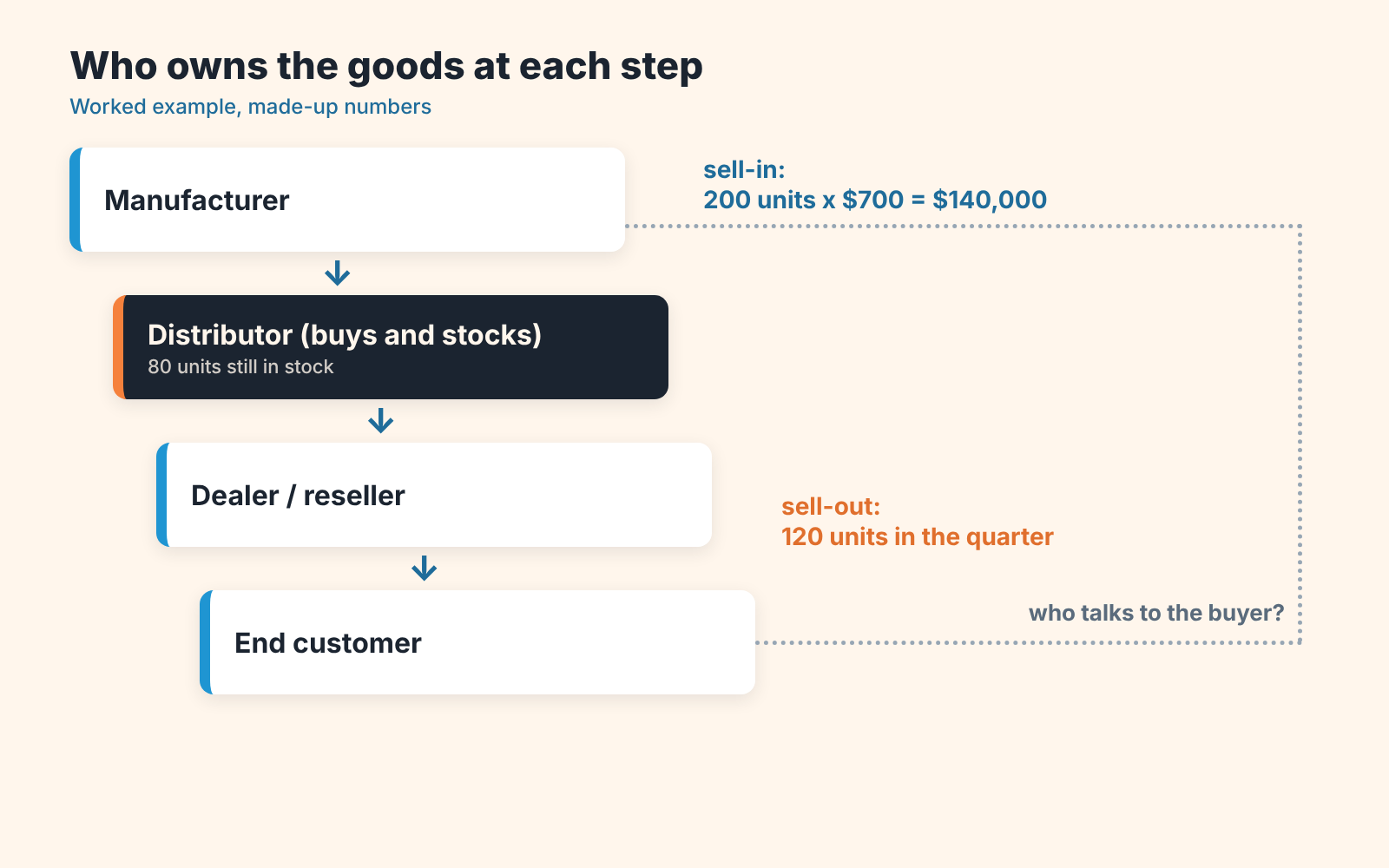
Say a company makes commercial coffee grinders and sells them at a list price of $1,000. It signs up a regional distributor at a 30% discount, so each grinder leaves the factory for $700. The distributor orders 200 units, pays $140,000, puts the grinders in its own warehouse and sells them on to cafe-equipment dealers and restaurant chains at whatever price its market allows. (Every number here is made up for the example.)
The distributor bought those 200 grinders, so it owns them and carries the risk if they don’t sell. Its buyers are mostly other businesses. It also ships to, and extends credit to, dozens of small cafes and dealers the manufacturer would never invoice one by one.
The reference definitions match. Wikipedia’s article on distribution in marketing (as read in November 2026) describes a distributor as a business involved in the distribution stage of the value chain. Its article on wholesaling treats “wholesaling” and “distributing” as the same activity: selling goods to retailers, professional business users or other wholesalers.
How many distributors should one market have? The same distribution article lists three strategic approaches. Intensive (mass) distribution puts the product in the majority of outlets. Selective distribution relies on a few intermediaries. Exclusive distribution gives it to one intermediary, often with rights to a specific area. Those are the “three types of distributors” people search for, and in your CRM the choice ends up as one field on the distributor’s record.
A vendor is whoever sells to you in a given transaction, while a distributor holds a fixed place in the chain between the manufacturer and its resellers. To the cafe the vendor is the dealer. To the dealer it’s the distributor, and to the distributor it’s you. Usage varies here too, but in most contracts “vendor” names a position in one sale, so the same company can be a distributor and somebody’s vendor on the same day.
Distributor vs reseller vs dealer vs agent
A distributor and a reseller both buy from you and resell. Dealers do too. A dealer is usually a reseller with a territory and a service desk (think of a forklift dealer that also stocks parts and sends a technician). An agent sells in your name and never owns the goods, so it’s paid by commission, and its buyer is the only one of the four that becomes your direct customer on paper.
| Role | Buys and owns the stock | Sells to | Who invoices the end buyer | How it earns |
|---|---|---|---|---|
| Distributor | Yes, in bulk | Resellers, dealers, large business buyers | The distributor or its dealer | Margin between your price and its resale price |
| Reseller (including a VAR) | Yes, often per order | End buyers | The reseller | Margin, plus its own services |
| Dealer | Yes, for a showroom or local stock | End buyers in its territory | The dealer | Margin, service and parts |
| Agent or manufacturer’s rep | No | Finds buyers for you | You | Commission on your sale |
The “owns the stock” column comes straight from the US industry classification. The US Census Bureau’s 2022 NAICS Manual splits Sector 42, Wholesale Trade, into merchant wholesalers that sell goods on their own account (the list names distributors and jobbers) and agents and brokers that arrange sales for others for a commission or fee, a group that includes manufacturers’ representatives who generally don’t own or handle the goods. Wikipedia defines a reseller as a company or individual that purchases goods or services with the intention of selling them for profit.
So is a distributor the same as a wholesaler? The Census Bureau lists “distributors” among the names a merchant wholesaler goes by, so for US statistics the two are one category.
Dealer and agent are looser words, and usage varies by industry. Car makers say dealer, software companies say reseller or partner, and some contracts call a commission agent a “distributor” anyway. So what do you put in the CRM’s “Partner type” field? Read the contract for two facts first. Who takes title to the goods? Who sends the invoice to the end buyer? If it’s you on the invoice, you’re dealing with an agent, whatever the cover page says.
Who is the customer in your CRM: three ways to record it
Record the distributor as the paying customer with revenue deals, and give the end buyer its own linked company record whose deals stay out of revenue. That’s option 3 below, and the one we’d pick for most teams.
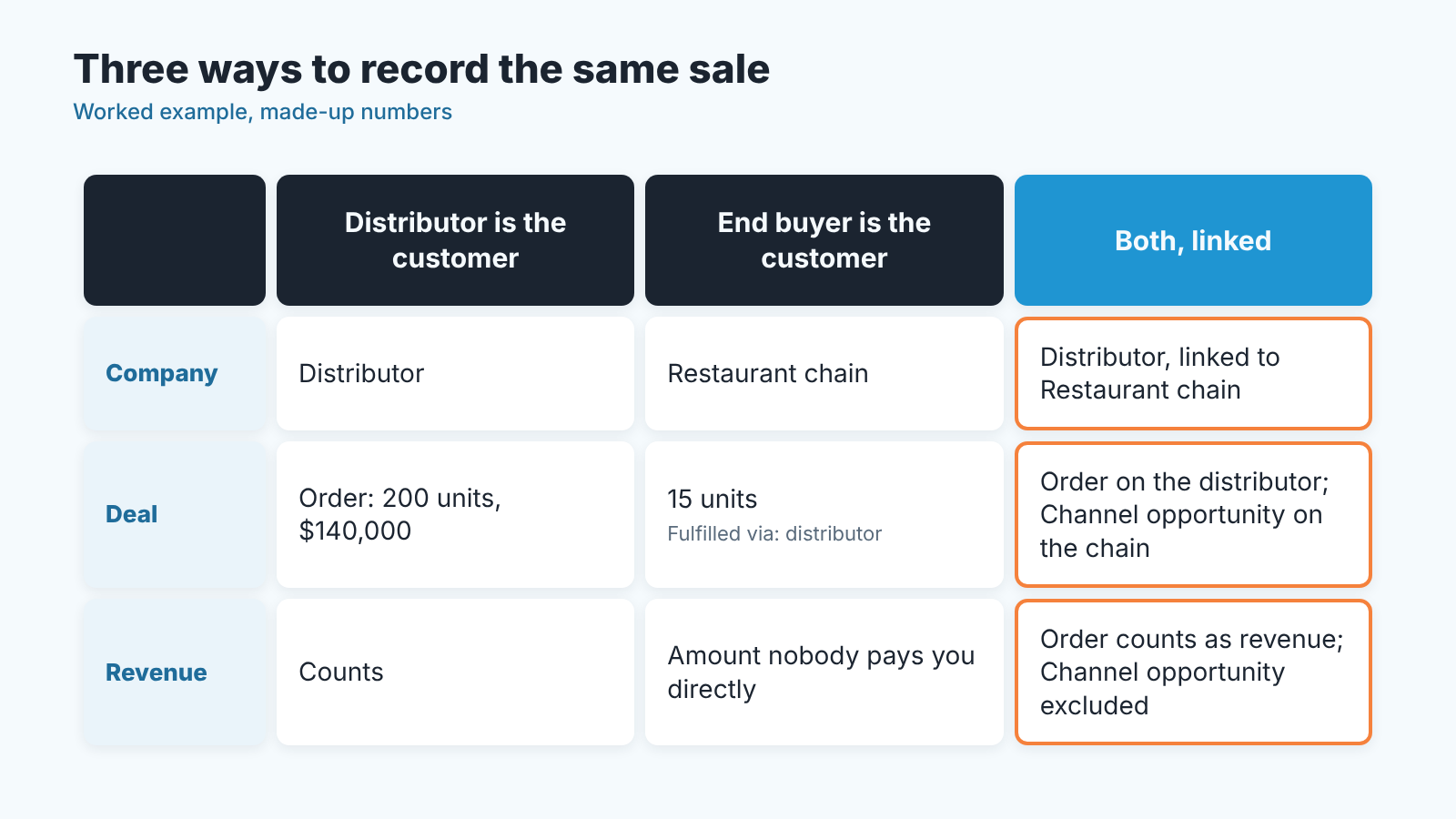
To see why, go back to the grinder maker. A restaurant chain wants 15 grinders. The manufacturer’s rep ran the demo, the distributor will ship and invoice. Whose deal is it?
Option 1. The distributor is the customer. One company record for the distributor, and every purchase order it places is a deal at your sell-in price ($700 a unit in the example). End buyers don’t exist in your CRM. This fits a manufacturer whose reps never speak to end buyers and whose only job is to keep the distributor ordering.
Option 2. The end buyer is the customer. The restaurant chain gets its own company record and a deal, with a field such as “Fulfilled via” naming the distributor. Reps see who actually uses the product, which helps with renewals and upsell. Money is the weak spot. The deal amount is a number nobody will ever pay to you directly.
Option 3. Both records, linked. The distributor has a company record with order deals that carry real money. The end buyer has its own company record, linked to the distributor, and a deal of a separate type (call it “Channel opportunity”) that tracks the buying process and is excluded from revenue reports.
A common piece of advice is to track only the end customer, because that’s who “really” buys. We disagree. The company that pays your invoice is where your revenue and credit exposure sit, and if it has no proper record with its own deals, your forecast is built on amounts that pass through someone else’s bank account first. Use option 3 for any team that both creates demand with end buyers and ships through a distributor, and option 1 for a team that truly never meets the end buyer. Option 2 on its own works only when the “distributor” is really an agent and you invoice the buyer yourself.
Most CRMs need three things for option 3: a relationship or parent field between the two company records, a deal type (or a separate pipeline) for channel opportunities, and a report filter that keeps that type out of the revenue total. If your partners look more like resellers than stocking distributors, the step-by-step version is in our guide to reseller and end-customer deals in Pipedrive. For agents and referrers, the commission side is covered in referral partner deals.
Sell-in vs sell-out: what goes into the forecast
Which number goes into next quarter’s forecast: what the distributor bought, or what it sold? Sell-in is what the distributor buys from you. Sell-out is what it sells to its own customers, dealers and chains and anyone else downstream. Your invoices this quarter follow sell-in, while next quarter’s reorder is driven by sell-out and by how many units are still sitting in the distributor’s warehouse.
Here is the grinder example over two quarters.
| Units | Value at $700 | |
|---|---|---|
| Q1 sell-in (distributor’s order) | 200 | $140,000 |
| Q1 sell-out (distributor’s sales) | 120 | $84,000 |
| Stock at the distributor, end of Q1 | 80 | $56,000 |
| Q2 sell-out, if the pace holds | 120 | $84,000 |
| Q2 reorder needed to cover it (120 minus 80 in stock) | 40 | $28,000 |
| Q2 reorder if the distributor also keeps one month of stock (40 units) | 80 | $56,000 |
A forecast that copies last quarter’s order says $140,000 for Q2. The stock figures say somewhere between $28,000 and $56,000. A gap that size means a channel forecast needs two inputs the CRM doesn’t have by default: the distributor’s sell-out for the period and its stock on hand.
Ask for both every month. Two number fields on the distributor’s company record, “Sell-out last month” and “Stock on hand”, are enough; a note on a recurring “sell-out report” activity works too. Then forecast revenue from expected reorders and treat channel opportunities with end buyers as the evidence behind those reorders. The restaurant chain’s 15 grinders are the reason the distributor will order again, and their $15,000 at list price is already inside that reorder.
Distributor agreement: the fields to track
The contract itself belongs with your lawyer, and nothing here is legal advice. Sales needs a handful of facts from it on the distributor’s record, so nobody has to open a PDF before a pricing call.
- Territory and segment the distributor covers
- Exclusivity: exclusive, selective or open
- Discount or price-list tier
- Minimum purchase commitment per quarter or year, if the agreement has one
- Payment terms and credit limit
- Start date and renewal date, with an activity scheduled well before the renewal
- How often the distributor sends sell-out reports, and who on your side receives them
- Deal registration: how a distributor or dealer claims an end-customer opportunity so your direct reps don’t chase the same account
- An owner on your side. One named person.
If you fund the distributor’s marketing that budget deserves its own tracking; we covered it in the article on market development funds. Manufacturers who quote through distributors will also want the quote stages from CRM for manufacturing.
Where channel records go wrong
The first mistake is arithmetic. A rep adds the restaurant chain’s 15 grinders to the main pipeline at list price, $15,000. Those same units are already inside the distributor’s $140,000 order. The pipeline report now shows $155,000 against $140,000 of money that can reach you. Multiply that by every rep who works with end buyers and the forecast drifts upward all year. The deal type from option 3 plus one filter on the revenue report fixes it.
The second one is quieter. End-customer records get created during a demo, the order goes through the distributor, and the record is never touched again. Nobody owns it after the rep leaves, nothing is scheduled, and it isn’t linked to the distributor that fulfilled it. A year later the chain needs 40 more grinders or a service contract, and nobody at the manufacturer knows the account exists. Give every end-customer record an owner and a link to it’s distributor on the day it’s created.
A few more to look for in your own CRM:
- Stock counted as demand. A big first order fills a warehouse, and the the next quarter’s plan assumes the same order again.
- No owner on the distributor’s record.
- Direct reps and the distributor quote the same end buyer at different prices because there’s no deal registration field. Who gets the account when both show up?
- Agents recorded as distributors. An agent’s buyer is your direct customer and belongs in the main pipeline at full value.
We build SalesBond, a sales management layer on top of the CRM a team already uses. It won’t decide which deals are sell-in and which are channel opportunities; that’s your deal type to set. Its free CRM audit looks at the last 30 days of your CRM and sends a PDF report with findings on deal health, managers and top clients, plus what to fix. A second PDF arrives seven days later showing what changed. An orphaned end-customer deal is exactly the kind of record those findings are about. Check your CRM with SalesBond once the deal types are in place, so the report reads a pipeline you’ve already separated.
If you do one thing this week, open your largest distributor’s record and look for three facts: its last order, its last sell-out report, and the name of the person who owns the relationship. How many of the three are there?


