Proration means charging only for the share of a billing period a customer actually uses. Start on day 10 of a 30-day period and you get a prorated charge for 21 days (on a $300 monthly plan, ($300 ÷ 30) × 21 = $210). For a sales owner, a mid-term upgrade puts the prorated remainder in deal value and the full-year price in a recurring field.
The formula behind that $210 is the one Melio’s guide gives for any prorated amount (checked November 2026): “(Total cost ÷ Total periods) × Periods used” (Melio: prorated meaning). The arithmetic is easy. Where it lands in the CRM is the part sales teams get wrong.
Five more seats in April
Here’s a worked example. Every number in it is illustrative. A team sells software at $600 per seat per year, and a customer signed for 20 seats, $12,000, on a contract running January 1 to December 31, 2027. On April 12 their operations lead emails the rep asking for 5 more seats, live the same day.
The rep’s reflex is 5 × $600 = $3,000. Too much. That’s the price of a full year, and the customer has 264 days of the year left.
| Step | Number |
|---|---|
| Full-year price of the add-on | 5 × $600 = $3,000 |
| Days left, April 12 through December 31 (both counted) | 264 |
| Days in the contract period (2027 isn’t a leap year) | 365 |
| Prorated amount for 2027 | $3,000 × 264 ÷ 365 = $2,169.86 |
| Added to the renewal on January 1, 2028 | $3,000 (25 seats, $15,000 in total) |
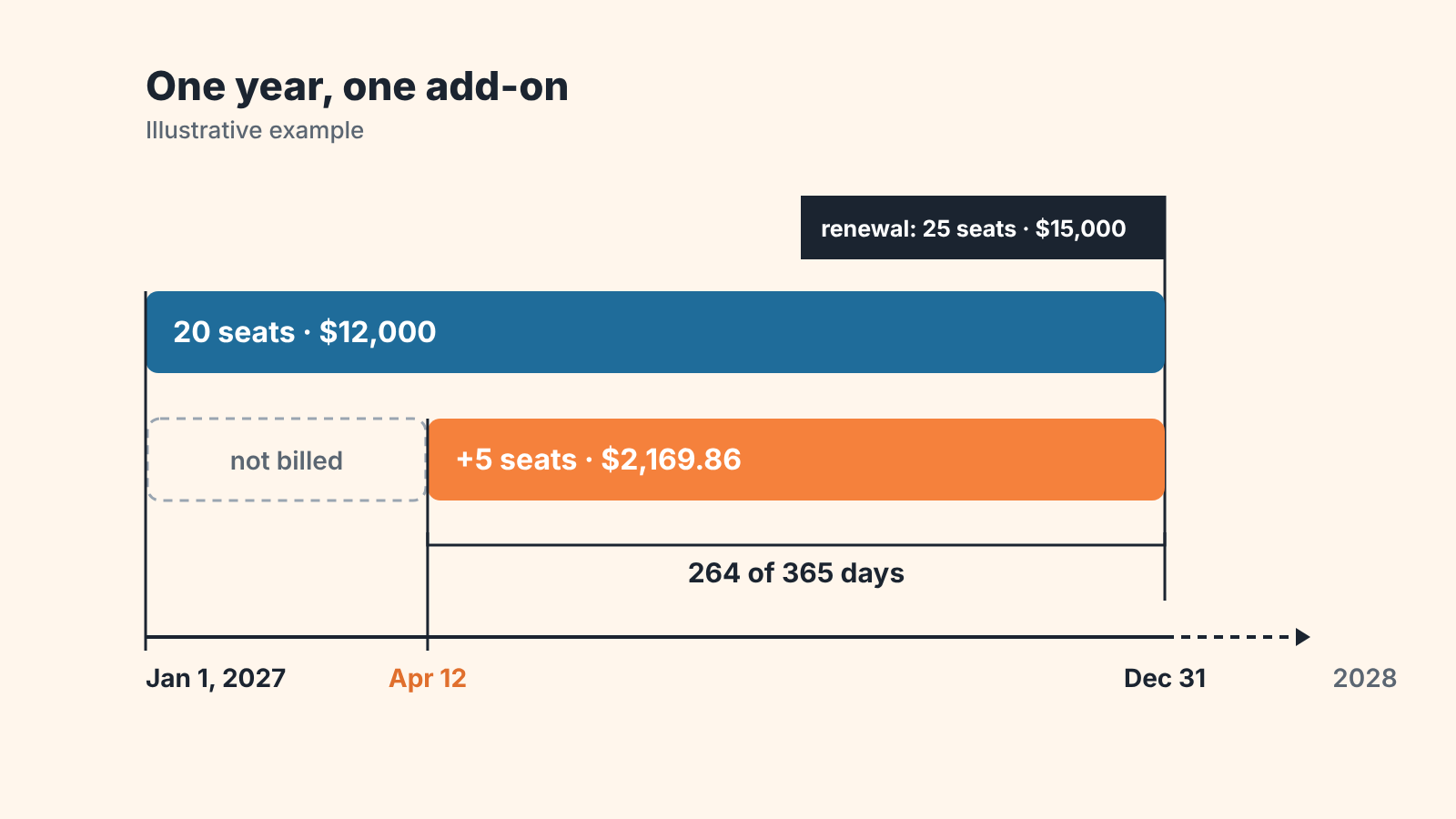
The add-on ends on the same day as the original contract, so there’s one renewal date for all 25 seats. That alignment has its own name and its own quoting rules, covered in co-terming add-ons to a shared end date.
So one request produced two numbers. $2,169.86 is what the customer pays this year. $3,000 is what the account is now worth per year on top of the original $12,000. Most CRM mistakes around proration come from putting one of them where the other belongs.
Prorate by days or by months? Settle it before the quote goes out
To prorate, divide the full-period price by the days in the period and multiply by the days used, and the result depends on how you count those days. Ask three people to prorate the same add-on and you can get three amounts. Melio’s guide says to count the total days in the specific month you’re billing, and adds that for annual contracts you “might use 12 months or 365 days depending on the level of precision you need” (Melio: prorated meaning). Baremetrics calls days of usage the most straightforward basis for subscription businesses (Baremetrics: understanding proration).
Run the April add-on through each count and the amounts drift apart.
| Method | Calculation | Amount |
|---|---|---|
| By days, 365-day year | $3,000 × 264 ÷ 365 | $2,169.86 |
| By months, with a partial April | $250 × (8 months + 19 of 30 days) | $2,158.33 |
| Whole months only, billing from May 1 | $250 × 8 | $2,000.00 |
You don’t need a proration calculator for the first row. In a spreadsheet it’s =3000*264/365, and =DATE(2027,12,31)-DATE(2027,4,12)+1 gives the 264.
The first two methods differ by $11.53. Small. Would the customer’s accounts payable team send an invoice back over it? If the quote said one amount and the invoice says another some will.
Write the convention down once, in the quote template, in a sentence a customer can read: “Mid-term additions are billed by calendar day to the contract end date.” Whoever issues invoices picks the wording, and sales copies that exact sentence onto every quote, including the ones a rep builds at 6 p.m. on the last day of the quarter.
A plan upgrade is the same math with a credit
What if the customer swaps plans and adds nothing? They’ve already paid for the old plan through the end of the period, so part of that payment comes back as a credit. Chargebee’s glossary walks through it (checked November 2026): a customer on a $100 monthly plan moves to a $150 plan exactly in the middle of the cycle, has $50 of credit left on the old plan, owes $75 for the rest of the cycle on the new one, and pays the net $25 (Chargebee: what is proration).
For the rep, that example carries the same pair of numbers as the seats did. $25 is the one-time charge for this period. $50 is the monthly increase from the next cycle on.
What goes in the deal
We’d record a mid-term change as a new deal linked to the account and leave the original won deal alone. Editing the original amount rewrites a month that has already been reported, and January’s won revenue changes in April with nobody able to say why.
Plenty of teams do it differently. They type the annualized $3,000 into deal value and keep the $2,169.86 in a billing field, on the logic that deal value should show what the account is worth. That works only if no won-revenue report reads deal value, and in most CRMs those reports do. So we put the prorated stub in deal value and the $3,000 in a recurring field.
On the new deal, four values do the work. Deal value holds the prorated first-period amount, $2,169.86 in the example: a one-time number, and the one that gets invoiced now. A billing start date field holds the day the seats go live, April 12, which often differs from the won date (a deal can close on April 3 for a start nine days later). A period end date copies December 31, 2027 from the original contract. And a recurring amount of $3,000 a year records what the add-on contributes from the next renewal on; teams that report monthly store $250.
A fifth field is optional and pays for itself fast. A yes/no “Partial first period” costs the rep one click, and it’s what makes the the review report further down possible.
Does your CRM have recurring products or installment schedules on the deal? Good. The stub goes in as a one-time line and the run-rate as a recurring line (two lines on the same deal, so nobody has to remember which number is which). The trade-offs between those two models are in recurring products versus installments.
Proration and the forecast
Which number does the forecast want? Depends on which forecast.
April’s won-revenue report takes $2,169.86. That’s the amount billed for 2027, nothing more. An MRR or ARR view takes the run-rate, $250 a month or $3,000 a year, starting from the billing start date. That date matters when a deal closes on the 28th and goes live on the 3rd. And the renewal forecast for January 2028 takes $15,000 for 25 seats, as one line.
Double counting creeps in at three points. Someone adds the stub to ARR on top of the $3,000, which inflates annual recurring revenue by $2,169.86 that will never recur. Someone types the full $3,000 into deal value, which overstates this year’s won revenue by $830.14, about 28% of the add-on. Or the add-on gets its own $3,000 renewal deal next to a $15,000 renewal deal for the whole account, and the 2028 pipeline shows $18,000 where $15,000 is coming.
On one deal that’s $830. Now say a quarter has a dozen expansions like this one, all recorded at full-year value (easy to do when the price list only shows annual prices). The sales report sits about $10,000 above what finance collected. How a deal’s amount relates to its recurring revenue gets a full treatment in MRR, ARR or Amount in a HubSpot deal.
Who should do the math
Should the CRM do this calculation itself? A common tip says yes, with a formula field that prorates automatically from the start date and the price. We don’t recommend it as the source of the deal value.
The invoice gets produced somewhere else, by a billing tool or by a person in finance, with it’s own day count, its own rounding and sometimes a credit from the old plan. Chargebee, for instance, also takes into account whether the existing invoice is paid or unpaid when it prorates (Chargebee: what is proration). A CRM formula knows none of that. It produces a second answer that’s off by a few dollars, and then a rep and a bookkeeper spend twenty minutes on $11.53.
So the CRM holds the inputs (dates, quantity, full-period price) and the amount that was actually invoiced. Who works out that amount depends on your setup. If a billing tool manages subscriptions, it calculates at the moment of the change and the rep copies the invoiced figure into deal value. If finance raises invoices by hand, the rep sends quantity and start date and enters whatever finance confirms. When the quote has to go out before finance sees it, the rep can use a calculator or a formula field, as long as the amount is marked as an estimate and replaced when the deal is won. An owner who does the invoicing personally needs only one thing: the same method every time, written into the quote template.
Mistakes that show up after a mid-term change
Build one report and run it monthly: won deals where “Partial first period” is yes, with deal value, recurring amount, billing start date and period end date as columns. What should you look for?
Start with deal value that equals the full-period price. With the box ticked those two can’t match, so any row where they do is the full-year mistake from the forecast section. Next, an empty billing start date, or one that equals the won date on every single deal. Usually the field was added and nobody told teh reps when to fill it.
A period end date that differs from the original contract’s end date means one of two things. Either the add-on wasn’t co-termed on purpose, or somebody typed a year from today.
Some mistakes don’t show up in this report at all, and you’ll only catch them if you look at the original deals. If a rep edited the original deal’s amount upward and created no new deal, the expansion is invisible here and in any count of expansion deals. Downgrades go wrong the opposite way, as a negative deal. Chargebee describes the customer side as a net credit that should show clearly on the invoice; in the CRM the cleaner record is the lower recurring amount with a note about the credit.
Monthly customer switching to annual prepay mid-cycle? Same pattern. You’d credit the unused days of the current month against the annual invoice (say 12 days of a 30-day month, if they switch on the 19th), and the deal fields stay the same four. The offer itself is covered in the annual prepay offer for monthly customers.
We build SalesBond, a sales management layer on top of the CRM a team already uses, and it reads deals as they’re recorded. Repeat Sales, for example, shows each customer’s Historical LTV as the actual sum of their won deals, so an add-on saved at $3,000 when $2,169.86 was billed makes that customer look bigger than they’ve been. SalesBond doesn’t calculate proration or invoices. For this kind of cleanup there’s the free CRM audit: SalesBond looks at the last 30 days of your CRM and sends a PDF report, then a second PDF seven days later showing what changed. Check your CRM with SalesBond.
Short answers to common questions
Is prorated good or bad?
Good for the customer. They pay for 264 days when they get 264 days. The seller accepts a smaller first invoice (in the example, $2,169.86 where a full year would be $3,000) and gets an expansion that starts now and renews at full price. The cost is administrative, since every prorated deal carries two amounts and somebody has to keep them apart.
How do I prorate something?
Divide the full-period price by the number of days (or months) in the period and multiply by the days used. That’s Melio’s “(Total cost ÷ Total periods) × Periods used”; in the example above, $3,000 ÷ 365 × 264 = $2,169.86.
Do you have to prorate a downgrade or a cancellation?
No. Baremetrics says you don’t necessarily have to prorate when customers cancel or downgrade, and that without prorated refunds customers should ideally keep full access until the next billing period begins (Baremetrics: understanding proration). Whichever way you go, put it in the contract terms before the first customer asks.