
A purchase order (PO) is a document a buyer sends to a seller stating what it wants to buy, in what quantity, at what price and on what terms (Wikipedia). The four common types are standard, blanket, planned and contract POs. For the seller, a PO is the customer’s written commitment to the order and the reference number the invoice has to carry if the buyer’s accounts payable team is going to pay it.
Sellers usually meet the PO at the end of a deal, with a verbal yes from the buyer, a PO “in process” and a deal one stage from won. A “verbal PO” is that spoken yes before the document exists. It has no PO number yet, so no invoice can quote one.
What is a purchase order?
A PO comes out of the buyer’s purchasing process, usually after an internal requisition has been approved, and in an ERP creating it is typically the first step of purchase-to-pay (Wikipedia).
Purchase order vs invoice vs sales order
A PO is written by the buyer before delivery and authorizes the spend; an invoice is written by the seller after delivery and asks for payment, quoting the PO number.
Two more documents travel with them. A quote goes the other way, seller to buyer, and commits nobody. A sales order is the seller’s own record that an order has been accepted, often raised from the PO; if your CRM only has deals, the won deal plays that role. So the sequence runs quote, PO, sales order if you keep one, delivery, invoice. The PO is the only document in that chain the buyer writes.
Is a PO legally binding? It depends on when. Wikipedia notes that issuing a PO does not by itself form a contract: where no prior agreement exists, the seller’s acceptance does. It also notes that the Uniform Commercial Code, or similar law, treats a PO as a contract by its nature, which is why sellers often accept one with their own terms of sale attached (Wikipedia, Legal). Our working rule: an accepted PO is binding, an unacknowledged one is an offer. For a specific deal, ask a lawyer.
Types of purchase orders
Oracle’s Purchasing guide, to take one documented system, lists four kinds: standard purchase orders, planned purchase orders, blanket purchase agreements and contract purchase agreements (Oracle Purchasing User’s Guide). Other sources use slightly different labels for the same four shapes. What matters to a seller is what each one says about the revenue.
A standard PO is a one-time purchase where the buyer already knows the items, quantities, prices and delivery schedule (Oracle). This is the common B2B case: one deal, one PO, one invoice. The amount on the PO is the amount you can book.
A blanket PO (blanket purchase agreement, also called a call-off order) covers goods or services the buyer plans to take from you over a period, often at a negotiated price, with the delivery schedule still open (Wikipedia; Oracle). The actual orders come later as releases. This is the one to be careful with, because each release is an order and the blanket’s ceiling only caps them. We cover running them in the CRM in blanket purchase orders and releases.
A planned PO is a long-term commitment to buy from one supplier, with individual orders specifying quantities as they are needed (Wikipedia). Sellers meet it the way they meet a blanket: frame first, money later.
A contract purchase agreement fixes terms and conditions with a supplier without naming the goods or services that will be bought (Oracle). If this is what the customer sent, you have a signed framework and zero committed revenue. Don’t move the deal to won on it.
Who creates a purchase order, and can you make your own?
The buyer does. The customer’s purchasing or finance team creates the PO and assigns its number (Otto). It is the buyer’s authorization to spend.
A seller can’t issue a purchase order to its own customer. A document you write that says “please buy this from me” is a quote, whatever the header says. What you can do is lay the quote out so the PO is easy to raise from it: the same line items, the same unit prices, the same totals, your legal entity name and address as the vendor. Buyers often build the PO from the quote, so a clean quote gives you a clean PO.
Not every purchase gets one. Small companies often skip POs entirely, and larger ones set a threshold. FreshBooks gives the example of a company that doesn’t require a PO for transactions under $10,000 (FreshBooks). So “will this order need a PO?” is a question to ask the customer before you assume anything.
What is on a PO
Open any PO and you will find roughly the same blocks: a PO number, the issue date, buyer and seller details, line items with quantities and unit prices, totals, payment terms, and the ship-to and bill-to addresses.
A seller reads that page differently from the buyer who wrote it.
The PO number is the field you will type most often. It goes on the deal, the order confirmation, the delivery note and the invoice. Copy it exactly, leading zeros and dashes included.
Line items and totals should match your quote. When they don’t, the buyer’s system has a different idea of the deal than your CRM does, and one of the two is wrong.
Payment terms are your cash forecast. Net 30 on the PO is net 30, whatever was said on the call.
Then the bill-to entity, which trips up more sellers than anything else on the page. The PO comes from one legal entity of the group, the invoice goes to another, and payment stops until someone notices.
The PO workflow, seen from the seller’s side
From the seller’s chair the workflow looks like this.
- You send the quote. The buyer’s requester takes it to to purchasing; inside the buyer’s company this is the purchase requisition (Wikipedia).
- Purchasing approves and issues the PO to you, with a number on it.
- You check the PO against the quote: items, quantities, prices, totals, terms, bill-to entity. If it matches, you confirm the order. If it doesn’t, you ask for a revised PO before you ship or start work. Your acceptance is what can turn the PO into a contract, so this is the moment to get it right.
- You record the PO number on the deal in the CRM and apply your team’s won rule (next section).
- You deliver, and your invoice carries the PO number.
- The buyer’s accounts payable team matches the invoice to the PO and pays.
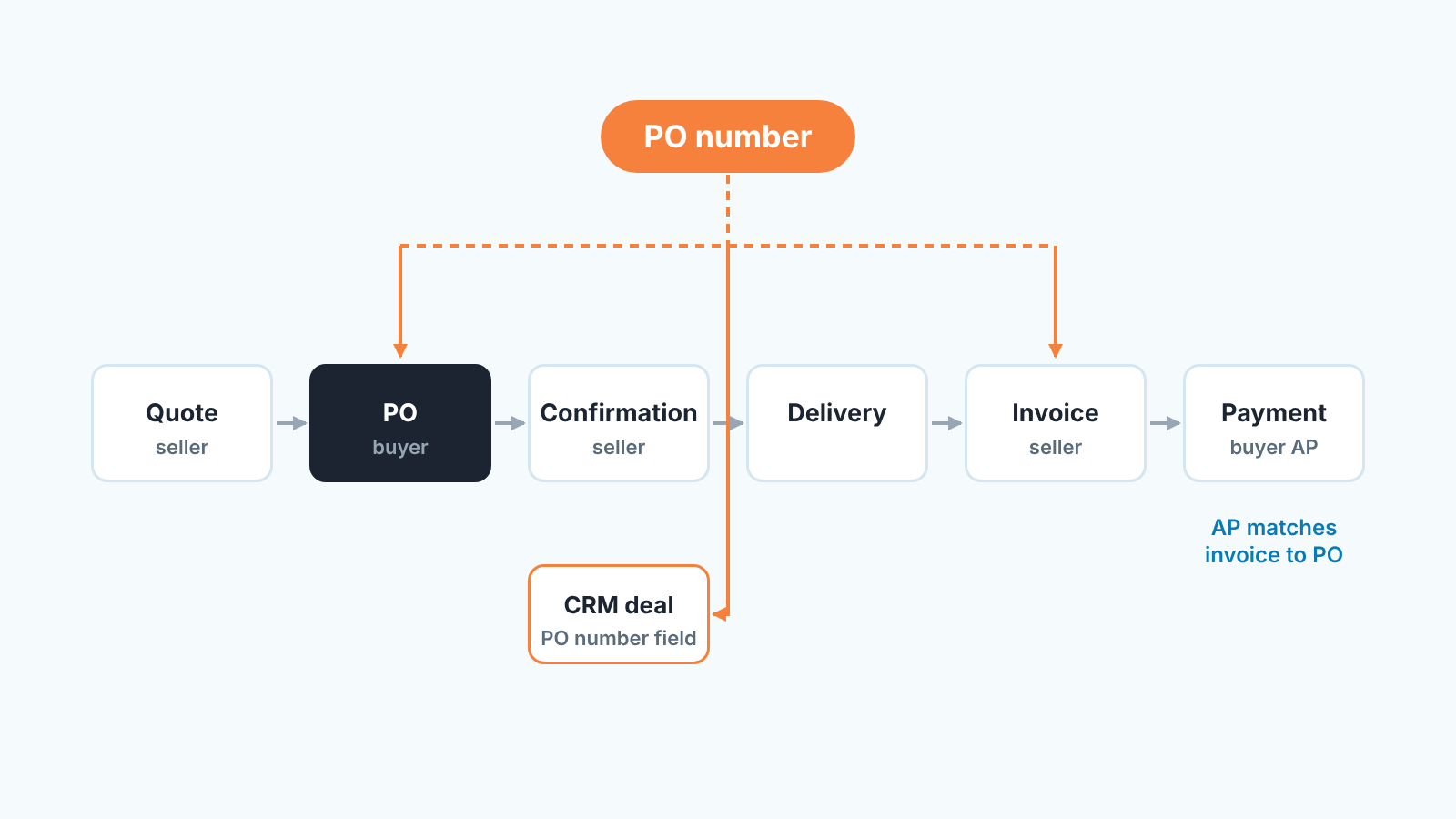
Step 6 is why the seller cares about the PO number at all. Some organizations run an explicit “No PO, no pay” policy: an invoice that doesn’t reference a PO number goes back to the supplier unpaid. Wikipedia gives the City of London Corporation as an example (Wikipedia). Plenty of companies apply the same rule without writing it down. An invoice without the number, or with a number that doesn’t match, waits.
A PO is a closing signal, not always a closed deal
Here is the question that splits sales teams: when the PO arrives, is the deal won?
We think the answer should be a written team rule agreed before the quarter, so it is never a rep’s call on the day. Either rule works. “Won when the PO is received and matches the quote” is the stricter one and lines the pipeline up with what finance will invoice. “Won when the customer confirms in writing, PO to follow” is looser, and it suits customers who sign a contract first and raise the PO weeks later. What doesn’t work is both at once: the won column then mixes two different things, and the forecast drifts by whatever is still waiting for paperwork.
Whichever rule you pick a deal that is waiting for a PO should be visible as its own state. A stage is a poor fit, because a deal that sits in one for three weeks tells you nothing. A date field, “PO expected”, and a scheduled activity to chase it do more. A verbal yes with no PO date is a deal that is still being sold. The person you are selling to now is the buyer’s purchasing team, and your champion has done their part.
One more check before anyone rings the bell: read the PO’s type. A standard PO for the quoted amount is a win. A blanket or planned PO is a frame, and what you have won is the right to receive releases.
Give the PO its own field
Put it on the deal, in a field of its own, where nobody has to dig through the deal title, the notes or the email thread it arrived in.
The reason is the next person. The invoice is usually raised by someone who was never on the call: finance, ops, or a billing tool reading the CRM. They need teh number in one predictable place, and on a deal with nine notes a number kept in one of them is hard to find.
Setting the field up takes minutes. In Pipedrive it is a deal custom field under Personal preferences > Data fields (Pipedrive: Custom fields, checked November 2026); HubSpot calls the same thing a deal property (HubSpot: Create and edit properties).
We’d keep it to three fields, because every field you add is a field someone will skip: “PO number” as text, “PO received” as a date, and “PO expected” as a date for the waiting state above. The received date is the quiet one. After a quarter it tells you, per account, how long customers take from verbal yes to paperwork, and that number belongs in the forecast. What to ask the customer about their PO process before the contract is signed is covered in the PO number before the invoice.
Whether the fields exist and whether they are filled are two different questions, and the second one is what a CRM audit is for. SalesBond looks at the last 30 days of your connected CRM and sends a PDF report: money at risk, a CRM score, deal health, the pipeline bottleneck and what to fix. Seven days later a second PDF shows what changed. It’s free. Check your CRM with SalesBond.
Five mistakes sellers make with a PO
- Nobody checks the PO against the quote. The deal goes to won at the quoted amount, the invoice follows, and AP rejects it because it doesn’t match their PO. That is what step 3 is for.
- The invoice goes out without the PO number. Then AP sends it back with “please resend with PO reference”, and the wait starts over.
- Work starts before the PO exists. Sometimes that is a business decision backed by a signed contract; often it is just momentum. If you start on a verbal, write down who approved it.
- The number lives in an inbox. The rep who received it leaves, goes on vacation or has 400 unread emails. Field on the deal, same day.
- The PO becomes a reason not to touch the deal. The customer adds two seats, the rep “doesn’t want to mess with the PO”, and the CRM now shows a smaller deal than the one being delivered. A changed order needs a revised PO from the buyer, and the deal amount in the CRM can be updated the day the change is agreed.
One thing to do this week: open the deals you won last month and count how many have a PO number in a field rather than in an email. If the answer is “we don’t have a field”, you know where to start.


