
If a buyer’s finance team requires a purchase order, an invoice without the PO number can be flagged or held, so ask who issues the PO, when and for how much before you send the contract, and write the number on the deal the moment you have it. A signature is the buyer saying yes. A PO is the buyer’s finance team saying the money may leave. Until the second exists, the deal has a step left, with an owner and a date like any other.
The signature that didn’t come with a number
An invented example, though we have seen it happen. Oona sells a $9,600 annual plan to a 60-person logistics company (the amount is an illustration). Bastien, head of operations, signs the order form on Thursday, September 3. Oona marks the deal Won, sends the invoice from the deal on Friday and moves on.
On September 15 the invoice comes back. Not from Bastien, who has never seen it, but from Joaquim in accounts payable: “We can’t process this without a PO number. Please resubmit once you have one.” Bastien, when asked, is apologetic and vague: he raises a purchase request, someone approves it, finance turns it into a PO. “Probably next week.”
Count what the sales side knows. The number? No. Who raises it? Roughly. When? “Probably next week,” which is not a date. The deal has been Won for twelve days and nobody has touched it, because it looked finished.
One more question in August, while the contract was still being drafted, would have caught all of this. The same call is the place to ask for the billing contact: who the invoice is addressed to and the exact legal name that pays.
Who issues a PO, and why it is the buyer’s document, not yours
A purchase order (PO) is the buyer’s own document approving the spend, and its number is what accounts payable uses to match your invoice. In Otto’s words, “The buyer (customer) creates the purchase order and assigns the number” (Otto: what is a PO number). That is why the step catches sellers out. You can’t produce it or hurry it. What you can do is find out early whether one is needed and who inside the buyer makes it exist.
Can you invoice without one? Otto again: “You can, but it may delay payment if the client requires one.” The invoice itself is fine. It just has nowhere to land until a number lets the AP system match it to approved spend. The PO is one of several items that must cross the handoff from quote to payment.
Not every buyer needs one at every amount. Many organizations set a threshold below which no PO is required; the FreshBooks guide gives $10,000 as an example (FreshBooks: what is a PO number on an invoice). A $9,600 deal might slip under the line at one company and sit above it at the next. You don’t get to guess. You ask.
If the buyer is also onboarding you as a new vendor, expect a tax form and bank details before the PO can be raised. Buyers often ask for these; each is a step with a name against it. If the deal came through a formal RFQ process, ask for these details with the price, not after the award.
Three questions before the contract goes out
The general pre-contract questions are in deals stuck in legal and procurement. The PO adds three of its own, and they fit in one message to your champion:
- Does your finance team need a purchase order before they can pay an invoice at this amount?
- Who raises it, who approves it, and when do you expect the number?
- What amount and period will be on it, so my invoice matches it line for line?
People skip the third one. A PO for twelve months against an invoice for a quarter goes to the back of the queue as surely as a missing number, and the terms are cheap to align only while the contract is still open.
Ask the champion, not finance. Bastien may not know, but he can find out in a day, and now he knows you are tracking the step.
Where the PO number lives on the deal
Most teams write the number into a note and lose it. Put it in a custom field, type Text rather than Numerical. Pipedrive’s Text field holds “Notes, URLs or other text” while Numerical holds “Numerical data” (Pipedrive: types of custom fields), and PO numbers often carry letters and dashes. Ours is called PO number and lives on the deal, not the organization, because next year’s renewal gets a fresh PO.
Two more things belong next to it. The date you asked for the PO, so anyone can see how old the request is without reading the thread. And the name of the person at the buyer who actually raises it, which is rarely your champion. In Oona’s case that was Joaquim, and the follow-up should have gone to him from day one.
Pipedrive creates an invoice from the deal with pre-filled deal, person and organization details and shows its status on the deal; the feature is in all plans, though third-party apps may involve extra costs (Pipedrive: invoicing feature). The QuickBooks integration documentation shows invoices on the deal’s invoices tab and lets the customer tax ID come from a custom field (Pipedrive: QuickBooks integration). Neither page mentions a PO or reference field. Keep the number in your own field and carry it into the invoice yourself, don’t build the process around a mapping that isn’t documented.
When the PO is “coming”: a follow-up with a date, not a hope
“Next week” is a mood. Turn it into a date in the same breath: “So I should expect the number by Friday the 11th? I’ll check in Monday if it hasn’t arrived.” Had Oona asked that on September 3, the activity would have sat on the deal for Monday the 14th, with Joaquim’s name in it.
“Waiting for PO” has no end. “PO promised by September 11, chase September 14” either completes or fails, and a failure tells you something: stuck at an approver, wrong amount, vendor onboarding never started. Each is a different phone call, better made in week two than week five.
Won, but not invoiceable: where it sits in your report
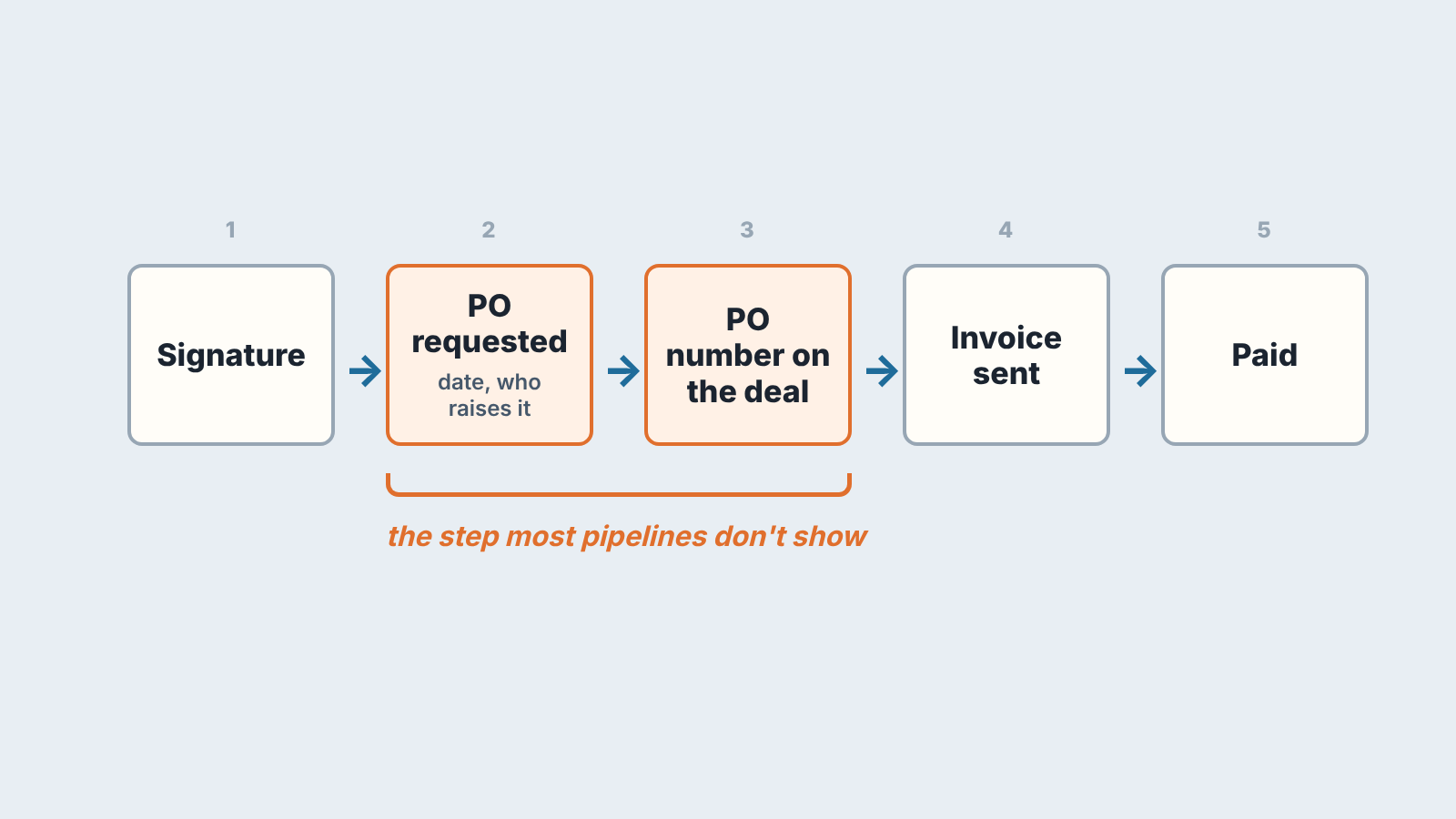
A deal that is signed but has no PO number is won on paper and not yet invoiceable. Whether it counts as Won depends on a rule you pick once; we argued it through in won but not paid: prepayment and the invoice. The report should show that state without a manager reading notes.
Under a Won-on-agreement rule, Oona’s deal is Won and a payment status field says where the money is: Not invoiced, PO requested, Invoiced, Paid. Under a Won-on-payment rule, it stays in its waiting stage with the PO fields filled in. Either way revenue from a deal with an empty PO number and a buyer who requires one is not in the bank, and the month’s number should show that in a column, not a conversation. The gap between signed and billed is its own topic (bookings vs billings vs revenue); budget-deadline deals are the sharp case of it (year-end budget deadlines).
A weekly look at signed deals without a number
One filter does the job: signed deals (your contract-signed stage, or status Won if that is your rule) where PO number is empty, sorted by the the date the PO was requested, oldest first. Ten minutes on Monday. For each deal, skip “any news?” and ask which step it is on, who owns it and what date you agreed. No date means the rep gets one that day. Then the deal goes on to the closed-won handoff.
We build SalesBond, a sales management layer on top of the CRM a team already uses; we started with Pipedrive. A deal signed two weeks ago with no next activity is the kind of gap Deal Health is there for: it checks every deal against the rules a team has switched on and explains what needs attention, so nobody has to remember the filter. Check your CRM with SalesBond.
Before the next contract leaves your outbox, create the PO number field and send your champion the first of the three questions. If the answer is “yes, we need one,” you have a step with an owner and a date, weeks before Joaquim would have told you.


