
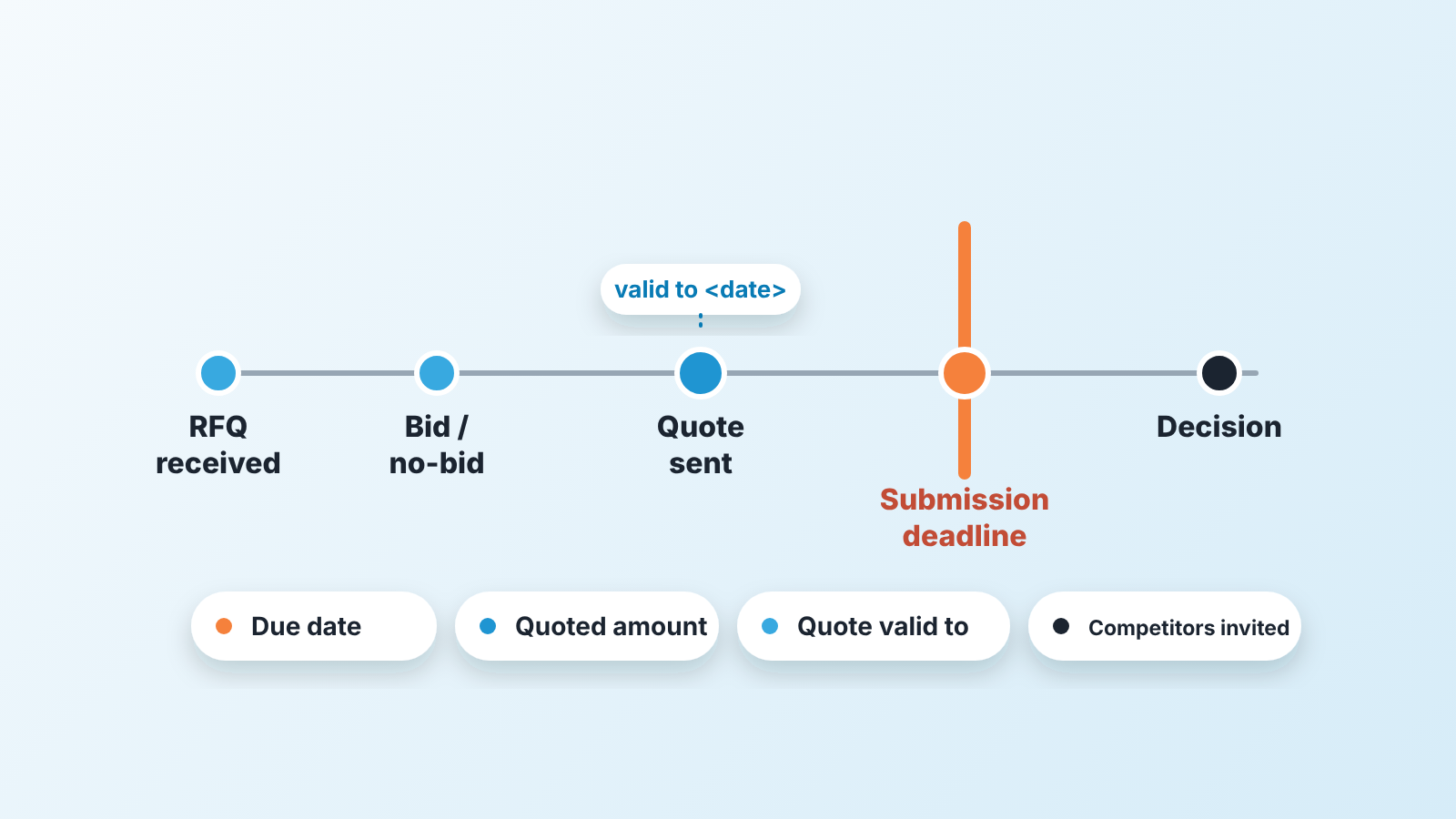
An RFQ is a buyer asking several suppliers for a price on a defined scope. For the seller it is a deal with a hard deadline, so the CRM should hold the due date, the quoted amount and the quote’s validity from the first day, not after the quote has gone out. Almost everything written about the RFQ process is written for the buyer: how to draft the document, whom to invite, how to score the bids. This article is for the other side of the table, a small sales team that answers RFQs regularly and has lost at least one to a date nobody was watching.
RFQ, RFP, RFI: what the buyer is actually asking for
The three letters tell you how far along the buyer is, and that decides how much work the response deserves.
A request for information is early exploration: open questions to learn what the market can do, before a budget or spec exists (Wrike: RFQs explained). A request for proposal is for complex, often customised work, so the buyer wants to see how you would do the job as well as what you would charge. A request for quote sits at the end of that line. The specification is fixed, and what the buyer wants from you is price and terms (Fleetx: what is RFQ in procurement).
The format of the RFQ matters too. Wrike lists open bids, sealed bids, invited bids and reverse auctions as the common types. For the seller the difference is what you can see: in an open bid other prices may be visible, in a sealed or invited one you are quoting blind, and a reverse auction is a live price fight you should decide to enter before it starts.
One detail matters for the CRM. Wrike notes that an RFQ is not a firm offer to purchase; the contract only exists once the buyer makes an offer and the supplier accepts it (Wrike). So a submitted quote is a long way from a won deal. It is a deal waiting for a decision the buyer controls, and that kind of deal goes quiet in a pipeline.
The buyer’s RFQ process in four steps, read from the seller’s side
Fleetx breaks the buyer’s process into ten steps, from defining the need and finding suppliers through evaluation, selection, negotiation and the purchase order, down to delivery and payment (Fleetx). From where the seller sits, those collapse into four moments.
- The buyer defines the need and the criteria before you hear about it. In Fleetx’s version that means price, quality, supplier reliability and delivery dates. The criteria are already set, so arguing for ones that aren’t on the list wastes your time.
- The buyer picks whom to invite. Wrike describes buyers working from prequalified lists and calls three to eight bids a cost-effective, competitive range (Wrike). If the RFQ reached you, ask in the first call who else is on that list.
- The buyer sets a submission deadline. Fleetx points out that not every invited supplier replies, which leaves fewer quotes to compare. Miss the date and you are simply out of the comparison.
- The buyer evaluates, awards, and is supposed to tell everyone, the losing bidders included (Wrike). In our experience that last part happens less often than the guides imply. Most of this article is about what to do when it doesn’t.
Qualify, respond, track: the seller’s side of the RFQ
Here is the position we hold: an RFQ should be qualified harder than an inbound inquiry, because the format hides how little of the decision you can influence.
Qualifying comes down to one question on the first day. Can we win this at a price we would be glad to get? The buyer will usually tell you what you need if you ask: how many suppliers were invited, whether an incumbent is among them, whether the spec was written around one vendor’s product, and when they expect to decide. A buyer who won’t say how many quotes they are collecting is telling you something as well. We run the bid or no-bid call itself as a short scored gate, written up in our bid/no-bid gate for RFP deals; it works the same for an RFQ, and we won’t repeat it here.
If you bid, the response should follow the RFQ’s own structure. Buyers compare on the criteria they published, in that order, so put the price on page one, the delivery date next to it and a validity date on the quote itself. Validity is the term sellers forget most often. A quote with no expiry is a price that stays open while the buyer negotiates with everyone else. If your CRM is Pipedrive, we wrote up how to put a validity date on every quote; the logic is the same anywhere.
Tracking starts earlier than most teams think. Our rule: an RFQ becomes a deal in the CRM on the day it arrives, before anyone decides whether to bid. The reason is the no-bid case. A declined RFQ that never entered the CRM is invisible six months later, when the same buyer sends a second one and nobody remembers why the first was declined. The deal is also where the the quote versions live: a revised price after a clarification round is a new version of the same deal, not a note in a thread (how we handle revised quote versions).
Four fields for a quote with a deadline
Four custom fields on the deal are enough for a small team, and none of them is exotic.
- RFQ due date. A date field, separate from the expected close date. The close date is when you think the buyer will decide; the due date is when your quote must be in. Merge the two and a deal with a close date “next month” misses a submission date this Friday.
- Quoted amount. A money field, filled when the quote goes out and overwritten when it is revised. Keep the deal value separate if you track the expected order, which can differ from the quote when buyers split awards.
- Quote valid to. It belongs on the quote, but copy it to the deal if your CRM doesn’t link the two. You’ll need it after the deadline.
- Competitors invited. A number, plus names if you know them. Wrike’s three-to-eight range is a sanity check: a rep who writes “1” on every RFQ hasn’t asked.
Make the due date required at the stage where the RFQ enters the pipeline. Leave quoted amount optional there. It doesn’t exist yet, and a required field with no honest value gets a dishonest one.
If you run a manufacturing or distribution pipeline, these fields sit next to the stage set and source field in our guide to the manufacturing quote pipeline. This article is the RFQ scenario inside that larger pipeline.
After the deadline: what to ask, and when
The quiet period after submission is where RFQ deals are lost without anyone losing them. The buyer has your price and there is nothing left to send. Reps stop touching the deal because touching it feels like begging, and the manager sees a deal in “Quote sent” that looks fine. Construction has the same silence after a submitted bid; this bid pipeline for subcontractors shows where to keep track of it.
The first question is one you should have asked already: when do you expect to decide? If you did ask, put that date in the CRM as the expected close date, which is what that field is for. If the date passes the next contact needs a specific question with a specific reason, something better than “any news?”. Has the evaluation been completed, and is there a clarification we can answer? That gives the buyer something to reply to besides a status.
Wrike tells buyers to inform all bidders of the final decision, including those not selected (Wrike). Treat that as thier obligation and your opening. A week after the stated decision date, it is fair to ask whether an award has been made and to whom. If you lost, ask what the winning quote did differently. Buyers who ran a clean process will often tell you, and in our experience the answer isn’t always price: delivery terms and the incumbent’s switching cost come up too.
Then write the outcome on the deal, with the winner’s name if you learned it. A year of those notes shows which buyers run real comparisons and which were always going to the incumbent, and it feeds straight into the next qualifying call.
Quote validity has one more job here. If your quote expires before the buyer decides, say so before it expires. A short message that the price holds for two more weeks is a reason to be in touch, and it reminds the buyer that their comparison has a clock on it too.
The Monday check: due this week, and no decision yet
Two saved filters are all a sales manager needs to run RFQs in a small team, and both come from the fields above.
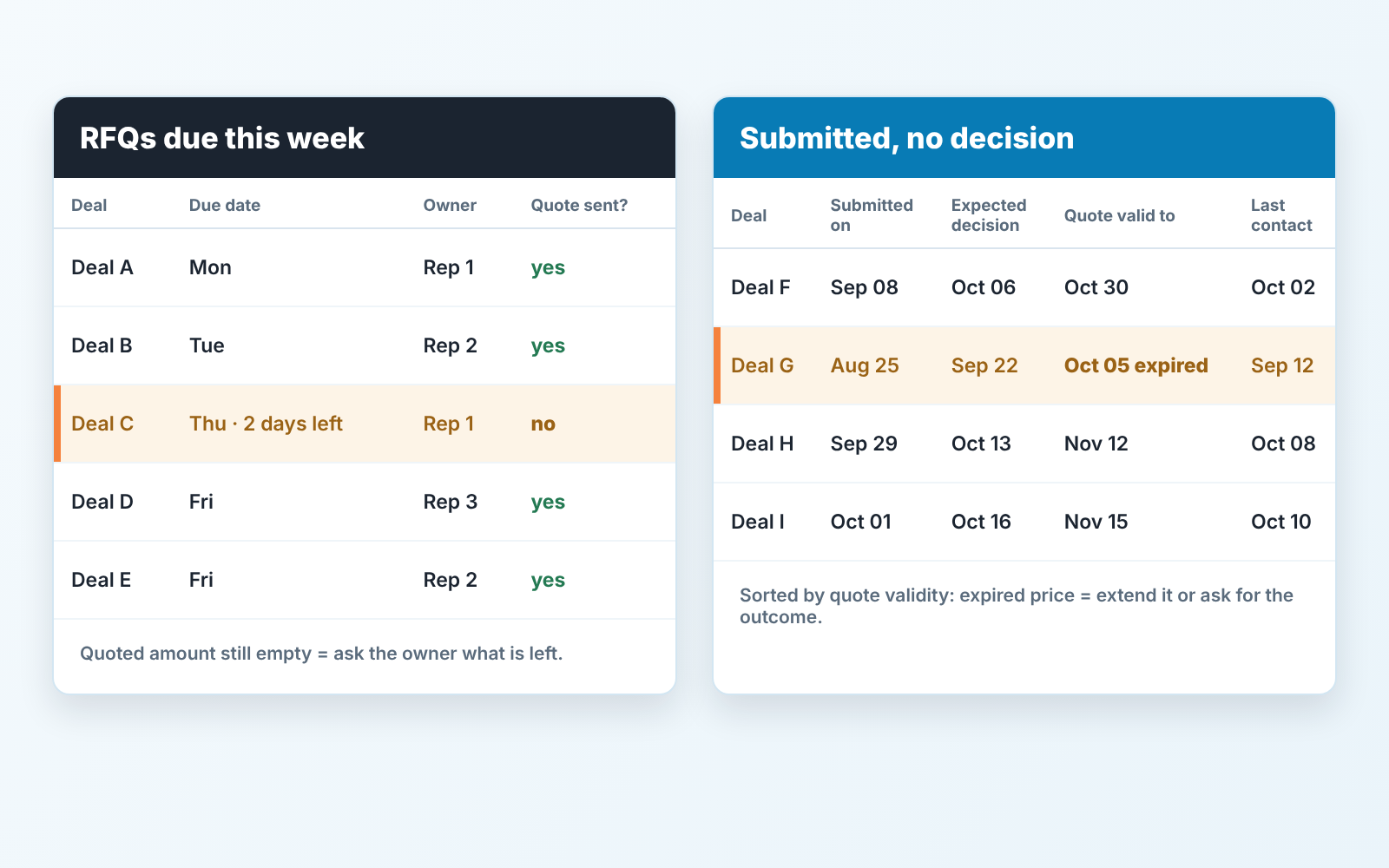
RFQs due this week. Open deals whose RFQ due date falls in the next seven days and whose quoted amount is still empty. It’s a short list on most weeks, and every line on it is a question for its owner: what is left before the quote can go out?
Submitted, no decision. Deals where the quoted amount is filled, the stage is still “Quote sent”, and the expected close date has passed. Sort by quote validity. A deal that is past it’s validity date carries a price the buyer can no longer accept as written, so someone either extends the quote or asks for the outcome. This is the list where a manager finds the deals that were never lost, only forgotten.
Neither filter needs a report builder. Both run on standard CRM filters over the fields above, which is the point of putting them on the deal.
A disclosure, since this is where tooling comes up: we build SalesBond, a sales management layer on top of the CRM a team already uses, and lists like these two are what it puts in front of a manager without anyone building the filters by hand. The filters are the easy part, though. The hard part is the rep who logs the RFQ on the day it arrives and the manager who reads the second list every week, including the weeks when it is embarrassing. If you want to see how your own pipeline reads against these checks, check your CRM with SalesBond.
If you do one thing this week, add the RFQ due date field and backfill it on every open quote. Next Monday, open “Submitted, no decision” and call the oldest deal on it. A price you can argue about; a missed deadline you can’t.


