
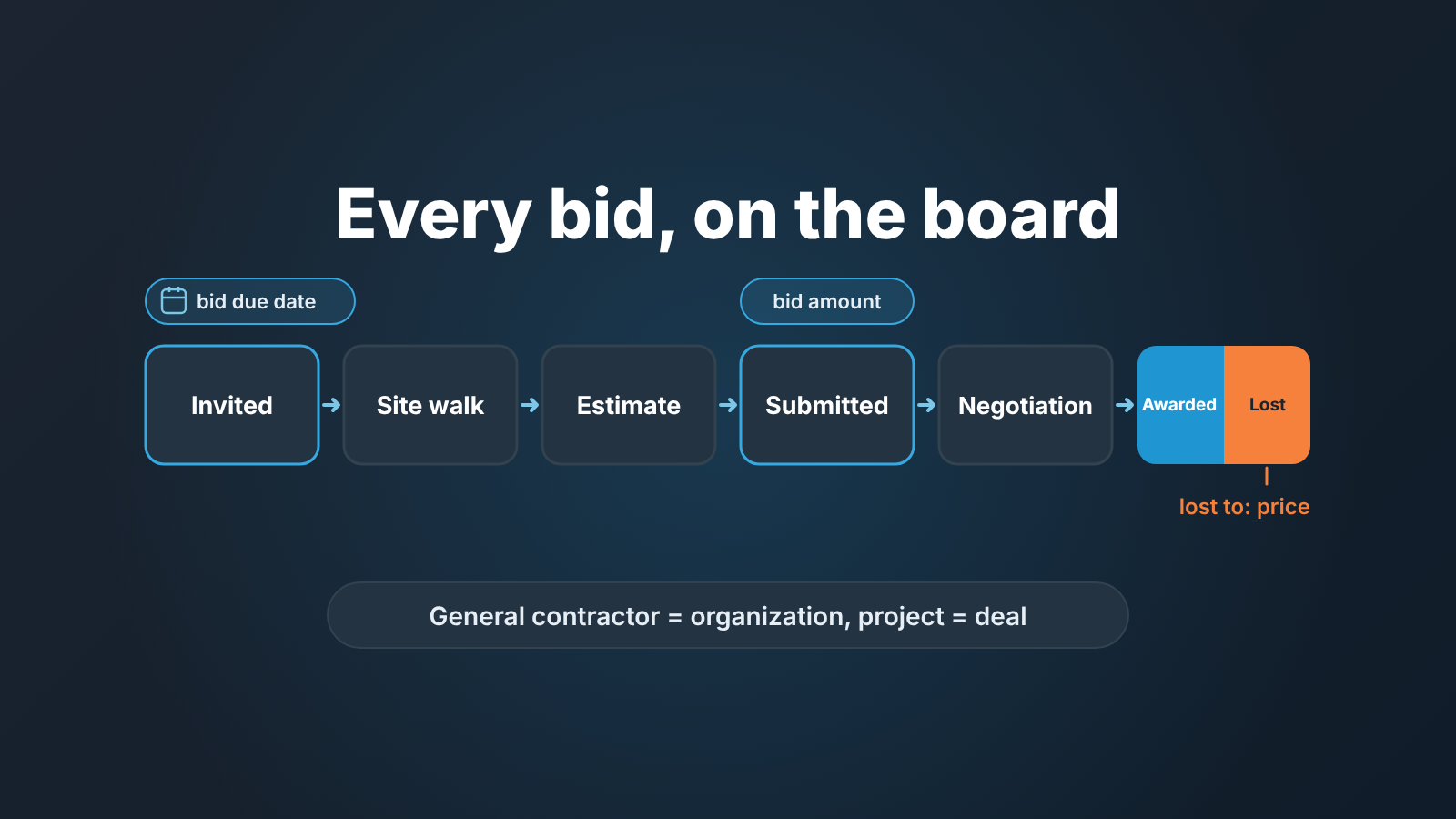
In construction, a CRM for subcontractors is the place where every invitation to bid (ITB) is tracked: who sent it, what it is for, when the number is due and how it ended. It works when the pipeline stages follow bid events (invited, site walk, estimate, submitted, negotiation, awarded or lost) and every deal carries three things: the bid due date, the general contractor as the organization, and a lost-to reason when the job goes to someone else. With those in place a manager can pull three lists on Monday: bids due this week, bids submitted and still silent, and win rate by general contractor. Below is how we set that up in Pipedrive, and where the sales record should stop so the project does not swallow it.
If you are still choosing software: when your sales work is mostly winning bids from general contractors, an ordinary sales CRM covers everything in this article. When you also want takeoff, estimating, scheduling and job costing in one system, you are shopping for a construction management suite, and its CRM is one module of it.
The buyer finds you, and the clock is theirs
Most CRM templates assume you found the buyer. In commercial construction the buyer finds you: an invitation lands in the estimator’s inbox with a due date someone else chose, a scope you did not write, and four other subs on the same list.
That is a different kind of pipeline. The one date that matters is the bid due date, not an expected close date a rep made up. The same general contractors invite you again and again, so the account is worth more than any single bid. And a loss carries information you have to ask for: price, schedule, or they simply went with the sub they already knew.
Pipedrive’s own page for construction companies cites a study finding that few contractors predict their margins accurately when bidding, and says that without tracking your processes, accurate bids and forecasts are nearly impossible (Pipedrive: CRM for construction). We would add that the forecast problem starts earlier than the margin: with not knowing how many bids are due this week.
Stages that follow the bid
Our rule for stage names is simple: a deal moves when something happened, not when someone feels closer. In construction the events already exist, so the stages write themselves.
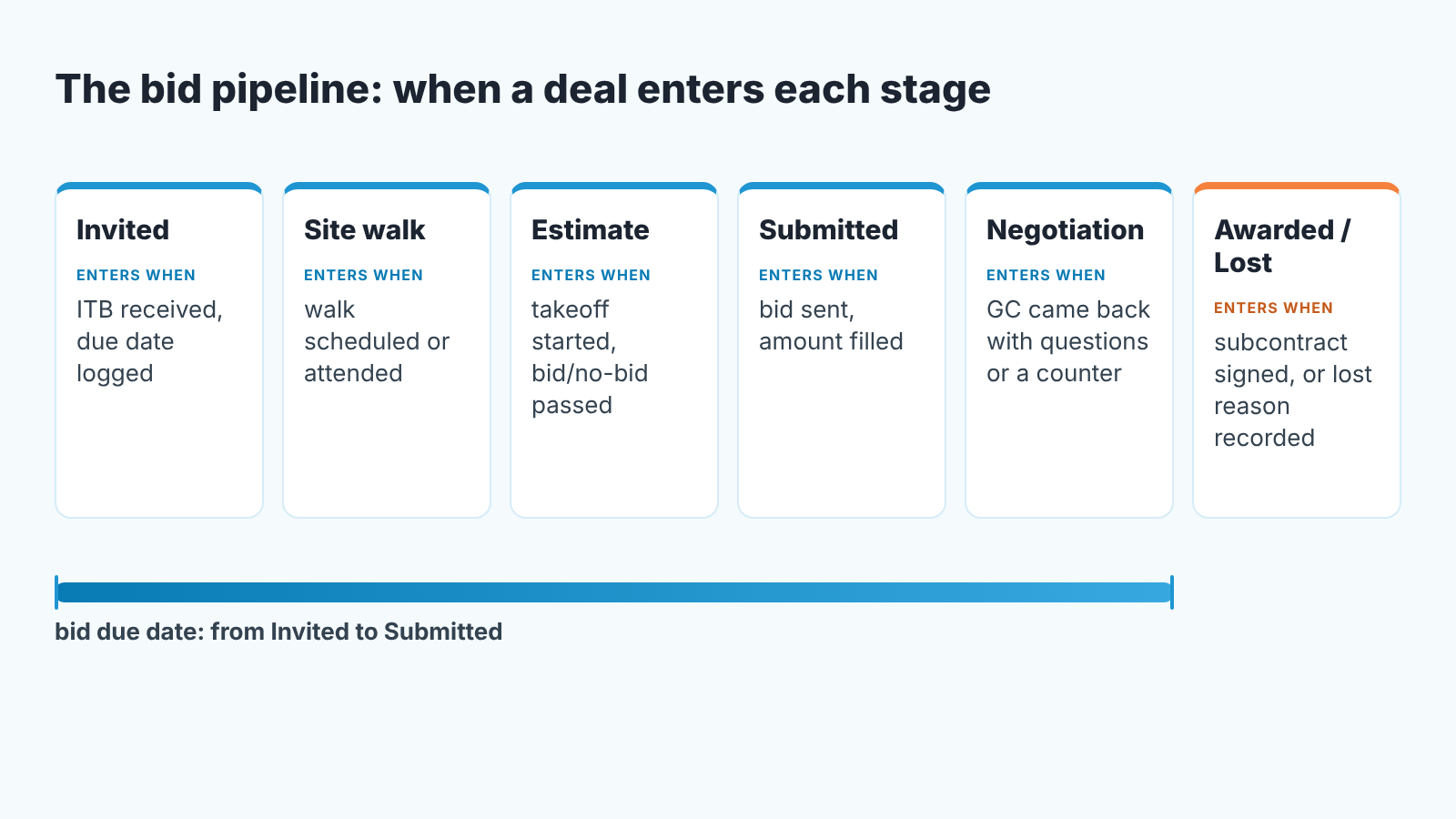
Invited is where the deal is created, on the day the invitation arrives, with the bid due date filled in. If the deal does not exist on the day of the invitation, the weekly list of bids due is already wrong.
Site walk holds the deal while the walk is scheduled and attended. Some trades skip it. Keep the stage anyway, because the walk is where you learn the scope is not what the drawings said.
Estimate is the only stage where your own work happens: takeoff, pricing, supplier quotes. It is also the expensive one, which is why the bid/no-bid decision sits in front of it.
Submitted starts when the bid is sent and the bid amount is in the deal. This is the stage deals rot in. The general contractor is waiting on the owner, and weeks go by without a word.
Negotiation is for when the general contractor comes back with scope questions, a request for a value-engineering alternate, or the familiar “can you sharpen your pencil.”
Awarded or lost is not a stage at all but the deal’s won or lost status, and we keep it that way. A deal is won when the subcontract is signed, not when the award call comes in. An award with no paper behind it stays in Negotiation with the award date in a note. The same logic applies to any deal waiting on someone else’s contract process (see deals stuck in legal and procurement).
Do not add a “Follow-up” stage. Following up is an activity, and it happens in Submitted.
The fields a bid can’t do without
Stages say where a bid is. Four fields say when it needs attention and what happened to it: the bid due date, the general contractor, the bid amount and the lost-to reason. The general contractor is the deal’s organization, not a text field (more on that in the next section), and the bid amount is simply the deal value.
The bid due date is a custom deal field of date type. Pipedrive lets you give a custom field a name, a type, a field group and a description that your team sees behind the info icon next to the field (Pipedrive: custom fields). Put the bid fields in a group called “Bid” so they sit together, and write the description. “The date the GC needs the number, not the date you plan to send it” saves an argument later.
A field that can stay empty will stay empty. Pipedrive’s required fields stop a user from saving or moving a deal until the field is filled, and for deal fields you pick the pipelines and stages the rule applies to; only a global admin can set it up, and it is not on every plan (Pipedrive: required fields). Make the bid due date required at every stage and the deal value required from Submitted on. Where required fields are not available, “important” fields only highlight the blank, and the Monday review catches the rest.
The lost-to reason is where most construction teams lose the most useful data they have. Pipedrive defaults to freeform lost reasons; a user with Deals admin permission can switch to a predefined list, and the chosen reason then shows in the deal’s details, with any comment saved as a note (Pipedrive: lost reasons). Use the predefined list and keep it short: Price, Schedule, Another sub chosen, Project cancelled, No bid, No response. “No response” is a real reason. If a general contractor never tells you the outcome, thats a fact about the general contractor.
One field we do not add is a probability or “gut feel” percentage. The stage already carries all the probability a bid has, and a number nobody can defend ends up in the forecast.
The general contractor is the account, the project is the deal
Name the deal after the project and attach it to the general contractor’s organization. That sounds obvious and we still see pipelines where every bid gets a fresh organization typed by hand.
The reason to get it right is the second invitation. Say a general contractor invites you to bid on a parking structure in March and on a distribution center in June. By the end of the year you want to know that you are three-for-eleven with them (a made-up number, but you get the idea), and that only works if all eleven deals hang off the same organization. Then the account history, every bid, amount and lost reason, sits in one place instead of eleven.
Two practical rules follow. The person on the deal is the estimator or project manager at the general contractor who sent the invitation, because that is who you call when the bid goes silent. And the project owner (the developer or the public agency) goes in a custom organization field or a note, not as the deal’s organization, because the owner did not invite you and will not invite you again.
If you already run one deal per order for repeat customers, this is the same idea in a hard hat; the argument for it is in one deal per repeat order in Pipedrive.
Bid or no-bid, decided before the estimate
The decision to spend estimating hours on a bid belongs between Site walk and Estimate. We wrote it up as a five-score gate with a minimum and a 48-hour deadline in score the bid before you write a word, and the same gate works for an invitation to bid. We will not repeat the scoring here.
One construction-specific point, though. When the answer is no, tell the general contractor on the day, with a reason. A sub who declines politely stays on the invitation list; a sub who goes quiet drops off it. Then mark the deal lost with the reason “No bid” instead of deleting it, so the invitation still counts in that contractor’s history and can be left out of win rate on purpose rather than vanishing by accident.
Monday: who you lose to, and why
Three lists, each one a filter over the fields above. The first two are the same habit we describe for quotes in the RFQ process from the seller’s side, so briefly:
- Bids due this week: open deals before Submitted with a due date in the next seven days, one question each for the estimator.
- Submitted and silent: nothing scheduled, nothing logged since the bid went out, oldest due date first. Ask whether they awarded it while they still remember which bid was yours.
- Win rate by general contractor, with “No bid” excluded and the lost reasons next to it.
A raw win rate tells you little; the lost reasons beside it tell you what to do. In Pipedrive you can add the lost reason as a column in the deals list view, or filter a deal performance report in Insights by lost reason (Pipedrive: lost reasons). Picture three losses on price to one contractor in a quarter. That is not bad luck. Either their buyer is price-only and your estimating hours are better spent elsewhere, or your number for that kind of work is wrong. How to calculate win rate honestly, and what to leave out, is in sales win rate in Pipedrive.
Managers tend to skip the silent list, because it embarrasses people. It is also the one that fixes the forecast, since every silent bid sits in the pipeline at full value. The small-team version of that problem is in forecast accuracy for small sales teams.
A disclosure, since tooling comes up here: we build SalesBond, a sales management layer on top of the CRM a team already uses; we started with Pipedrive. It checks every deal in the connected CRM against rules on activity, progression and data, and explains which deals need attention and why. It reads the CRM record and nothing else, so it does not see your estimate or the bid portal, and a bid that never became a deal is invisible to it. If you want to see how your bid pipeline reads, check your CRM with SalesBond.
Signed subcontract: where the deal ends
The deal ends when the subcontract is signed. Submittals, schedule, change orders, billing and retainage belong to the job, not to the pipeline. A deal that keeps collecting notes for eight months after it was won is how the Submitted list stops meaning anything.
Pipedrive draws the same line itself. Deals track and close sales opportunities; projects organize the work tied to a customer and move through phases on a project board, and you can link a project to a deal so sales and delivery stay connected (Pipedrive: deals vs. projects). So the handover is a single move: mark the deal won, create or link the project, and the estimator stops being the owner of record for the job.
Whether you run the job in Pipedrive Projects or in the the project management tool you already have is a separate decision. What matters on the sales side is that the won deal is closed, dated and attached to the general contractor, because that is the row your next bid to them will be judged against.
If you do one thing this week, add the bid due date field and backfill it on every open bid. Next Monday pull Submitted and silent, call the oldest one, and write down what they tell you. The number was the easy part.


