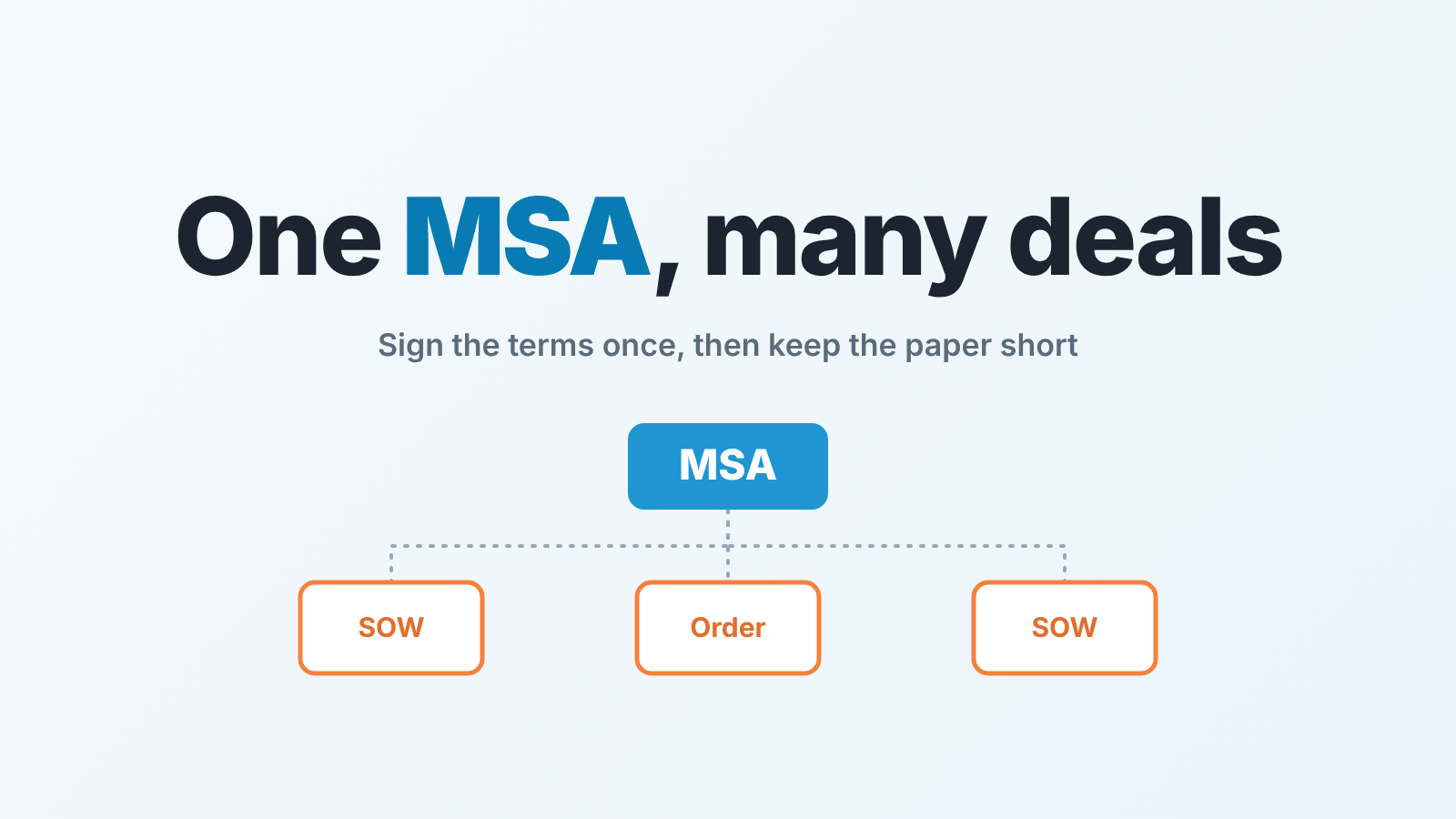
A master service agreement (MSA) sets the standing terms between you and a client; a statement of work (SOW) or an order form then describes each specific deal under those terms. For a sales team the practical rule is to record, on the account and on every deal, whether an MSA is in force, when it was signed, how long it runs, and what exceptions it carries. Then a repeat deal takes the short path (an SOW or an order form) and only the first deal with a client needs the full legal package.
This is not legal advice. An MSA is a legally binding contract (Thomson Reuters: what is an MSA), and what yours commits you to, where you operate, is a question for your lawyer; this article covers only the sales side of the paperwork.
MSA vs SOW vs order form: one sentence each
The MSA is the agreement about how you work together. It sets the baseline terms between vendor and client, and its point is to speed up every negotiation that comes after it. It answers the question “on what terms do we do business at all?”
What goes into one is the lawyer’s job, but a rep should recognize the shape. Thomson Reuters lists the services to be provided, delivery dates and timelines, payment terms, each party’s responsibilities, indemnification and termination, confidentiality and intellectual property rights, plus the governing law and jurisdiction for disputes; an MSA can also limit liability if one side fails to deliver (Thomson Reuters). Notice what is missing from that list. Quantities, this quarter’s price, a start date for one project. Those belong to the next two documents.
The SOW is the agreement about one piece of work. It answers “what exactly are we delivering this time, by when, and for how much?” It lives under the MSA and refers to it, so it does not repeat liability, payment schedule or jurisdiction. What goes inside one is covered in statement of work for Pipedrive deals.
The order form is the SOW’s shorter cousin for things that need no description: seats, licences, units, a renewal. It answers “how many, at what price, from which date?” and little else.
One more line for anyone who searched “MSA vs SLA”. A service level agreement (SLA) sets out service levels, and it is often attached either to the SOW or to the MSA (Thomson Reuters).
First deal and repeat deal are two different pipelines
The mistake we see in most small teams’ CRMs: every deal with a client is treated as the first one. The rep sends the full package, procurement sends it back with redlines, and a legal loop starts on a deal that, on paper, was already covered.
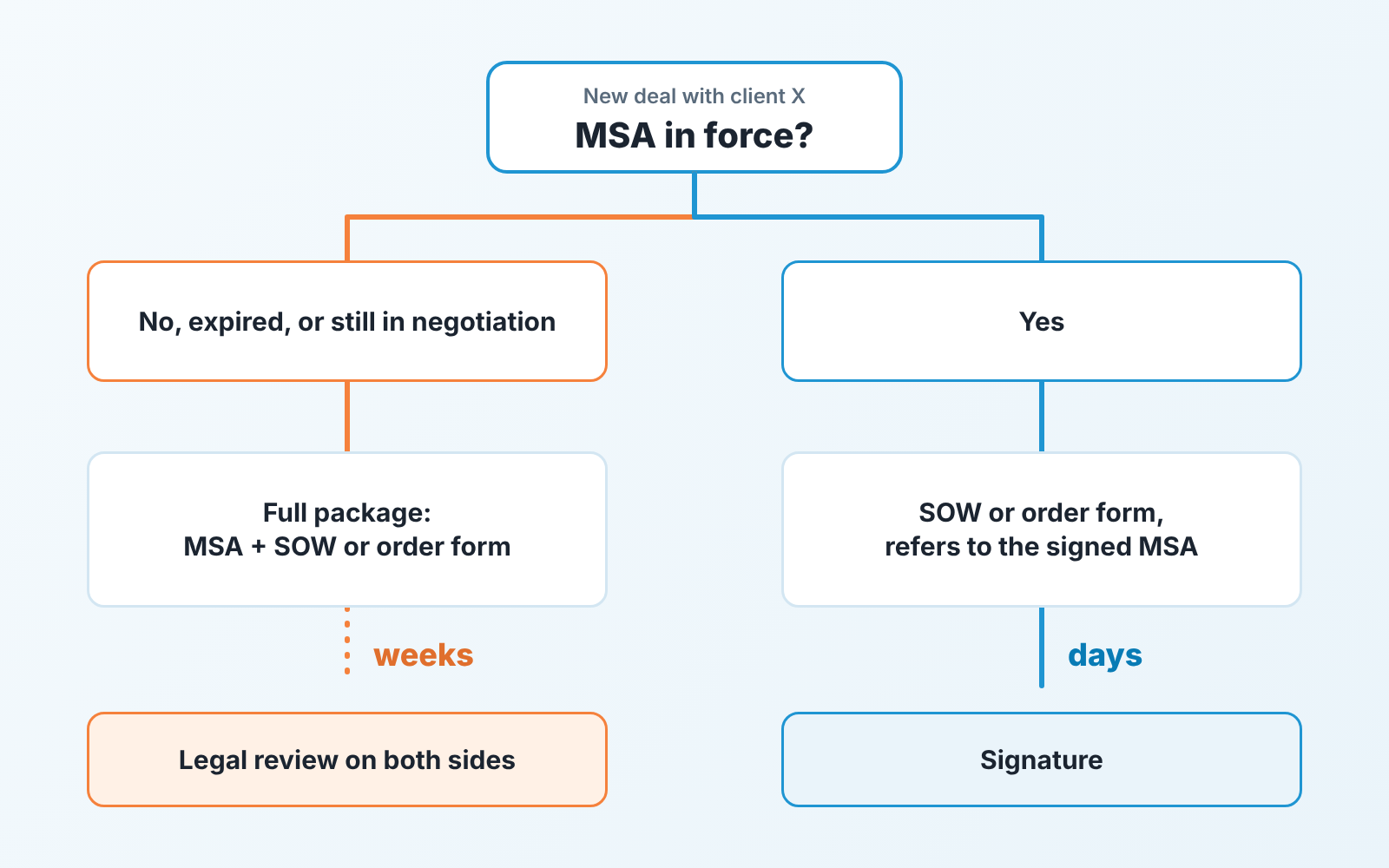
So the deciding question on day one of any deal is not “what are we selling” but “is there an MSA in force with this client?”
If the answer is no, this is a first deal. It needs the full package: MSA, plus an SOW or an order form for the thing being bought. Expect legal on both sides, expect the close date to move, and set the stage durations accordingly. A first deal with a large client is a legal project with a sale attached. If the buyer wants to start before the paper is ready, a letter of intent can hold the place, but it is a checkpoint in the pipeline, not a won deal.
If the answer is yes, this is a repeat deal and it takes the short path: an SOW or an order form that refers to the signed MSA by date, and nothing else. No one re-reads the liability clause. A repeat deal that lands back in a full legal review is a process failure: usually nobody could see from the deal that the MSA existed. How to open and count repeat orders under a running agreement is in repeat orders: a new deal per order.
A blanket purchase order is another way a repeat buyer can order without new paper each time.
“Yes, but it expired” and “yes, but it’s still in negotiation” are treated as “no” for the paperwork and as a reason to hurry for the pipeline.
Four fields about the contract, and where they live
The whole mechanism above depends on one thing: a rep opening a deal can tell, in ten seconds and without opening a PDF, whether an MSA is in force. That means fields, not notes.
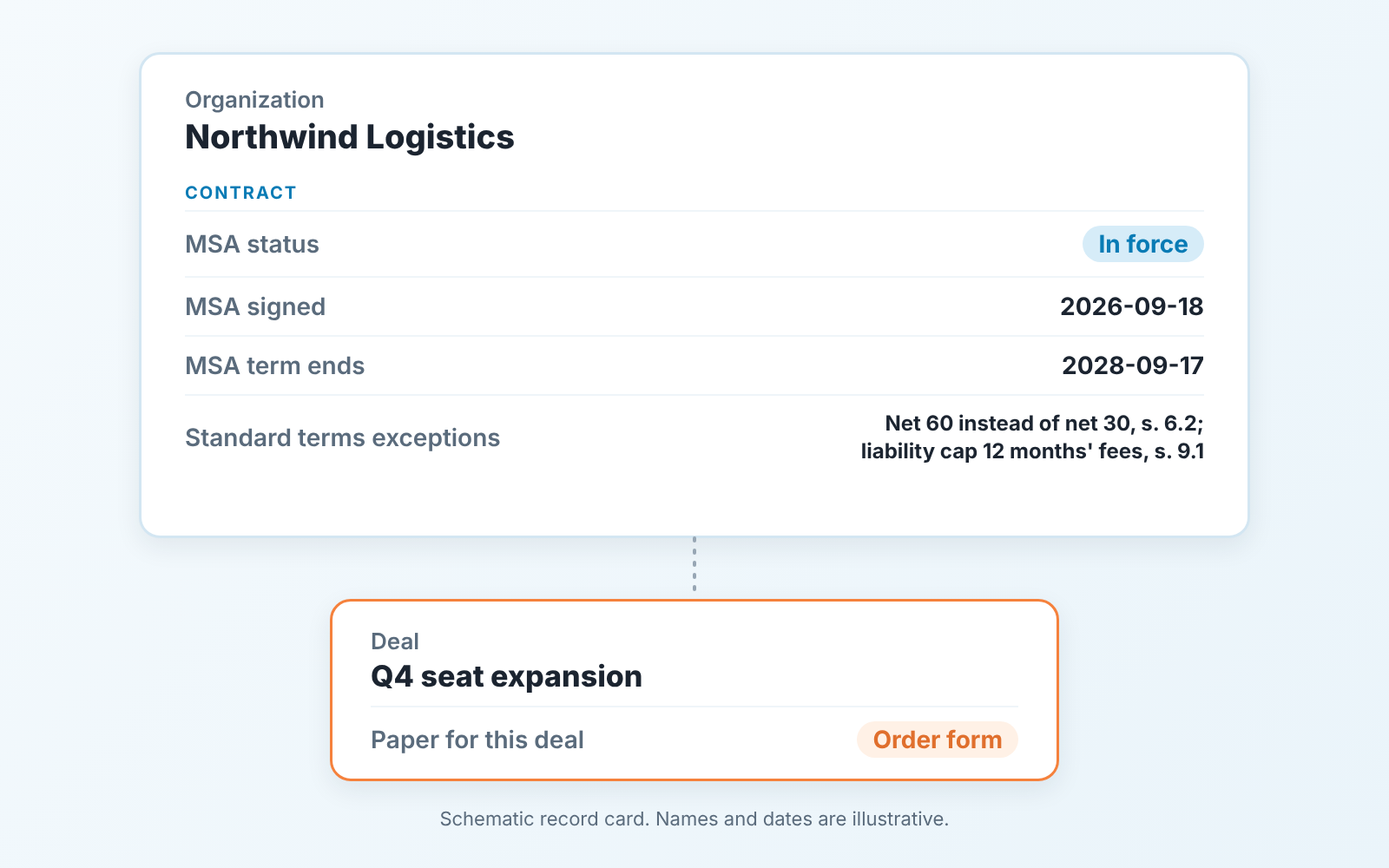
We keep four of them. The first three live on the organization (Pipedrive) or company (HubSpot) record, not on the deal. The agreement belongs to the client and it outlives any single deal. The fourth field goes on the deal.
- MSA status, a single-option field:
In force/In negotiation/Expired/None. Resist adding a fifth; “pending signature” isIn negotiation. - MSA signed, a date field. This is the date the SOW or order form will cite (“under the master service agreement dated 18 September 2026”). If your lawyer numbers versions or amendments, the number goes in a short text field next to it.
- MSA term ends, a date field. How long an MSA lasts, and whether it renews on its own, is set in the agreement itself, so copy the date from the term clause. If it renews automatically, still put in the date the current term ends; a renewal nobody noticed is worth a call. Working a long term after signature is in multi-year deals.
- Paper for this deal, on the deal:
Full package/SOW/Order form. The rep sets it the day the the deal is created, by looking at the organization’s MSA status.
Exceptions to your standard terms don’t fit a dropdown. A negotiated payment term, a capped liability, a most-favoured-customer clause: each one needs a line that says what was agreed and which section says so. We put that in a text field called Standard terms exceptions on the organization, one line per exception with the section number, and keep the exact wording in a note pasted from the signed copy. A price commitment needs its own check on every discount, which we covered in the most favored customer clause.
Both CRMs can hold all of this without add-ons. Pipedrive lets an admin create custom fields on deals or organizations and mark one as required, which blocks saving until it is filled (Pipedrive: custom fields); HubSpot calls them properties and lets you add validation rules (HubSpot: create and edit properties). We would make MSA status the only required one. One required field is a habit. Four is a reason to type anything that saves.
Who edits the MSA, and who only reads it
Sales reads the MSA. Legal edits it. One owner for changes, and that owner is not the rep, even on a four-person team where the rep is also the founder’s cousin.
The reason is not trust. A term changed in one client’s MSA quietly changes your standard for everyone, because the next procurement team will ask what you gave the last one. What the rep owns is the fields, the deal and the conversation: “we can look at that, let me take it to the person who owns our terms, you will have an answer by Thursday.”
On a small team that person is often a founder or an operations lead, and the request format they need is in a deal desk for small sales teams.
The fields split the same way. The rep fills MSA status and Paper for this deal. The contract fields are filled, or at least confirmed, by whoever signed off on the document. Signature on the MSA or order form also decides the deal stage, and the signed contract and Closed Won rule says which signature counts.
When the MSA lapses two weeks before close
Late in the quarter, say a rep is two weeks from closing an order form for 40 more seats with a client who has been buying for three years. Procurement replies: “our MSA with you lapsed in August, we need a new one before we can issue a PO.” The order form that should have taken four days now waits for a contract cycle, and the deal forecast for this quarter lands in the next one, if it lands.
Nothing in that story is about negotiation. It is about a date that sat in a signed PDF and in nobody’s CRM.
With MSA term ends on the organization, the fix is one saved filter someone opens on Monday: organizations whose term ends within the next 90 days, and next to it the same list narrowed to organizations with an open deal. The first list is renewal work for whoever owns the terms. The second is a risk to this quarter’s forecast and needs a decision this week: start the renewal now, or ask legal whether the SOW can go ahead without it. That second option is not the rep’s call.
We build SalesBond, a sales management layer on top of the CRM a team already uses; we started with Pipedrive. Its Deal Health checks every deal against more than 20 rules and explains what needs attention on each one. It does not read contracts, and the date in the PDF still has to be typed by a person. To see where your pipeline stands, check your CRM with SalesBond.
What a salesperson should never type into a contract
This list is short on purpose. Its the part we would put on the wall.
- Any clause of the MSA itself. Not a payment term, not a liability cap, not a “small” change to the termination notice. Mark it up in the request to legal; do not mark up the document.
- A promise of service levels or response times, in the SOW or in the order form. If the client wants one, that is an SLA, and legal writes it.
- Anything about data, security or confidentiality beyond pointing to the section of the MSA that already covers it.
- “As discussed” in place of a number, a date or a scope.
What the rep does write: the commercial facts in the order form (quantity, price, start date), the deliverables and exclusions in the SOW, and the reference to the signed MSA by date. Everything else is read, not written.
Two mistakes we keep seeing
The first is contract terms living in notes. “Agreed net 60 on the call” in a deal note is invisible to the filter, invisible to the next rep, and invisible to finance when the invoice goes out on net 30. A note is for the story, a field is for the fact. If a term changed, it goes into the exceptions field and into the document, in that order, and the note can say why. When a signed customer later changes numbers, scope or terms, sort the request by its effect first: change order, addendum or amendment.
The second is a new MSA for every deal. It starts with a template that bundles the terms and the order into one PDF, because that was simpler for the first client. Three clients later, each one has a slightly different “standard”, every repeat order reopens the terms, and nobody can say which version a client is on without opening three PDFs.
If that sounds like your account list, start small. Pick your five biggest clients this week, find each signed MSA, and fill MSA status and MSA term ends for those five before you build anything else.