
Move a deal to Closed Won only when every required party has signed, not when the client has. A contract the client signed and your side has not is still an open deal, so keep a separate status for “client signed, waiting for our countersignature” and treat it as the last stage of selling rather than the first day of delivery. HubSpot already draws that line: a quote the buyer has signed shows as Pending countersignature in the deal view, and the buyer only receives the signed copy once all required signatures and countersignatures are completed (HubSpot: manage quotes; HubSpot: use e-signatures with quotes). The rest of this article is about making the deal stage follow the same rule.
Signed by whom: client only, both sides, or neither
“The contract is signed” is the least precise sentence in a pipeline review. It can mean the buyer clicked through the e-signature. It can mean your director also signed. Or it can mean the rep saw a PDF in an email thread and nobody has checked who is on it.
Is a contract binding if not every party has signed it? Sometimes, and that is exactly why it is a poor trigger for a stage change. In US law a contract becomes enforceable through mutual assent (offer and acceptance), consideration and capacity, and a court has upheld a contract written on a restaurant napkin (LII: contract). Whether your half-signed contract binds anyone depends on its own wording and on the jurisdiction, and that is a question for your lawyer, not for the CRM. The CRM needs a rule a rep can apply without one.
So ask signed by whom instead. A sales contract usually needs two sides, and only one of them is in the room when the rep updates the CRM. After the quote goes out the deal has three honest states: nobody has signed, the client has signed, both sides have signed. Only the last one is a won deal. The middle one is where false Won deals come from, because from the rep’s chair the hard part is done and the stage change feels earned.
Our position: the stage change is earned when the company is bound, not when the rep is relieved. The company is bound when the last required signature lands. Until then the deal stays in the pipeline, with an owner and a next step, like any other open deal.
There is a fair counter-argument. If your side never actually signs by hand (your signature is applied automatically, or the order form is accepted with a click and asks nothing of you) then the buyer’s signature is the last real event, and marking Won on it is reasonable. The test is simple. Could anyone on your side still decline to sign? If yes, wait. If no, the client’s signature is the all-parties signature. Either way, the close date is the date of the last signature, for e-signatures as much as for paper.
Four signature states and the deal stage each one maps to
HubSpot shows a quote’s status right on the deal, in the Quote column of the deal view. Among the statuses are Sent – pending signature, Viewed – pending signature, Pending countersignature and Accepted, and the quote’s activity log records events such as Quote buyer signed, Quote countersigned, Quote expired and Quote recalled (HubSpot: manage quotes). That is more detail than most teams use, which is the point. The deal stage can follow it instead of following the rep’s mood.
Sent or viewed, pending signature. The quote is out and nobody has signed. The deal sits in Proposal sent, or whatever your pipeline calls that stage.
Pending countersignature. The buyer has signed and your side has not. This gets its own stage, Contract pending, and it is the one teams skip.
All parties signed. Every required signature is in and the buyer gets the signed copy. In HubSpot the quote reaches Accepted once it has completed each required step, e-signature included. This is the only state that should ever point at Closed Won.
Expired or recalled before everyone signed. The document as sent is no longer the one to deliver against. Back to Proposal sent, or Closed Lost with a reason.
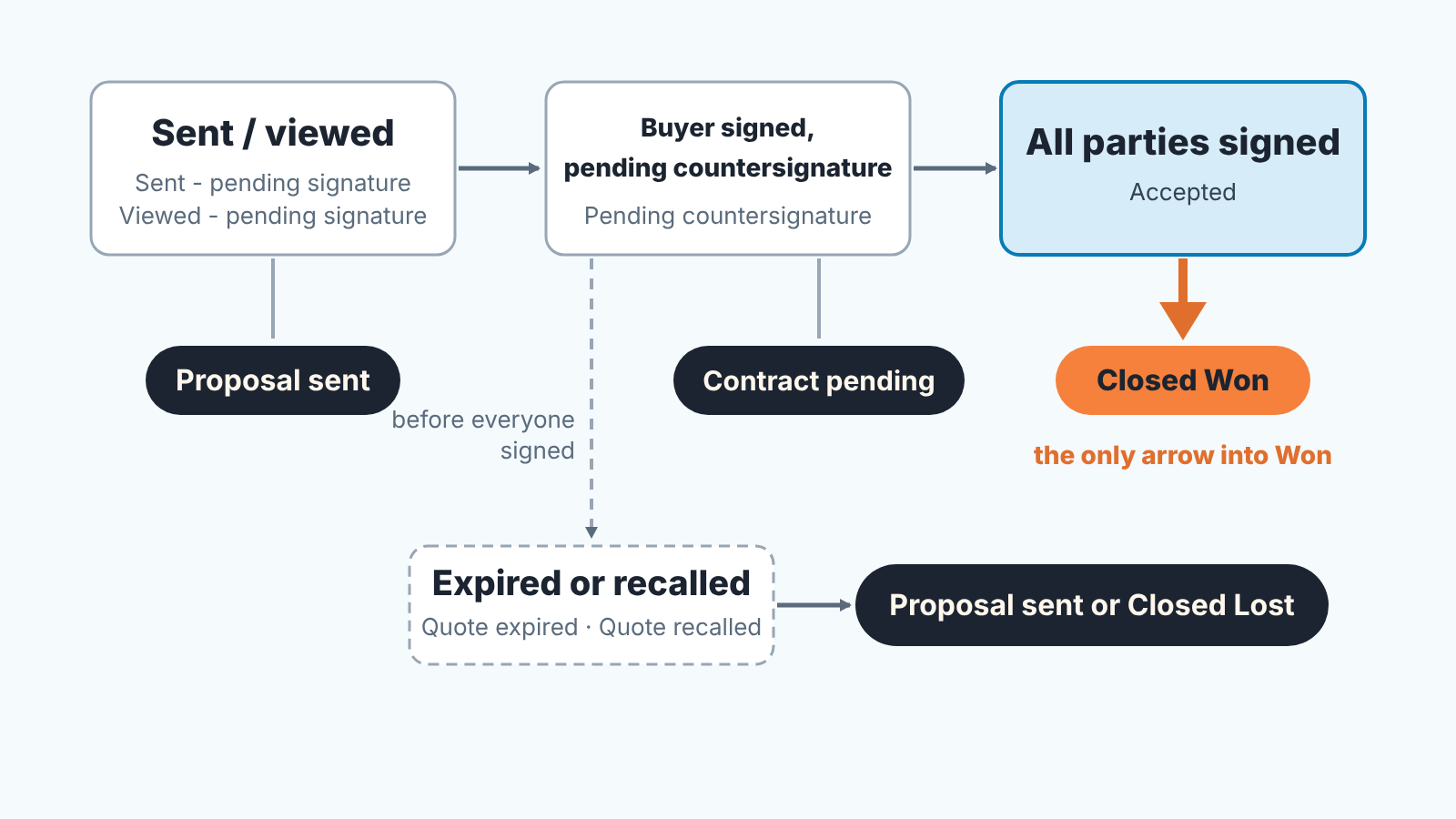
If you have a stage called Contract Sent and nothing between it and Won, add the middle stage. It costs one pipeline setting, and it removes the reason a deal would otherwise have to be reopened after onboarding has already started. What onboarding needs from the deal before it moves is listed in our client onboarding process in HubSpot guide.
A note on automation. If a workflow moves deals to Closed Won for you, the condition it should wait for is the all-parties-signed state, not the buyer’s signature. Which trigger that is in your portal depends on your subscription and on whether you use quotes or legacy quotes, which HubSpot sets up differently (HubSpot: use e-signatures with quotes), so test it on one deal before you rely on it.
Countersignature: the stage nobody owns
The buyer signs on Tuesday afternoon. HubSpot emails the countersigners that the quote has been signed (HubSpot: use e-signatures with quotes). The rep sees the notification, marks the deal Won and tells onboarding to start. Your director, who is the countersigner, is travelling and opens the email on Friday. For three days the company has been delivering against a contract it has not signed, and the pipeline report has counted revenue that isn’t contracted yet.
The gap is small each time and it is not the rep’s fault. In most small teams the countersignature is a step with no owner: the rep does not control it, the director does not see it as a sales task and the CRM shows it as a status rather than as an activity on someone’s list.
So give it an owner and a clock. Three settings on the Contract pending stage are enough:
- The deal owner stays the rep. They are the one who will chase the signature, and chasing it is still selling.
- A task is created when the deal enters the stage, assigned to the countersigner, due the same day. The countersigner can open the quote from the quotes index page and choose Countersign under Actions, so the task only needs to point at the quote (HubSpot: use e-signatures with quotes).
- Nothing downstream starts from this stage. Onboarding, invoicing and the handoff all key off Closed Won, which now means all parties signed. What the rep needs to write down before the deal leaves sales is in the closed-won handoff, and none of it changes because the CRM is HubSpot.
Keep the stage short. If a deal sits in Contract pending for more than a couple of days, the problem is on your side, and the report should say so rather than hide it inside Won. Where the signed contract itself should live afterwards is the subject of contract lifecycle management vs CRM.
When a quote expires with one signature missing
HubSpot quotes expire, and the link to the signed document the buyer receives expires along with the quote. Resending a quote after it has expired or been recalled counts as an additional e-signature toward your monthly limit (HubSpot: use e-signatures with quotes). On Sales Hub Starter and Professional that limit is ten e-signatures per user a month, pooled across the account (same source). A team that lets half-signed quotes lapse and resends them is spending its allowance twice on the same deal.
The awkward case is the quote the buyer signed on the last valid day, with the countersignature still open when the date passes. Don’t guess what HubSpot will do with it. Open the quote and read the status it shows. If the quote has expired, the document as sent is no longer the one to deliver against and the clean path is a new quote with the same terms and a fresh date, signed by both sides. The buyer has already said yes, so this is a formality, but its a formality that leaves you with a contract everyone can find.
The rule for the stage is the same as before. An expired quote with one signature missing is not Won. It goes back to Proposal sent with a note explaining why, or to Closed Lost if the buyer has gone quiet. The longer discussion of expiry dates and the extend-or-reprice decision is in quote expiry and the validity date, written for Pipedrive, with the reasoning carrying over unchanged.
One prevention step is cheap: set the expiration date with the countersignature in mind, not only the buyer’s decision. If your director needs two working days to sign anything, a quote that expires the day after the buyer’s deadline is already too short.
Wet signature and PDF-by-email: how to log them
Not every contract goes through the e-signature flow. A buyer prints the quote, signs it, scans it and emails it back. A procurement department sends its own paper for your signature. Either way the contract is real and the CRM has to record it, or the Won stage becomes a mix of verified e-signatures and the rep’s word.
HubSpot has an action for this. When a quote requires a written signature you can choose Mark signed and the activity log records Quote manually signed rather than Quote buyer signed (HubSpot: manage quotes). Use it, and use it only when the signed document is attached to the deal. The rule we suggest is short enough to say on a planning call: no attachment, no manual signature, no Won.
Two details make this hold up. First, mark the quote as signed only when both sides have signed the paper, the same rule as for e-signatures. A scan with the buyer’s signature and a blank line for yours goes into Contract pending, not Won. Second, note the the date of the last signature on the deal, because a scanned PDF carries no timestamp HubSpot can read and the date decides which month the revenue belongs to.
A contract that exists only as “the customer said yes on the call” is not a signed contract at all. That is a different situation with its own handling. This article starts where it ends: the document is out, and the question is which signature state it is in.
Weekly check: Won deals without a completed signature
Once the stage rule exists, the weekly check is a single list: deals moved to Closed Won this week whose quote is not signed by all parties. In HubSpot that is a deal view filtered by close date in the last seven days, with the Quote column visible, read top to bottom. If you already run the Monday check that the quote, the deal amount and the stage agree, add this to the same view. That check asks whether the numbers match. This one asks whether anyone is actually bound by them.
What goes on the list:
- Won deals still showing Pending countersignature. Move them back to Contract pending and chase the signature today.
- Won deals with a manually signed quote and no attachment. Find the document, or move the deal back.
- Won deals showing No quote associated. Ask the rep what was signed and where it is.
- Won deals whose quote expired or was recalled; decide now whether to reissue, because these are the ones most likely to be re-sent and re-signed.
The list should be short. If it is long in the first week, that is the backlog, not the process failing. Work through it once and from then on the check takes a few minutes on Monday.
Pipedrive teams get the same rule with fewer statuses: in Smart Docs each signer shows as Sent, Completed or Declined, and the signed PDF goes out only when everyone has signed (Pipedrive: sales documents and e-signatures), so Won waits for the last Completed. The tracking side is covered in Smart Docs view tracking.
We build SalesBond, a sales management layer that works on top of a team’s existing CRM (today: Pipedrive, HubSpot, Salesforce and Zoho CRM). Its Deal Health checks every deal in the connected CRM against more than twenty rules in categories that include Data and Progression, shows the specific violations with the reason, and lets the team resolve, snooze or ignore each one. A won deal that left the pipeline without the evidence behind it is the kind of thing that check is for, so if you would rather not keep the Monday list by hand, check your CRM with SalesBond.


