
Contract lifecycle management is the process, and the software, for creating, signing and renewing contracts, and it is not a CRM: the CRM tracks the deal and the relationship, CLM tracks the document. A small sales team can keep five contract fields in Salesforce (start date, end date, renewal term, notice period and a link to the signed file) and look at a CLM tool only when versions and approvals, not dates, become the bottleneck.
That is the whole argument. The rest is how to set it up so the two systems share data instead of fighting over it.
CLM in plain words, and why it is not a CRM
Salesforce’s own definition is fine: contract lifecycle management is “the process of managing a contract from its creation through execution and renewal”, and the same page splits it into creation (drafting, negotiation, internal approvals), execution (routing for signature, storing the signed copy) and what happens after, which is where renewals live (Salesforce: What is contract lifecycle management). The page sells Revenue Cloud to companies with a legal department and procurement. Most of a CLM product is about the middle of that list: who edited clause 9.1, which version the customer has, who still has to approve the liability cap.
A CRM does none of that, and it should not try. Salesforce’s help page says what a contract record is for: “Use Salesforce to establish and document the contracts that you have with your accounts and opportunities” (Salesforce Help: Contracts). Document, not draft. The record says that a contract exists, with whom, from when to when. The wording lives somewhere else.
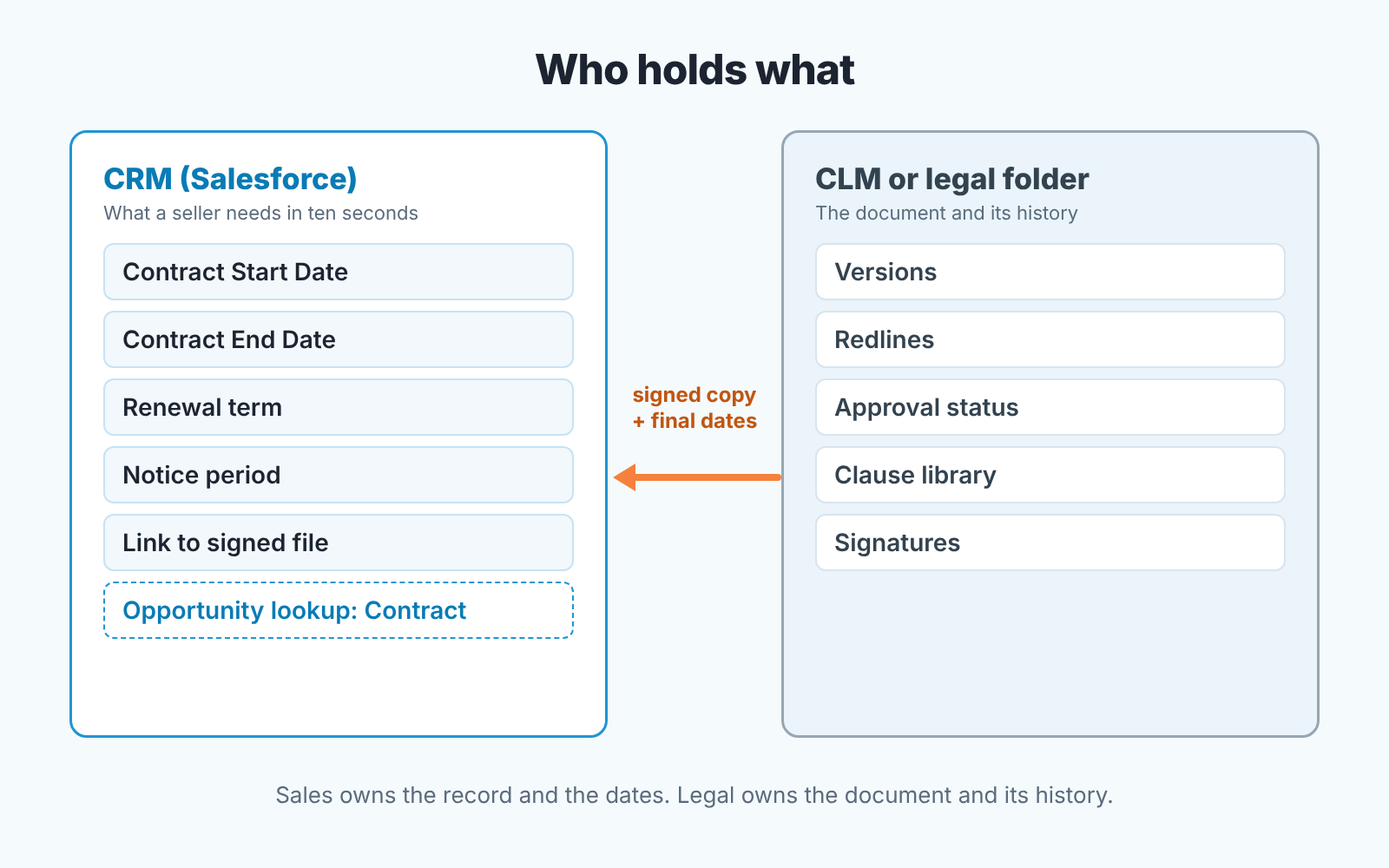
So the honest answer to “Is CLM a CRM tool?” is no, and neither one swallows the other. They split the data. The CRM holds the facts a seller needs in ten seconds; the CLM, or the lawyer’s folder, holds the document and its history. The question for a small team is only where to draw the line, and our position is that it goes right after the dates.
What a small sales team needs to see about a contract (five fields)
Picture the moment: a rep opens an account because the customer just asked for more seats. What does she need to know before she quotes? Whether a contract is in force, when it ends, whether it rolls over on its own, how late is too late to cancel, and where the signed copy is. Five things, and none of them requires reading the contract.
- Start date. The first day the contract is in effect.
- End date. The last day. The single most important date in the account, and the one most often wrong.
- Renewal term. Does it renew unless someone objects, or does it simply end? A picklist is enough, with values such as
Auto-renews 12 months/Ends, needs new contract/Month to month. - Notice period. How many days before the end date the customer, or you, must give notice. This is the field that turns “ends in March” into “the real deadline is December” when the notice period is, say, 90 days.
- Link to the signed file. A URL to the signed PDF in whatever storage legal uses. Not an attachment copied into Salesforce, a link. One copy, in one place.
We stop there on purpose. Our article on MSA, SOW and order form: what a sales team keeps in the CRM covers framework agreements and the fields that sit on the organization in Pipedrive or HubSpot; this one is about the Contract object in Salesforce and the renewal clock.
Where those fields live in Salesforce: Contract vs Opportunity vs custom fields
The Salesforce Contract object already has three of the five. Salesforce documents Contract Start Date (“First day when the contract is in effect”), Contract End Date (“Last day when the contract is in effect”) and Contract Term (months), plus a Status picklist whose values sit in three system-defined categories: Draft, In Approval Process and Activated (Salesforce Help: Contract Fields). The same page says an admin can configure Salesforce to calculate the end date from the start date and the term. We would turn that on. A date nobody types is a date nobody types wrong.
Renewal term and notice period are not standard fields, so they become two custom fields on Contract. Keep the notice period numeric, in days, because you will filter and sort on it. The link to the signed file is a custom URL field on the the same object. There is also a standard Special Terms field, “Any terms that you’ve agreed to and want to track in the contract”, which is a reasonable home for one-line exceptions if you dont want another custom field for them (same Contract Fields page).
The question we get most is whether to put these on the Opportunity instead. No. An opportunity closes once; a contract outlives it and usually outlives the next few. Salesforce gives the Opportunity a standard Contract field, “the contract that the opportunity is linked to” (Salesforce Help: Opportunity Fields), and that lookup is the whole relationship: the renewal opportunity points at the contract it renews. The dates are read from the contract, not copied onto the deal.
One habit makes this stick: somebody creates the Contract record when a deal closes, and that somebody is the rep who closed it, before she moves on. If your team already runs renewals as their own opportunities, the record-type question is separate and we covered it in when renewals deserve their own opportunity stages.
One report: contracts reaching renewal in 90 days
If the fields exist and nobody reads them, you have a database, not a process. One report fixes that, and it’s the only one you need to start.
This is the filter logic; the menu path depends on your setup. Build the report on contracts, not on opportunities, because the renewal opportunity may not exist yet and that is exactly what you want to catch. Keep only contracts whose status is in the Activated category, so drafts and anything still in approval drop out. Limit Contract End Date to the next 90 days. Show the account, the end date, your renewal-term and notice-period fields and the contract owner, sorted by end date. Then look at it every Monday. Each row either has a renewal opportunity linked to it or it does not, and the ones that do not are the morning’s work.
Why 90 days, when some notice periods are shorter? Because the report is for starting the conversation, not for meeting the deadline. A customer who hears from you three months out is being managed. One who hears from you the week the notice window closes is being chased.
Salesforce has a built-in backstop for the second case. The Owner Expiration Notice field on Contract sets the “Number of days before the contract end date” when the contract owner and the account owner get notified of an upcoming expiration (same Contract Fields page). Set it no shorter than your notice period. It is an email and easy to ignore, so it stays a backstop. The report is the process.
How the renewal itself is worked, stage by stage, is a different article, written for Pipedrive but the logic travels: a customer renewal process that does not depend on memory. And if the contract you are tracking is the competitor’s, not yours, the same end-date field is the one to watch; see tracking the incumbent’s contract end date.
What stays with legal: versions, redlines, approvals
CLM software manages the document: drafts, redlines, approvals, signature routing and a clause library. Dates and status stay in the CRM, where the sellers already look. Model the negotiation in Salesforce fields and the record ends up a version or two behind the paper, which is worse than no record at all. A data processing agreement in a sales deal is a good example: the paper lives with legal, while its status belongs on the deal. If you sign through DocuSign, the Salesforce DocuSign integration piece shows how to keep envelope status and opportunity stage in step.
The rule we use is short. Sales owns the record and the dates; legal owns the document and its history. When the document is signed, whoever played legal hands sales the final start and end dates and the link, and sales types them in once. The deal stage follows the same paper: Closed Won only after every required party has signed. Who edits the paper and who only reads it is covered in the MSA article.
Three signs you have outgrown fields and spreadsheets
You need a CLM tool when contract volume, edits to the paper or lost renewals outgrow five fields and a report. That point has little to do with company size.
The first is volume you can feel: nobody can name the active contracts, and records get made the week after signing or never. By then the shared drive is the system of record and the CRM is a copy.
The second is that every deal needs edits to the paper. If standard terms close most deals untouched, a signed PDF and five fields are plenty. If most come back with redlines, someone is already keeping a “contract_v7_final_FINAL” folder, which is CLM by hand.
The third costs money, a renewal lost to the document rather than the date. The date was in Salesforce; the notice clause was in a PDF nobody opened.
Two of the three, and it is time to look. One, and it is usually a process fix. Is CLM difficult? The hard part is not the tool, it is deciding which system owns the end date.
What to ask a CLM software vendor so it does not duplicate the CRM
When you do look, the risk is not that the tool is bad. It is that it is good, and now two systems hold the end date. The demo will show a renewal dashboard much like your 90-day renewal report. Ask these first.
- Where does the end date live after we buy you, in your tool or in Salesforce, and which one is the copy?
- When a contract is signed in your tool, does the Contract record in Salesforce get its start date, end date and status written automatically, or does a person retype them?
- Can the renewal opportunity in Salesforce link to the contract in your tool?
- If we cancel, do we keep the signed files and the dates in a form we can load back into the CRM?
- Which Salesforce fields do you read, which do you write, and what happens on a conflict?
The answer you want to the first one is “Salesforce, and we write to it”, because the sales team lives there and the dates are a sales fact. The answer you do not want is a shrug and the word “sync”.
A disclosure: we build SalesBond, a sales management layer on top of the CRM a team already uses; we started with Pipedrive. It reads deal and customer data from the CRM, so it can only work with what is on the record, which is one more reason to keep the dates there and not in a PDF. It is not a CLM and does not manage contract documents. If you want to see what your CRM data says about your deals and customers today, check your CRM with SalesBond.
Mistakes: two sources of truth for the renewal date
Almost every renewal problem we have seen in a small team comes down to the same mistake, so we will end on it rather than on a checklist. The end date is in two places, and they disagree.
A typical example: the rep put a date on the Opportunity when it closed, because the deal needed a close date and it felt right. Legal has the signed PDF, where the term starts on the countersignature date, a couple of weeks later. A year on the renewal report runs off the Opportunity date and the customer’s notice window runs off the PDF. Nobody is wrong. Both dates are real. They answer different questions, and only one of them is the contract.
The fix is dates on the Contract record, applied without exceptions. The Contract holds the dates, the Opportunity holds a lookup to the Contract, and Close Date goes back to meaning what Salesforce says it means: “The date when you plan to close the opportunity” (Salesforce Help: Opportunity Fields). Nobody types the end date twice. The same discipline applies to money: when the quote changes after the record is made, the amount drifts the same way the date does, which we covered in the Salesforce quotes and opportunity amount check. One record is the truth. Everything else points at it.
A CLM tool, when you get to it, is the third place a date can live. Buy it for the versions and the approvals and make it write the dates back to Salesforce. Then there is still one truth, and the sales team can still find it in ten seconds.


