
The Salesforce DocuSign integration shows the envelope status on the opportunity, but out of the box it does not decide which status moves the stage. Somebody has to make that call and write it down. Once the rule exists, the manager’s job is a weekly report with two lines: envelopes completed while the opportunity is still open, and envelopes sent more than seven days ago with no signature. The rest of this article is how to keep those two lines honest.
What the DocuSign integration writes to the Salesforce opportunity
Setup guides cover installation well; the Revenue Grid guide spends nine sections on it (Revenue Grid: DocuSign Salesforce integration guide). What they tend to skip is what the opportunity looks like after an envelope goes out.
With DocuSign Apps Launcher, DocuSign’s managed package for Salesforce, each envelope gets a DocuSign Status record related to the opportunity, and that record carries the envelope’s status. DocuSign publishes that status back to Salesforce through DocuSign Connect.
The opportunity’s own fields, StageName, Amount, CloseDate, stay as they are unless someone configured otherwise. There are two ways to do that. An envelope template in Apps Launcher can carry field updates that fire on status changes such as Sent, Completed, Declined or Voided and write to text and picklist fields on the source record, and StageName is a picklist (Docusign Community: field updates not working in Salesforce eSignature; Docusign Community idea: field updates for all field types). The other way is a Salesforce Flow that watches the DocuSign Status record. Either one can move the stage. Neither exists until somebody in your org builds it.
When a rep says “it’s signed, it’s in Salesforce,” they mean the envelope says Completed. Not that the opportunity is Closed Won.
Envelope status vs opportunity stage: a mapping you can check
Put one question to the team: for each status an envelope can show, what should the opportunity say? DocuSign’s own user guide for its earlier Salesforce package lists five envelope events: Sent, Delivered, Completed, Declined and Voided (DocuSign for Salesforce User Guide v6.1.1, 2015). The Apps Launcher field updates trigger on four of the same names. Here is how we map them:
- Sent: stage unchanged. Next Step names who is signing and by when.
- Delivered, meaning the recipients have opened it and not everyone has signed: leave the stage alone and give the rep a call task due within two working days.
- Completed is a Closed Won candidate. The rep proposes the move, the manager confirms it, and only after the Closed Won exit criteria are met.
- If the customer declined, the stage goes back one step and the decline reason goes on the opportunity the same day.
- A voided envelope changes nothing, as long as a replacement exists by the end of the week. No replacement, the stage goes back.
Completed is the line that matters. A completed envelope is evidence, not a stage. If Closed Won in your pipeline needs a purchase order number or your own countersignature, the envelope alone does not meet it. We wrote about this for Salesforce stages in general in exit criteria for every Salesforce opportunity stage; a signed envelope is one exit criterion for the last stage, not the stage itself.
Who is allowed to move the stage on signature
Someone has to decide: an automation on Completed, or the rep after checking the exit criteria. We pick the rep. The wrong answer is leaving it undecided.
The automation is a real option, built with a field update or a Flow. The Revenue Grid guide presents Closed Won on signature as a writeback scenario, without saying what should happen when one of several signers has not signed yet (Revenue Grid). It works when one envelope equals one deal and the amount on the envelope is the amount on the opportunity. Add an amendment envelope on a deal already won, and the automation starts closing things that are not closed.
With the manual route, the rep moves the stage after checking the exit criteria and the manager confirms it at the weekly review. Slower by a day, and a day costs less than one wrongly won deal sitting in the forecast for a month.
If you keep the automation anyway, write down the three conditions it assumes: one live envelope per opportunity, every signer on that envelope, amount matches. We made the same call for PandaDoc on Pipedrive in when a signed PandaDoc document should mark a Pipedrive deal Won. Only the field names differ.
The weekly report: signed but open, sent but silent
This part the manager owns. Three list views, run before the pipeline review.
- Completed envelope, opportunity still open: the status is Completed and the stage is neither Closed Won nor Closed Lost. The customer said yes; the forecast does not know. Usually the answer is “nothing, I forgot.”
- Sent or Delivered, with a sent date older than seven days. These are the quiet ones. The next step is a call, not another DocuSign reminder.
- The mirror image, and the one that hurts most: Closed Won with no Completed envelope on the record. Sometimes it is a paper contract. Sometimes it is optimism.
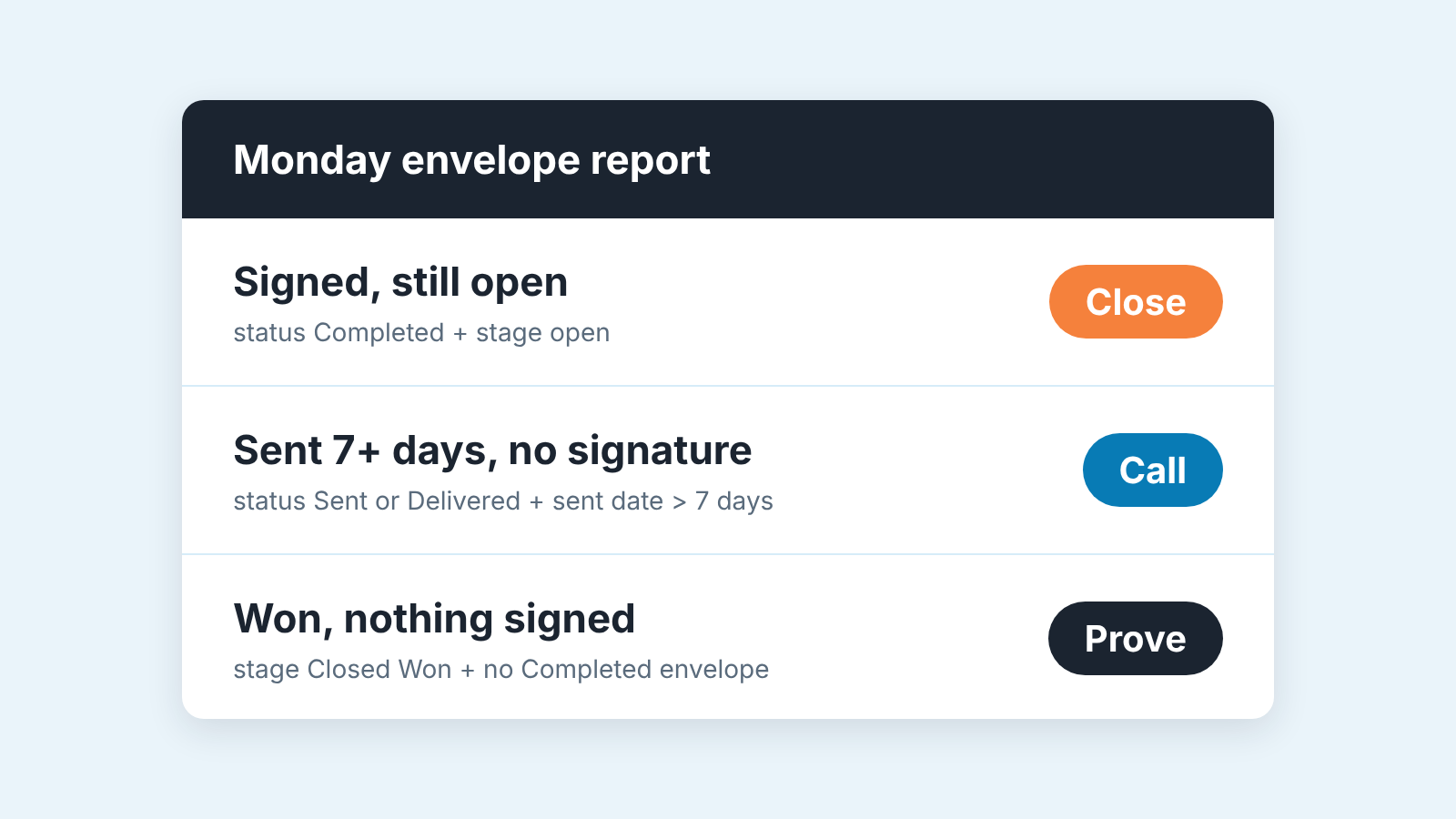
At the review, say it as state, reason, action: “Signed, sitting in Negotiation, nobody moved it; confirm the criteria and close it today.” The goal is that in a month the first list is empty on most Mondays.
When the sent-but-silent list is long, ask whether anyone called after the envelope went out. The activity timeline answers that faster than the rep does: what the Salesforce activity timeline should show on a live deal.
Why a status goes stale (deactivated sender, duplicate envelopes)
Sometimes the report lies and the reason is not the rep.
The case that catches teams out is a sender who has left the company. In a DocuSign community thread, envelopes sent by a deactivated former employee showed Completed in DocuSign and Sent in Salesforce, and transferring them to an active user and republishing did not help. The Docusign moderator tested it and found that the DocuSign Apps Launcher status “does not update when the users are closed.” The status updated only after the user was reactivated in both DocuSign and the Apps Launcher; reactivating in DocuSign alone was not enough. The moderator’s workaround: keep the user active until every document is signed and published to Salesforce, then transfer the envelopes (Docusign Community: envelope status not updated in Salesforce after transfer from inactive user).
So the offboarding rule is simple. Before anyone deactivates a rep’s DocuSign user, run the sent-but-silent list filtered to that rep and get those envelopes signed or voided, or wait.
The second reason is duplicate envelopes. A rep sends a corrected version without voiding the first. Now the opportunity has one Completed and one Sent envelope, and the report picks either. One live envelope per opportunity: void the old one before sending the new one and write why in the the void reason.
The third is an envelope related to the wrong record. Sent from a contact or an account, it never shows on the opportunity at all, and the deal looks unsigned forever. When the signed-but-open list and the rep disagree, look at the related record before you look at the rep.
What to log on the deal when it is signed
A signed envelope closes the conversation, not the record, and the record is what the handover and the renewal will read.
Set CloseDate to the signature date, not to the end of the month the rep guessed in March. Check Amount against the signed document, a discount agreed on the last call and never typed in is the usual gap. We covered that check in quotes and opportunity amount in Salesforce. Add the signer as a contact role if they are not one already, because the person who signs is the person the renewal starts with. Then one line in the description on what was not signed: an order form with the master agreement still in legal is a different deal from a fully executed contract.
Done on the day of signature this takes five minutes. At quarter end it takes an afternoon and still comes out wrong.
We build SalesBond, a sales management layer on top of the CRM a team already uses; we started with Pipedrive. It monitors the health of deals in Salesforce and explains what needs attention, which is why the signed-but-open and sent-but-silent lists above are the kind of thing we think a manager should not have to assemble by hand every Monday. The rule about which status moves the stage is still yours to write. Check your CRM with SalesBond.