

Give every Salesforce opportunity stage one exit criterion that someone can verify on the record itself, trim the list to the stages reps actually move through, and set probabilities from your own closed deals instead of the defaults. The stage name is a label a rep picks from a picklist; the exit criterion is the thing you can point at in the record and say “show me”. A stage without one is a wish, and Salesforce will happily store wishes for years.
This is not a setup walkthrough. Salesforce’s own Trailhead covers the clicks, and the one we lean on below is Customize Opportunity Stages. A new org comes with a ready-made list of stages, from Prospecting, Qualification and Needs Analysis through to Closed Won and Closed Lost. We suggest cutting it to five and writing down, for each one, what a deal has to prove before it moves on. That written agreement between a sales manager and the team is what this piece is about.
A stage name is a wish
A manager, call her Dagny, inherits a Salesforce org with a stage named Evaluation. Nobody wrote down what it means. One rep moves a deal there after the first demo, another when the prospect says “send me something”, a third whenever she doesn’t know what else to do with it. Two quarters later Evaluation holds more open pipeline than every other stage combined, the weighted forecast sits on top of it, and the pipeline review runs forty minutes over while reps describe deals one at a time.
The name was never teh problem. “Evaluation” is a perfectly good word. The problem is that a name describes a feeling about the deal, and feelings aren’t checkable. A rep cannot defend “the economic buyer is named in Next Step” if the Next Step field says “follow up”.
Salesforce stores Stage as a picklist on the Opportunity, and a picklist value is just text. The meaning lives in the exit criterion. If you never wrote one, the meaning is whatever each rep decided it was on a Tuesday afternoon. Dragging a card on the Kanban board changes that same Stage value.
Exit criteria for each Salesforce opportunity stage
An exit criterion is the condition a deal has to meet before it may leave a stage. It has one test: can a manager open the opportunity record and verify it in under a minute, without asking the rep? “We had a good call” fails that test. “A contact with the Decision Maker role is on the opportunity” passes it.
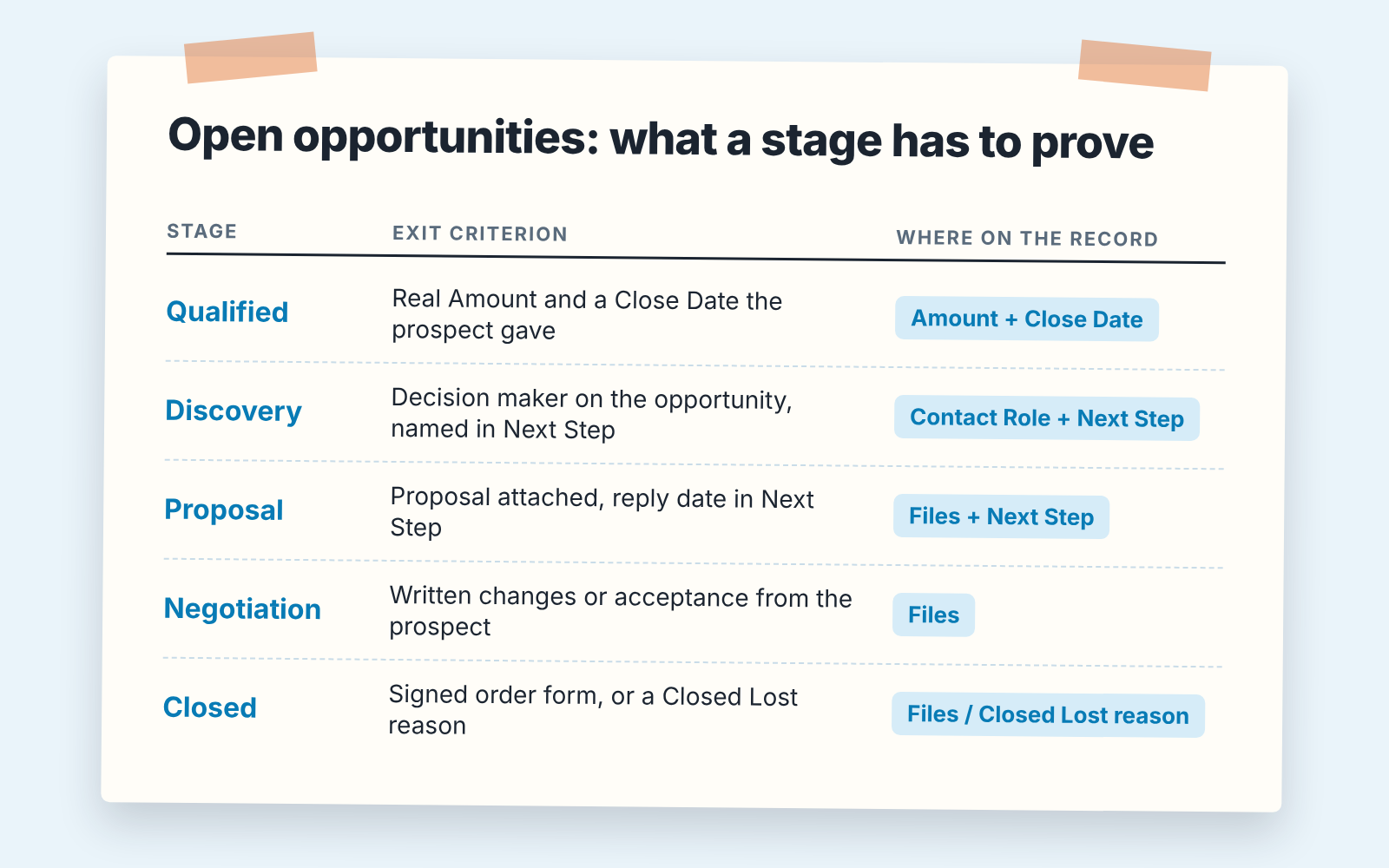
Here is a five-stage list we would start from for a team selling on a monthly or quarterly cycle. The criteria are ours, change the words, keep the shape.
- Qualified. Exit when: the Amount is filled and the Close Date is a real date the prospect gave you, not the end of the quarter. Two fields, both on the record.
- Discovery. Exit when: a contact on the opportunity is marked as the decision maker, and the Next Step names them. One lookup, one line of text.
- Proposal. Exit when: the proposal is attached to the opportunity, and the Next Step contains a date on which the prospect said they would respond. If there is no date, the proposal was sent, not received.
- Negotiation. Exit when: the prospect has sent back written changes, or written acceptance, and that document is on the record. Redlines count. “They said it looks fine” does not.
- Closed Won / Closed Lost. Signed order form attached, or a Closed Lost reason picked from a list you control.
Notice what is not in the list. There is no stage called Evaluation, Pending, or On Hold, because none of those has an exit condition a rep can act on. And each stage has one or two facts, not five. Resist making the criteria thorough. A rep will check two things on every opportunity; a rep will check seven things on none of them. For a stage that depends on a signature, the Salesforce DocuSign integration check compares envelope status with the opportunity stage.
The second half of each criterion is where to put the fact so it can be found. Trailhead’s sales path project shows the mechanism Salesforce gives you for this: on each stage of the Path you choose key fields to show and write Guidance for Success, the short text the rep sees under the stage (Trailhead: Customize Opportunity Stages). Put the exit criterion there, in the same words you wrote above: one sentence, not a paragraph of coaching.
If your other team runs HubSpot, we wrote the same idea as required properties by deal stage, where the gate is a property rather than the Path. The principle doesn’t change: the stage proves something, or it is a mood.
Cut the stages nobody uses
Open Opportunity History for a dozen closed-won deals and look at which stages they actually passed through. The stages they skip are the ones reps don’t believe in, and a stage that deals enter and never leave is a parking lot. In Salesforce the values live on the Stage field of the Opportunity in Object Manager, and the Trailhead project above walks through editing them. We’d deactivate the stages you drop rather than delete them, so old opportunities still read correctly in reports. Then check that the sales process behind your record type shows only the stages you kept: reps won’t skip a stage they can’t see. Five is where we start for a cycle under a quarter, but the count matters less than whether each stage has a criterion. The broader case is in fewer, clearer pipeline stages.
Probabilities: yours, not the default
Each stage in Salesforce carries a probability of closing; Trailhead’s own example is a Qualification stage with a 10% chance to close (Trailhead NPSP: Create and Manage Stages and Sales Processes). The weighted pipeline is built from that number. The default was set by someone who has never seen your team sell, and once it’s in a forecast report a placeholder looks exactly like a measurement.
Your own number is easy to get. Take every opportunity that reached a given stage over the last two or three quarters, whether it later closed won or lost, and count how many of those were won. That share is the stage’s probability for your team. If thirty deals reached Proposal and nine were won, Proposal is 30, whatever the default says. Write it in for each stage you kept, with the date.
Watch the sample size. A stage that fifteen deals have passed through in a year will give you a number that moves ten points when one deal flips. Round it, and say in the pipeline review that its a rough figure until the count grows.
If the probability on one deal feels wrong, the fix is almost always that the deal is in the wrong stage, not a different number. Our Pipedrive piece on deal probability versus stage probability makes the same argument with that CRM’s fields. Redo the calculation each quarter; the second pass runs on far more data than the first. And if you already track stage conversion, stage conversion rates are the same history read from another angle.
Making it stick: validation rules and one review question
A written exit criterion needs two things to survive a busy Thursday: a gate in Salesforce for what a machine can check, and a question in the review for what it can’t.
The gate is a validation rule. Salesforce describes them plainly: “Validation rules verify that data entered by users in records meets the standards you specify before they can save it,” and when the rule’s formula returns true, the data is treated as invalid and the user sees the error message you wrote, placed on the field you chose (Trailhead: Create Validation Rules).
Write one rule per stage, and only for what a field can show. The rule that guards the way out of Proposal checks the opportunity as it enters Negotiation: if the Stage is changing to Negotiation and Next Step is blank, stop. In formula terms, something like this, which you should test in a sandbox before trusting it:
AND(
  ISCHANGED(StageName),
  ISPICKVAL(StageName, "Negotiation"),
  ISBLANK(NextStep)
)
ISCHANGED matters here. Without it the rule fires on every save of an opportunity that already sits in Negotiation, and reps learn to type anything into Next Step just to get past it.
Make the error message honest about what it checks: “Next Step can’t be blank when moving to Negotiation. Add the date the prospect said they’d respond.” The rule only sees that the field is filled. Whether there’s a real date in it is a job for the review. The rep reads the criterion at the moment they try to break it, the only moment anyone reads a rule. A rule blocks a save but does not change the page; you can also show the fields a stage needs with Dynamic Forms.
Don’t try to automate the whole contract. A rule that fires wrongly twice gets switched off, and takes the the team’s trust in the other rules with it, so start with the blank-field cases nobody will argue with.
The review question covers the rest, and there is only one: “show me where that is in the record.” A rep who can point at the attached redlines is done in five seconds. A rep who can’t has just found out the deal is in Proposal, with no argument needed. How to run that check each week is in our Salesforce opportunity audit for sales managers, and the reports that show whether deals still skip stages are in weekly Salesforce reports for sales managers.
A disclosure, since this is where a manager asks whether the “show me” check has to be done by hand. We build SalesBond, a sales management layer on top of the CRM a team already uses; we started with Pipedrive. Deal Health runs checks like these against every open deal automatically, more than 20 rules, and shows which deal fails which one and why, so the review starts from the exceptions. It doesn’t write the exit criteria for you; that agreement with your team is the part that matters. If you’d like to see your open opportunities against a rule set, check your CRM with SalesBond.
What Dagny’s list looks like now
Four stages, after she cut Evaluation and merged two others. One line of Guidance for Success under each. Two validation rules, both on blank fields, both tested in a sandbox before anyone saw them. Probabilities from two quarters of closed deals, rounded, dated. And one question in the review, which she asks less often now, because the team learned the answer has to be on the record before the stage changes. The weighted forecast is smaller than it was, and for the first time she believes it.
If you do one thing this week, pick the stage holding the most money in your pipeline and write its exit criterion in one sentence. Then paste it into Guidance for Success.


