
Give a small HubSpot team a second deal pipeline only when its stages, sales cycle or owner really differ; a different product alone is better handled with a deal property. Each pipeline keeps its own stages and probabilities, so reports, forecasts and required-property rules have to be set up for each one (HubSpot: set up and customize pipelines). For a team of three to ten people that is usually more admin than the second pipeline is worth.
HubSpot’s own help page leans the same way: “Separate pipelines are only recommended if your processes have unique stages that require different pipelines.” (We wrote up the Pipedrive version of this decision in when to use multiple pipelines in Pipedrive.)
Split on stages, not on products: the three-question test
In HubSpot, a deal pipeline is the ordered set of stages a deal moves through, from the first conversation to Closed won or Closed lost. The request for a second one usually sounds like this: “We sell licences and implementation projects, can we have a pipeline for each?” The honest answer is a question back. Do the two kinds of deal actually move through different stages?
A licence deal and a project deal often share the same path. Qualified, demo, proposal, negotiation, closed. What differs is the amount, the length and the paperwork. None of those is a stage. If the only thing a second pipeline would show is a different word in the deal name, it’s decoration.
Three questions settle it, answered for the deals you want to move out:
- Would the stages be different, or only differently named? A renewal that goes “notice sent, price agreed, signed” has nothing in common with new business. A product that still needs a demo and a proposal does.
- Is the cycle a different animal? Deals that take two weeks and deals that take six months distort each other’s conversion and velocity in the same pipeline, and a manager reads both wrong.
- Does a different person own the whole flow? One rep working renewals end to end is a reason. “Same reps, different SKU” is not.
Two or three yeses: split. One yes: fix the problem the yes points at, usually with a property or a saved view. Zero: leave it alone.
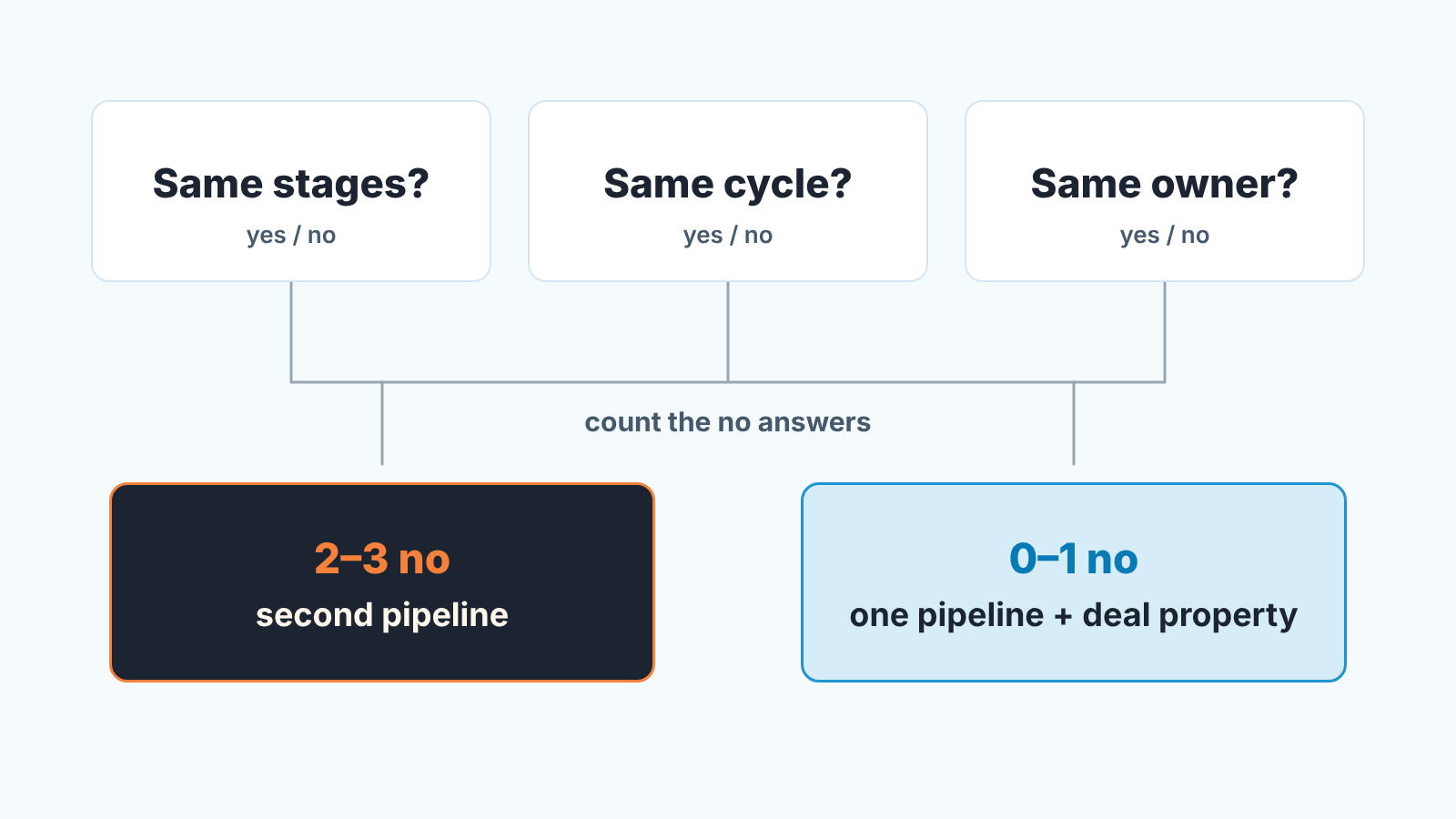
We think the stages question is the one that matters and the other two are tie-breakers. Stages are where HubSpot hangs probabilities and required properties, so a second set of stages is a second configuration to maintain. A different cycle on the same stages is a reporting problem with cheaper fixes.
What a second HubSpot pipeline does to the forecast and reports
Say you split anyway. On Monday the board view looks tidier. On Friday the forecast review gets harder.
Stage probability is the likelihood of closing that HubSpot attaches to each deal stage, and you set it on a stage inside one pipeline. The weighted amount in board view is the total amount in a stage multiplied by that probability (HubSpot: set up and customize pipelines). So a 40 percent “Proposal” in two pipelines is two separate settings that happen to agree today. Tune one and the other does not move. We covered that tuning in deal stage probability in HubSpot; after a split you do it twice, with half the data each time.
Half the data is the quiet cost.
A ten-person team closes a limited number of deals a quarter. Split them and each stage’s conversion rate rests on a handful of deals, which is noise. A funnel report measures conversion between the stages of a pipeline, so the weekly funnel read becomes two thin reports, or one that mixes stages from different paths.
Reports don’t sort this out for you. Anything that counts by stage needs a filter on the Pipeline property, and a report someone built before the split knows nothing about the the new pipeline’s stages until it is edited.
None of this is a bug. A pipeline is a separate sales process; the trouble starts when a team creates one to solve a labelling problem.
Stage rules and required properties don’t follow you
If you made Amount or Next step required at a stage, you did it in that stage’s conditional logic rules, inside one pipeline. A pipeline created from scratch has no rules, so deals moved into it skip every gate you spent a month tuning. On Professional and Enterprise you can clone the pipeline instead and copy over conditional stage properties, pipeline rules and automations (HubSpot: clone a pipeline). That saves clicks, not thinking: a renewal path, where the amount is known on day one, needs different gates. The reasoning is in required properties by deal stage in HubSpot.
Automation works the same way. Pipeline automations live on each pipeline’s Automate tab, and any workflow, saved view or report filter that names a stage names a stage of one pipeline.
The cleaner option: one pipeline and a deal property
For most small teams the right move is a single pipeline with a property that says what kind of deal this is. Call it Deal type, give it a few fixed values (new business, expansion, renewal, services), and make it required at the first stage so nobody skips it.
What you get back is one set of stages, probabilities tuned on all your closed deals, one funnel report and the ability to slice any of it by Deal type. “What is our conversion on services deals?” becomes a filter, not a separate configuration. The board view can be filtered to one type when a rep wants to see only thier renewals. What you give up is the picture of two pipelines side by side.
There is a middle case. A short renewal path can live as a Deal type that skips the early stages: the deal is created straight in “Negotiation” because there is nothing to qualify. HubSpot allows creating a deal in any stage, and that stage’s conditional properties still apply. That bends the one pipeline a little instead of building a second. It stops working when renewals need stages of their own, which brings you back to the three questions.
If the test does say split the mechanics are short. Custom pipelines need a Starter subscription or higher; free tools get none. Go to Settings, then Data Management > Objects, pick Deals and open the Pipelines tab. Under Create pipeline, choose Create from scratch or Clone from existing. To move deals across, select their cards in board view (Cmd or Ctrl and click), click Edit and set the Pipeline property (HubSpot: manage records in board view). Merging back is the same edit in reverse; HubSpot won’t delete a pipeline that still holds deals.
A disclosure, since tooling comes up here. We build SalesBond, a sales management layer on top of the CRM a team already uses; we started with Pipedrive. One of the things it watches is whether the stage data behind your forecast is thick enough to trust, which is what a split thins out. If you want a second opinion, check your CRM with SalesBond. For many teams the saved views in this article are enough.
Before you split, and the Monday after
Split only after the three-question test says yes, and do five things so the reports do not lie for a quarter:
- Write down the current stage probabilities and decide what the new pipeline starts with. “Same as main” is a decision too.
- List every required-property rule, workflow and saved view that names a stage. Each is a thing to recreate or to consciously leave out.
- Pick the Deal type values anyway, because you will want to filter across both pipelines.
- Put one name on the new pipeline’s configuration.
- The Monday after, open the funnel and forecast reports and add the Pipeline filter where it is missing.
Then give it a month and count the closed deals per stage in each pipeline. If one has too few to say anything about conversion, you’ve learned something about the split, and it is not too late to merge back while the deals are few.
Renaming stages is a separate decision; HubSpot’s default deal stages for a small team covers it.