

HubSpot’s default Sales Pipeline has seven deal stages: Appointment scheduled (20%), Qualified to buy (40%), Presentation scheduled (60%), Decision maker bought-in (80%), Contract sent (90%), Closed won and Closed lost (HubSpot: set up and customize pipelines). They are placeholders. HubSpot’s help page tells you how to rename them and says nothing about what each one should mean. For a team of five, keep four or five open stages, name each after something the buyer did, and write one sentence per stage that says what has to be true before a deal moves in. The sentence is the job. The renaming is the easy part.
This article stays on names and definitions. The percentages are in HubSpot deal stages and probabilities, the properties a deal needs before it enters a stage in required properties by deal stage. Neither works if the stage itself means nothing.
The seven default stages, and why “Appointment scheduled” is a poor first stage for many teams
Read the seven names in a row and notice whose calendar they describe. Two are events in the seller’s calendar, two are the seller’s judgments, and Contract sent is something the seller did. Only Closed won and Closed lost describe something the buyer did. That is the problem with the defaults, and it starts in the first column.
Appointment scheduled creates a deal because a meeting exists. The buyer has not yet said what they want, whether they have money, or when. What lives in that column, in every HubSpot we have looked at, is no-shows, “let’s find another time”, and demos booked out of curiosity. The column fills, the board looks healthy, and the number at the top of it is partly fiction: stage probability multiplies the total amount in each stage into the weighted amount on the board view (HubSpot), so every booked call counts at 20% of its amount before anyone has spoken.
We think a deal should exist after the first conversation, not before it. Booked meetings belong in a contact’s lead status or a task list (more on keeping the two levels apart in lifecycle stage vs deal stage). The exception is a team that lives on inbound demos and manages the no-show rate as a number. Keep a first stage for booked meetings then, but don’t let it pretend to be a sale.
What each default stage assumes about the buyer
Each default name carries an assumption. Say it out loud and you can see why the stage drifts.
Appointment scheduled (20%)
Assumes a meeting is booked. The buyer agreed to spend time, nothing more, which is why we put it before the pipeline rather than in it.
Qualified to buy (40%)
Assumes someone decided the deal is real, and does not say by what test. Two reps, two meanings, and the board can’t tell you which one you are looking at.
Presentation scheduled (60%)
The calendar again. A demo on the calendar is not a demo held, and a demo held is not a buyer who wants the thing. The default still puts it at three times the first stage.
Decision maker bought-in (80%)
The most assumed stage of the seven. In practice it reads as “my champion says the boss likes it”, which is hearsay about a person the rep has never met.
Contract sent (90%)
A seller action. Sent is not read, and read is not signed. Deals age here quietly because nothing more seems to be required of the rep.
Closed won (100%) and Closed lost (0%)
The only two defaults with an unambiguous buyer event behind them. They get their own section below.
Rename, reorder, drop: four edits to your HubSpot deal stages
All of it happens in Settings → Data Management → Objects: choose Deals, open the Pipelines tab, click the pipeline’s name. To add a stage, click + Add stage under the existing ones, enter a name and pick a deal probability. To rename one, click its name. To reorder, drag it. Click Save when you are done (HubSpot: set up and customize pipelines). Whoever does this needs the Edit property settings permission. Agreeing on the changes with four other people takes longer than the clicks, so do the agreeing first.
First, replace Appointment scheduled with the event that ends the first call. We use Discovery held. A deal is created when the call happened and the buyer said something a rep could repeat. If your team already creates deals after the first call, delete the stage instead of renaming it.
Second, replace Presentation scheduled with Proposal sent: a priced proposal is in the buyer’s inbox and a meeting to discuss it is booked. The demo still happens; its an activity on the deal, not a column on the board.
Third, replace Decision maker bought-in and Contract sent with one stage, Verbal yes: the person who signs said yes to scope and price. Drafting the paperwork is administration, and administration does not need a column. Add an In procurement stage only if your deals routinely sit in legal or purchasing for weeks with nothing a rep can do. Most five-person teams don’t need that fifth stage.
Fourth, keep Qualified, because everyone already uses the word, and let its entry sentence below do the defining. Then reorder: ask each rep to tell the story of their last won deal. The order they tell it in is the order.
Notice the tense. Discovery held, Proposal sent, Verbal yes: each name is something that already happened, so a rep can answer “did it?” with yes or no. Anything ending in “scheduled” names a hope.
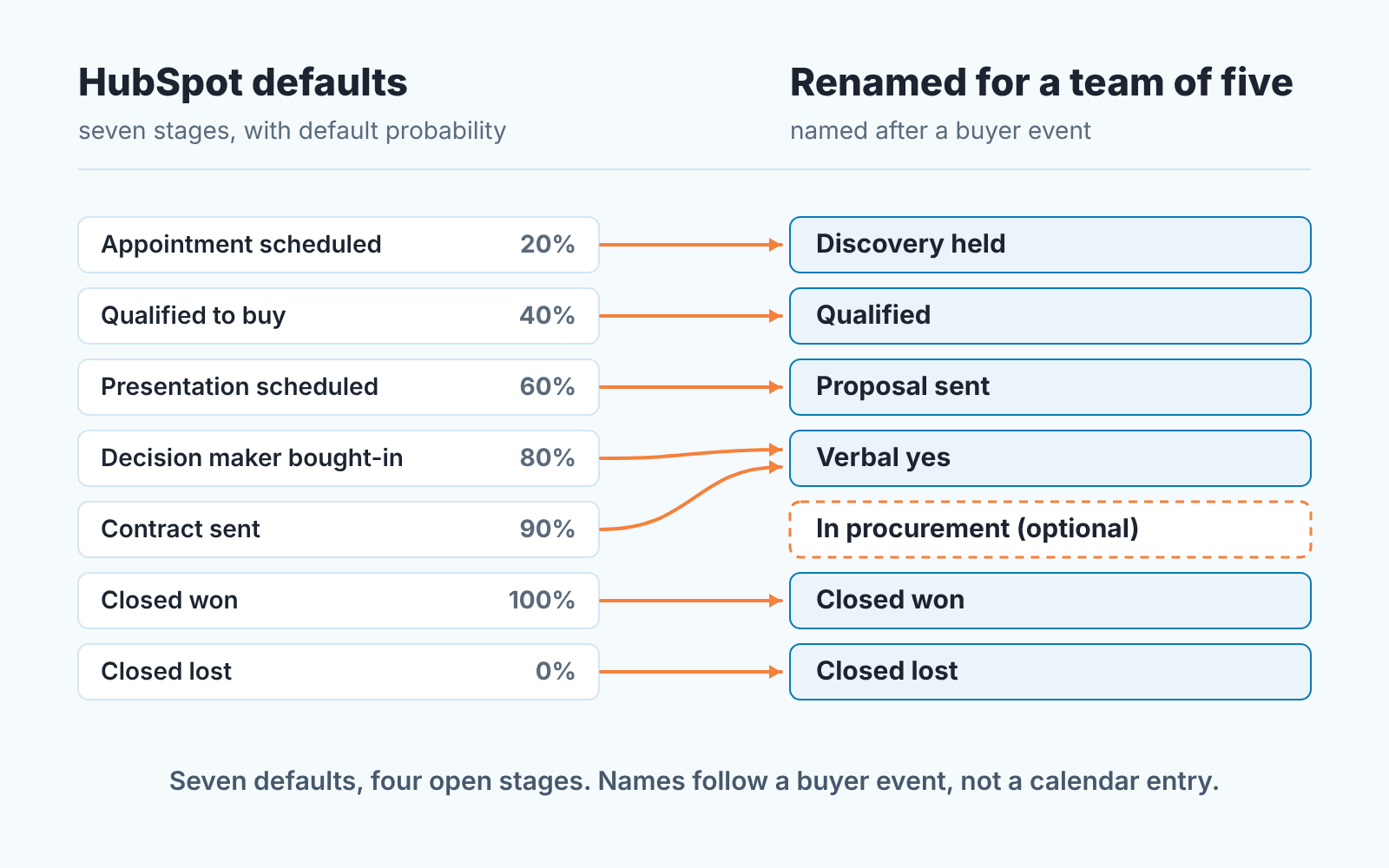
The general case for naming stages after buyer progress rather than seller activity is in sales pipeline stages. What is HubSpot-specific is how little the defaults follow it.
One sentence per stage: the entry event a rep can point to
Write the entry event, not the exit, and make it something a rep can point at: a call note, a message, a signed page. If the only thing they can point at is a feeling, the deal stays where it is. Here is the set we hand to a new team on HubSpot. Change the nouns to match your sale; keep the shape.
- Discovery held. The first call took place and the buyer named a problem and why it matters now, in words the rep wrote into the call note.
- Qualified. The buyer said who signs, roughly what they can spend, and when they want the problem gone. Any of the three missing, the deal stays in Discovery held.
- Proposal sent. A priced proposal is in the buyer’s inbox and a walkthrough is on a date the buyer accepted.
- Verbal yes. The person who signs said yes to scope and price, on a call or in writing the rep has seen. A champion’s report of it does not count.
- In procurement (only if you kept it). The buyer’s legal or purchasing team has the contract and gave a date or a process.
- Closed won. Signed contract, countersigned order or payment received, whichever one you choose. Choose one.
- Closed lost. The buyer said no, chose someone else, or stopped answering after the follow-up sequence your team agreed on ran out.
Names are for the board; the sentences go on one page pinned where the team talks. We read them out at the first pipeline review after the change, which feels silly and works. If your team uses playbooks the stage questions in HubSpot playbooks for deal-stage notes are the same sentences in question form.
Won and lost are stages too (what moves a deal there)
Teams write careful sentences for the open stages and leave won and lost to instinct. That is backwards: won and lost feed every number a manager looks at.
Closed won should have one entry event, and it should be a document or a payment, not a conversation. “They said yes” is Verbal yes; it has its own stage now. Pick the artefact that means money is coming in your business and move nothing to won without it, least of all in the last week of a month. Whatever you pick feeds the HubSpot win rate, which divides closed won by all closed deals.
Closed lost needs an entry event too, and the one most teams miss is silence. A buyer who stops replying has made a decision; they just did not tell you. Agree on what “stopped answering” means for your sale, in attempts and in weeks, and when the the sequence runs out the deal is lost. Not parked, not pushed to next quarter. Lost. A deal pipeline where nothing is ever lost is one where everything sits at 90%, and the forecast built on it is a wish. To make the lost reason compulsory at that moment, see how to require a closed lost reason on the stage.
After the edit: open deals on removed stages and the 30-day check
Before you delete a stage, filter the deal list to it and move every open deal yourself, by the entry sentences, with the owner in the room. HubSpot won’t delete a stage that still has records in it; the Used in column shows what is blocking it (HubSpot). Most deals will move backward, because “Decision maker bought-in” deals rarely meet the Verbal yes sentence, and that is the point. The board will look worse for an afternoon and be honest afterwards.
The weighted amount at the top of the board will change too, since you have just moved deals between probabilities. Leave the percentages alone for a month of real deals, then set them the way the probability article describes.
Somebody will suggest a second pipeline now. It would get its own stages, order and probabilities, and HubSpot itself recommends separate pipelines only when a process has stages of its own (HubSpot). For five people we would start with one. Renewals or a partner channel can earn a second. One rep wanting their own columns can’t.
Thirty days after the change open the board and look for three things. A stage with no deals in it: the definition is wrong or the stage is unnecessary. A stage holding most of the pipeline: the entry sentence is too loose, and the fix is the buyer fact that splits it. Deals that crossed two stages in one day: usually the middle stage’s entry event is something the rep does, not something the buyer did. Then pick a random deal and ask its owner what put it there. “I felt it was ready” sends you back to the sentence.
A disclosure, since tooling comes up here. We build SalesBond, a sales management layer on top of the CRM a team already uses; we started with Pipedrive, and today it works with Pipedrive, HubSpot, Salesforce and Zoho CRM. It runs checks like these so the board isn’t the only place you learn a stage has gone soft. For five people, a saved filter and a Monday habit do most of the job: put the 30-day review in the calendar the day you change the stages. If you would rather not keep the filters by hand, check your CRM with SalesBond.


