

Win rate in HubSpot is closed-won deals divided by all closed deals, won plus lost, with the same Close date period on both sides of the fraction. Sales analytics has ready-made views of won and lost deals, but a custom report counts deals and sums amounts by Deal stage without dividing one by the other. So the number you can defend comes from a closed-deals-only report broken down by owner, with the division done once by count and once by amount.
Win rate is a denominator choice, not a formula
We covered the formula and the competing denominators in sales win rate in Pipedrive, and the same logic holds for a Zoho CRM team. Open deals stay out of the denominator because they haven’t decided anything yet. HubSpot’s own blog counts the same way and flags the real trap: teams differ on whether “no decision” deals belong in the number.
So the question for a HubSpot team isn’t the math. It’s which deals your report calls closed, and in which month.
What counts as closed in HubSpot: Closed won, Closed lost and the stages people forget
In HubSpot, “closed” is a property of the stage, not of the deal. Every deal pipeline needs stages marked Won and Lost under Deal probability, because sales reports, custom deal reports and the sales analytics tools rely on them to process deals correctly (HubSpot: set up deal pipelines and stages). When a deal lands in either one, HubSpot sets Is Closed Won or Is closed lost to true and, unless someone turned that automation off, sets Close date to today (HubSpot: default deal properties).
Two consequences follow, and both change your number.
First, a custom stage called “Lost, no budget” or “Won, pending signature” is only closed if someone set its Deal probability to Lost or Won when they created it. A stage at 0% that is still marked Open is an open deal to every report, however final its name sounds. Read the Deal probability column for every stage in your pipeline settings; that five-minute read is where most “our win rate looks wrong” conversations end. (The same column drives the weighted forecast, which we unpacked in deal stage probability in HubSpot.)
Second the Close date your report filters on is the day the deal entered the closed stage, not the day the customer said yes. A rep who marks ten deals lost on the first Monday of the quarter to clean up the board has just moved ten losses into the new quarter.
The HubSpot win rate report: deal stage count by owner, closed deals only
Start with what HubSpot already gives you. Under Reporting, Reports, the Sales section of the sales analytics suite has a Deals won & lost report, which shows the number of deals won and lost by user or team, and a Sales velocity report that shows the percentage of deals that turn into closed won (HubSpot: sales analytics reports).
It stops short in two places. The help page doesn’t spell out which deals sit under that percentage, and neither report puts won and lost amounts next to each other per owner. When you have to explain the number to someone, you need a report where every filter is yours.
That’s the custom report builder, on Professional and Enterprise: Reporting, Reports, Create, Create report, Custom report (HubSpot: create reports with the custom report builder). Deals is the primary data source. From there:
- Put Deal owner on the X-axis and Deal stage in Break down by. Both are dimensions, with no aggregation.
- Add Count of deals as the measure. HubSpot sets it to Distinct count and that can’t be adjusted (same page), which is good news: a deal is counted once however many contacts hang off it.
- Add Amount as a second measure with Sum. A report takes up to 12 measures, so count and sum sit side by side.
- In Filters, limit Deal stage to the Won and Lost stages of the pipeline you’re measuring, and Close date to the period. The Close date filter is what turns a lifetime score into a rate for a period.
- Pick the table visualization. Tables show totals only for columns aggregated with Sum (HubSpot: understand the custom report builder), so the Amount totals appear and the deal counts you add up yourself.
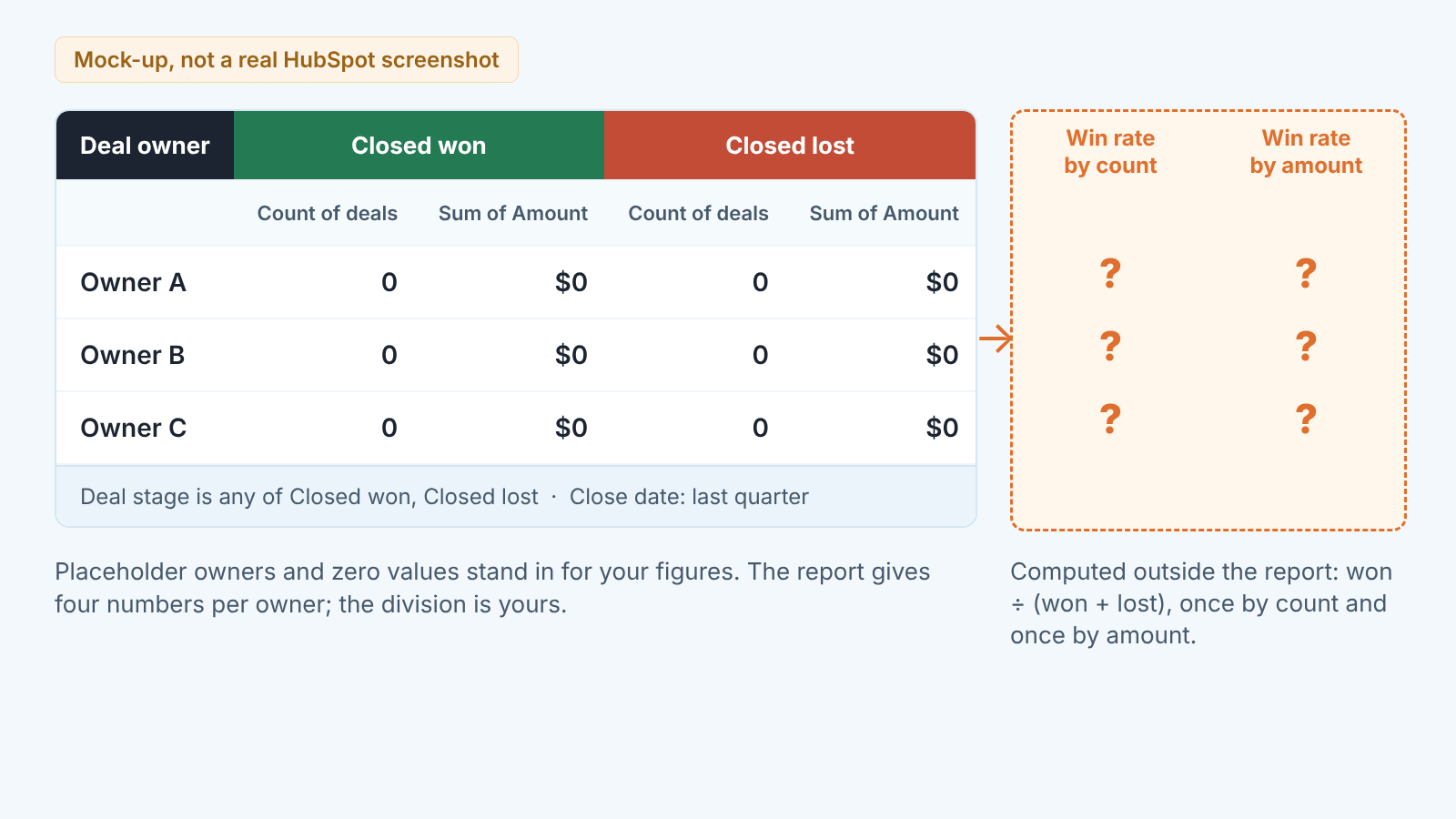
What this report doesn’t do is divide. The aggregation methods are Distinct count, Sum, Average, Median, Min and Max, and none of them is a share of a column total. You get four numbers per owner. The division happens in a spreadsheet cell, in your head or in a tool that reads the CRM.
Win rate by count versus win rate by amount, and why they disagree
They disagree because the deals you lose aren’t the same size as the deals you win. That’s why you want both numbers.
A made-up quarter. Ten closed deals, four won. By count, 40%. Now suppose the four wins total $40,000 and the six losses total $160,000, because the two biggest opportunities of the quarter both went to a competitor. By amount, 40,000 over 200,000, or 20%. Same deals, same report, half the win rate. The rep quoting 40% and the finance lead looking at 20% are both reading the table correctly.
Our position: by count tells you about the rep’s selling, by amount tells you about the pipeline’s shape. A rep at 60% by count and 25% by amount is closing the easy ones and losing the ones that mattered, and that’s a qualification conversation, not a reason to celebrate. So always quote them as a pair: “40% by count, 20% by amount, Q3, closed deals, main pipeline” is a sentence a manager can defend, “Win rate 40%” isn’t.
Is 30% good? No source we trust publishes a benchmark that would survive your own definition of closed. Compare against your own last quarter, counted by the same rule.
No decision, duplicate deals and reopened deals: three ways the number lies
No decision first, because it’s the one HubSpot’s blog singles out. A prospect who went quiet is neither a win nor a loss until you say so. Teams close them lost, leave them open or delete them, and any of these is defensible; switching between them from one quarter to the next is not, because the denominator moves and the trend becomes noise. Decide once, write the rule down and give those deals a Closed lost reason of “No decision”, so you can pull them back out of the denominator later if the rule changes.
Duplicates inflate whichever side they land on. Distinct count stops one deal being counted twice inside the report, but it can’t know that “Acme renewal” and “ACME 2026” are the same opportunity created by two reps. A duplicate closed lost while the real one was closed won is a free loss in your denominator. Sort the the lost list by company before you quote the rate.
Reopened deals are the quiet one. Moving a deal between two closed-won stages, or between two closed-lost stages, leaves Close date alone. Moving it from Closed lost straight to Closed won, or back to an open stage and later to Closed won, gives it today’s Close date (default deal properties page). Its earlier loss disappears from the quarter it was lost in, last quarter’s win rate goes up retroactively, and nobody notices unless they wrote last quarter’s number down.
What to check on Monday before you quote it to the team
Compare this period’s count of closed deals with the count you wrote down last Monday. A closed period’s count should only ever go up, by the deals closed since. If it went down, something was reopened, moved or deleted, and last week’s rate stood on a different denominator. The Deal change history report in sales analytics lists changes to deal stages, amounts and close dates, which is the quickest way to find out which deal moved.
Look at the deal list behind the lost column before you read the lost total. Ten losses closed on the same day by the same owner are a clean-up, not ten sales conversations, and they belong to the quarter the conversations ended in. Sales cycle length in HubSpot runs on the same Close date, so one clean-up fixes two reports.
Then quote the two numbers with thier labels and say which rule you used for no decision. If a stage conversion on the dashboard doesn’t square with the win rate, that’s expected: the funnel counts stage events, not outcomes.
The slow part of this routine is the deal list, not the division. We build SalesBond, a sales management layer on top of the CRM a team already uses. It reads deal data from the CRM, finds risks and explains what needs attention, so the Monday check starts from a short list instead of a blank export. Check your CRM with SalesBond.


