
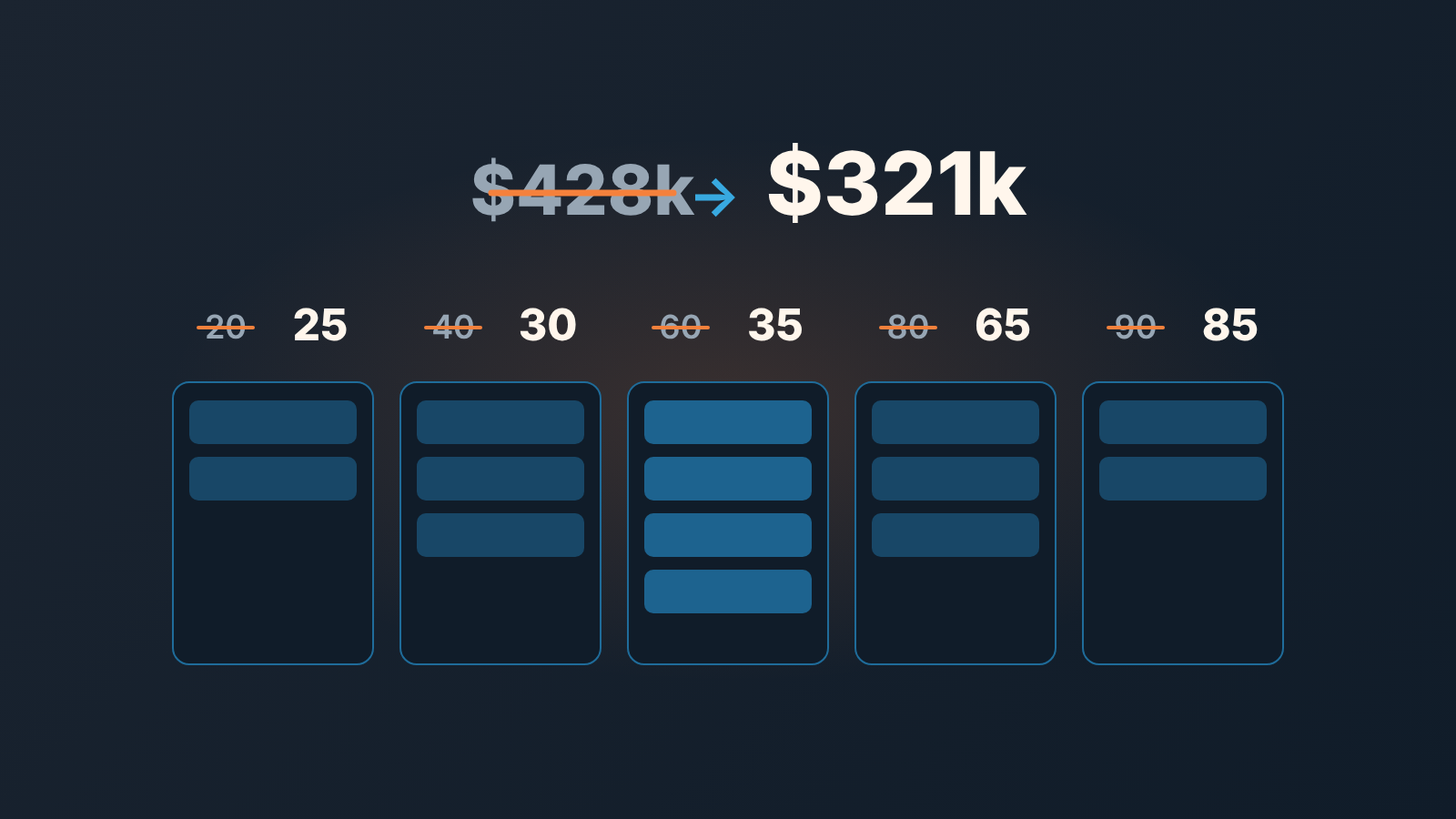
Set each HubSpot deal stage’s win probability to the share of deals that reached that stage and ended up closed won, counted from your own closed deals over the last two to four quarters. The percentages HubSpot ships with (20, 40, 60, 80, 90) are a placeholder so the weighted amount (deal amount multiplied by stage probability) is not zero on day one; they are not a statistic about your team. Until you replace them, the weighted pipeline on your board and the weighted pipeline in the forecast tool are both reporting somebody else’s guess multiplied by your deal amounts.
The defaults are HubSpot’s guess, not your data
HubSpot’s default sales pipeline comes with seven stages and a probability on each: Appointment scheduled 20%, Qualified to buy 40%, Presentation scheduled 60%, Decision maker bought-in 80%, Contract sent 90%, Closed won 100% and Closed lost 0% (HubSpot: set up and manage object pipelines). It is a sensible shape. Each stage is more likely to close than the one before it, and the steps are evenly spaced. That evenness is the giveaway. No real pipeline climbs in neat 20-point steps, because no real pipeline has stages that filter deals at exactly the same rate.
The numbers matter more in HubSpot than they look, because they travel. The stage probability sets the weighted amount on the board, calculated as the total amount in each stage multiplied by the stage probability. It also sets each deal’s own Deal probability property when a deal moves into the stage, and Weighted amount on the deal is Amount multiplied by Deal probability (HubSpot: default deal properties). That deal-level weighted amount can then be the default amount in the forecast tool. One setting on the pipeline, three places where it shows up as money.
Most teams rename the stages in week one and never touch the percentages at all. The stage called “Presentation scheduled” becomes “Demo booked”, the 60% stays, and from then on every booked demo counts as six tenths of its amount in the forecast. If your reps book demos with anyone who will take the call, that is where the forecast starts to inflate. The rest of this article is about finding out by how much, and fixing it in the one place that matters.
Count the probability from deals that already decided
The stage probability you want is a win rate from that stage: of all the deals that ever reached it and have since been marked won or lost, what share were won. Open deals stay out of the count, because they have not decided anything yet; the reasons are in our piece on win rate in Pipedrive, and the arithmetic is the same whatever CRM you run.
Take a hypothetical team on HubSpot’s default stages, looking back over two quarters. All numbers below are made up for the example. 160 deals reached a decision: 40 won, 120 lost. The losses, by the furthest stage each deal reached: 30 at Appointment scheduled, 20 at Qualified to buy, 50 at Presentation scheduled, 12 at Decision maker bought-in, 8 at Contract sent. Assume nobody skipped a stage.
Now work backwards. Every one of the 160 reached the first stage, so its win rate is 40 of 160, 25%. The 30 that died there never reached Qualified to buy, so 130 did: 40 of 130, about 31%. Presentation scheduled: 110 reached it, 40 won, about 36%. Decision maker bought-in: 60 reached it, 67%. Contract sent: 48 reached it, 83%.
Put those next to the defaults and the the shape of this team’s problem is obvious.
| Stage | HubSpot default | This team’s data | Rounded | Open amount today | Weighted, default | Weighted, own |
|---|---|---|---|---|---|---|
| Appointment scheduled | 20% | 25% | 25% | $100k | $20k | $25k |
| Qualified to buy | 40% | 31% | 30% | $150k | $60k | $45k |
| Presentation scheduled | 60% | 36% | 35% | $300k | $180k | $105k |
| Decision maker bought-in | 80% | 67% | 65% | $120k | $96k | $78k |
| Contract sent | 90% | 83% | 85% | $80k | $72k | $68k |
| Total | $750k | $428k | $321k |
Same open pipeline, $107k apart, and $75k of the gap sits in one stage. Booking a demo tells this team almost nothing about whether a deal will close; the default says it tells them a lot. The forecast was not wrong everywhere. It was wrong mostly in one column, where it counted $180k and the data supports $105k.
We round to the nearest five. The underlying count is 110 deals in the biggest stage and 48 in the smallest, which is not the kind of sample that supports a 67 instead of a 65, and a round number is easier to defend at a planning meeting. Rounding to the nearest ten throws away too much at the top of the funnel, where 25 and 30 are different answers.
Where to set deal stage probability in HubSpot
To edit deal stages and their probabilities in HubSpot, click the settings icon, go to Data Management, then Objects, pick Deals, open the Pipelines tab and click the pipeline name. The setting is on the pipeline, not on the deal: the stages and their win probabilities are in the add/edit stages section. The dropdown offers preset values, and a value that isn’t there can be typed in: enter a custom value, then click Add option and select it (HubSpot: set up and manage object pipelines). Keep Closed won at 100% and Closed lost at 0%, HubSpot’s reports need both closed stages to process deals correctly, and a won deal is not a probability. Deal pipelines can be edited on every HubSpot plan, free included. If the controls are grayed out for you, check permissions: editing stages needs Edit property settings.
Two things about how the number propagates matter before you change it, because they decide whether the board total and the deal records agree afterwards. They also explain the question that keeps coming up on HubSpot’s community forum: why the stage percentage on the board and the probability in a deal report don’t match. The board reads the stage setting; reports built on Weighted amount read each deal’s Deal probability.
First, the help describes Deal probability as updated automatically “when a user moves a deal to a new stage”. It does not say what happens to deals already sitting in a stage when you change that stage’s percentage. The board total is computed from the stage setting, so it moves at once. The deal-level property may not. After you save, open one deal in each stage and compare its Deal probability to the new stage value before you trust any report built on Weighted amount.
Second, a manual edit freezes the deal. HubSpot is explicit: if someone edits a deal’s probability by hand, the property “will no longer be updated automatically based on the pipeline’s open stages”, and manual edits include bulk edits, imports and changes through integrations or the API. It is set again only when the deal reaches Closed won or Closed lost (HubSpot: default deal properties). So a deal whose probability a rep typed in last spring, or that came in through an import with a probability column mapped, is still carrying that number through every stage it has moved through since. Before the new stage values can do their job, find those deals: compare each open deal’s Deal probability with the win probability of its current stage, and clear the mismatches or move them back through a closed stage and out again. Pipedrive has the same two-field trap with a different precedence rule; we covered it in deal probability vs stage probability in Pipedrive.
There is a third probability in HubSpot, and we suggest ignoring it for this job. Forecast probability is a separate custom percentage that only fills in through a workflow, and Forecast amount is Amount multiplied by it. HubSpot’s own recommendation for expected revenue on a deal is Weighted amount, not Forecast amount (HubSpot: default deal properties). One probability per deal is enough to argue about. The same pipeline screen is where you set HubSpot required properties by deal stage.
Close date is the other half of the forecast
Fixing the percentages changes how much each deal counts. It does nothing about whether the deal is in the quarter at all, and that is decided by Close date. The forecast tool filters by pipeline and by close date, and it uses deal stages to forecast revenue based on a deal’s likelihood to close (HubSpot: use the forecast tool). A deal with an honest 35% and a close date form two quarters ago contributes nothing to this quarter, and a deal with a close date somebody pushed to the last day of the quarter to keep it in view contributes its full weighted amount.
HubSpot sets Close date automatically when a deal is created in an open stage and again when it moves to a closed stage (HubSpot: default deal properties). Between those two moments the field is whatever the rep last typed. So the weighted forecast has two inputs that drift in opposite directions. Stage probability, once set from data, is a stable number that nobody edits week to week. Close date is edited constantly, usually forward, usually without a reason in the record. If your weighted forecast still misses after the percentages are right look at close dates before you look at probabilities again.
Forecast categories are the third input, and they are a different instrument. HubSpot groups deals as Not forecasted, Pipeline, Best case, Commit or Closed won, and the category can update automatically if that setting is on (HubSpot: default deal properties). Categories carry a rep’s judgment about a specific deal. Probabilities carry the base rate for deals like it. We keep them apart on purpose, and we wrote up how we read commit versus best case separately.
What none of these fields catch is a deal whose stage has stopped meaning anything. “Contract sent” at 85% is a good number for a deal where the contract went out on Tuesday. It is a bad number for a deal where the contract went out in June and nobody has logged anything since. A quick way to find these is to list deals with no next activity date and look at which stage they sit in. We build SalesBond, a sales management layer on top of the CRM a team already uses, and it connects to HubSpot. Its Deal Health checks every deal against more than 20 rules, including activity and progression rules, and shows which deals carry a stage their activity no longer supports, with a reason and a suggested next step. If you want to see which of your late-stage deals are holding a probability they have not earned, check your CRM with SalesBond.
Run last quarter again with the new numbers
A probability table is a hypothesis. The test is whether the weighted forecast it produces would have predicted a quarter you already know the answer to. The backtest takes an hour, and it is teh part most teams skip.
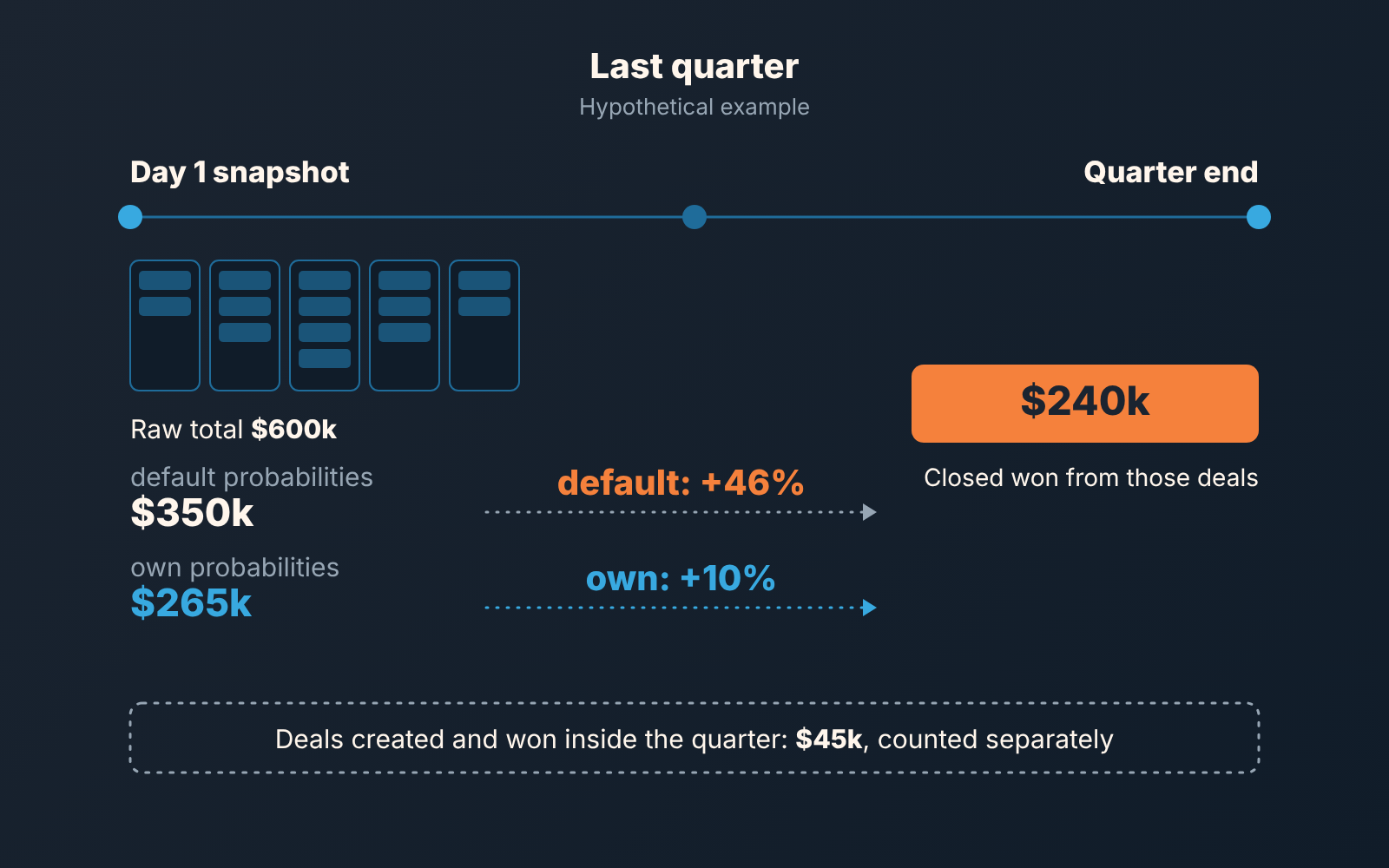
- Pick the last full quarter. List every deal that was open on its first day with a close date inside the quarter. On Sales Hub Professional or Enterprise you have the forecast tool, and its History tab keeps past forecast submissions for up to a year (HubSpot: use the forecast tool), which gives you the list as somebody saw it at the time. Without submissions, the same plans also give you Date entered and Date exited for each stage, which are stage calculated properties that need a Professional or Enterprise subscription (HubSpot: default deal properties); from them you can work out which stage each deal was in on day one. On Free or Starter neither exists, so rebuild the day-one list by hand from a deal export and what each deal record shows. It’s slower, and the backtest still works.
- Multiply each deal’s amount on that day by two probabilities: the stage’s default, and the number you just calculated. Sum both.
- Take the same list of deals and total what actually closed won by the end of the quarter.
- Deals created and won inside the quarter were never in the day-one snapshot. Total them on a separate line. The snapshot forecast was never meant to see them, and mixing them in hides whichever error you are trying to measure.
Continuing the hypothetical: on day one the open deals in quarter came to $600k raw. With the default percentages the weighted total was $350k. With the team’s own numbers it was $265k. By quarter end, $240k of those deals had closed won, and another $45k came from deals that did not exist on day one. The default forecast overshot by 46%. The data-driven one overshot by 10%, and most of that was a single Contract sent deal that slipped into the next quarter.
A 10% miss still isn’t precision, but the owner can plan around it. Nobody could plan around 46%. If the backtest shows your own numbers missing by as much as the defaults did, the probabilities are not the problem; go back to close dates and to stage definitions, and read our notes on forecast accuracy for small teams before touching the percentages again.
Run the backtest once when you set the numbers, and once a quarter afterwards. Stage probabilities drift when the team changes how it qualifies, and a quarterly rerun catches that long before the annual plan does. Closed won is still not invoiced revenue, and why forecast vs invoiced revenue never agree once an order system takes over is a separate question.
Seven stages, forty deals: when the statistics run out
Counting stage probabilities from your own deals needs enough decided deals per stage, and many small teams don’t have them. The honest response is to simplify the question, not to invent a decimal.
Our working rule for any win-rate slice is arithmetic: don’t read a number until one more win would move it by less than three points, which at a 30% rate takes about 25 decided deals. By that rule the hypothetical team’s 48 deals at Contract sent are fine, and a stage that only 15 deals ever reached is not. A seven-stage pipeline with 40 decided deals in the look-back window has maybe two stages that pass.
Three things help, in this order.
Widen the window before you narrow the stages. Four quarters instead of two doubles the count without changing the pipeline , and for most small teams the sales process has not changed enough in a year to make the older deals misleading.
Give adjacent stages the same number. If Qualified to buy and Presentation scheduled together have enough deals to count but separately do not, calculate one win rate for the pair and set it on both. The forecast loses one gradation and gains a number you can defend. The stages themselves can stay; reps still need the board to show where a deal is.
Leave the stage count alone until the conversion data says otherwise. A stage that almost no deal is ever lost from, and that deals pass through in a day, is a checkbox dressed as a stage, and our piece on stage conversion rates is where to look at that. But merging stages is a process change, and it should come from how the team sells, not from what makes the forecast arithmetic tidy.
If after all that a stage still has too few deals to count, set its probability between its neighbors and write “estimate” next to it in the pipeline notes. A guess labeled as a guess is fine. HubSpot’s defaults were only ever a problem because nobody labelled them.


