
A CRM (customer relationship management system) tracks the relationship and the deal up to the moment the customer says yes. An ERP (enterprise resource planning system) runs the order, the invoice and the stock after that moment. So a small sales team keeps its pipeline and forecast in the CRM, and agrees, in writing, which deal fields get copied into the ERP when a deal is won. Most of the pain people blame on “ERP vs CRM” is really the absence of that agreement.
Definitions are the easy part. This guide is about the day a deal closes: what crosses the border, who owns it, and how to tell when the two systems have stopped agreeing.
CRM vs ERP in one table
The table is written from the sales manager’s chair, not the IT buyer’s. The question for each row is: which system should the team trust when the two disagree?
| Question | CRM | ERP |
|---|---|---|
| Who is this person and what have we said to each other? | Yes. Contacts, calls, emails, notes | No, or a thin copy of the account |
| Where is the deal and how likely is it? | Yes. Stage, value, expected close date, probability | No. A deal that is not an order does not exist here |
| What will we sell next quarter? | Yes. Pipeline forecast | Only what is already ordered or invoiced |
| What exactly did the customer order, at what price and terms? | A quote, if you use the CRM’s quoting | Yes. The sales order |
| What did we invoice, and has it been paid? | No | Yes. Accounting, receivables |
| Can we ship it, and when? | No | Yes. Inventory, purchasing, fulfilment |
| What did we earn? | A forecast of revenue | The revenue |
Zapier’s comparison calls CRM software the backbone of sales and marketing operations, where teams organise lead data, track interactions, manage pipelines and automate workflows. On the other side it puts internal operations: finance, HR, inventory and supply chain, with ordering and invoicing as typical ERP automation (Zapier: ERP vs CRM). Put the two lists side by side and the border is obvious. The CRM holds intentions and conversations, the ERP holds commitments and money.
Note the last row. The CRM’s “revenue” is an expectation, the ERP’s is an invoice, and that gap is where small teams argue with thier own finance person.
What sales owns, what finance and operations own
Sales owns everything that can still change by talking to the customer: the contact list, the stage, the expected value, the close date, the probability, the notes. Finance and operations own everything that has become a commitment: the order lines, the price actually charged, the payment terms, the delivery date promised to the warehouse, the invoice.
The practical rule we use: a field belongs to the system where its owner edits it. If the rep can still negotiate the price, the price lives in the CRM. The moment the price is accepted and an order exists, the authoritative price is the one on the order and the CRM field becomes a copy. A copy is allowed to be wrong for a day. It is not allowed to be the number anyone reports from.
In a small team the same people often do both jobs: the founder sells and approves invoices, the ops manager takes the order and updates the deal. The systems still need to know which hat is on. Running invoices from the CRM, or pipeline from the ERP, puts a field under the wrong owner, and nobody notices until two reports disagree.
What the CRM itself should record and answer is covered in operational CRM vs analytical CRM. This article starts at the edge of the CRM.
The handoff point: closed-won is not the order
Closed-won is a sales event. The order is a finance event. They can happen on the same afternoon and they are still two different things. The handoff is the act of turning the first into the second without losing anything on the way. The whole path from sent quote to payment is the quote-to-cash process, and this handoff sits in the middle of it.
The sequence we recommend for a team of three to ten people, in any CRM:
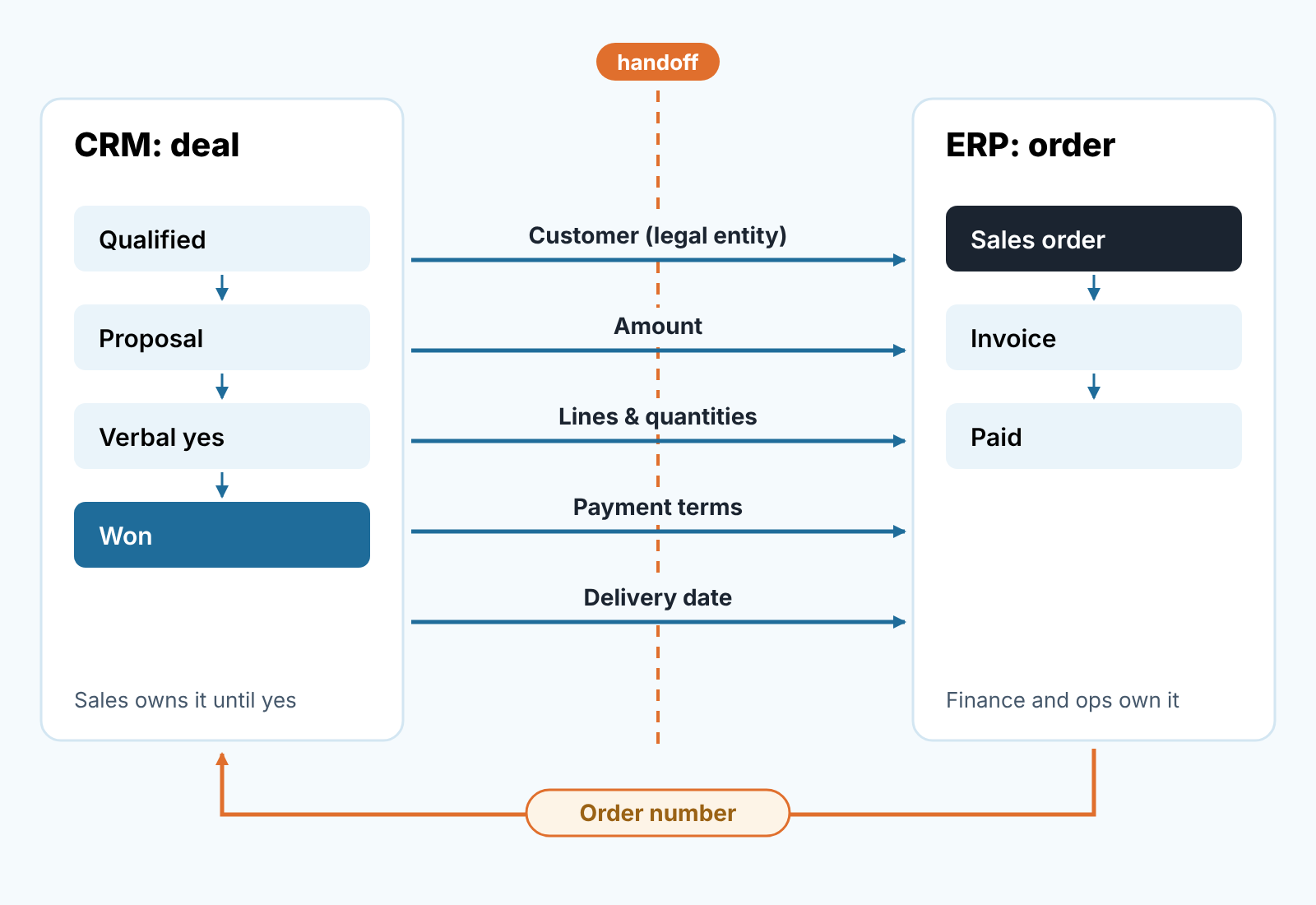
The rep moves the deal to the last open stage, usually “Verbal yes” or “Contract sent”. At this stage the deal still belongs to sales and nothing has been entered in the ERP. The rep fills the handoff fields (next section). Then, and only then the deal is marked won. If your CRM can require fields when a deal is marked won, make those five fields required there; if it can’t, the manager checks them before marking the deal won. Won is a gate, not a celebration.
On the other side of the gate, someone in operations or finance creates the sales order in the ERP from the deal, line by line, and writes the order number back into a field on the CRM deal. That order number is the thread. Without it, a month later nobody can prove which deal became which invoice, and the forecast review turns into archaeology.
Who creates the order is a decision, not a default. In our experience the rep should not, however small the company. The order is where discounts get checked against policy and delivery dates against stock, and the person who promised the customer is the wrong person to do that check. No ops person? Then the founder does it. It is the cheapest control you will ever add.
What the rep must write down before the deal leaves sales, the promises and the contacts, is its own topic: the closed-won handoff. Here we only care about the fields that must agree between the two systems.
Five deal fields that must match the order
These are the fields we check on every won deal against its ERP order. If any of them differ, the forecast you reported last month was off, and now you know by how much.
- Customer, as a legal entity. The CRM organisation is often the brand you talk to; the order needs the entity that pays, with registered name, billing address and tax ID. “Acme” on the deal and “Acme Logistics GmbH” on the order is fine if the CRM record carries the legal name in a field. If not, sooner or later an order gets typed from an email signature and the invoice goes to the wrong entity.
- Amount, with currency and tax basis. Decide once whether CRM deal value is net or gross, and in which currency. Then the deal value and the order total should match to the cent on the day the order is created. They won’t a month later, after a change order, and that’s fine. The day-one match is the test.
- Lines and quantities. A CRM deal with a single value field hides the mix. The order has lines. For a small team the fix is not a product catalogue in the CRM; it is a rule that the proposal attached to the deal is the one the order is typed from, with the version named in the deal (“Quote v3, 14 Oct”). Different quantities on the order mean somebody changed something after the yes, and the rep needs to know.
- Payment terms. Thirty days, fifty percent upfront, annual in advance. This is the field most often agreed on a call and never written down. It belongs on the deal as a dropdown, and the value on the order must equal it. A mismatch here turns into a cash-flow surprise, because the forecast assumed money in month one and the invoice says month three.
- Delivery or go-live date. The expected close date in the CRM is when the customer signs. The delivery date on the order is when you have to perform. The first drives the forecast, the second drives the warehouse or the onboarding calendar. At handoff the promised date moves from the deal notes onto the order, and if the ERP says it can’t be met, the rep hears about it before the customer does.
Five fields, not fifteen. In our experience, teams that try to sync a long field list between a CRM and an ERP tend to give up the first time the mapping breaks because someone renamed a dropdown. Five fields can be checked by eye per order, which is the right amount of rigour for a small team.
Forecast vs invoiced revenue: why the two numbers never agree
Your CRM forecast for last quarter said one number. Your accountant says another. Both are right, and the gap usually comes from four places.
Timing. The deal was won on the 28th, the order created on the 2nd, the invoice sent on the 15th and paid next quarter. The CRM counted it in Q3; the books show it when the invoice is raised or when it is paid, depending on how they are kept. Same money, different month. Write down which date your forecast uses and which date finance uses, and stop expecting them to match.
Scope. The CRM deal value included a renewal year or an optional module that was never ordered. Or the order included shipping and a training day the deal never mentioned. The lines check catches most of this at handoff.
Change after the yes. A discount granted at order creation, a quantity trimmed on delivery, a credit note. The ERP has the current truth; the CRM deal still shows the number it closed at. We don’t recommend editing won deals to match, because then you lose the record of what the forecast said. Keep the the won value frozen and report “won” and “invoiced” as two columns.
Deals that never became orders. The deal is marked won, the customer went quiet, no order was ever created. In the CRM it is revenue. In the ERP it is nothing. This is the one that embarrasses people, and the order-number field is the cure: a won deal with an empty order number after seven days is a question for the Monday meeting.
Both kinds of system can integrate with other tools and with each other, and an integration can copy the five fields for you. What it can’t do is decide what a field means. It will happily sync a wrong value in both directions. Agree on the fields first, then automate the copying if the volume justifies it.
A disclosure, since this is the point where a tool comes up. We build SalesBond, a sales management layer on top of the CRM a team already uses; we started with Pipedrive. It checks deal and customer data in the CRM and explains what needs attention. It does not see your ERP, so the won-without-order-number check is one you set up on the CRM side with a filter or a rule. If the CRM half of this handoff is where your data goes quiet, check your CRM with SalesBond.
Do you need an ERP yet?
Probably not as soon as you’re told. For a small sales team the usual story is that the CRM came first, invoices live in an accounting app, stock lives in a spreadsheet, and someone is asking whether that is still fine.
Our view: it stays fine for longer than vendors say, and it stops being fine when three things are true at once. The same order is handled by more than one person after the sale (someone picks it, someone invoices it, someone checks payment). The spreadsheet that tracks stock or capacity has been wrong in a way that cost a customer. And the handoff fields above are being typed into several places by hand, and someone has already found a mismatch. One of the three, and an accounting app with sales orders is enough. All three, and you are already running a small ERP in your head, the software just makes it visible.
For a Pipedrive team on QuickBooks Online, the working split is to create the customer when the deal is won and let QuickBooks own the invoice status; we describe it in customer record and invoice status in QuickBooks.
What we would not do is choose an ERP to fix a CRM problem. An ERP imposes discipline on the order side, not the deal side. A deal with no next step and a close date weeks in the past is a CRM hygiene issue, and the ERP will never see it. If that’s the problem, start with the CRM data quality metrics and come back to the ERP question later.
Manufacturers and distributors reach this moment earlier than software companies, because quotes have versions and stock has lead times. We covered that pipeline separately in CRM for manufacturing.
Monday check
Fifteen minutes, the CRM in one tab and the ERP or accounting app in the other.
Pull every deal marked won in the last seven days. For each one, look at the order number field. Empty means the handoff has not happened; ask who owns it and by when . Filled means you open the order and compare the five fields: entity, amount, lines, terms, delivery date. A mismatch is not blame, it is the week’s lesson about which field people skip. Note it in the deal with the date, so next month you can see whether the same field keeps slipping.
Then look back one more week. A deal won eight to fourteen days ago with no order number is no longer a handoff delay. Either the customer has not really committed and the deal goes back to its last open stage, or the order exists and nobody wrote the number back. Both take one message to find out.
Start with this week’s won deals and one empty field on each: the order number. If it’s still empty next Monday, you have found where your own handoff leaks.


