
Quote to cash (Q2C) is the path from a sent quote to money in the bank. For a small sales team the CRM owns the first half of it, up to a won deal with the agreed amount and terms, and the manager’s job is to make sure those fields reach billing unchanged and that nobody is left waiting between the steps.
Most explanations of quote to cash are written for finance and revenue operations, and they assume CPQ software, a billing platform and people to run them. This one is written for the person who runs a pipeline of three to ten reps without any of that. The question is not which system to buy. It is who is holding the deal at each moment between the quote and the payment, and whether your CRM can tell you.
The quote to cash process in one picture: six steps from quote to payment
GetSphere treats it as a single revenue cycle that opens when someone drafts a quote for the customer and closes when the money has been collected (GetSphere: What is quote-to-cash). Planview puts the start a little earlier, at the buyer’s decision rather than at a document, and runs it until the product has been paid for (Planview: Quote-to-cash vs CPQ). For a small team selling without a subscription platform, six steps are enough, and each one has a document you can point at.
- Quote sent. The rep prices the work and sends a number with a validity date. The document is the quote, with a version on it.
- Quote accepted. The customer says yes to that version, in writing. An email is enough; a verbal yes is not.
- Approval and contract. Anything non-standard gets approved before it is promised: a discount beyond the usual, payment terms the business does not normally give, a delivery date operations has not confirmed. The approval lives as a note on the deal; the contract or order confirmation is the document.
- Deal won. The deal is marked won in the CRM with the amount, currency and terms the customer accepted. The deal record itself is the document. A letter of intent is not this step; give it a stage name instead of a Won.
- Invoice sent. Someone creates the invoice from the won deal and writes the invoice number back to it. Under a blanket PO there is one invoice per release, each referencing the same PO number, as in blanket purchase order releases.
- Payment received. Money arrives and is matched to the invoice. The bank line is the document, and the paid date goes back to the deal. With Pipedrive and QuickBooks Online, that status comes back from the invoice on the QuickBooks customer record.
GetAccept’s version starts earlier, with product configuration and pricing, ends later, with renewals, and attaches a tool to each stage: CPQ up front, order management once the contract is signed, billing software for the invoices (GetAccept: Quote-to-cash process). The list is fine, and it is also why small teams tune out. You do not need a tool per step. You need to know which step each open deal is on.
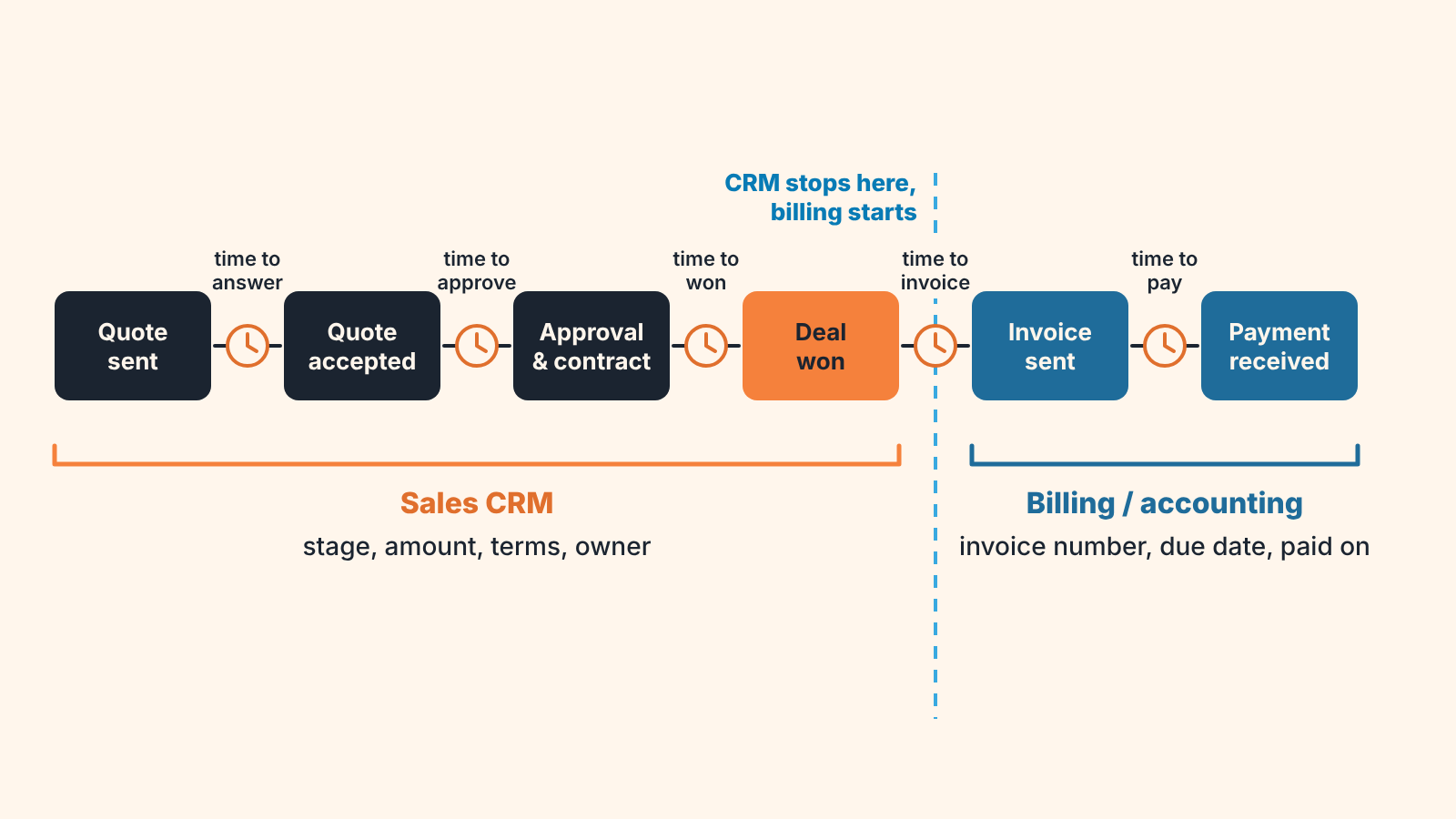
The border is the won deal. The first four steps live in the sales CRM, the last two live in whatever issues your invoices, and only two things need to travel back: the invoice number and the date it was paid. Which deal fields cross the other way, and who copies them, is covered in ERP vs CRM: where the deal ends and the order starts.
What a field list does not answer is how long each step waits, and for whom.
How long each handoff takes, and who is waiting
Every arrow in the picture above is a wait, and every wait has a person on the other end who may not know they are the bottleneck. Five gaps.
Time to answer. From quote sent to quote accepted or declined. The customer owns this gap, the rep owns following up on it, and the quote’s validity date is the alarm. A quote past its date with no answer is not pending. It is a deal that has quietly left the process while still sitting in your forecast at full value. Our rule is that on that day the deal either gets a new quote or goes back one stage, and the reasoning is in quote expiration date: set it, then decide what happens on it.
Time to approve. From “the customer wants a bigger discount” to a yes or no from whoever can give it. In a small team that is usually the founder, and the founder is usually in a meeting. This gap is invisible in most pipelines because there is no stage for it; the deal sits in Proposal with a note. Give it a stage or a checkbox, Awaiting approval, with the date it was requested. Then the manager can see every deal that is waiting on them, which is a humbling report the first time you run it.
Time to won. From the customer’s yes to the deal being marked won. This should be minutes. When it takes days the rep is waiting for a signed contract or a purchase order number before they dare to mark it, so decide once whether won means the yes or the paperwork, and write it down.
A changed quote stretches this gap without anyone noticing. The customer accepts, then asks for one small change: a later start date, one fewer seat, longer payment terms. The rep agrees on the phone, sends a revised quote and leaves the deal on the old amount, because editing a nearly won deal feels like going backwards. Now the invoice will be built either from the deal or from the latest PDF, and they disagree. Every revision has to land in the deal fields, not only in the attachments. If a third version is becoming normal on your team, Quote v3 is not a good sign looks at why.
Time to invoice. From won to invoice sent. Now the waiting person is outside sales, and the deal has usually dropped out of the rep’s view because won deals do not show in the open pipeline. GetSphere singles out the move from sales to finance as the place where revenue slips away most often (GetSphere). In our experience that is because nobody is assigned to the gap. The rep thinks finance has it. Finance has not been told. The fix is a field, not a tool: an Invoice number field on the deal, empty until finance fills it, and a saved filter for won deals where it is still empty. What the rep should hand over along with the deal is a separate list, the closed-won handoff.
Time to pay. From invoice sent to money received. GetAccept blames a late final step mostly on invoices that go out slowly and on payments nobody keeps track of (GetAccept). Collections are finance’s job, but the rep is the person the customer answers, so the rep should know when an invoice on thier deal is overdue. A Paid on date on the deal, filled by finance, closes the loop and also tells you whether the payment terms the rep agreed were ever real.
Measure each gap in days on your own deals before deciding which one matters. We expected time to pay to be the long one when we first looked. It was time to approve, and the person being waited for was the one asking the question.
A disclosure, since this is where a tool usually enters. We build SalesBond, a sales management layer on top of the CRM a team already uses; we started with Pipedrive. It checks deal data in the CRM and explains which deals need attention and why, which is where the first three gaps show up. It does not see your invoices or your bank, so the empty invoice number check is a filter you build on the CRM side. If you suspect the CRM half of your quote to cash is where deals go quiet, check your CRM with SalesBond.
Quote to cash, order to cash, CPQ: which term you need
Order to cash (O2C) is the finance side of the same journey: it begins once an order or contract has been signed, rather than at the quote, and ends when the payment is in. GetSphere’s side-by-side comparison puts the line in the same place (GetSphere).
You will meet all three terms in the same search results, and they are not interchangeable. Quote to cash is the whole road from quote to payment, and it is mostly what sales and revenue operations people say. Order to cash is its back half, the words your accountant uses, and CPQ is the very front: configuring and pricing the offer up to the quote itself, a term you mostly hear from vendors of sales tools.
So the order to cash process is steps five and six of the picture above, with the order as the starting document instead of the quote. When your accountant talks about O2C and you talk about Q2C, you are describing the same money from two sides of the won deal. That is worth knowing in a meeting, because it means the invoice number on the deal is the one piece of data both processes need.
CPQ is narrower still. Planview presents it as a tool for sales that gets configuration, prices and quotes out faster and with fewer mistakes, and says outright that a company without complex or custom offerings may manage without it (Planview). GetSphere draws the same boundary from the other side: CPQ handles the front of the process, and quote to cash keeps going through contracts, billing and collection (GetSphere). For a team that sells from a price list with occasional discounts, CPQ is step one of the six, done with a spreadsheet and an approval rule. Buying software for it does not shorten any of the the five waits above.
If you sell configured products with distributors in the mix, the quote stage itself gets complicated, and that pipeline has its own article, CRM for manufacturing. For everyone else the term you need is quote to cash, and the part you can fix from the sales chair is the first four steps and the handoff out of the fourth.
One gap at a time
Pick the gap you think is longest, then check it against last month’s deals rather than your memory of them. Add one field or one stage so the CRM shows who the deal is waiting on, and look at that view once a week with the people who appear in it. When the invoice number starts coming back onto the deal without anyone chasing it, the handoff is working and the number you report as won will begin to resemble the number finance reports as billed. The distance between those two has its own article, bookings, billings, revenue, but you will not need it until the handoffs stop leaking.


