A quote expiration date is the last day the quoted price holds. In Pipedrive it belongs in its own Date field on the deal, with an automation that reminds the owner a few days before it arrives. On that day the quote gets one of three outcomes: you extend it, you reprice it, or you close the deal as no decision. The rest of this article is how to set that up and how to make each call without a meeting.
A quote with no expiry is a price you can’t take back
Most quotes from small teams go out with a number and no date. The buyer comes back in month three, after your supplier raised prices or your team changed the packaging, and asks for “the price you sent us”. You have two bad options: honor a number that no longer works, or explain why a written offer from your own company is no longer valid. The first costs margin. The second costs trust. Not every document carries the same promise, though: quote, estimate and proposal differ in what they commit you to on price.
There is a quieter cost too. A quote without a date has no moment where the deal has to move. It sits in Proposal Made with a close date that keeps sliding, the pattern we wrote about in pushed close dates in Pipedrive. Nothing forces a decision, so nobody makes one. And if the buyer is still bound to another supplier, the date that matters is the notice deadline of the current vendor.
How long the quote should live
There is no standard; the sources below range from a week to a month.
Tools that build expiry into the quote itself show the spread. IBM’s legacy quoting documentation says “the default value is 30 days after the current date”, and an administrator can change it (IBM: Quote Expiration Policy). The Layer keeps a quote valid until the end of the calendar month it was created in, with an option to switch to a fixed number of days (The Layer: default validity period). ITEM’s quote expiration page describes a 7-day expiry for standard product sales and a 30-day price lock for enterprise buyers on a budget cycle (ITEM: Quote Expiration).
None of those pages say which end you should pick. Our rule: the shorter your cost certainty, the shorter the quote.
If you resell hardware a quote that outlives your supplier’s next price list is a bet against your own supplier; two weeks is already generous. If you sell a service where your cost is mostly people and the price has not moved in a year, thirty days hurts nobody. And if the quote holds a limited slot, say an installation crew or a training date, it should expire when you can no longer hold the slot, not on a round number.
One more test. The expiry should be shorter than the time deals usually spend in Proposal Made. If deals sit there for 40 days and quotes live for 30, the date forces a conversation. If quotes live for 60, the field is decoration.
Setting a quote expiration date in Pipedrive
The help center’s fit for a deadline is a custom field of type Date, described as a “specific date chosen from a drop-down calendar”, with “delivery date, deadlines” as typical uses (Pipedrive: what types of custom fields are there). A quote expiry is a deadline.
- Open the account menu, go to Personal preferences > Data fields, pick the deal entity and click “+ Custom field”. Name it “Quote valid until” and choose Date. The type can’t be changed after the field is created, so pick Date, not Date range (Pipedrive: custom fields).
- On Growth and higher plans, add a field description, one sentence behind the info icon: “The last day the quoted price is valid. Set it when you send the quote.” Nobody reads a wiki; everybody reads the tooltip.
- In the deals list view, click the gear icon and add “Quote valid until” as a column next to the expected close date.
- Build a shared filter: open deals where “Quote valid until” falls in a relative time selection such as “this month”, which moves forward on its own (Pipedrive: filters, common uses; advanced filtering). It’s the list a manager opens when the forecast looks off. Glance at it before the pipeline review you already hold and ask each owner which of the three outcomes below they’ve picked. If it’s empty for weeks, the field isn’t being filled in, and that is a conversation about discipline, not about quotes.
- The part that does the real work, on Growth and higher: a date-trigger automation. It can fire on the exact date in a date field, or a set number of days before or after it, up to 180 days either way, and you choose the hour and time zone it runs in (Pipedrive: automations, date triggers). Use “Before date”: three to seven days before “Quote valid until”, create an activity for the deal owner called “Decide: extend, reprice or close”. The decision now lands in someone’s activity list instead of waiting for someone to remember.
If you send quotes through Smart Docs, paste the same custom field into the template, so the date the buyer sees and the date in the CRM are one value. Custom fields are supported in Smart Docs templates (Pipedrive: custom fields); Smart Docs itself comes with the Premium and Ultimate plans, and Lite and Growth teams can buy it as an add-on (Pipedrive: Smart Docs). The mismatch to avoid is a PDF that says “valid for 30 days” and a CRM field that says something else.
What the field does not do is remind the buyer. The rhythm of touches after a proposal is in follow-up after a proposal in Pipedrive; whether the buyer opened the document at all is in Smart Docs view tracking. Here we stay on the date and the decision.
Expiry day: extend, reprice, or close
The date is only useful if something happens when it arrives. We allow three outcomes. “Leave it and see” is not on the list.
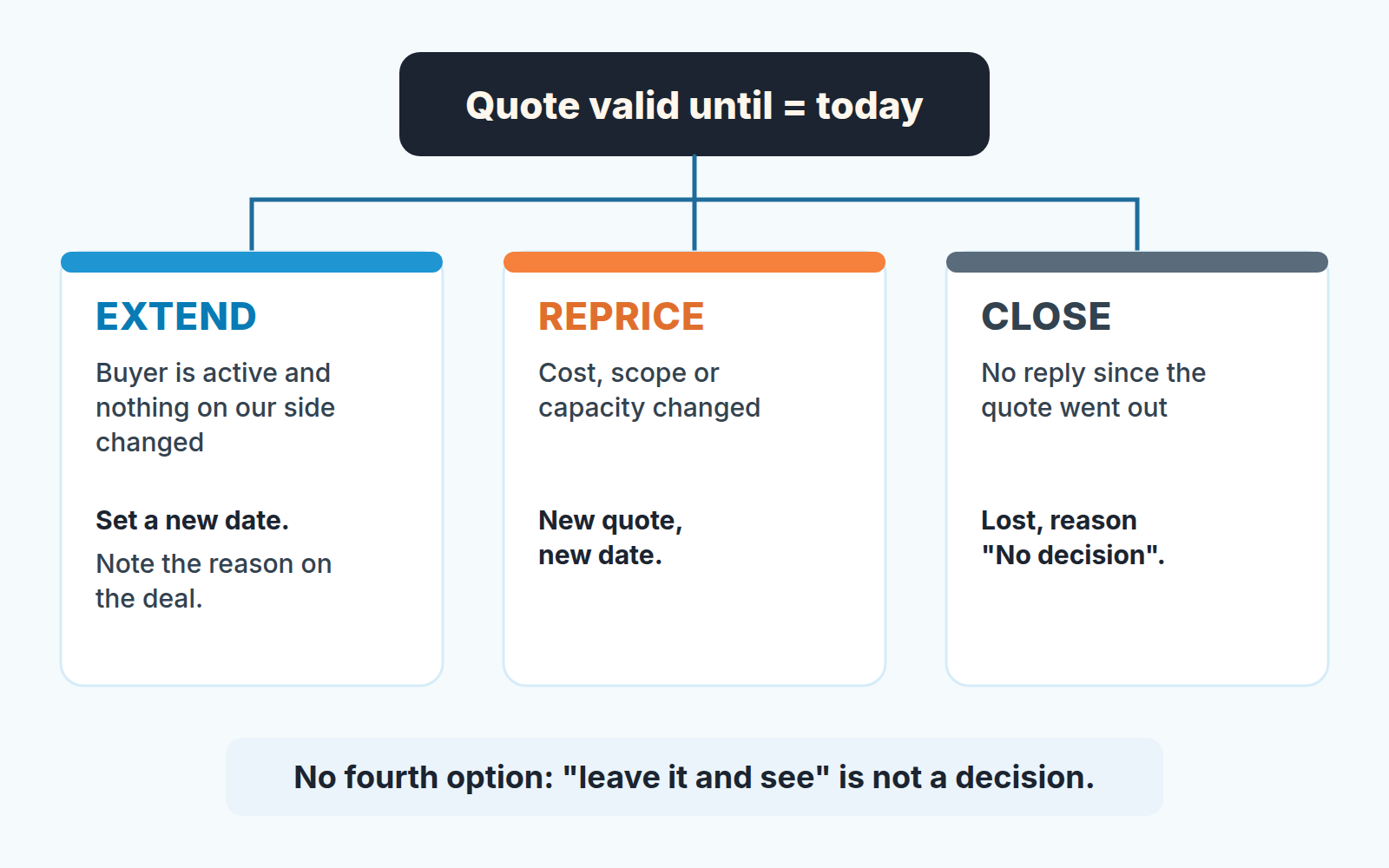
Extend when the buyer is still talking to you and nothing on your side has changed. The signatory was traveling, the budget meeting moved. Fine, with two conditions: a new date goes into the field, not a mental note, and a one-line note on the deal says why. Chargebee handles extensions the same way: the new date is recorded on the quote with a comment and overrides the general validity period for that one quote only (Chargebee: extend the expiry date of a quote). A quote extended twice is telling you something, and the notes let you see it.
Reprice when your side has changed: a cost went up, the scope grew, the slot you were holding is gone. The old quote is replaced and the buyer gets a new document with a new date. In Pipedrive, log each revised quote as one line on the deal and keep only the current amount in Value. Watch the opposite case, too. A buyer who went quiet often reappears on the last day and asks whether the price can be “sharpened” if they sign this week. That is a discount request with a deadline attached, so it goes through your discount policy or your deal desk, and the expiry date stops being a lever the buyer pulls.
Close when there has been no reply since the quote went out and an extension would be for your comfort, not theirs. Mark the deal Lost with the reason “No decision”, not “Price”, because you don’t know that (no-decision deals in Pipedrive).
The quote that outlived its price
A made-up case, but a familiar one. A team sells installation projects. One rep has a quote out to a regional retailer and hears “we’ll come back to you after the spring budget is signed off”. The budget gets signed. Nobody comes back. The quote has no date on it, and the deal sits in Proposal Made with a close date that moves from April to May to June.
In July the buyer calls, ready to sign at the quoted price. In between, the installer the quote was built around has raised their day rate, and the bundle no longer exists. The rep rebuilds the offer, sends a higher number, and then has to explain to a buyer who just secured internal approval why the figure in that approval is wrong.
Nothing in that story needed software. A “valid until” date would have forced one of two calls in May: the price holds until the end of the month, or the quote has lapsed and the next conversation starts from a new number. Either is a better position in July than the one the rep ended up in.
Start with the next quote you send
You don’t need to backfill every open deal. Create the field, set the date on the next quote that goes out, and add the automation so the decision lands on the owner’s list before the price runs out. Within a month most quotes in Proposal Made will have a date, and the old ones will have expired into one of the the three outcomes.
We build SalesBond, a sales management layer on top of the CRM a team already uses; we started with Pipedrive. Its Deal Health checks flag an open deal with no next activity booked while its dates slip, which is exactly what a quote running out with nobody assigned to call looks like, so if you’d rather not keep the list by hand you can check your CRM with SalesBond.