
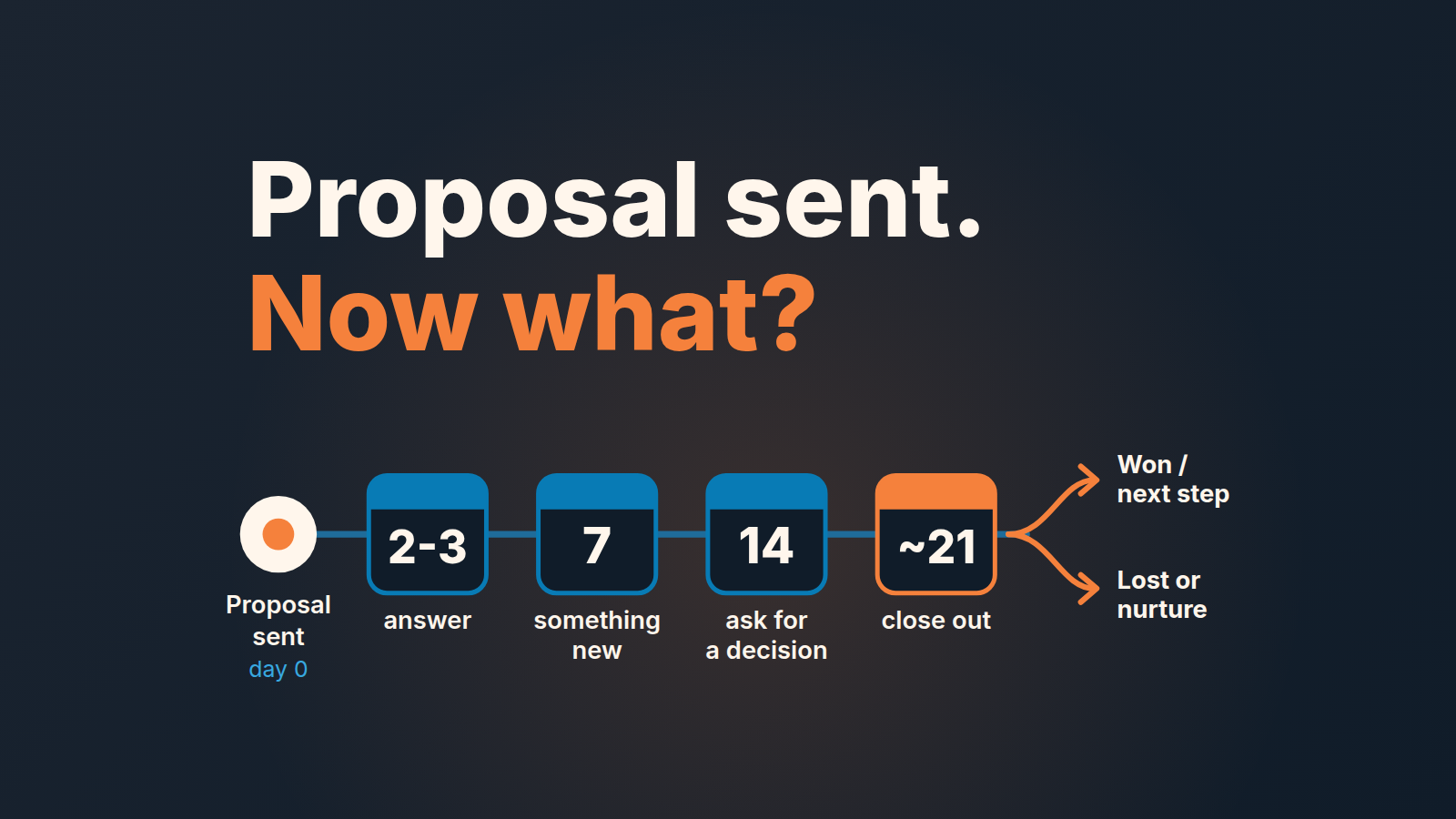
The best follow-up email after sending a proposal is one you booked before you sent it. Put the follow-ups on the calendar the moment the proposal goes out, not after the silence has already started: a first nudge in two to three days, a second with something new around day seven, a third around day fourteen, then a polite close-out. Each message needs a reason to exist beyond “checking in,” and after the last one the deal moves to lost or nurture. If you would rather build it once than per deal, here is a four-step follow-up sequence in Pipedrive.
That’s the whole method. The rest of this piece is about making it survive a busy week, because the rhythm is easy to agree with and very easy to drop. Most reps don’t skip follow-ups on purpose. They skip them because nothing on their calendar says “today is day seven on the Harlow proposal.”
What a proposal follow-up is actually for
A proposal is the point where the buyer has to do work. They have to read it, forward it, defend the number to someone who wasn’t on your calls, and find the budget line. Silence after a proposal usually means that work stalled somewhere you can’t see.
So the follow-up has one job: find out where it stalled and remove the reason. “Just checking in” does neither. It asks the buyer to write back with a status update they may not have, which is extra work on top of the work they’re already avoiding.
A useful test before you send anything: if the buyer replied “thanks, still reviewing,” would you have learned something? If not, the message had no job. Rewrite it so it answers a likely question, adds something they didn’t have, or asks for a decision they can make in one line. With a three-package proposal that decision is often the package itself, and until the customer has picked one of the three packages, the deal stays at the discussed price.
This is also different from chasing a prospect who went quiet after a demo. There the question is whether they’re still interested at all; we covered that case in what to do when a prospect goes silent after the demo. After a proposal, interest was high enough to ask for pricing. You’re usually fighting internal friction on their side, not indifference.
And if the demo itself was missed twice, use the second no-show rule instead of a follow-up.
The rhythm: day 2, 7, 14, then close it out
The timing below isn’t from a study. It’s where common advice from sales tool vendors converges. Salesforge suggests 3-5 business days before the first follow-up on a client proposal, about a week for the second, and a final message around two weeks (Salesforge). Zoomforth lays out touches on day 3, 7 and 12, with a closing-the-loop message around day 18-21 (Zoomforth).
We run a slightly tighter version, with a different purpose for each touch:
- Day 2-3, answer. Cover the question they’re most likely to have after reading: scope, a line item, timeline, who signs.
- Day 7, add. Bring something they didn’t have, like a relevant customer example, a revised option or an answer to an objection from discovery. This one can just as well be a short call instead of an email.
- Day 14, ask. A direct question they can answer in one line, including “no.”
- Day ~21, close out. You’re closing the file on your side, and the door stays open.
If Smart Docs shows the proposal was opened and nothing came back, the first touch can come sooner; what a view does and doesn’t tell you is in our piece on Smart Docs.
Two notes on this. Days are counted from the send date, not from the last follow-up, so the whole thing fits inside about three weeks. And if the buyer gave you a date (“we’ll decide after the board meeting on the 12th”), thier date beats this schedule. Book one activity for the day after their date and drop the rest. Day 2, 7 and 14 is one row of a wider touch cadence, the one for deals at the proposal stage.
Three follow-up emails after a proposal, three different jobs
These are made-up examples (Dana and the Harlow deal are fictional), not templates. Copy the job, not the wording, because a buyer who gets the same message from three vendors can tell. If you do want reusable wording, build a shared template library for the team with one owner per template.
One thing about the subject line: don’t write a new one. Reply in the original thread, so the buyer sees “Re: Proposal for Harlow” with everything above it, and keep “Just checking in” out of the subject entirely.
Day 2-3, answering a question they haven’t asked yet.
Hi Dana, one thing people usually ask after seeing the proposal: the onboarding fee covers the data import and two training sessions, so there’s nothing extra in month one. If your finance team wants that split out as a separate line, I can send a version today.
It’s short, it assumes they read it, and it offers a concrete next step that costs them nothing.
Day 7, adding something new.
Dana, you mentioned on our call that the regional managers were worried about adoption. Here’s how a team of about your size handled the first month [link]. Page 2 is the part that answers the adoption question.
The new thing has to connect to something they said. A generic case study is just a louder “checking in.”
Day 14, asking for a decision or a no.
Dana, I don’t want to keep nudging if the timing’s wrong. Is this still something you’re planning for this quarter, or should I check back in January? Either answer is fine.
Giving them an easy “no” is the point. A clear no in week two is worth more to your forecast than a maybe that sits in the pipeline until quarter end.
The close-out on day 21 can be two sentences:
Dana, I’ll close this proposal on my side for now so it doesn’t keep landing in your inbox. If the project comes back, reply here and I’ll pick it up from where we left off.
Don’t guilt-trip, and don’t send a “breakup email” with a joke subject line to someone who asked you for pricing three weeks ago.
Book all of it before you hit send
Here’s the part most follow-up advice skips and it’s the part that decides whether any of the above happens. The rhythm has to exist in Pipedrive before the silence starts, because once you’re waiting you’re already relying on memory.
In practice that means the proposal email and the follow-up activities get created in the same sitting. You send the proposal, move the deal to your proposal stage, and then schedule three activities on that deal right away: one for day 2 or 3, one for day 7, one for day 14. Pipedrive’s “Schedule an activity” window shows your calendar for the chosen day next to the activity fields (Pipedrive support), which makes it easy to avoid stacking all your day-seven follow-ups on the same Tuesday. Put the job in the subject of each activity, like “Proposal: answer onboarding question” or “Proposal: send adoption example,” not “Follow up.” When the activity comes up in a week, the subject tells you what to write, and you don’t have to reread the whole thread to remember why you scheduled it.
The fourth activity, the close-out, we’d book too. It feels pessimistic to schedule the goodbye on the day you send the proposal, but that’s exactly why it works: it forces a decision date onto a deal that would otherwise drift. It helps to put the expiration date of the quote in its own field, so the close-out has a real date to land on.
When the buyer replies, don’t let the old activities hang around. Mark the next one done or delete the the rest and book whatever the reply calls for. A deal in the proposal stage should always have exactly one open activity that says what happens next. If it has four stale ones, nobody trusts the list, and if it has none, the deal is already drifting. After a call with the buyer, send the recap the same day and give it the same date as that activity. If your stages themselves are fuzzy about where “proposal” begins and ends, it’s worth fixing that first; our guide to sales pipeline stages covers how to define exit criteria.
When to stop, and what “no” sounds like
After the close-out, stop. Four touches over about three weeks is enough time for a buyer who asked for the proposal to reply. If they haven’t, more emails won’t change it, and they’ll start to cost you the relationship you’d want if the project comes back next quarter.
“No” after a proposal rarely arrives as the word no. It sounds like:
- “We’re going to hold off for now.”
- “Budget got moved to next year.”
- “We’re going to look at a couple of other options.”
- Silence through all four touches.
Each of those is a closing signal. The deal goes to lost with a real reason, or to a nurture stage with a dated activity to reopen it, if your team uses one. What it shouldn’t do is sit in the proposal stage at full value. We wrote more on making that call in when to close a deal as lost, including why an honest lost reason is worth more than an optimistic forecast.
One exception. If the buyer replied at any point with a specific reason for waiting and a date, that’s not silence, and the clock resets to their date.
What the manager checks on Monday
The failure a manager can actually catch is the proposal that went out and then nobody wrote anything for ten days. The rep isn’t hiding it, they just have dozens of other deals. Sometimes the proposal email never left at all; here is how to find a follow-up that failed to send.
Pipedrive deals carry a “Last activity date” (the last activity marked done) and a “Next activity date” (the next one scheduled and not done yet), per the activities article. One way to set it up: a saved filter on your proposal stage built on those two fields, so the problem deals show up in one list. The ten days below is our rule of thumb, not a Pipedrive setting. We look for three things:
- Deals in the proposal stage with no next activity at all.
- Deals in the proposal stage where the last completed activity is older than ten days.
- Deals that have been in the proposal stage past the day-21 close-out and still carry full value.
That’s a two-minute scan, and it fits into the 15-minute weekly pipeline review without a separate meeting. The conversation with the rep is short too: “What’s the next step on this one, and when is it booked?” If there’s an answer, it goes in as an activity while you’re both looking at the screen. If there isn’t, you’ve just found a deal that should probably be closed. When the filter returns a dozen deals, you can schedule the follow-ups in one batch, as long as each task carries a note a rep can act on.
A rep who books the rhythm at send time will rarely show up on that list. So start with the last proposal you sent: open the deal in Pipedrive and check whether day 7 is already on the calendar. If it isn’t, book it now.


