
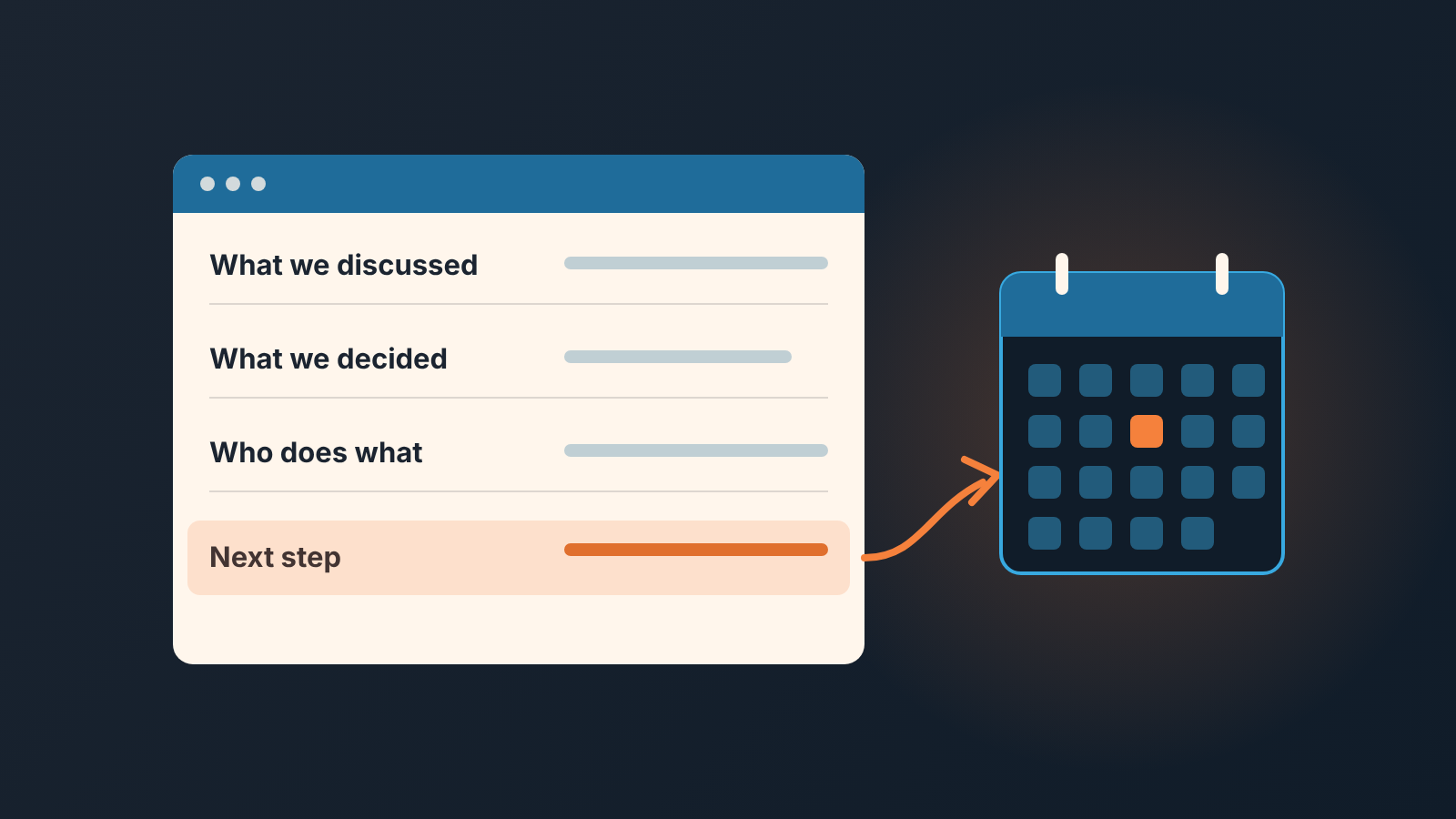
Send a four-line recap email after a sales call, the same day: what you discussed, what was decided, who does what, and by when. Then put that same date on the next activity in Pipedrive. The email is for the buyer. The activity is for you. When the two carry the same date, the deal has one version of the truth instead of two memories.
“I thought you were sending that”
A composite example, stitched together from calls we have sat in on, not one real deal. A rep, call her Vera, sells shift-scheduling software to mid-sized plants. On a Tuesday she has a good call with an operations lead who wants to see shift handovers with his own people in them. She hears “send me something and I’ll get the plant manager in.” He hears “they’ll build a mock-up of the handover on our real roster, and I’ll wait for it.” She writes a note, books a call for next week and moves on.
Next week’s call opens with “I thought you were sending that.” She did send something: the standard brochure. Not a mock-up on his roster. Nobody lied. Two people left one conversation with two lists of who owed what, and neither was written where the other could read it.
Four lines in his inbox an hour after the call would have shown the gap on Tuesday afternoon, not a week later in front of the plant manager.
The recap email template: four lines, no more
The template pages that rank for this query agree on the shape, at least the ones we opened: a brief reference to the call, the decisions, action items with owners and dates, and one next step (Serif, HubSpot). They drift on length: HubSpot attaches a tip or resource to every recap, Serif allows two to five summary points. We cut harder: if it doesn’t fit in four lines, the call didn’t end with a decision.
Here is the shape we use. Placeholders in brackets, the rest is typed fresh every time.
Subject: Recap: [topic] on [day]

Hi [first name],

Thanks for the time today.

What we discussed: [one line, their problem in their words]
What we decided: [one line, the decision, or the thing that is still open]
Who does what: I'll [deliverable] by [date]. You'll [their action] by [date].
Next step: [call / demo / review] on [day, date, time]

If I got any of this wrong, reply and I'll fix it.
[Your name]
That last sentence does more work than it looks. It turns a summary into an agreement, because silence now counts as a yes.
Two rules on the lines themselves. “What we decided” is allowed to be “nothing yet; you’ll check the budget line with finance first.” An honest open item beats an invented commitment. And “Who does what” always has two subjects. A recap where only you have homework is a to-do list you sent yourself with the buyer in cc.
On timing Serif says within two hours of the call, same day at the minimum (Serif). We’d put it differently: send it before your next call starts, because the next call overwrites the details in your head. Same day in practice.
What stays in your note
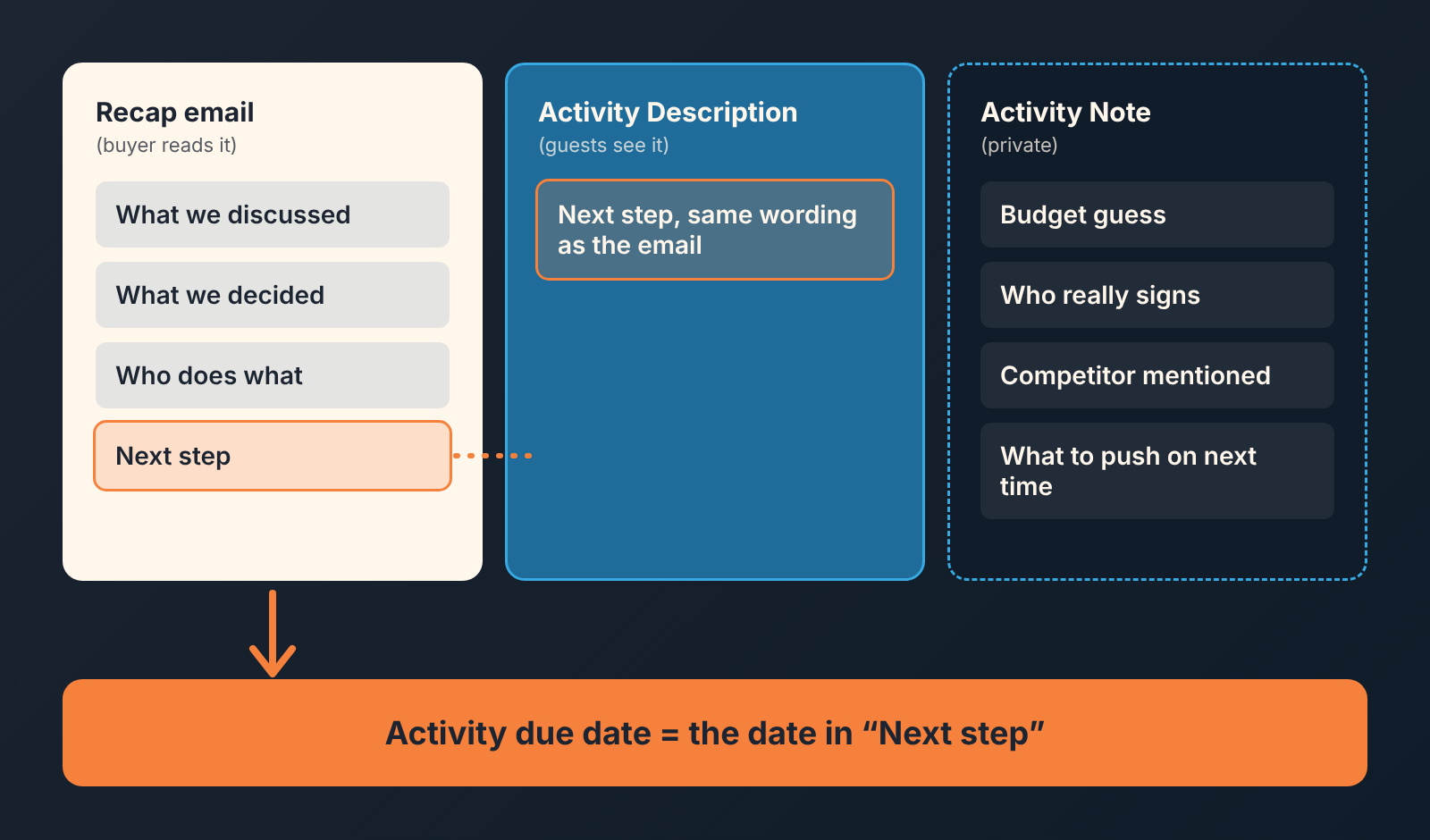
Your budget guess. The sense that the operations lead is keen but doesn’t sign. The competitor he mentioned in passing. The thing you plan to push on next time. None of that belongs in an email he will forward to his boss. What the note itself should hold is its own topic; we wrote it up in the five-line call note and won’t repeat it here.
In Pipedrive an activity has both a Note and a Description, and they are not the same. The Note is private and only visible inside your Pipedrive account. The Description syncs to your external calendar and is visible to every guest you add to the activity (Pipedrive: activities). So treat the Description as part of the email: the agenda line, in the same wording as “Next step”. Treat the Note as the room after the buyer has left.
The test is simple. Would you be fine if the buyer read it? Then it can go in the email or the Description. If not, it goes in the Note. “They seemed nervous about price” has never once improved a recap.
Sent from the deal, not from your inbox
Send the recap from the deal in Pipedrive and it is linked to that deal and sits in its history. Who else can read it is another matter. Another user sees an email from your inbox only if the thread is set to Shared, it is linked to a deal or contact, and they have access to that item (Pipedrive: email privacy and sharing). With Shared, your manager and whoever covers the deal while you’re out can see what was promised. Left Private, its readable by one person. How to pick a team default is in who can see an email in a deal.
Sync is also the prerequisite for templates: Pipedrive’s email templates only work once email sync is set up, and sync is not included on every plan (Pipedrive: email templates). Nearby in the settings you’ll find an option to log sent emails as activities automatically. The recap doesn’t need it to land in the deal. That option feeds the activities performance report, and switched on by one rep and not the others it skews the comparison, so it is a decision for the whole team, made once (auto-logged emails and the activity report).
Making the template takes a minute. Write the recap once in the composer, then click Choose template > Save draft as template, give it a name and set it to private or shared. A merge field fills in the first name. Team libraries and naming are in shared email templates for the team; here you need one template for one case.
What the template can’t do is write the four lines. Automate “What we decided” and you get recaps that say nothing. The template gives you the frame; the few minutes of typing are the point.
The date in the email is the date in the activity
The “Next step” line and the due date of the next activity are the same fact written twice. Set the activity first and copy its date into the email, or write the email first and schedule the activity from it. Either order works. Two different dates never do.
If the buyer later asks to move the call, move the activity and send a one-line reply from teh deal confirming the new time. Don’t count on the activity to remember the old date: its due date can simply be edited, even retroactively (Pipedrive: activities). The reply is the trail: it sits in the deal next to the original recap.
When the buyer names the time, keep their words. “Call me Thursday after two, I’ll have the numbers from finance” goes into the Next step line and into the activity just like that, not rounded to “next week.” What the next-activity date does for the pipeline beyond one deal is in the next activity field in Pipedrive.
What this rules out is the deal we see most often in reviews: the email says “I’ll follow up next week,” the activity says the 14th, and the buyer’s calendar says nothing at all.
When to skip it
Not every call earns a recap. If the buyer emails “can you do the 12th instead?” and you reply “yes, the 12th at ten,” that exchange is the recap. Another email on top is noise. Serif’s own FAQ draws the line in the same place: agreed actions, yes; a casual check-in with someone you talk to every day, probably not (Serif).
Skip it, too, when the call ended with no decision and no next step. The honest recap would read “we talked.” Send a single question instead: what would need to be true for them to look at this again next quarter? If it ended with a request for more information instead, see what to send and what to log.
And skip it when a bigger instrument already exists. After a proposal has gone out, the follow-up has a different job and a different rhythm; that is follow-up after a proposal, not this. When six people on two sides owe each other things across several weeks, four lines won’t hold it and a mutual action plan will. The recap lives in the middle, between the first real conversation and the proposal, which is where the the misunderstandings are born.
Four lines, the same day, sent from the deal, with the same date on the activity. The buyer who gets that email learns how you’ll behave after the contract is signed. We build SalesBond, a sales management layer on top of the CRM a team already uses (we started with Pipedrive), and its Deal Health checks every deal against the rules a team has enabled and shows what to fix. The recap is yours to write, though: save the template today and send the first one after your next call. Once the whole team sends them, keep recap blocks in a shared library.


