
A lead handoff agreement is one page: what counts as a lead the closer must look at, how fast the first contact happens, the five reasons a lead may be sent back or closed, and what happens to the lead after that. Think of it as a small team’s version of a sales and marketing SLA. In Pipedrive it lives in the Leads Inbox, through the owner field, the source channel, one custom field for the outcome, and the archive. Nothing on that page needs a new tool. It needs two people to sign it, and one ten-minute conversation a month to keep it honest.
“They keep sending us garbage”
A composite example from several small teams we have watched; the people are invented. Anika runs marketing part time for a small software company. She hosts a webinar, exports the sign-up list and adds everyone to the Leads Inbox with the webinar as the source. Theo closes. He opens the inbox, recognizes two names, calls both, and leaves the rest sitting there. A month later Anika asks what happened to her leads. Theo says most of them were students and consultants, and anyway he had a quarter to close. Anika says he never even opened them. The leads have no activity logged, so she can see it.
Both are right. Nobody wrote down what a lead has to be before Theo owes it a call, so Anika counts sign-ups and Theo counts conversations. Nobody wrote down what Theo should do with a lead he won’t work either, so he does nothing, which from Anika’s side looks exactly like being ignored. His reasons stay in his head, and the next webinar gets aimed the same way as the last one.
What fixes this is boring. A page, signed by both of them.
What a sales and marketing SLA assumes
Search for a sales and marketing SLA and the pages that rank describe a three-stage vocabulary: marketing qualified, sales accepted, sales qualified. A sales accepted lead is simply a lead that sales has agreed to work. Around those stages sit a response time, a minimum number of attempts and a standard list of rejection reasons. That advice assumes marketing and sales are separate departments, with the SLA as the treaty between them.
A team of five has one person on either side of one step. Three stages with acronyms give them three places to argue instead of one. Acceptance-rate targets need more leads than a webinar produces, and a scoring model needs closed-deal history a young team doesn’t have yet.
Two ideas survive the shrinking, and we’d keep both. One is a time limit for the first contact. The other, the one almost nobody small actually does is a closed list of reasons for sending a lead back. A reason picked from a list is a data point. A reason typed into a chat message is a complaint.
The one page
Here is the agreement we would write for Anika and Theo. Five lines and a short list, read out loud at one meeting and then pinned where both people can see it.
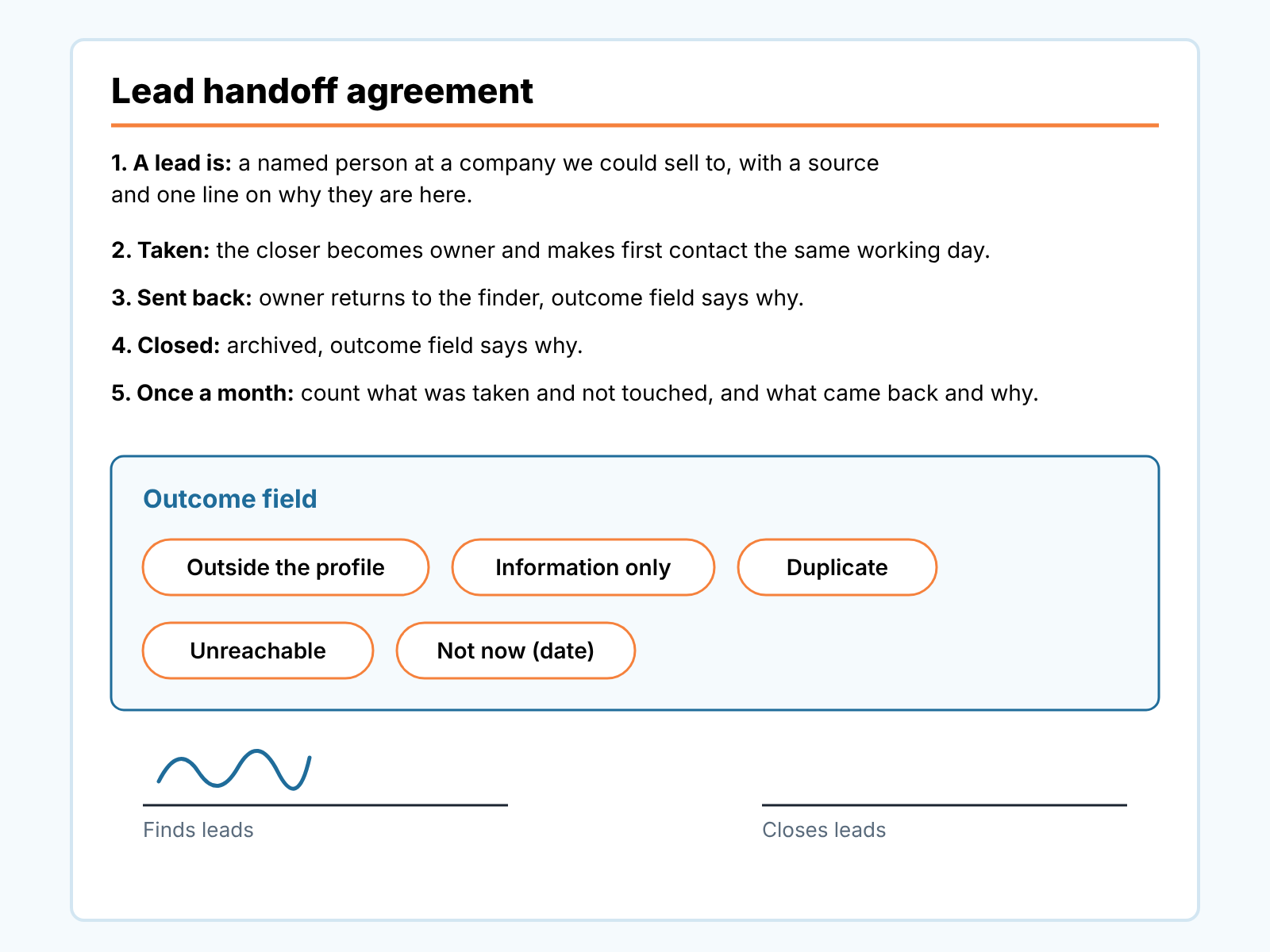
- A lead is a named person at a company that fits our customer profile, with the source filled in and one line on why they are here (what they downloaded, what they said at the booth, which form). A list of email addresses isn’t leads. It’s a list.
- Taken means the closer becomes the owner and makes a real first contact the same working day. That’s the only line about speed, on purpose; what counts as a first touch and how to check it is in speed to lead in Pipedrive.
- Sent back means the owner goes back to the person who found the lead, with one reason from the list below. The finder keeps working it (a newsletter, a check-in in three months, a different contact at the same company) and may hand it over again when something changes.
- Closed means the lead is archived with a reason from the same list. Nobody will work it. Archived, not deleted, so the record is there if the person shows up again.
- Once a month the two of us look at two numbers: how many taken leads were never touched, and how many came back, by reason. If your leads live in Salesforce rather than Pipedrive, first check who actually owns the new leads under Salesforce assignment rules.
The outcome list, in the words we would use:
- Outside the profile. Wrong size, wrong country, wrong industry, a student, a competitor. The profile itself should be written down somewhere; we described how to build one from your own won deals in ideal customer profile from won deals.
- Information only. The person asked a question or took a download and has asked us for nothing: no call, no price, no demo. Real company, no request. The browsers we wrote about in tire kickers in your sales pipeline usually land here.
- Duplicate. An existing customer, or a company with an open deal already. This one goes back so the finder can fix the source, not so they can nurture it.
- Unreachable. The agreed number of attempts across two channels, no answer, no bounce you can fix.
- Not now, with a date. The one reason that always sends a lead back rather than closing it. The buyer told you when. Without a date it isn’t this reason; it’s one of the four above. Where that lead waits and what brings it back before the date is covered in lead recycling in Pipedrive.
“No budget” is missing, although most rejection lists online include it. Budget is something the closer finds out on a call, so it belongs to qualifying the deal, not to refusing the handoff. If your team needs a sixth reason, add it with your eyes open, because every reason on the list is a thing the finder is being asked to change. On HubSpot, see how HubSpot lead status marks a handoff.
Two things are left off the page on purpose: which of several closers gets the lead, and when a taken lead becomes a deal. See lead routing for a small Pipedrive team and leads vs deals in Pipedrive; Hot, Warm and Cold lead labels keep working on top.
Where the page lives in Pipedrive
Line one is already half enforced. A lead in Pipedrive must be linked to a person or an organization, and every other field is optional (Pipedrive: Leads Inbox). So the agreement adds the two optional things it cares about: the source channel set, and one line of context as a note on the lead. If leads come in through a form the source is written for you; that setup is in lead source tracking with Pipedrive web forms.
Taken and sent back are both the owner field. The finder creates the lead as owner and changes the owner to the closer; the closer either keeps it or changes it back. If the people who find leads sit outside your company, the same agreement applies, and it matters more: see outsourced appointment setters in Pipedrive. Owner is one of the few lead fields you can bulk edit in the Leads Inbox (same source), so a webinar’s worth of leads moves to the closer in one pass. When “I never got it” meets “I sent it to you weeks ago”, ask the closer first, then look at who the owner field shows today.
The reason is the part Pipedrive doesn’t do for you. The archive help page lists no reason field for an archived lead; what it reports on is the “Archive status” and “Archived on” fields (Pipedrive: archive deals and leads). So the reason has to live in a field you create. Our choice is a custom field called something like “Handoff outcome”, with the five values from the page as its choices.
Pipedrive’s help on custom fields confirms you can create one for leads, with a catch worth knowing before you do: leads use the same fields as deals, so a field created for deals also appears on leads, with the same name and properties (Pipedrive: custom fields). Use the field description to say what each value means, so the closer reads the definitions at the moment of picking one. Why not a label? On a small team labels already carry temperature, and one scheme per purpose keeps them readable. A custom field can also be shown as a column in the list view, which the monthly count depends on.
The order of the clicks matters, because an archived lead is mostly locked: its owner and custom fields can’t be changed until someone unarchives it. So set the outcome field, then change the owner if the lead is going back, then archive if it’s closed. A sent-back lead isn’t archived at all, since the finder is still working it. Everything else archiving keeps and blocks, including the “Edit deals owned by others” permission you need to archive someone else’s lead, is in what archiving keeps and what it blocks.
If the lead had already become a deal before the buyer said “not now”, that’s a conversion back to the inbox, covered in converting a deal back to a lead.
The monthly ten minutes
Two numbers, once a month, both people in the room.
The first is how many taken leads nobody touched, and it belongs to the closer. Use the untouched count from speed to lead rather than inventing a second one. If it’s high, the finder’s leads aren’t the problem, the closer’s week is.
The second is how many leads came back, by reason. Filter the archived leads from last month by the Handoff outcome field and export them; the archive help page lists export from list views among the things you can still do with archived items. Add the sent-back leads from the active inbox, where the owner is the finder again and the outcome field is set. Count by reason. Five lines in a spreadsheet.
Then read the reasons as instructions. A month dominated by “Outside the profile” says the webinar or the ad audience is aimed wrong, and that is the finder’s fix. A month of “Information only” says the finder is handing leads over too early and should keep them longer before the owner changes hands. A pile of “Duplicate” means nobody checks the company before creating the lead, and lots of “Unreachable” usually means the form asks for an email and nothing else. No percentage target needed. The order of the five lines and whether it changes from month to month, is the whole report.
The conversation gets short and oddly calm. Instead of “you ignore my leads” and “you send me garbage”, it’s “most of what came back was students, let’s add a company-size question to the form.” The reasons did the arguing in advance. If marketing hands over leads by score, add one more check: whether the top score band actually converts, as in this HubSpot lead scoring check.
When there is no marketer
Plenty of teams reading this have no Anika. The founder meets people at events, forwards an email from an old contact, mentions a company in the standup, and the rep is expected to pick those up. The founder is the finder, and the agreement matters more, because the founder’s leads are the ones most likely to arrive as a sentence in a hallway rather than a record.
Line one does the heavy lifting: a lead exists when it is in the Leads Inbox with a source and a line of context. “I told you about them on Tuesday” is not a handoff. The reasons list protects the rep in the other direction. A founder’s lead sent back as “Information only” with the note “asked about the roadmap, no project” is a fact on the record, and nobody can read it as the rep brushing off the boss.
And when the founder is also the closer, with nobody to hand anything to? Write the page anyway, and sign it twice. The outcome field still turns a month of gut-feel dismissals into a list that shows which event was worth the the flight, and the untouched count is the most honest view a founder gets of their own selling time. Handing selling over to a first hire is a bigger move; see handing off founder-led sales.
Sign it, pin it, reread it in a month
The page will be wrong in places after the first month, and that’s what the monthly count is for. Change a reason, tighten a definition, sign it again. What should stay is the shape: a definition, a deadline, a short list of reasons, and the record in Pipedrive carrying all three. We build SalesBond, a sales management layer on top of the CRM a team already uses; we started with Pipedrive. Once a lead has become a deal, Deal Health takes over from this page, checking every deal in the connected CRM against more than 20 rules.


