
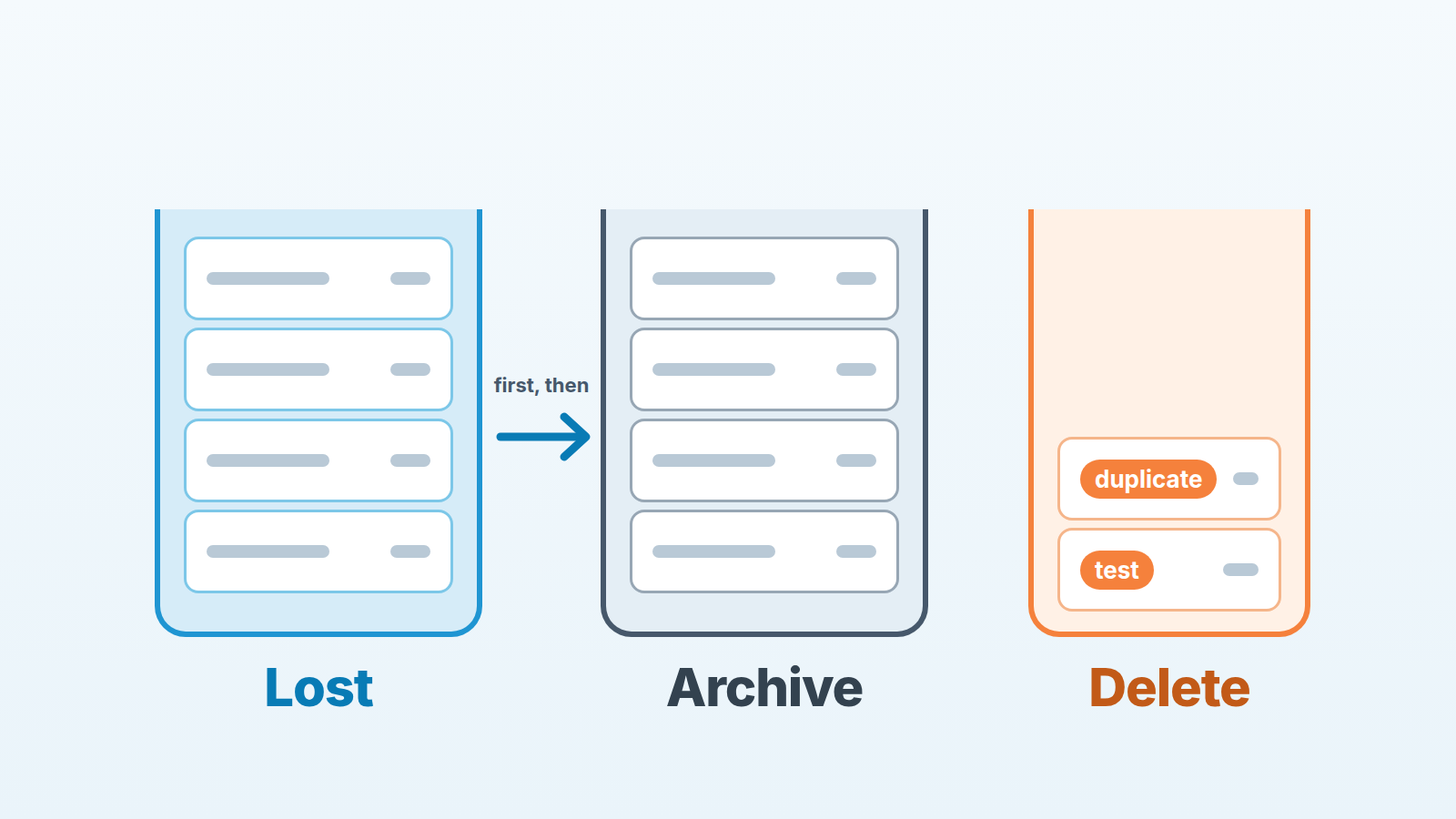
Close a dead deal as lost, with a reason, and then archive it. Archiving in Pipedrive keeps the deal’s status and its whole history but takes it out of the working list; it does not turn an open deal into a lost one, and it does not record why you lost. Delete only what should never have existed: duplicates and test records. Lost first, archive second, delete almost never. That is the whole rule. The rest of this post is why the order matters and how to run it once a quarter without breaking an automation on the way.
Nine hundred open deals and a delete button nobody wants to press
Picture a Pipedrive account. The one here is made up, but the shape is common. The deals list view shows 900 open deals. Filter by last activity older than six months and 600 of them are still there. Most have no next activity scheduled. Some carry a last note from a rep who left a year ago. The sales manager knows the pipeline total is fiction. She also knows that those 600 records hold emails, call logs and context that someone may need in a renewal, a dispute or a handover.
So nothing happens. Delete feels irreversible. Lost feels like booking 600 failures in one afternoon. The list stays at 900, and every forecast meeting opens with “ignore the top number”.
The way out is not courage. It is noticing that the manager is holding one button for three different jobs. Pipedrive gives you three actions for an old record, and each one answers a different question. Once the question is clear, the 600 are a lot less frightening.
Lost, archived, deleted: three questions, three answers
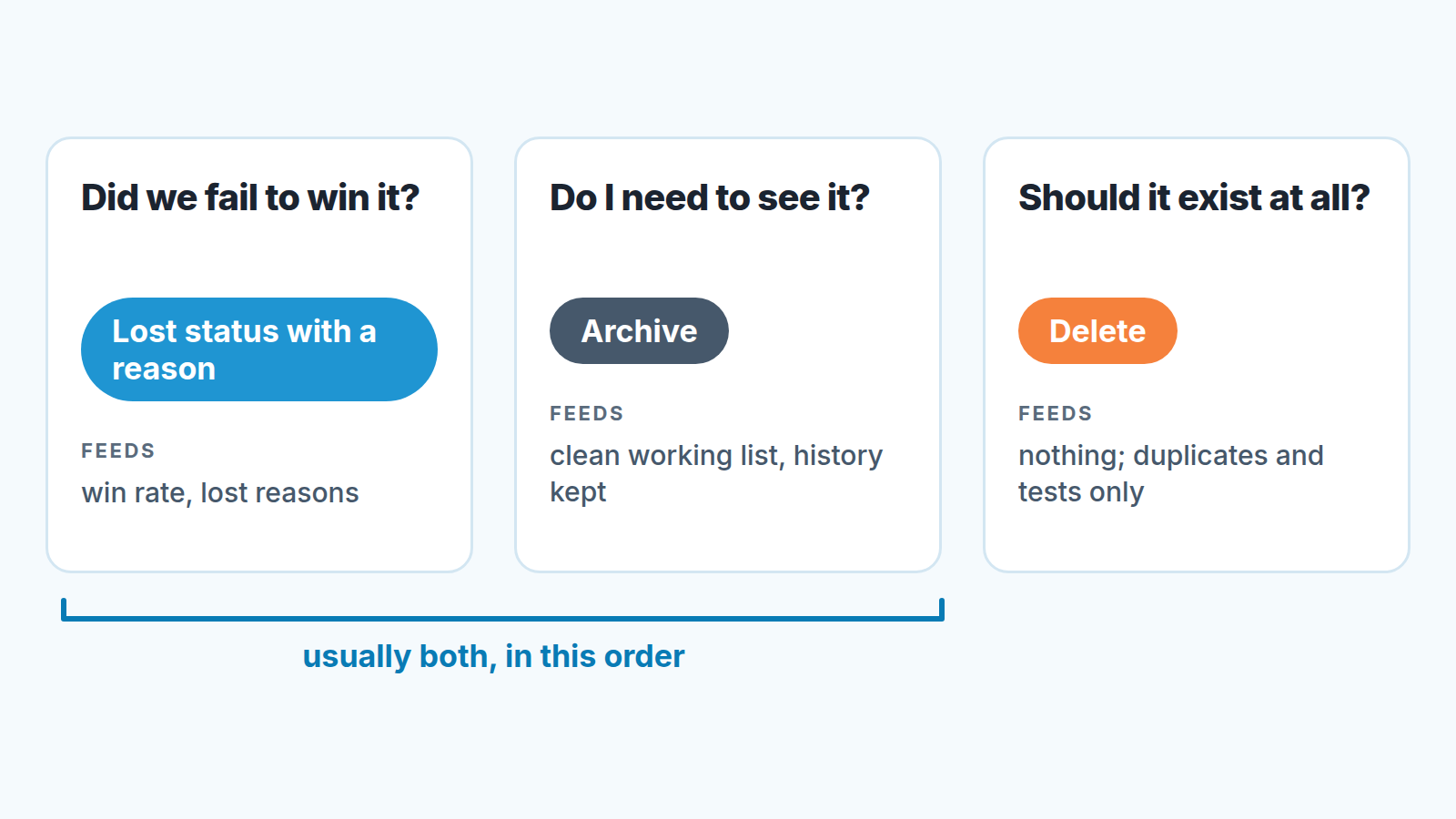
Lost answers the question: did we fail to win this, and why? Lost is a deal status, next to Open and Won, not a stage in the pipeline. Since August 2026 a toggle can keep won and lost deals in the pipeline view, but that changes what you see, not the status. In any CRM, a lost status with a reason is what feeds win rate and a lost-reasons report. A deal that quietly sits in a stage for a year is still counted in the pipeline, just never as a loss. We have written separately about when to close a deal as lost and about telling a stalled deal from a dead one; this post starts at the moment that call has been made.
Archive answers a different question: do I need to see this in my working list? Pipedrive’s help is specific here. An archived deal keeps its previous status, Open, Won or Lost; it gets an archive status of “Archived” plus a timestamp, and it leaves the active view without losing its history (Pipedrive: Archive deals and leads). The same page lists when to archive: no activity or updates in the past 6 to 12 months and no upcoming tasks; lost deals or cold leads that won’t be revisited; won deals that have been delivered; disqualified leads; deals from past campaigns or experiments; and records kept only for compliance or audits. The first scenario on that list covers open deals too. We are stricter on purpose: an open deal goes through the lost decision before it goes anywhere near the archive. Archive is not a decision. It is storage. Archiving also frees space under the usage limit, and we covered what happens when an account hits its limit.
Delete answers the third question: should this record have existed at all? A duplicate, a test deal from onboarding week, a lead imported twice from the same webinar list. Those do not belong in your win rate, they should not take up archive space, and nobody will ever need their history, because there is none. For everything else the answer is keep. A contact who asks to be erased is the exception, and there the choice is delete, anonymize or keep, item by item.
Here is the overlap that confuses people. The same dead deal is usually both lost and archived. Those are two fields not two alternatives. Status says what happened to the deal. Archive status says whether it sits in your working view. Picking one and skipping the other is how pipelines end up either cluttered with perfectly honest lost deals, or tidy on the surface with 600 open deals parked in the Archive tab and a win rate that lies.
What archiving keeps and what it blocks
Archive is more restrictive than most managers expect, and that is exactly why the order “lost first, archive second” matters.
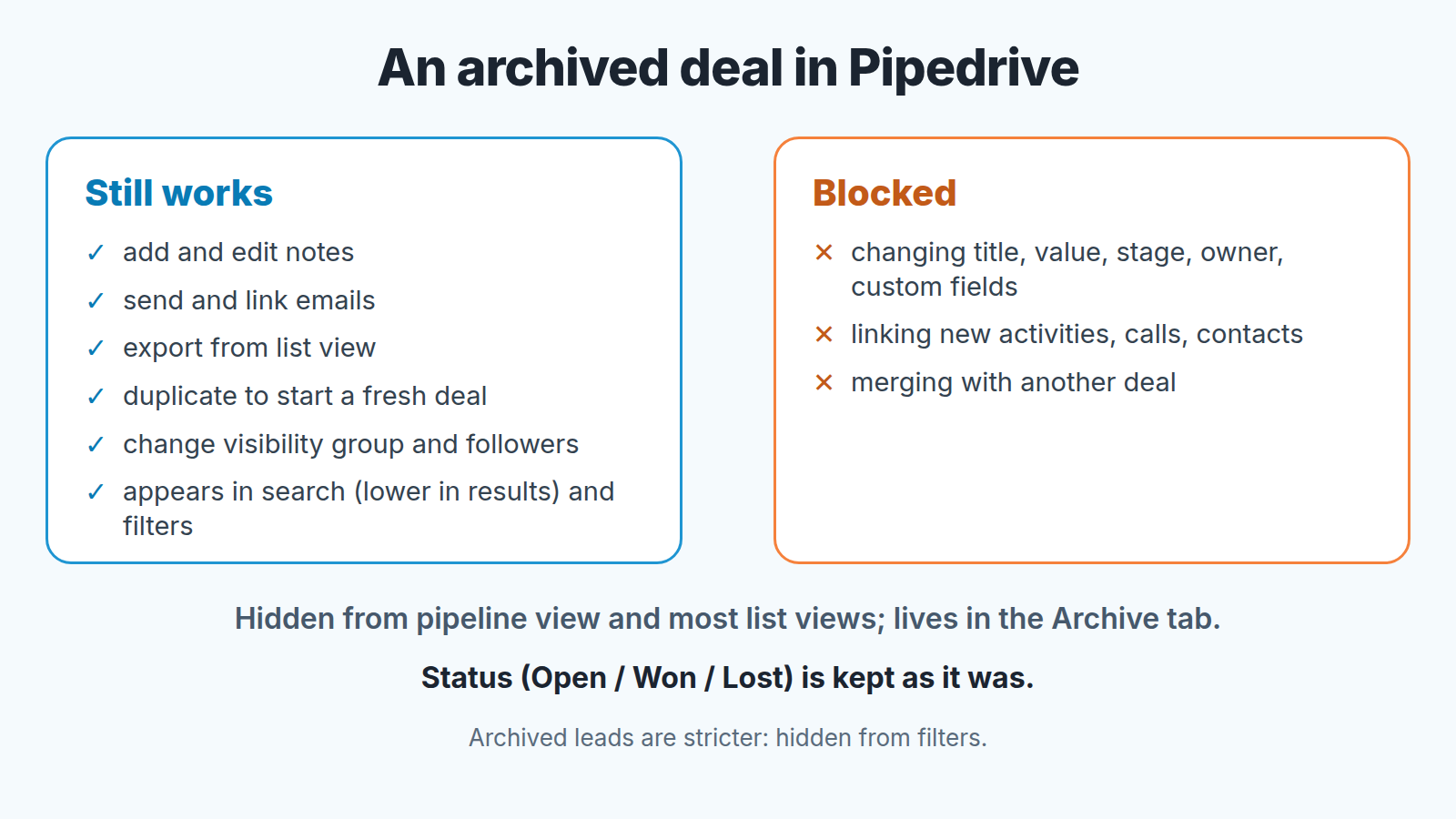
According to Pipedrive’s help page, on an archived deal you cannot change the title, value, stage, owner or custom fields. You cannot link new activities, calls or contacts. Archived deals cannot be merged, and archived leads cannot be converted to deals. They are hidden from most list views and pipeline views, and the standard list endpoints of the API do not return them (Pipedrive: Archive deals and leads). The FAQ compresses it to one line: emails and notes are allowed, new activities are not (Pipedrive: Archive deals and leads FAQ).
What stays open on an archived deal is narrower but useful. You can add and edit notes, send and link emails, export archived deals from the list view, duplicate one to start a fresh deal, and change its visibility group and followers. Archived deals still show up in search, lower in the results, and in filters. Leads are stricter: the FAQ says archived leads are hidden from filters and standard API endpoints and can be fully restricted from editing or linking. Pipedrive’s help lists Insights reporting as supported, using fields like “Archive status” and “Archived on”.
The practical consequence: archiving settles nothing. An open deal stays Open in the archive, and you can no longer link a new activity or call to it. So the status is set before you archive, while the deal is still part of your working list, and only then does it go away.
Two more lines from the FAQ bite later rather than now. If a deal’s pipeline or stage has been deleted since it was archived, the deal will not appear in any pipeline after unarchiving until you assign one. And a deal that was archived and then deleted comes back from the deleted items still archived. On limits: archived items count toward a separate archive limit, not toward active usage, and the number of active (non-archived) leads and deals depends on the plan. For a team pressing against its active limit, archiving is the release valve. For everyone else its housekeeping.
A quarterly sweep in four steps
Why quarterly? Pipedrive’s help gives 6 to 12 months without activity as one archiving scenario, and a pass every three months means no deal drifts past that line unseen. Sweep more often and you start archiving deals that are merely slow. Sweep less often and the list view grows back to 900. Archiving is one step; the monthly CRM data cleansing routine also covers owners, forecast fields and duplicates.
The order below is the method. Change the order and you get the archived-open-deal problem from the previous section.
-
Close dead deals as lost, with a reason. Filter open deals by last activity older than your threshold and no next activity scheduled, and go through the list with the rep who owns the deals, not instead of them. Criteria and reason codes are in when to close a deal as lost. A deal with a real next step gets a next activity instead and leaves the list. If the buyer said not now with a date rather than no, there is a middle option: convert the deal back to a lead instead of marking it lost.
-
Archive what is lost, won and delivered, or disqualified. That means the deals you just closed in step 1, plus won and lost deals with no updates in the last 90 days or so. Look at the count in the filtered list, then select a small first batch in the list view and click Archive, or set the Archive status field through the bulk edit drawer (Pipedrive: Archive deals and leads); our note on bulk edit safety has the habit. A single deal is archived from the “…” menu in its detail view or on its row in the deals list view. Archived deals live in the Archive tab of the Deals list view, and Unarchive sits in the deal’s detail view, or select several in the Archive tab and unarchive them together. Archiving other people’s deals needs the “Edit deals owned by others” permission, so this step normally sits with an admin or the manager rather than with each rep.
If the batch is large, export a copy before you archive, so you have a dated file of what those deals looked like on the day.
-
Delete duplicates and tests, and nothing else. This is the shortest list and should stay that way. Duplicates you noticed in steps 1 and 2 are merged first, so the surviving record keeps both histories; duplicate records in Pipedrive explains why merging beats deleting the newer copy. Test deals from onboarding and the import that ran twice go straight out. Bot submissions are different again: spam and junk leads from web forms get their own weekly sweep. If you catch yourself deleting a real lost deal “to keep things clean”, go back to step 2.
-
Look at what is left. After three passes, whatever is still open is the pipeline somebody intends to work. Filter the survivors to open deals with no next activity scheduled. That short list is the the sweep’s real finding: deals that are alive on paper and asleep in practice. Give each a next activity or a lost reason before the meeting ends, and you will not meet them again next quarter.
A disclosure, since step 4 is the one that keeps growing back: we build SalesBond, a sales management layer on top of the CRM a team already uses; we started with Pipedrive. It keeps that fourth list, open deals with no next activity, in front of the manager every week instead of every quarter, so the sweep finds a short list rather than 600. Check your CRM with SalesBond. The three decisions above still belong to a person.
Letting an automation archive for you, and what it can trigger
Pipedrive’s help gives the recipe in one example: use the Archive status as an action in Automations and archive won or lost deals with no updates in 90 days (Pipedrive: Archive deals and leads). Automations are available on Advanced plans and higher. This takes the routine part of step 2 off your hands. It cannot take step 1, because no automation knows why a deal was lost, and it should never touch step 3.
Two cautions, both from the same page. First, archiving is a change to the record, and the page says it plainly: automations and webhooks that depend on record changes may be triggered. If you have an automation that fires on a deal update to post to Slack, or a webhook pushing deal changes into a spreadsheet or a BI tool, a bulk archive of the 600 on a Friday afternoon can fire it for every one of them. Run the first bulk archive on ten deals and watch what else moves before you do the rest.
If that Slack channel is already noisy, trim what that channel posts before you archive anything in bulk.
Second, archive status is also a trigger. Pipedrive suggests using changes to the “Archived status” field to notify a user or log the change. That is handy as a weekly digest of what teh robot put away. It is also a loop waiting to happen if one automation says “on archive, update field X” and another says “on field X change, archive”. Before adding an archive automation, walk through who owns which automation in your account and read what each one listens to.
Our own preference for a team doing this the first time: let the automation archive won deals, and archive lost deals by hand at each sweep for two quarters. The manager watches the lost reasons fill in while the deals are still visible. Pick one of those lost deals and debrief it with the rep before it leaves the view. Only after those two quarters does the automation get lost deals too, and from then on reps learn that a lost deal leaves the view 90 days after they mark it, which takes most of the fear out of marking it.
A rule you can paste into your team’s notes
Old deals and leads: once a quarter.
Lost means we did not win it. Mark it lost with a real reason before you archive it.
Archive means we do not need to see it. Archive lost, won-and-delivered and disqualified records only. An open deal is never archived to avoid a decision.
Delete means it should never have existed. Duplicates and tests only, and duplicates get merged first.
The automation archives won or lost deals untouched for 90 days. Nothing else happens on its own.
Before any bulk archive: ten records first, then watch the automations.
Back to the manager with 900 open deals. After one sweep she has roughly 300 open deals plus the handful that got a next activity, lost reasons that finally say something, and most of the 600 sitting in the Archive tab, where she can still search them, email from them and export them. The Archive tab is where the history went, not where the decisions went. If the sweep turns up problems beyond old deals, such as stages nobody uses, that is a job for a full Pipedrive audit, and old deals are usually its easiest part.


