
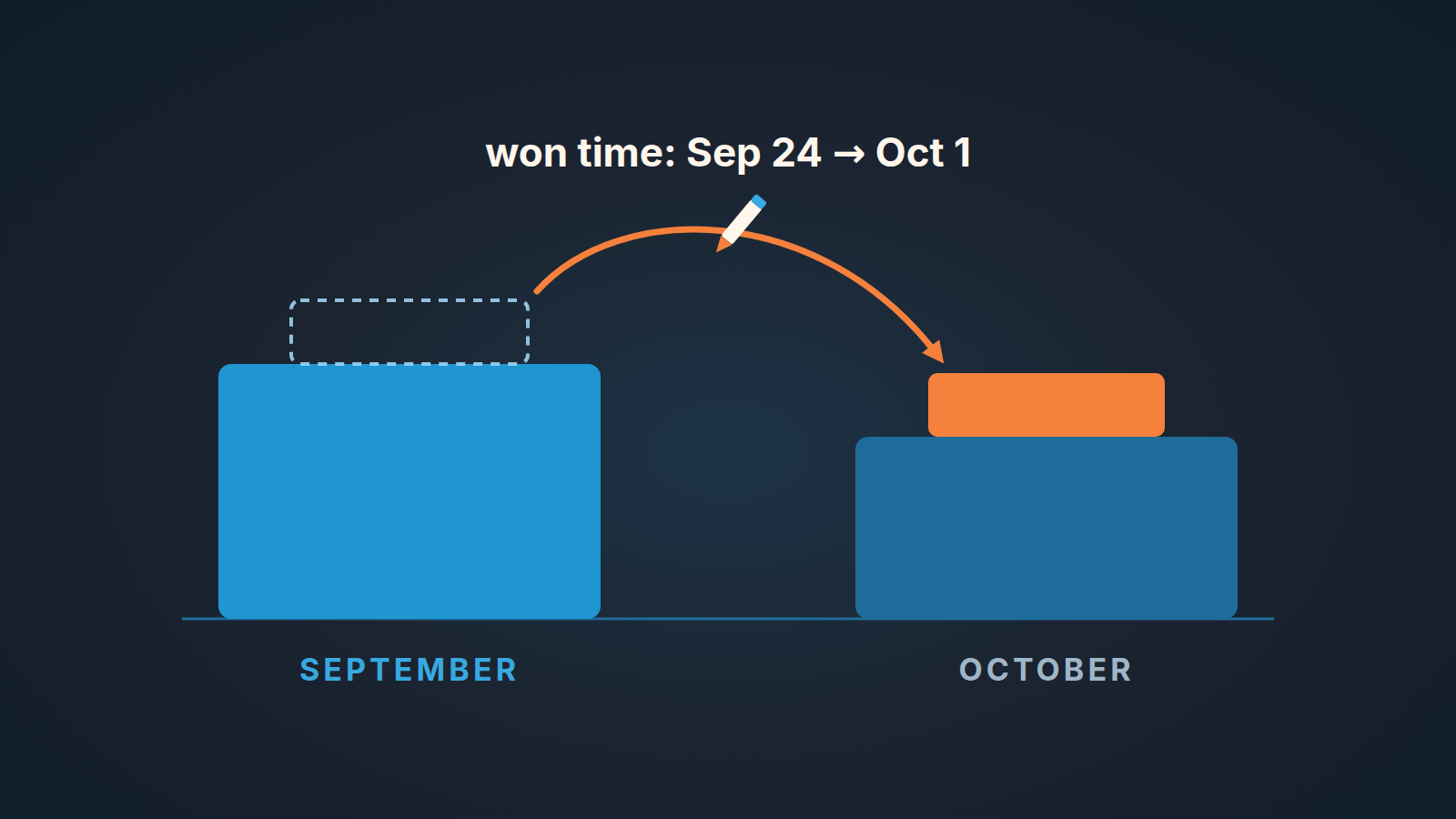
In Pipedrive’s Revenue forecast report, a won deal sits in the month of its won time, so editing that field moves the deal’s value from one month to another (Pipedrive: Insights reports, deal revenue forecast). Only users with deals admin permission can make that edit, from the pencil icon next to won time in the deal’s detail view or in the Deals list view (Pipedrive: how can I edit the deal won time). Our rule for a small team: one person holds that permission, the reason for every change goes into a note on the deal, and the manager reads the list of changed deals once a month before the number leaves the building.
That’s the whole article in one paragraph. The rest is why the rule matters more than it looks, and how to run it without adding a meeting.
Won time also decides, for each deal, which month’s bookings it lands in, which is not the same as when the deal was billed or recognized as revenue.
The September number that changed on October 2nd
A made-up scene, but one most managers will recognize.
Friday, September 25. The sales manager builds the slide for Monday’s review. September is a good month: three deals over the line in the last week, the total comfortably above plan. The slide goes out.
Friday, October 2. The manager opens the same Revenue forecast report for September to copy the final figure into the month-end sheet. The number is smaller. Not by a rounding error. By one deal.
Nothing was lost, and nobody deleted anything. One of the three late-September deals now shows a won time of October 1. A rep had marked it won on the 24th, when the customer said yes on the phone. The signed order came back on the 1st, and someone with deals admin permission moved the date to match the paperwork. Perfectly reasonable on its own. Except the September figure had already been shown to the team, and if commission is paid by the month a deal closes, the rep’s September payout just changed too.
The report did exactly what it’s built to do. Two people simply had two different ideas about what won time means, and nobody had written down which one wins.
Where won time comes from and who can edit it
Won time is the date field Pipedrive uses to place a won deal: the Revenue forecast report shows won deals by their won time. Won itself is a status, not a stage. A deal moves through your pipeline stages while it’s open, and at the end it gets marked won or lost; Pipedrive’s help describes won as the deal being “closed and a sale was made” (Pipedrive: how can I edit the deal won time). If you already pull won time into a spreadsheet as the end of the sales cycle, it’s the same field.
The same help page gives the case for changing it: a deal that was marked won prematurely. The edit is restricted to users with deals admin permission, and there are two places to make it:
- In the deal’s detail view, click the pencil icon next to Won time under Details, pick the date in the calendar and click Save.
- In the Deals list view, add the Won time column, click the pencil icon next to the value, pick the date and click Save.
Two things here matter more than the clicks.
First, the permission. On a small team the people with deals admin are usually the manager and maybe whoever set up the account. Reps can’t touch the field unless their permission set includes deals admin. That’s a good default, and the rule below leans on it.
Second, what the help page leaves out. It explains the button. It doesn’t say what happens to your reports afterwards, and it doesn’t describe how a change to won time shows up in the deal’s history. We don’t rely on any Pipedrive audit trail for this field. If you want to know why a date moved, the record has to be one you create yourselves.
Why the forecast report cares: open deals by expected close date, won deals by won time
The Revenue forecast report in Insights places deals on the timeline by two different fields. Open deals are shown by their expected close date; won deals are shown by their won time. Lost deals aren’t in the report at all (Pipedrive: Insights reports, deal revenue forecast). The report is available on the Growth plan and higher.
Put those two rules side by side and the month-end mechanics are plain. While a deal is open, the rep controls which month it lands in, through the expected close date. We wrote about what happens when that date keeps moving in the close date you keep pushing. Once the deal is won, control passes to a different field and a different person: won time, editable only by a deals admin.
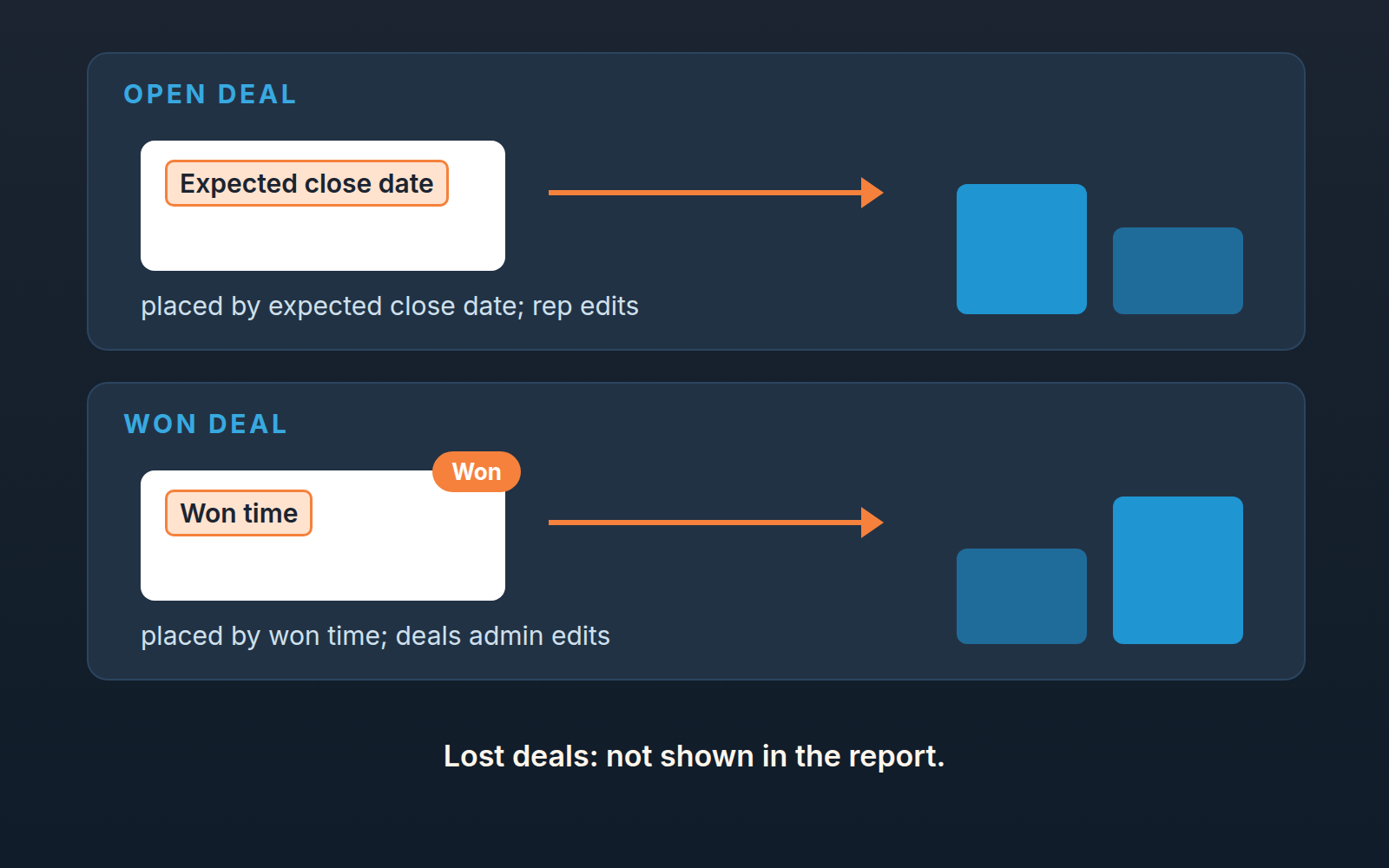
So a won deal with a won time of September 24 adds its value to September. Edit the won time to October 1 and the same deal adds its value to October instead, and September drops by that amount. Nothing in the report tells you the date moved. It shows the current value of the field, which is what a report should do.
This is also why we’d rather count on won time for any backward-looking number. Expected close date was the rep’s guess about the future; won time is meant to record something that happened. The trouble starts only when the the record itself is edited after the month has been reported. So when is that fine?
When moving the date is legitimate, and when it’s a smell
Pipedrive gives one reason to edit won time: the deal was marked won too early. That reason holds up, and on a small team it comes up more often than you’d think. A rep hears “yes” on a call and clicks won. The order form arrives a week later. If your team’s definition of won is “signed order received”, the first click was premature and the won time should show the day the order arrived. A customer who cancels later is a different case, and how to record a cancellation after Won has its own rule.
The edit isn’t the smell. The direction, the timing and the silence are.
Direction: a date that moves backward, into a month that’s already closed and already short of plan, deserves a question. “The customer actually agreed on the 30th” may be true. It’s also exactly what someone would say if they wanted the deal to count toward last month’s number.
Timing: an edit made on the 1st or 2nd, while the previous month’s figure is being finalized, changes a number people have already seen. The same edit made on the day the paperwork arrives, before anyone has reported anything, changes nothing that mattered yet.
Silence: a changed date with no note is the real problem. One sentence on the deal would settle it. Without that sentence the manager is left reconstructing a story a month later, from memory, in teh middle of a quarterly review. Reports built for a small-team QBR are only as reliable as the quietest edit behind them.
We’d say it this way at the team meeting: moving won time to match the real close is good hygiene. Moving it to make a month look different is a forecast problem wearing a hygiene costume.
A one-paragraph rule for a small team: who edits, what gets written down
Here’s the rule, short enough to paste into your sales process doc.
Won time is our closing date for reporting and, if we pay by closing month, for commission. Reps don’t change it. If a deal was marked won before our definition of won was met, the rep asks the sales manager, who is the only deals admin for this purpose. Before changing the date, the manager adds a note on the deal: the old date, the new date, and the reason in one sentence. Once a month’s figure has been reported, any change to a won time in or out of that month is announced to whoever received the figure.
Three choices in that paragraph are deliberate, and you may make them differently.
We tie the rule to a definition of won. Without one, “premature” means nothing. Pick something checkable: signed order, first invoice sent, payment received. If you also pay commission by the month a deal closes, your commission plan should name the same definition, and the two documents should agree.
If most of your wins also land in the last week of the month, check the plan before the reps: count won deals by day of the month.
We make the manager the single editor. Reps aren’t the issue. The person who reports the number should be the person who can change what feeds it, and one owner for the field means one person who knows every change that happened.
And we put the record in a note on the deal rather than anywhere else. The note travels with the deal, anyone who opens the deal sees it, and it doesn’t depend on any Pipedrive feature beyond notes. A line like “Won time 24 Sep → 1 Oct. Marked won on verbal yes, signed order received 1 Oct.” takes fifteen seconds to write and saves the fifteen-minute argument in the review. The same notes make the monthly commission reconciliation faster, because every moved won time already has a reason next to it.
Month-end: the five minutes you spend on it
The rule only works if somebody checks it, and the check is small. On the first working day of the new month, before the previous month’s figure goes anywhere:
- Open the Deals list view and filter the list to won deals with a won time in the month you’re closing, plus the first few days of the next one, then add the Won time column. A deal moved out of September won’t be in September’s list anymore, so look a little past the boundary.
- Scan for won times in the last days of the old month and the first days of the new one. Those are the deals where a small edit changes which month gets the revenue.
- For any deal you don’t remember closing on that date, open it and read the notes. If the rule is being followed the reason is there. If a date looks moved and there’s no note, that’s the conversation to have, with the rep and with whoever else holds deals admin.
- Write the figure down together with the date you took it. If a legitimate correction comes in later, report it as a correction, not as a quietly different number.
That’s the whole routine. It fits into the same sitting as pulling the other month-end numbers from Pipedrive; if you already run a short set of pipeline health reports, this is one more filter on that list, not a new ritual. During the month, a toggle can also bring won deals back in the pipeline view for the weekly review.
A disclosure, since this sits in our territory: we build SalesBond, a sales management layer on top of the CRM a team already uses; we started with Pipedrive. Deal Health checks every deal in the connected CRM against more than 20 rules, in categories that include Data and Forecast, and shows which deals broke which rule and what to do about it. A list like that gets a manager to the suspicious deals faster. It won’t decide whether a date deserved to move; that stays a judgment call, and the note on the deal is what makes it a short one. If you want to see how the deals in your pipeline look against those rules, check your CRM with SalesBond.
The September number from the top of this article didn’t change because anyone did something wrong. It changed because a field that decides which month gets the revenue had two unwritten definitions and no owner. Give it one definition, one editor and one sentence per change, and the number you show on the 25th will still be the number on the 2nd.


