
Sales commission tracking, for a team of five without commission software, is a monthly reconciliation: the payout sheet on one side, the CRM report of deals won that month on the other, and three fields that have to match on every row: the won date, the amount, and each rep’s share of the credit. If those three fields cannot be edited after the month is closed, a spreadsheet is enough. If they can, software will not save you either, because the argument is about the data, not the formula.
This article is about the reconciliation and the close. Which plan to pay (flat rate, tiers, accelerators) is a separate question, and we covered it in sales commission structures for a small team. Here the plan already exists. The question is how to pay it correctly every month from what the CRM actually says.
The three numbers every payout depends on
When the sheet and the CRM disagree about a payout, the disagreement almost always sits in one of three numbers.
The won date decides which month a deal belongs to: not the signature, not the invoice, but the day the deal was marked won, because that is the field the report filters on. If the plan pays on cash received instead, that date has to live somewhere and someone types it in by hand, which is exactly where the sheet and the CRM start to drift. We would rather pay on won date and claw back than pay on cash and chase bank statements; for teams that do need cash first, there is a prepayment rule for deals won but not paid.
The amount is the base of the formula. The credit share says who gets paid, and once two reps work a deal the split has to be data in the CRM, not a line in a chat thread.
What each of those fields should mean (gross or net, taxes and setup fees, currency, who is allowed to edit them) belongs in the plan, and we listed it field by field in the CRM fields your payout depends on. Everything else on the sheet is a formula applied to these three numbers. Get them right and the formula is boring.
Pull closed-won from the CRM, not from memory
The report is a filter, and it is the same filter every month: status is won, won date is inside the month, one row per deal, columns for deal name, won date, amount, currency, owner and the split where there is one. Save it in the CRM under a name a stranger would understand , something like “Commission, closed-won, monthly”. Rebuilding it from memory each time is how one month quietly includes a deal that the previous month already paid.
Export that report and paste it into the sheet. Do not retype it. Retyping is where a 4 becomes a 9, and where a rep’s recollection of closing a deal “on the last day of the month, late” replaces the CRM’s record of it being marked won on the first of the next. Only one of those two versions holds up in a dispute.
Multicurrency needs a line in the plan before it needs a column in the sheet. If deals are won in more than one currency, decide which rate applies: the CRM’s conversion on the won date, or a fixed rate for the month. Without that rule the same deal pays a different commission depending on who exported the report and when.
Edge cases that change a payout: split credit, won date edits, cancelled orders and clawbacks
Three situations produce most of the lines where the sheet and the CRM disagree. Each one needs a rule written before it happens, not during the argument.
Split credit first. Two reps on one deal is normal in a five-person team: one opened it, the other closed it after a handover. The question is not whether to split but where the split is recorded. If the CRM supports it natively, use that and let the report carry the percentages; we wrote up shared deal credit in Pipedrive and opportunity splits in Salesforce. If the CRM does not, the sheet needs a split tab that the manager owns, and the reconciliation checks that the splits on each deal add up to its amount. Otherwise a deal can be paid at a hundred and twenty percent by accident and nobody notices until the the next quarter.
Won date edits are the quietest problem. A deal marked won on the second gets its won date moved back to the thirty-first. Sometimes that is honest, because the rep forgot to mark it on the day. Sometimes it is a quota month being rescued. The reconciliation cannot tell which, so the rule has to be procedural, and won-time edits at month end in Pipedrive shows how one edit moves revenue between months. The mechanics differ by CRM. The rule does not.
Cancelled orders cost money twice. A deal is won, the commission is paid, and then the customer cancels or asks for a credit memo that cuts the value. The plan has to say whether commission is clawed back and for how long after the won date. The sheet handles a clawback one way only: a negative line on the next month’s sheet that references the original deal, never an edit to a month already paid. Whether the report even sees the cancellation depends on how the CRM records it; see a cancelled order after won in Pipedrive and a credit memo on a won deal in HubSpot.
The monthly commission reconciliation in 30 minutes
A monthly commission reconciliation is a fixed-day check that every row on the payout sheet matches the CRM’s closed-won report on won date, amount and credit share, with every difference fixed in the CRM before anyone is paid.
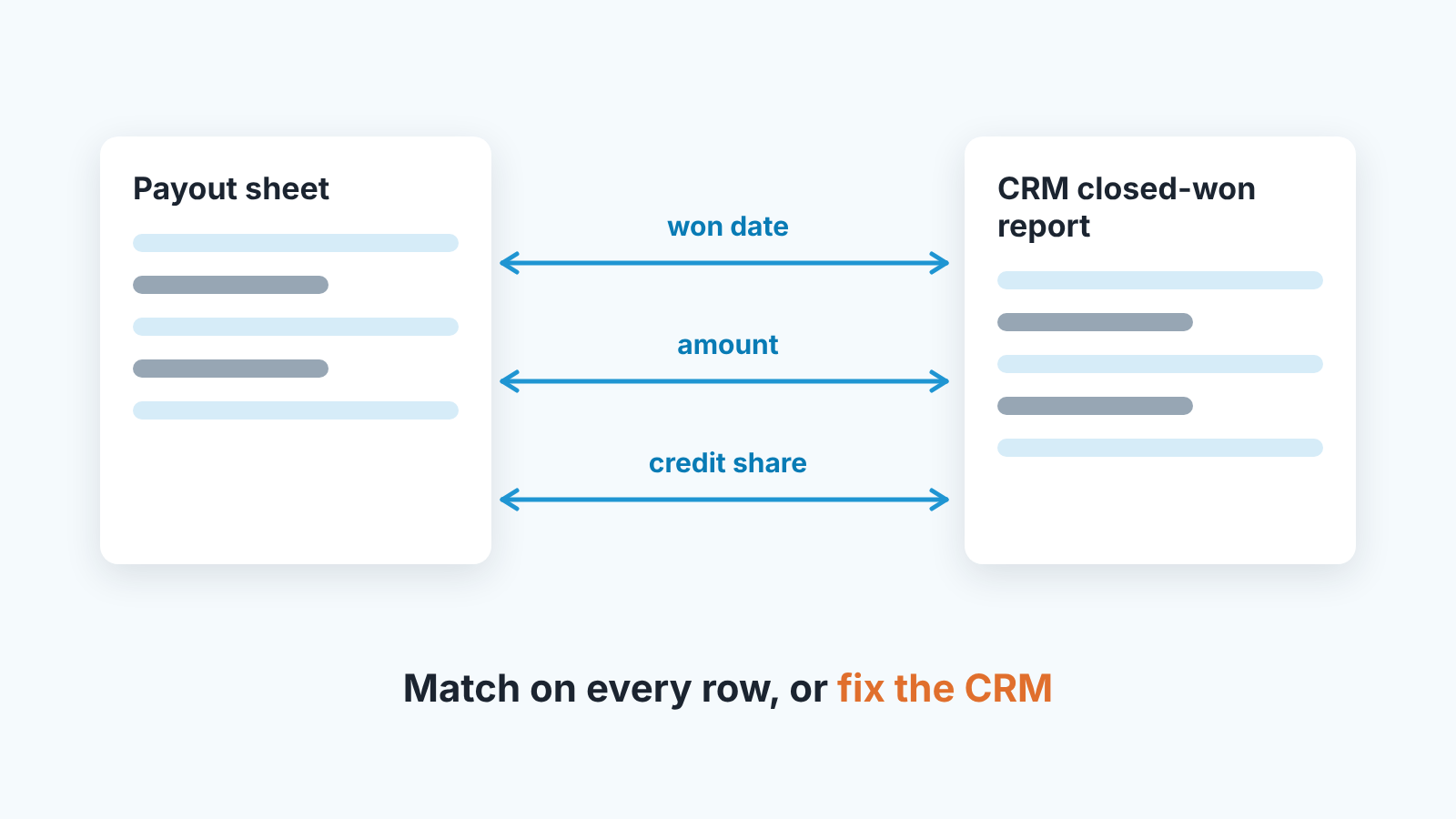
It starts early in the following month. Run the saved report, export it, and paste it into a tab called “CRM” in the payout sheet. From that moment the tab is read-only and nobody types into it.
Then compare two totals per rep: the number of deals and the sum of amounts, CRM tab against payout tab. If both match for every rep, you are most of the way done. If they don’t, list the differences. A deal on one side and missing from the other. A deal on both sides with a different amount, won date or owner.
Here is the rule that keeps the sheet honest: fix the CRM, not the sheet. If the CRM is wrong, the manager corrects the deal and the report is run again. If the sheet is wrong, the CRM tab is pasted again and the payout tab recalculates. The only columns allowed to exist in the sheet and not in the CRM are the ones the plan defines, like the rate, the tier and the clawback.
Last come the adjustments: clawbacks for deals cancelled since the previous close, and any split corrections the manager approved in writing. Apply the formula, send each rep thier own rows, and get a confirmation before payroll, not after, because an objection after payroll becomes a correction on next month’s sheet. Then lock the tab.
We think thirty minutes is realistic for a team of five when the totals match on the first try. When they don’t, the time goes into fixing the CRM, and the cause is usually a deal somebody forgot to mark won or marked won twice. Both are CRM hygiene rather than commission problems, which is why a monthly CRM data cleansing routine makes this one shorter.
Lock the month, and keep it locked
Who may edit a won deal after the close is a permission question, and the structures article covers it. What it leaves out is the close itself.
Put the close date into the plan as a fixed day of the following month, so a rep who marks a deal won on that day knows it is next month’s money. Anything changed after it is an adjustment on the next sheet, and the closed sheet is never reopened. We’re strict about this for a reason that has nothing to do with trust. A sheet that can be reopened is a sheet nobody can quote in a dispute. A locked sheet can be wrong, but it is wrong in a way both sides can read and the correction sits next to it with a date and a reason.
So what happens when a rep moves a won date after the month closed and the manager agrees the change is legitimate? Nothing changes on the closed sheet. The deal moves between months as a pair of lines on the next sheet: a negative line for the month it left and a positive one for the month it joined, both referencing the deal.
Where the CRM cannot stop an edit to a single field, a second saved report does the catching instead: won deals whose last modified date falls after the close. The manager reviews it before the next payout. It finds the edit after the fact rather than preventing it, but it is still a record, and a record settles arguments.
When a commission spreadsheet stops being enough
Vendors will tell you the spreadsheet is already not enough. Everstage, which sells commission software, argues that spreadsheets invite manual-entry errors and do not scale as the team grows, while granting that they “can work well when your team is small” (Everstage: how should you track your sales commissions). Read it as the position of someone with a product to sell. Free templates like Vena’s commission tracking spreadsheet solve the formula side of the sheet. Neither solves the data side, which is the reconciliation above.
Our own line is drawn by the data, not by headcount. The sheet stops being enough when splits are the rule rather than the exception. Or when tiers depend on cumulative attainment across periods and the formula becomes something only its author can audit. Or when more than one person legitimately needs to edit won deals after the close, or currency rates move inside a month and the fixed rate starts to feel unfair to whoever sold in the wrong currency. Hit two of those and the reconciliation takes an afternoon instead of 30 minutes, and software starts costing less than the afternoon plus the argument.
A disclosure, since we are at the vendor question ourselves: we build SalesBond, a sales management layer on top of the CRM a team already uses; we started with Pipedrive. It does not calculate commissions. It checks, every day, whether the CRM says what the team believes it says, and a team whose won deals are clean on the first of the month spends very little of its thirty minutes fixing the CRM. If that is the part that keeps breaking, check your CRM with SalesBond before you shop for commission software.


