
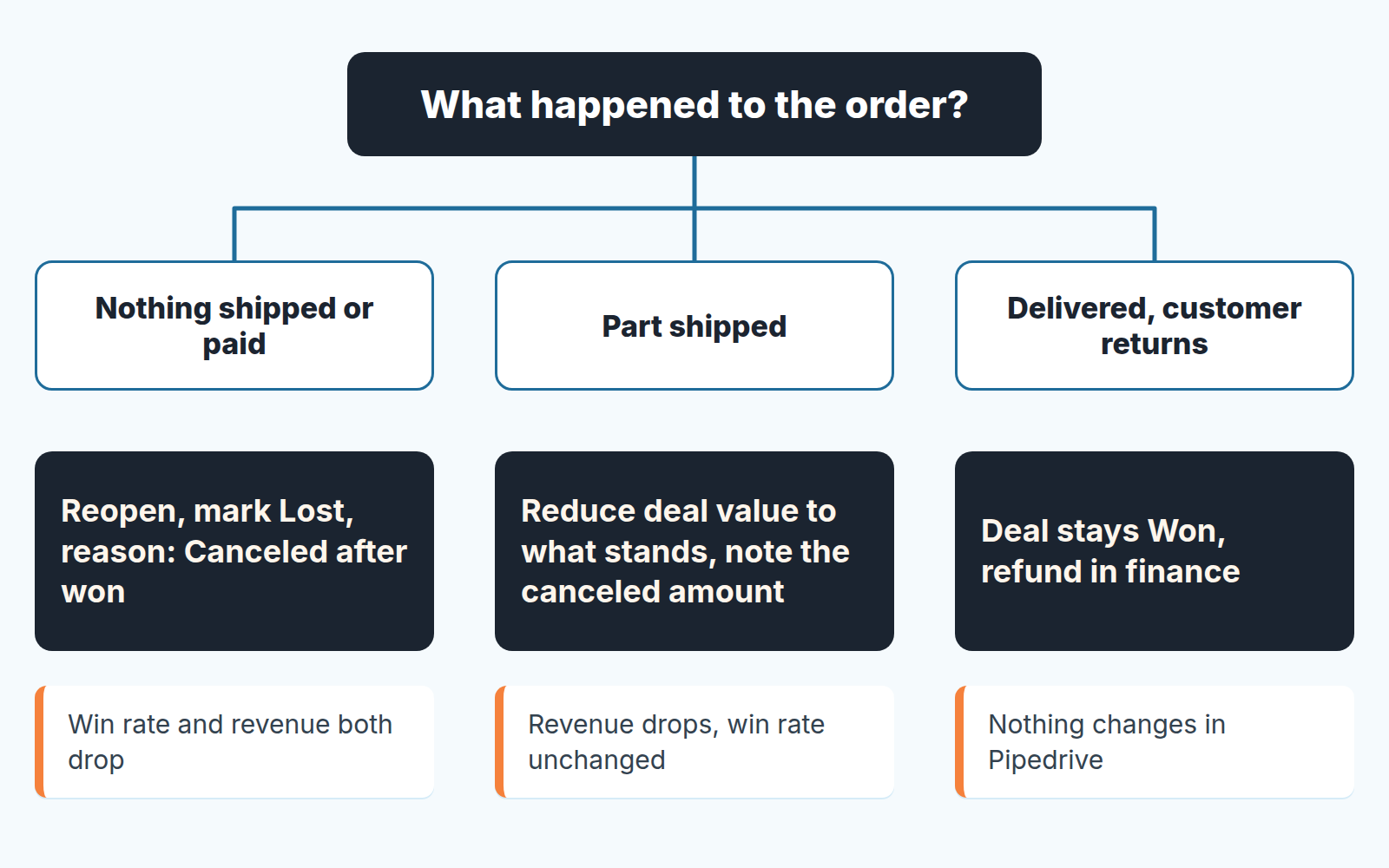
When a customer cancels after the deal is already Won in Pipedrive, don’t delete the won deal, and don’t quietly flip it either. Pick one rule per case and write it down once. If nothing was delivered and nothing was paid, reopen the deal and mark it lost with the reason “Canceled after won.” If part of the order shipped, shrink the deal to what stands and record the canceled remainder where you can find it later. Then count cancellations as their own number, separate from win rate, so neither your revenue nor your conversion report has to lie to cover for a customer who changed their mind.
Why a cancellation is not an ordinary Lost
A lost deal never made it into your numbers. A canceled one did. The moment a rep clicked Won, the amount landed in the period’s won revenue, the deal joined the winning side of the conversion report, and the manager may already have read it out at the Monday meeting. Pipedrive counts a won deal as one that went through every stage of the pipeline, which is why it sits in your win rate right now (we unpacked that quirk in the win rate article).
So the question is not “how do I mark this lost.” It is “which number do I correct, and which do I leave alone.” Correcting the revenue is obvious: money that will not arrive should not be counted as arrived. Correcting the win rate is a judgment call. The rep did win the deal. The customer later walked. Those are two different facts, and a CRM with two statuses, Won and Lost, has no clean place for the second one.
Hence a rule per case. Reopening and marking lost, the usual reflex, is right for one case and wrong for the other two.
Three cases, three different records
Before touching the deal, ask one question: what has actually happened in the real world? Every cancellation we have seen falls into one of three buckets.
- Canceled before anything shipped or was paid. The sale did not happen. This is the only case where the deal should stop being Won.
- Partially canceled. Some of the order was delivered or invoiced, the rest will not be. The sale happened, smaller.
- Canceled after delivery. The customer wants to return goods or unwind a completed sale. That is a refund, and a refund is a finance process, not a pipeline event. If the order stands and finance only issues a credit memo against a won deal, that case has its own rule: leave the deal alone and record the credit next to it. The deal stays Won; the money comes back through accounting. We won’t cover it here.
The first two are the the ones that break reports, and they break them differently.
Reopen a won deal or shrink it: the three ways to record a cancellation
Pipedrive gives you three usable moves. None of them is free.
Reopen the deal and mark it lost. Reopening puts a won deal back in the pipeline as open, and you then close it as lost with a reason. The cost shows up in the conversion report. Pipedrive’s funnel conversion treats a Won deal as having completed every stage, no matter where it was closed, and a Lost deal as one that stopped at a specific stage (Pipedrive: Insights deal conversion). Reopen and mark lost, and the deal moves from the won side to the lost side, at whatever stage it was sitting. The period’s won revenue drops by the deal amount, which is what you want. The win rate drops too, which is right only in the first case, where the sale never really happened.
Know what happens to the dates before you click. Per Pipedrive staff on the developer forum, the API keeps a separate first_won_time with the moment the deal was first marked won, even after a reopen, while won_time follows the current status (Pipedrive developer community: Reopen timestamp through API). That field is API only. In the interface don’t expect the deal to keep showing its original won date the way it did; the record of when it was won and reopened lives in the deal’s history, which we covered in the deal changelog article.
Reduce the deal value and keep it Won. This is the move for a partial cancellation. Edit the value down to what was delivered or will be, and leave the status alone. The cost: the original amount disappears from the deal’s face, and anyone reading the won report next quarter will see the smaller number as if it had always been the number. So the canceled part has to be written somewhere. A note on the deal is the minimum. A custom money field, call it “Canceled amount,” is better, because a note can’t be summed and a field can. If your deals use products, remove or reduce the line that was canceled instead of overwriting the total, so the deal still explains itself.
Leave the deal Won and record the cancellation in a field. Some teams would rather not touch status at all, even when nothing shipped. We think this is the wrong default: the win rate stays intact, and the won report quietly overstates revenue until someone remembers to subtract.
One thing not to do: a negative deal. A second deal with a minus value to cancel out the first produces a correct total and a wrong count of everything else. Deal count, average deal size and conversion all get a phantom entry, and you will be explaining it for years.
A rule a five-person team can keep
Pipedrive has no permission for reopening a won deal. The Deals section of its permission sets covers changing a deal’s owner, deleting deals, converting them to leads, merging duplicates and editing won/lost dates, and that’s the list (Pipedrive: permission sets). Editing the won date is it’s own trap, covered in how one won-date edit moves revenue. The reopen itself you govern with a team rule, not a setting. Ours is short.
- Only the manager reopens a won deal. The rep asks, in the deal, with one line saying what the customer canceled and when.
- A reopened deal is closed again the same day, as lost, with the reason “Canceled after won.” Never left open overnight, because an open deal that used to be won looks like pipeline and is not.
- Every cancellation gets a note with three facts: the date the customer canceled, what they said, and whether anything had shipped or been invoiced. If your closed-won handoff already records what the customer agreed to, this note takes a minute.
- Partial cancellations do not get reopened. Value down, “Canceled amount” filled, note written.
The lost reason is the load-bearing part. Pipedrive lets a company keep up to 100 lost reasons, predefined by a deals admin or typed freely, and a reason you set shows in the deal’s details, as a column in the list view, and as a filter in Insights under Reports > Deal > Performance (Pipedrive: lost reasons). Add “Canceled after won” to the predefined list so nobody types a variant of it. If your lost reasons list is already a mess, sort it out first. A cancellation reason buried among twenty near-duplicates will not be filtered by anyone.
The cancellation report, and what it says about qualification
Once cancellations carry their own reason and their own field, you can look at them as a group, and the group is more interesting than any single case. Before it becomes a record, someone has to take the call, and we wrote up the save call separately.
Filter lost deals by the reason “Canceled after won” in the Performance report, and put “Canceled amount” on the won deals in a list view. Four columns tell the story: who owned the deal, how many days passed between won time and the cancellation note, where the deal came from, and what the customer said. Why bother? Because a cancellation shortly after Won is usually a deal that was marked won too early. The signature was real; the decision was not. Someone upstream had not signed off, or the customer was still comparing a second quote.
Read it quarterly, not weekly. A single cancellation is noise. Three from the same lead source, or three from the same rep inside two weeks of Won, is a qualification problem with a name on it, and it is a far cheaper thing to fix than a win rate that drifts for a year with nobody knowing why. A cancellation count sitting next to the win rate is what makes the win rate readable.
If cancellations keep landing before the first payment, the real question is when you call a deal Won at all, which is what Signed but not paid is about. And if moving won dates between months starts to look like a shortcut, see the won-date warning above. A cancellation is different from both: a deal that was correctly Won on the day and later stopped being a sale.
What to say to the customer
The message to the customer is the half people get wrong, usually by writing too much.
Confirm the cancellation in writing the same day, in two or three sentences. Say what you understood was canceled, in their words and what, if anything, still stands. Ask one question only if something is genuinely unclear, such as whether the shipped part stays. Don’t negotiate or ask why in that message. The “why” belongs to a call a few days later, when the customer is not bracing for a fight, and that call is where your lost-reason note gets its real content.
We build SalesBond, a sales management layer on top of the CRM a team already uses; we started with Pipedrive. Its Deal Health checks every deal in the connected CRM against more than 20 rules across activity, data, progression and forecast, shows the specific violations and explains what to do about each. That is useful upstream, while a deal is still open, because missing fields and stalled activity are often where “won too early” starts. To see what it finds in your own pipeline, check your CRM with SalesBond.


