Deal slippage is when a deal forecast to close in one period gets its close date pushed into a later one. A close date that has moved twice is no longer a date, it’s a hope. Count the pushes, log why each one happened, and treat a deal pushed twice or more as at-risk until the buyer gives a reason you can check.
That is the whole method. Across a pipeline, the share of a period’s forecast deals that slip into the next period is your slip rate; for a single slipped deal, what matters is the history of its pushed close date. The rest of this article is how to track both in Pipedrive without buying a forecasting tool.
Why the fourth push is a different deal than the first
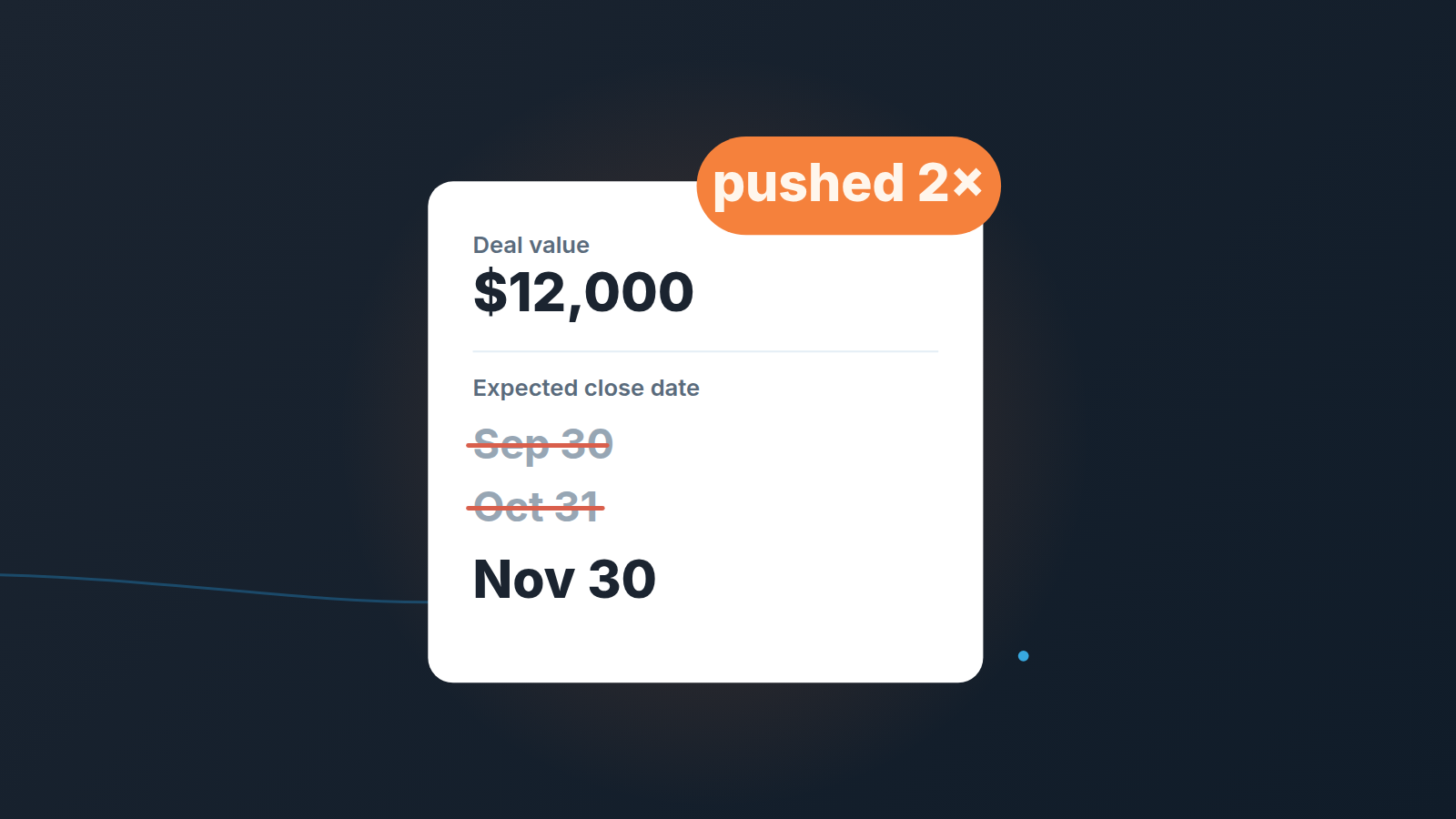
Take a made-up but very ordinary deal. $12,000, a 20-person agency, demo went well. The rep sets the expected close date to September 30. On September 28 the buyer says legal needs another week, so the date becomes October 31. At the end of October the champion is “still waiting on budget sign-off” and the date moves to November 30.
Nothing about the deal card looks alarming. The value is the same, the stage is the same, and the date is in the future again. If you only look at the pipeline today, this deal sits in your November number exactly like a deal that was set for November 30 from day one.
It isn’t the same deal, though. The first push came with a concrete reason (legal review) that you could ask about. The second came with a vague one. A third push usually comes with no reason at all, because by then the rep is editing the date to make the deal stop showing up as overdue.
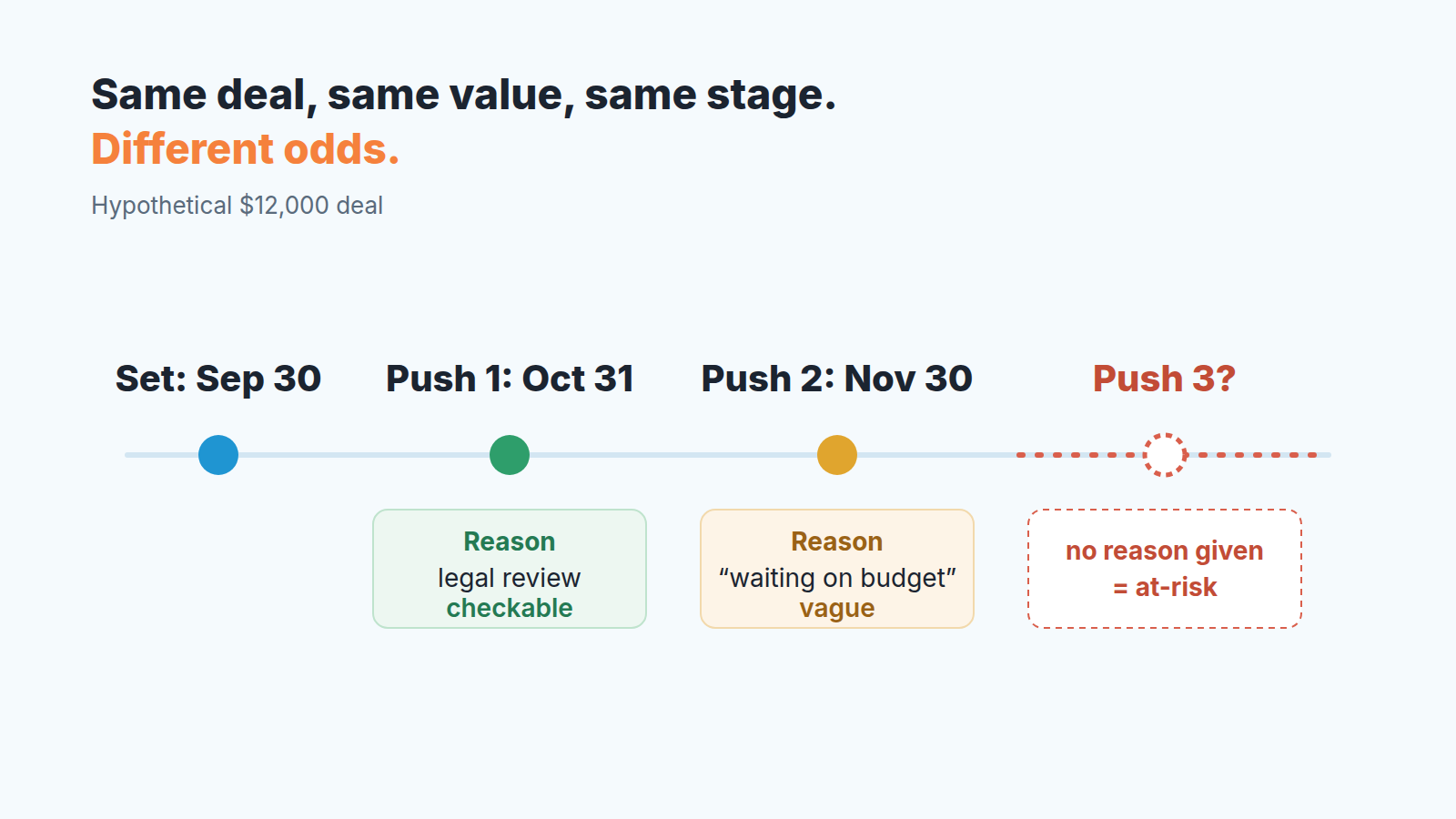
So the signal isn’t the date. It’s the history of the date. A pipeline that shows only the current value of “Expected close date” throws that history away every time someone clicks save. And the forecast view has a second way to erase it: one drag on the forecast view rewrites that date too.
When the stated reason for a push is legal review, here is how to track deals stuck in legal and procurement.
Two kinds of push: the buyer moved it, or you did
Not every push is bad news, and a rule that treats them all the same will get ignored by your team within a month.
Some pushes are the buyer telling you something true about their calendar. Procurement added a security questionnaire. The signer is on leave until the 14th. Their fiscal year starts in January and they would rather book it there. A pushed date is a different story for deals with a year-end budget deadline, because if the money expires on December 31, a slip into January can mean the deal is gone. These pushes have a shape you can recognize: the reason is specific, it names a person or a step, and you could verify it with one email. A deal that moves for a reason like that can be healthier after the push than before, because now you know about a step you had missed.
The same test applies when the buyer keeps rescheduling the meeting itself: one move with a specific reason is normal, a pattern is a signal.
The other kind of push starts on your side. The rep set an optimistic date in the first call because the form asked for one. Nobody on the buyer side ever agreed to it. When it arrives, the rep moves it a month out, because a month feels safe. The buyer may not even know there was a date. When the buyer is tied to another vendor, the honest date comes after the notice deadline of their current contract.
A common source of repeat pushes is a pilot with no end date, where the close date moves because nobody ever wrote down when the buyer would decide.
You can usually tell which kind you’re looking at by asking one question: who said the new date first? If the answer is “the buyer, in writing”, it is a buyer push. If the answer is “I figured end of month is realistic”, it is a seller push, and the deal has probably been guessed at from the start. We treat seller pushes as the stronger risk signal, because a changed plan is normal and a missing plan is not.
Finding slipped deals in Pipedrive
Pipedrive does keep the trail. In a deal’s detail view, the Changelog tab under History lists changes by date, and the expected close date is one of the fields it records (Pipedrive: deal detail view). That is fine for a single deal you are already worried about, and we wrote up how to read the Changelog before a forecast call. It is slow when you want to find every deal that has slipped.
Rotting won’t catch it either. Pipedrive’s rotting period is based on the deal’s last updated time, and it ignores the next activity date (Pipedrive: the rotting feature). A rep who pushes the date is updating the deal, so a slipping deal can look perfectly fresh. We wrote more about what rotting does and doesn’t tell you in our guide to rotting deals in Pipedrive.
What we set up instead is small:
- Add two custom deal fields (Pipedrive: custom fields): a numeric field called “Close date pushes” and a text field called “Last push reason”.
- Agree on one habit. Whenever a rep changes the expected close date, they add 1 to the push count and write the reason in a sentence. Who proposed the new date goes in that sentence.
- Build a filter: open deals where “Close date pushes” is 2 or more. Save it and share it with the team.
- Add both fields as columns in the list view, next to value and expected close date, so the manager sees count and reason without opening each deal.
The counter depends on reps actually incrementing it. That is its weak spot and the Changelog is your spot check: once a month, open three deals from the filter at random and compare the count with the history. If the numbers drift, the habit needs a word at the next team meeting rather than a new tool.
For a simpler weekly check, a saved Insights report of open deals whose expected close date is already in the past does the job; the setup is in our pipeline health reports guide.
A push rule your team can remember
A rule works when a rep can apply it in the moment, before they press save. Ours is three lines:
- First push: log the reason and who proposed the new date. If the reason is specific, the forecast stays as it is.
- Second push: log it, then book a call with the buyer to agree on a dated plan. The deal drops one forecast category.
- On a third, the manager reviews the deal with the rep before anyone touches the date, and it’s out of this period’s forecast until the buyer confirms a step in writing.
Why downgrade at the second push and not the third? Because by the third, the number has already been wrong for two cycles. How you name the categories is your call; if you are still sorting that out, our piece on commit vs best case covers it, and weighted pipeline forecasting explains why a deal’s probability should follow evidence rather than the stage.
The rule is about the reason more than the count. A third push because the buyer’s legal team sent redlines, with a meeting already booked, can stay where it is if the manager agrees. A second push with “they’re busy” as the reason should not.
A close date that moved because an assistant suggested it still needs proof; here is how to check suggested close dates from Nova.
What to say to the buyer instead of “when do you think?”
“When do you think you’ll be ready?” invites a polite guess, and a polite guess is exactly how the date got pushed in the first place.
Ask about steps instead of dates. Something like: “Walk me through what has to happen on your side between now and a signature. Who else needs to see this, and when are they back?” Then, once you have the steps: “If legal returns it by the 10th, is the 17th realistic for signing, or am I missing someone?”
This gives you a date the buyer has built themselves, which is the the only kind worth putting in the field. It also gives the rep the reason text for the push log, word for word.
When the buyer can’t name the steps, write that down too. “Buyer could not say who signs” is a far more useful push reason than “moved to next month”, and it’s the kind of note that separates honest optimism from wishful thinking (there’s more on that in sandbagging vs happy ears).
Bringing it to the weekly review
The saved filter does the prep work. Open it at the start of your weekly pipeline review and go through only the deals pushed twice or more. For each one, ask the rep two things: what was the last reason, and who proposed the current date. If the answers are “vague” and “we did”, the deal leaves the forecast for this period: pushed twice with a vague reason the buyer never put in writing means it’s out.
Pushed deals are one of five kinds of weekly change; the weekly bridge puts them next to new deals, value changes, stage moves, wins and losses so the totals add up.
Keep it short. Two or three minutes per deal is plenty, and most weeks the list will be small. If it’s long, that tells you something about how close dates get set in the first place, and its worth fixing at the start of the deal rather than the end. For deals with a quote out, an expiration date on the quote gives the close date something to lean on.
Pushes are also one of the inputs worth feeding into a deal health score, next to activity and stakeholder coverage. And when you add up the value sitting in the “pushed 2+” filter, you get a rough figure for revenue at risk in your pipeline that most teams have never looked at.
Some of those deals will close anyway. Some never close either way and end in no decision. Some should be closed lost, and when to close a deal lost is a separate decision with its own criteria. The point of counting is simpler than either: the next time a date moves, somebody writes down why.