
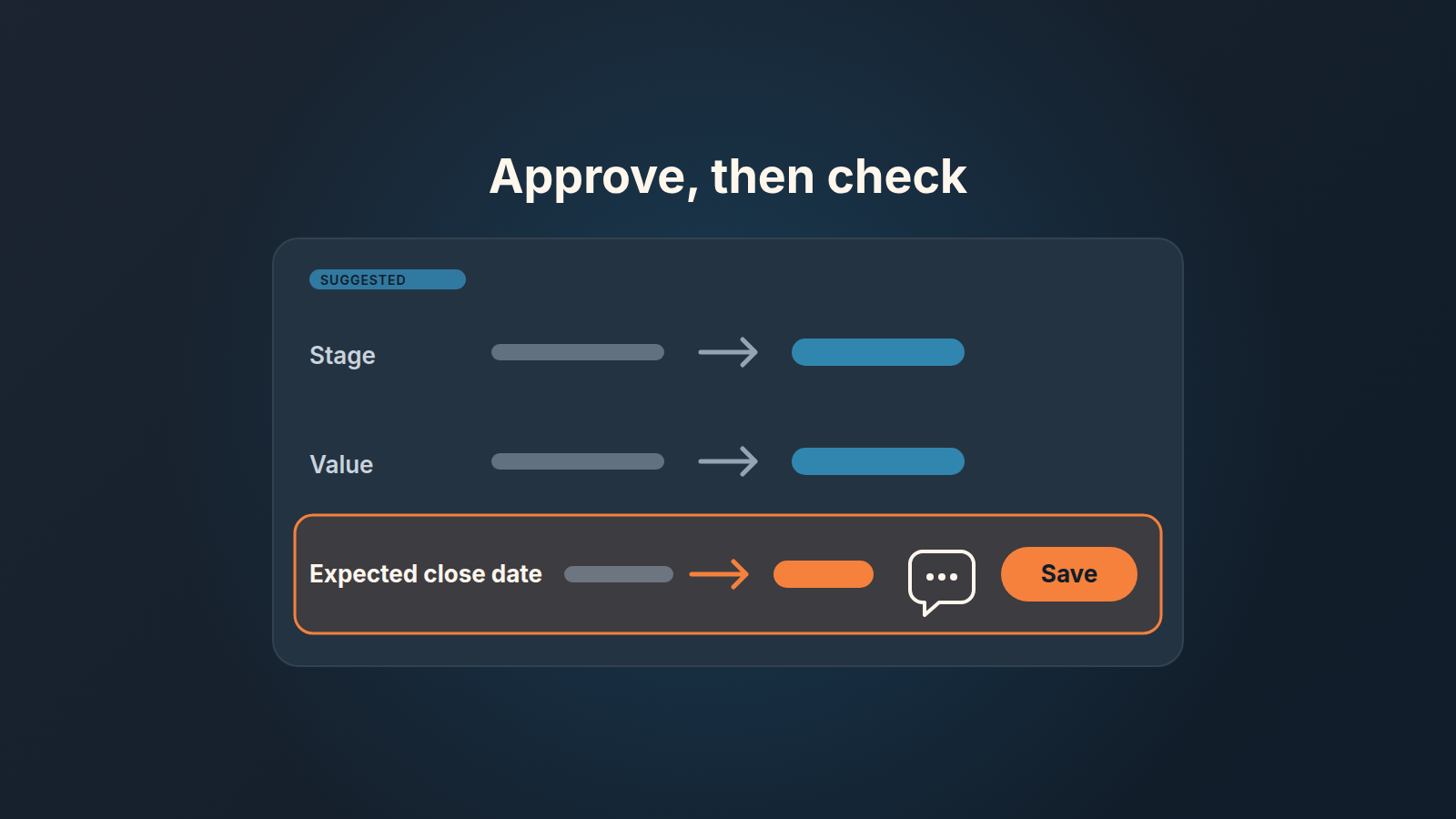
Pipedrive Nova drafts changes to deal stage, value and expected close date after a call and saves none of them until the rep approves them. Our rule for a manager: let reps accept the meeting debrief and the next step without a second look, accept a close date or a value only when they can point at the sentence in the transcript that supports it, and once a week pull ten accepted updates and read them against the transcript. Nova removes the typing. It does not remove the responsibility for what ends up in the forecast.
The approve button problem
A rep finishes four demos before lunch. Nova has drafted a CRM update for each of them, and the rep goes through the cards in about a minute: stage to Proposal sent, close date to the end of the month, value bumped to match a number the buyer said out loud. Save, save, save, save. The fifth card is the same, and by now the thumb is faster than the eye.
Nothing in that minute is wrong on Pipedrive’s side. The rep did exactly what the product asks: review and approve. But the manager who reads the pipeline on Friday sees four deals that moved forward and four close dates that landed in the current month, and has no way to tell which of those the rep actually decided and which the rep merely did not object to.
A human confirmation step sounds like a control. It only works as one if the person confirming has a reason to say no, knows which fields deserve the reason, and knows someone will occasionally look. Everything below is about building those three things on a team of five to twenty reps without turning the review into a second job.
This piece is about the fields and the person who signs off on them, not about setting Nova up.
What Nova proposes and what it does not apply alone
What Nova records and which plans include it is covered in our conversation intelligence guide for small sales teams, so here we only need the shape of the output. After a meeting, Nova “suggests CRM updates such as deal stage, value and expected close date” (Pipedrive newsroom, 16 September 2026). Pipedrive’s knowledge base is explicit about the boundary: “Nothing Nova suggests is applied automatically. Suggested CRM updates and meeting debriefs are only saved to your deals, people, or organizations after you review and approve them” (Pipedrive Nova: overview).
The review happens in a CRM update tab that shows the current Pipedrive value next to the suggested one, and the rep can sync changes selectively (Pipedrive Nova: meetings). Suggestions reach well past the three headline fields, into custom fields, labels, contact details and organization fields. The debrief is saved as a note on the linked deal, person or organization (same page). Before the meeting, Nova also builds a brief, and we covered the Nova meeting brief and how to customize it.
So the design is sound. Three fields that drive your forecast are now drafted by a model from the tone of a conversation, and the only thing between the draft and the pipeline report is a rep’s thumb.
Which Nova suggestions to accept, and which need evidence
The rule we give teams has three tiers. The sorting key: how expensive is a wrong value, and how easy is it to prove the right one from the call?
- Safe to accept: the meeting debrief as a note, the next step as an activity with a date, phone numbers and email addresses that were said on the call. A wrong note costs a minute to fix and nobody forecasts from it.
- Accept with evidence: expected close date, deal value, and any custom field your weekly review reads, such as budget range, decision date or who signs. The rep needs one sentence from the transcript, said by the buyer, that supports the value. No sentence, no change; the question goes into the next step instead.
- Never from the suggestion alone: deal stage. The rep moves it by hand once your team’s exit criteria are met.
The middle tier is where the work is, so a few words on what counts as evidence. “We’d love to get this done before quarter end” is a close-date hint, not a close date. “Our board meets on the 24th and I’ll bring it there” is evidence for a date in the days after the 24th. A buyer who says “budget is around forty” has given you a value; a rep who said “so we’re looking at about forty, right?” and heard “mm-hm” has not. Reps know this distinction from discovery calls. The rule exists so the suggestion card does not let them forget it.
The stage row is the one people push back on, because Nova’s stage suggestion will often be right. It will be. The problem is the days it is wrong: a deal sits in Proposal sent with no proposal, your stage conversion numbers drift, and nobody knows when the drift started because the change looked like every other change. We made the same call for third-party tools in what to let an AI notetaker write into Pipedrive, and the reasoning carries over unchanged.
How to make this stick in Pipedrive without a new tool: put the three tiers in the pinned note of your team pipeline, and add a custom field “Close date source” with three options (Buyer said it, Rep estimate, Nova suggestion) that reps fill whenever they change the close date. The last option is allowed. It is simply visible, and visible is enough for the next section.
A weekly sample: ten accepted updates against the transcript
A rule nobody checks becomes a suggestion within a month. The check we run is small on purpose: ten accepted updates a week, read against the transcript, by the manager, in about half an hour.
- On Friday, filter deals by Update time this week that have a Nova meeting linked, and open the deal history to see whether close date, value or stage moved. Pick ten at random across reps, not the ten biggest. Big deals get reviewed anyway; the sample is for the ordinary ones.
- For each update, open the meeting, find the suggestion in the CRM update tab, and search the transcript for the buyer’s sentence that supports the saved value. Write down one of four verdicts: buyer said it, rep inferred it reasonably, nothing in the call supports it, or the field should not have been accepted at all (a stage, usually).
- Count. Three or more “nothing supports it” out of ten means the forecast for this period is built on accepted guesses, and the fix is a conversation with the team on Monday, not a quiet correction of the fields.
- Keep the sheet. After six weeks you have sixty rows and a very clear picture of which rep approves on reflex and which fields drift most.
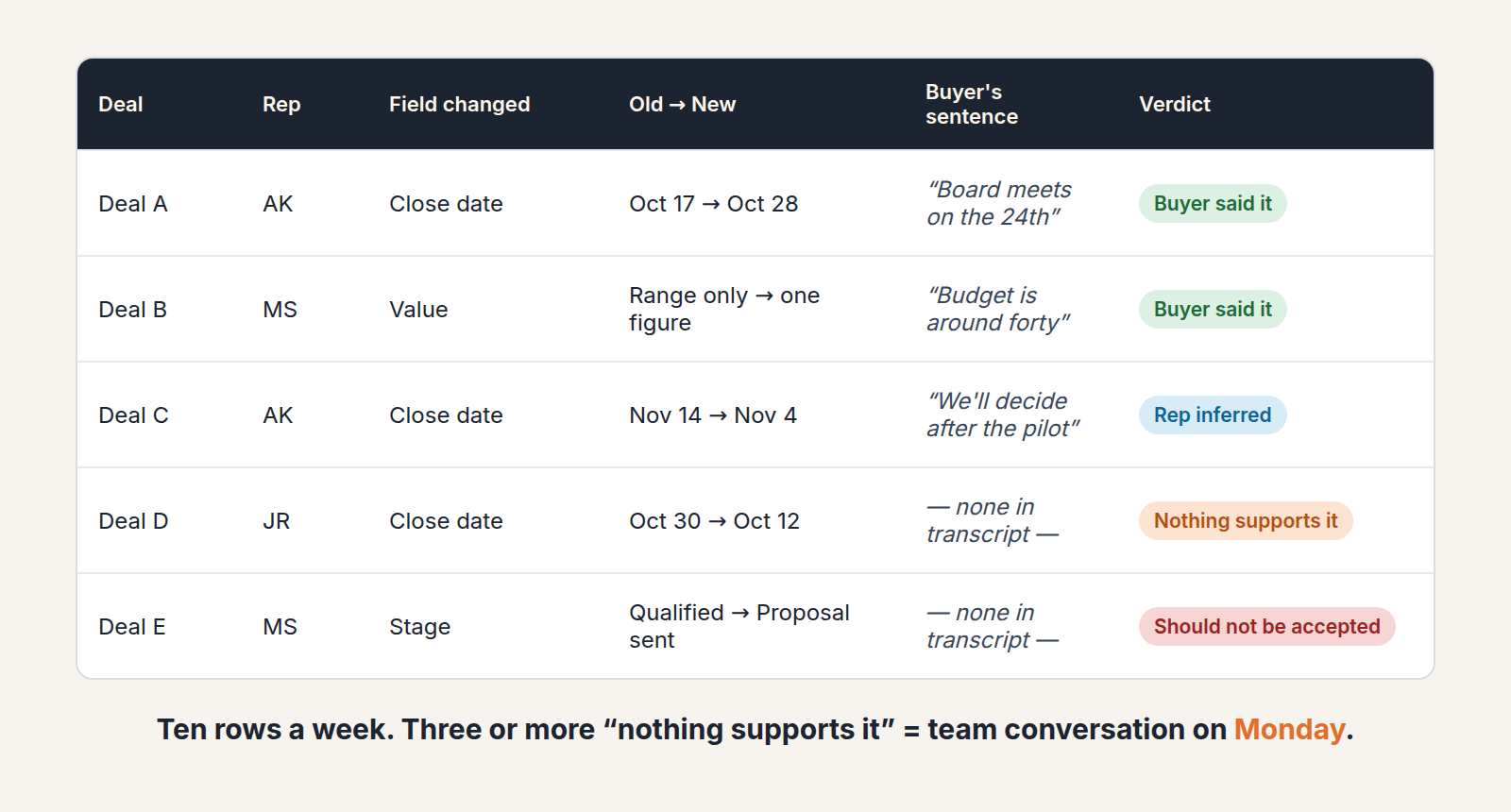
Two things about the verdicts. “Rep inferred it reasonably” is not a failure; good reps read between the lines, and a close date set from “we’ll decide after the pilot” plus a known pilot end is fine. What you are hunting is the third verdict, the the saved value with no trace in the call. Those are the updates that would have stayed invisible under a pure approve-and-move-on habit, and they are why this half hour is worth more than another hour of pipeline review.
Ten is enough to see a pattern and small enough that you will actually do it; we have watched teams design a hundred-row audit, run it once, and never again. The wider set of numbers is in CRM data quality metrics for small teams.
What it does to forecast fields
The expected close date was already the most pushed field in most Pipedrive accounts before any model touched it. We wrote about pushed close dates in Pipedrive and the saved filter that counts how many times a date has moved. Nova changes the texture of the problem. Before, a pushed date meant a rep sat down and chose a new one, usually under some pressure to explain. Now a date can land in the field because the buyer sounded warm on a Tuesday, and the rep’s only act was not disagreeing.
That matters for the forecast in a specific way. A forecast built from close dates is a forecast of buyer commitments. The moment some of those dates come from a model’s reading of tone, the forecast quietly becomes a mix of commitments and sentiment and the two look identical in the pipeline view. The “Close date source” field is how you keep them apart: deals whose date source is “Nova suggestion” go into best case, not commit, until the rep upgrades the source with a buyer’s sentence. Same treatment for value. A value the buyer named is a number; a value the model extracted from “somewhere in the mid five figures” is a range, and a range belongs in a weighted view with the probability adjusted down.
Stage worries us most. Stage conversion rates are the one piece of pipeline history most small teams actually use to set probabilities, and a few months of model-nudged stage moves will reshape that history without anyone deciding to. A weekly review rather than an inspection is the format that surfaces these moves.
A disclosure, since we are in the forecast section: we build SalesBond, a sales management layer on top of the CRM a team already uses; we started with Pipedrive. Deal Health checks every deal against more than 20 rules and explains, per deal, what lowered its score. The weekly sample above still has to be read by a person. Check your CRM with SalesBond when you are ready; the three-tier rule works without it.
When reps stop reading the suggestions
You will know it has happened before the sample tells you. Approval gets fast. The “Close date source” field starts saying “Nova suggestion” on every deal for one rep and never on another. Next steps start reading like the summary wrote them, which they did, with no verb a rep would use. And in the Friday sample, the “nothing supports it” count creeps from one to three.
The fix is not to switch Nova off; the typing it saves is real, and the debriefs are usually more complete than the notes reps wrote by hand. The fix is to change what approval costs. Two moves have worked for teams we know. First, make the review a spoken act once a week: in the pipeline meeting, pick two deals and ask the rep to read the buyer’s sentence behind the close date, out loud. Nobody wants to say “there wasn’t one” twice. Second, give reps a reason to reject. A rejected suggestion with a one-line note (“buyer said Q1, not this month”) is worth more to you than an accepted one, because it tells you the rep read teh card. Count rejections per rep in the sample sheet, and treat zero rejections over a month as the signal it is. If your team runs Salesforce, here is how AI writes to Salesforce leave tracks.
A model’s output is an input to a person’s decision, and the decision has to stay visible as a decision; we made the longer case in AI deal scoring for small teams. The same rule applies to a number: a deal score built from your own criteria is an input, and the manager still decides which deal gets the call. This Friday, before the pipeline meeting, pull the first ten and see what the count is.


