A Pipedrive Score is built from criteria in three groups, Highly positive (+25), Slightly positive (+10) and Negative (−10), normalised to a 0–100 scale, and it can only use deal and activity fields (Pipedrive: Scores; Pipedrive: Scores calculation). So the score is exactly as honest as those fields. A score reps trust is made of conditions that are hard to satisfy with a dropdown, and it gets checked in the preview on deals whose direction you already know before anyone sorts a pipeline by it.
A score of 72 on a deal that went quiet
An invented scene, but we have watched versions of it more than once. Dana Okafor runs a six-person sales team on Pipedrive. She switches on Scores on a Monday, picks the criteria that sound right, and asks the team to start the day from the top of the list sorted by score.
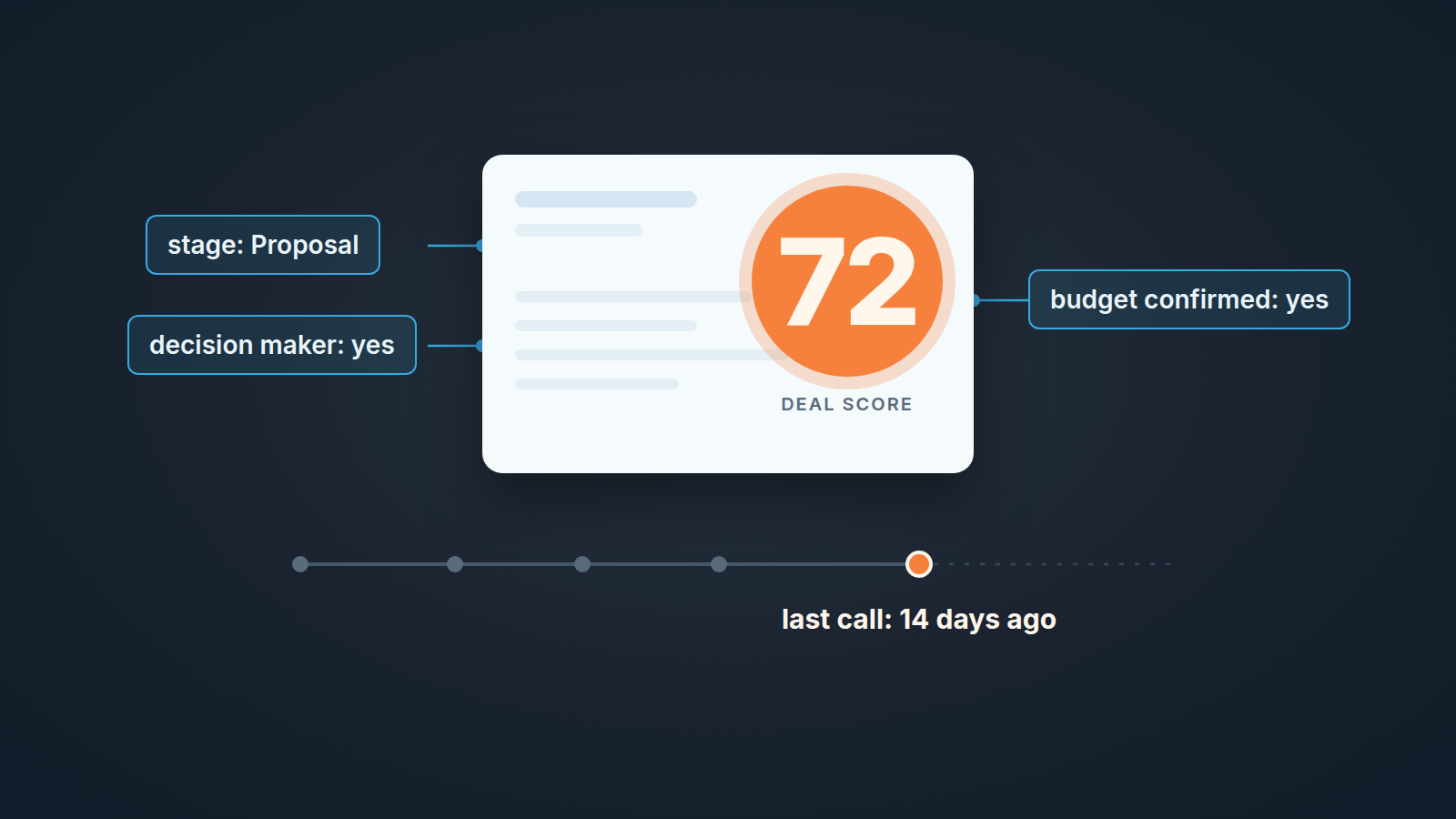
By the following Monday, most of the pipeline sits at 60 or above. The deal at the top shows 72. It has a decision maker named, a budget confirmed, and it sits in Proposal. Its last logged call was fourteen days ago and nothing is scheduled after it. The rep, Luis Brandt, is not hiding anything. He filled in the fields on the day he moved the deal to Proposal, as the stage checklist asked him to.
Three of Dana’s criteria were fields a rep sets by hand on stage change. They were true the day they were filled, and the score has no way of knowing whether they still are. That is the failure this article is about: a score that rewards filled-in fields while the buyer has stopped answering.
What a Pipedrive Score is made of, and the limits that shape it
Scores is available on the Premium plan and above. Deal admin users create and edit scores; everyone else sees the result. For now the target is deals only, and only one score can be active in a given pipeline (Pipedrive: Scores).
A score is a list of criteria, each placed in one of three groups with a fixed point value: Highly positive at +25, Slightly positive at +10, Negative at −10. The conditions can only use deal fields and activity fields. You can set up to ten criteria in total (Pipedrive: Scores calculation).
The result is normalised to 0–100. A deal shows 0 when only its negative criteria are met and 100 when every positive criterion is met and no negative one is. The help article shows both the total point value and the normalised value, so you can see how a raw sum turns into the number on the card (Pipedrive: Scores calculation).
On the deal itself the score is a field you cannot edit by hand. Pipedrive recalculates it automatically when deal data changes, and hovering over it shows which criteria contributed (Pipedrive: Scores). That hover is the part reps will use to argue with you. It is also what makes the score defensible, if the criteria are good.
Three consequences follow. Because the points are fixed, your only real decisions are which criteria you pick and which group each goes in. Because the ceiling is ten, every criterion that measures paperwork is a slot you did not spend on a signal.
And because only one score runs per pipeline, you cannot keep an inbound score and an outbound score side by side in the same pipeline. If those deals genuinely need different signals, that is an argument for separate pipelines, which many small teams should have anyway. If you keep one, write the score for the the deals that carry most of its value and accept that the edges will be scored imperfectly.
The fields limit bites hardest. Since only deal and activity fields can go into conditions, person and organisation data stay outside the score, so a single-threaded deal with one responsive champion can look identical to a deal with four stakeholders involved.
One more thing not to confuse with this feature. In August 2026 Pipedrive added an admin switch that turns the visibility of AI scoring in the deal card on or off for the whole account (Pipedrive product updates). That is a separate function from the Scores you build by hand. If a rep tells you “the score changed”, first establish which number they are looking at.
Picking criteria that reps cannot fake with a dropdown
Here is the test we apply to every candidate criterion: can a rep make it true in one click, with nobody else involved? If yes, it belongs at +10 at most, or not in the score at all.
Fields that fail the test: a custom field saying the budget is confirmed, a checkbox for “decision maker identified”, a dropdown for “pain validated”. None of them are bad fields. But as score inputs they describe what teh rep believes, and the rep is the one whose deals are being sorted.
Fields that hold up better are the ones the rep cannot satisfy alone: an activity that actually got done, a meeting the buyer has agreed to, a close date that is still ahead of you. Pipedrive’s help does not name criteria for you; it only says the conditions are built on deal and activity fields (Pipedrive: Scores). So the set below is our recommendation, written as conditions on standard Pipedrive deal fields, and every threshold in it is yours to set.
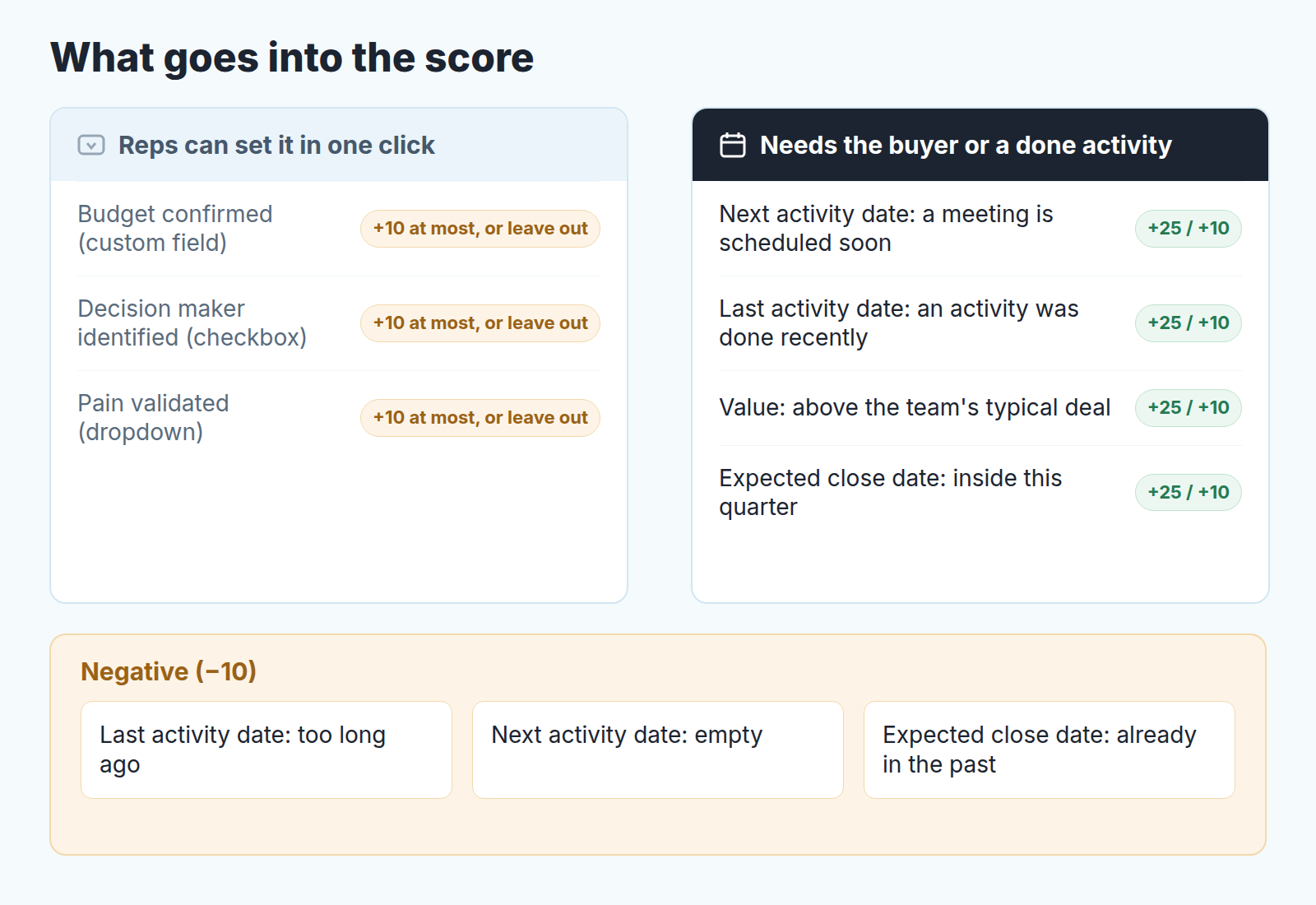
- Highly positive, +25. Next activity date falls within the next few days and that activity is a meeting. Last activity date is recent, meaning something was actually completed on the deal. These two carry the heaviest weight because they separate a live deal from a well-documented quiet one.
- Slightly positive, +10. Value above what your team typically closes, so bigger deals float up but cannot out-score silence. Expected close date inside the current quarter. If you must, one self-reported qualification field that your team has a habit of filling honestly. One is plenty.
- Negative, −10. Last activity date older than your cut-off. Next activity date empty. Expected close date already in the past. Each of these is cheap for the rep to fix, which is the point: fixing it means doing the thing the pipeline needed anyway.
That is eight criteria, leaving two slots. We would leave them empty for the first month. An empty slot costs nothing, a weak criterion costs trust.
The exact operators available for each field show up when you build the first criterion, so treat the list as the shape of a good score rather than a click-by-click recipe. “Recent” and “too long ago” are numbers you take from your own sales cycle. A ten-day gap is alarming in a two-week transactional pipeline and normal in a six-month enterprise one. (If you are tempted to lean on stage probability instead, read our piece on deal probability versus stage probability in Pipedrive first; they answer different questions.)
Checking it in the preview on deals you already know
The help describes one tool for this: while you build a score, you can test your conditions in the preview section by selecting a deal from your pipeline, and the preview shows how the score is calculated (Pipedrive: Scores), including the point values and which criteria the deal met (Pipedrive: Scores calculation). Most people preview one or two deals, nod and save.
Use it like a small test instead. The preview reads the deal as it is today, so it cannot show you what a deal looked like three weeks before it closed. Pick ten open deals whose direction the team already agrees on: five that are clearly moving (a meeting next week, a buyer who replies) and five everyone privately knows have stalled. Preview each one and write the numbers in two columns.
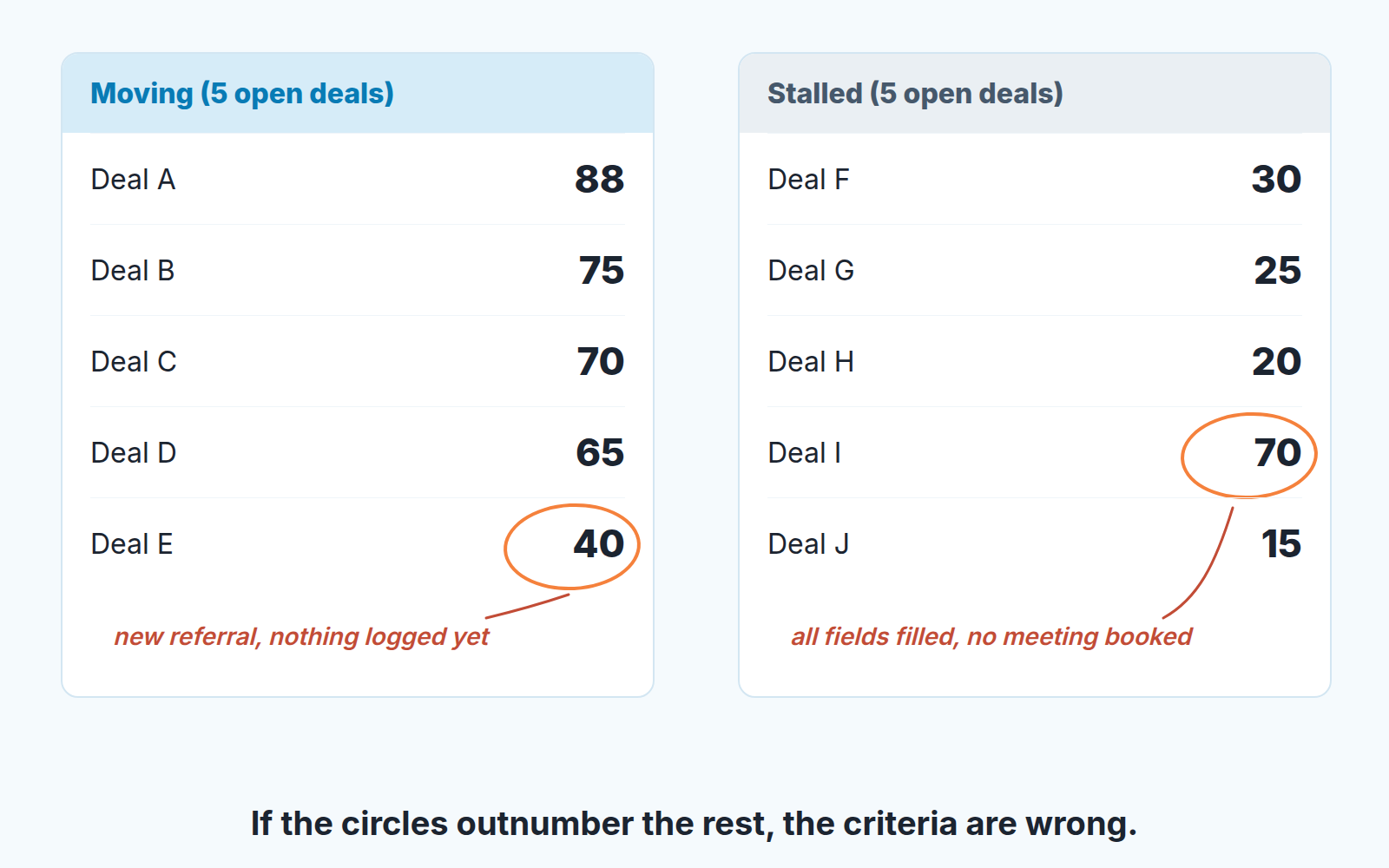
If a stalled deal scores high, hover the result and see which criteria carried it there. Those are the ones measuring documentation, and they move down a group or out. If a moving deal scores low, ask why; sometimes a negative criterion is just too aggressive for your cycle.
In Dana’s invented case the preview shows it in minutes. Three deals the team agrees have stalled score 65 or higher on her first draft, all because the qualification fields were filled on stage change. She drops two of those fields, moves the third to +10, and adds “Next activity date is empty” as a negative. The stalled deals fall to the 20s and the moving ones stay put.
If you want to check criteria against won and lost history as well, that is a back-test done outside the preview, and we described the method in AI deal scoring for small teams.
What a score does not see, and where deal health picks up
A well-built Pipedrive Score is a sorting key for the morning: it answers “which deals should I look at first”, and it reads only the current values of deal and activity fields, so a buyer who never replied or a close date that has slipped three times leaves no trace in it (we wrote separately about what to do when a prospect goes silent after the demo). Deal health answers a different question, “what is wrong with this deal and what should happen next”, and we covered the idea in what a deal health score is. A disclosure, since this is where the two meet: we build SalesBond, a sales management layer on top of the CRM a team already uses, and we started with Pipedrive. Its Deal Health checks every deal against more than 20 rules across activity, progression, data, ownership and forecast, gives each deal a 0–100 health score, shows which rules it breaks and suggests the next action for each one (how Deal Health flags at-risk deals). If your score sorts the list well but you still get surprised by deals that looked fine, that is the layer to add: Check your CRM with SalesBond.
Who owns the score, and when to revisit it
Deal admin users build and change scores; regular users see the number and its explanation (Pipedrive: Scores). We would go one step further: one named person owns the score, even if three people have the permission.
Every rep will at some point hover over a 35 on a deal they believe in and disagree. That is healthy. Criteria changing every time someone disagrees is not. The owner collects the disagreements and changes criteria on a schedule: once a quarter, or after any change to the pipeline’s stages or activity types, rerunning the ten-deal preview each time.
And say on day one what the score is for. On Dana’s team, Ines Moreau ignored it for a month because she assumed it was a performance metric. It is a sorting key, and a low number on a deal you are sure about is a prompt to log what you know. Without the score, the order of deals in the pipeline view follows next activity dates, not deal priority.