Multi-threading in sales means keeping more than one relationship alive inside a customer account on the same deal, so one person leaving or going silent does not kill it. In Pipedrive, that comes down to two habits: add every real participant to the deal instead of keeping them in the rep’s head, and check once a week which late-stage deals still have a single contact. For a team of three to ten reps, that is the whole method.
What multi-threading means in a small-team deal (and what it does not)
Most of what you will read about multi-threading was written for bigger deals, with many stakeholders spread across a complex account (Aligned, Demandbase). That version is real, and it is probably not yours.
In a small team selling to small and mid-sized companies, the buying side is usually two to four people. The person who answers your emails. The person who signs. Sometimes the person who has to live with the result. Multi-threading here means that at least two of those people have talked to you, and both are written into the deal in your CRM. A deal where only one of them has is a single-threaded deal, and that is the term we’ll use from here on.
It does not mean emailing everyone in the company or building a stakeholder matrix. It doesn’t replace your champion either (how to identify and keep one in Pipedrive); it is the insurance around them.
Why single-threaded deals stall
The first reason is boring and the most common. The one contact goes on holiday, changes jobs, or simply gets busy, and the deal stops moving. The rep logs “waiting on client” for three weeks. Nobody else on the buying side even knows the deal exists.
The second reason is that the one contact is often not the one who decides. A rep who only talks to the operations manager hears “we love it” for two months and then gets “finance said no” in a single line. The no was never a surprise to anyone inside the account. It was only a surprise to us, because we had no second person to ask.
The third is the quietest: one contact means one version of the story. A second contact is how you find out the budget is approved for next quarter, not this one.
None of this means the rep failed. It is how a single-threaded deal behaves, so we treat the contact count as a pipeline signal, not a performance review.
How many people to know by which stage
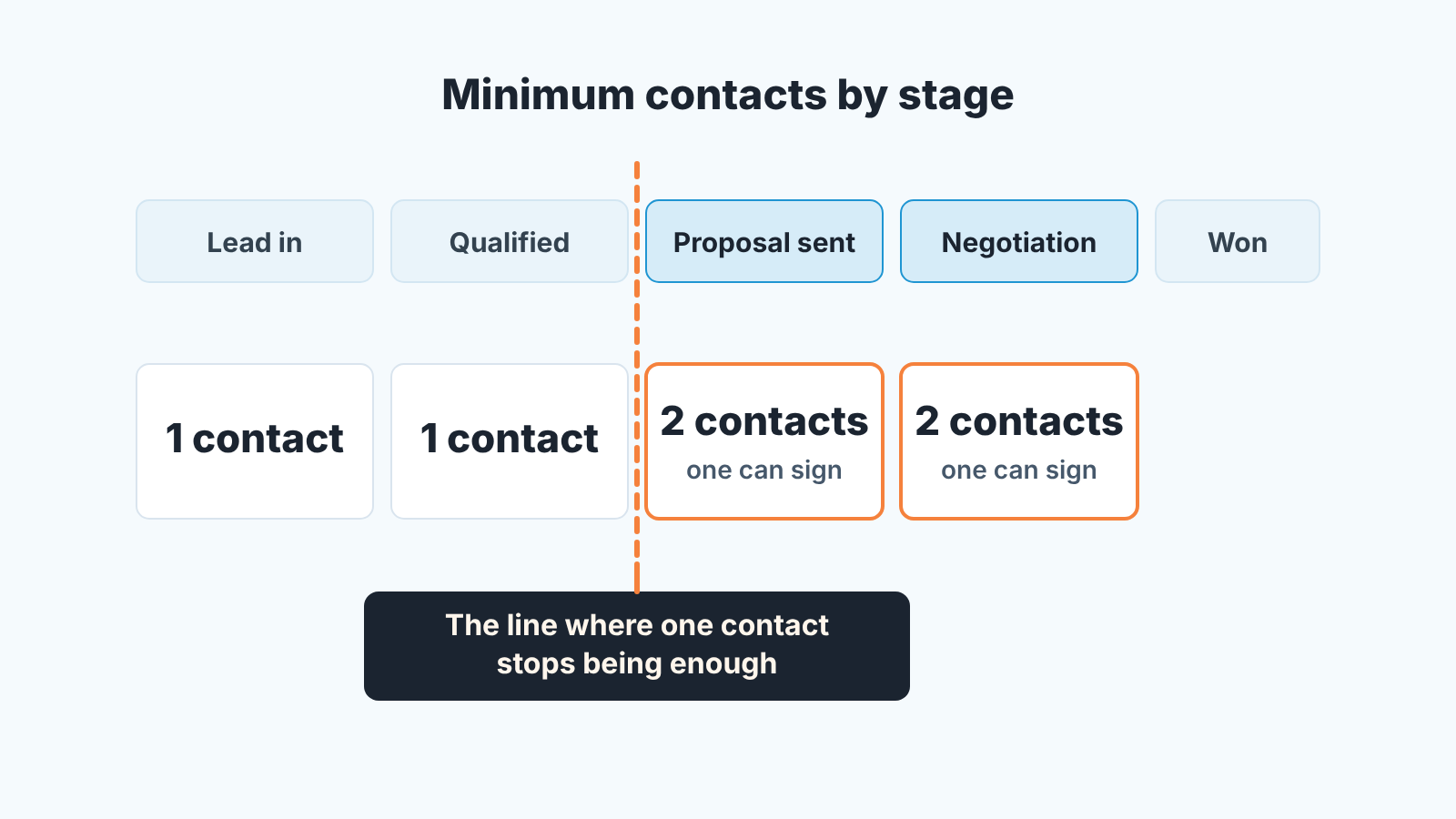
By proposal stage, a deal needs at least two contacts, one of whom can sign. That is our rule for a team this size, and we would rather you argue with it than ignore it.
Up to and including qualification one contact is fine. You are still finding out whether there is a deal at all, and demanding a second name before the first conversation is finished just produces fake names.
From the stage where a commercial proposal goes out, the second contact is required, and one of the two should be the person who can say yes to the money. Not “influences the decision”. Can sign, or can block the signing. If the rep cannot name that person at proposal stage, the proposal is going to someone who will forward it, and you have no idea to whom.
Why two and not three? Because three is an enterprise number. In a company of thirty people the decision is often made by one owner and one person who will use the product, and asking for a third contact pushes reps to add the the receptionist. Two real relationships beat three logged names every time.
Where to keep them in Pipedrive: participants and roles on the deal
In Pipedrive a deal can have only one linked person at a time. Everyone else goes in as a participant, so the deal keeps its “one clear point of contact” and still shows who else is involved (Pipedrive: Participants).
Adding one takes a few seconds:
- Open the deal.
- In the detail view sidebar, find the Participants section and click “+”.
- Type the person’s name; pick an existing person or create a new one.
- Already emailing them from the deal? Hover over their name in the deal history and click “Add as deal participant”.
One more thing from the same help article matters to the manager: Participants can be a column in the deals list view: open the list view, click the gear icon, find the Participants field and save. That column is what the Monday routine runs on.
Roles are another matter. The participants article covers adding, importing, unlinking and suggesting people; it says nothing about marking which of them signs. So we don’t rely on a role on the participant. (Salesforce teams have contact roles on the opportunity; HubSpot teams have association labels.)
In Pipedrive we solve it with one custom deal field. Call it “Decision-maker” and give it three options: Named, Not yet identified, Confirmed by them. A rep sets it to Named when the signer is a participant on the deal, and to Confirmed when that person has actually spoken to the rep. One click, and “I think the owner is involved” becomes something a filter can read. Three fixed values give the filter something exact to match. Free text gives you twelve spellings of “CFO”.
The Monday check: late-stage single-threaded deals
Every Monday before the pipeline meeting, the manager opens the deals list view with the Participants column visible and one saved filter. In the filter drop-down, click “+ Add new filter”, add a condition on Stage for your proposal stage and one for Negotiation under ANY, and set the visibility to shared so the reps see the same list (Pipedrive: Advanced filtering). Then scan the Participants column for empty cells. On a pipeline of thirty or forty open deals its a one-minute job.
If you use the Decision-maker field, save a second filter with the same stages plus Decision-maker is Not yet identified. Those are deals with names on them where nobody can say who signs.
What to do with the list:
- Each deal on it gets one question in the meeting: who is the second person, and when do you talk to them?
- The answer becomes a scheduled activity on the deal, not a promise. A deal with no next activity is its own problem, and the next activity field is how you catch it.
- A deal that has been on the list three Mondays in a row moves back a stage. Not as punishment. A proposal with one thread is not really at proposal stage, and the forecast should say so.
What to say to a rep who “only talks to the champion”
You will hear this, usually from your best rep, and usually something like this: “I have a great relationship with Dana, she is handling it internally, going around her would damage trust.”
You are not going around Dana. You are asking Dana for an introduction, which is what a real champion does without being asked. Something like: “Dana, before I send the proposal I want to make sure it answers the questions your director will have. Could the three of us spend fifteen minutes on it?” A champion who is driving the deal says yes. A champion who says no, repeatedly, is telling you how much pull they have, and that is information you want at proposal stage, not at the lost-reason screen.
Give the rep that exact sentence. Most resistance to multi-threading comes from the ask feeling awkward, not from disagreeing with it, and the Monday list does the follow-up so you don’t have to lecture.
We build SalesBond, a sales management layer on top of the CRM a team already uses; we started with Pipedrive. It analyses deal and customer data, finds risks and explains what needs attention, so a manager reads the exceptions instead of every deal. If you want to see what else is waiting in your pipeline, check your CRM with SalesBond.
This Monday, add the Participants column, open the proposal-stage filter and count the empty cells. That number is your single-threaded pipeline.