

Turn on spam protection in the web form’s Submit block, let form submissions land in the Leads Inbox as leads rather than deals, and give yourself ten minutes a week to delete the bots, archive or label the people who will never buy, and convert only the leads a human has actually read. That is the whole method. Everything below is how to do it in Pipedrive without losing the one real buyer who typed their company name in the phone field.
Back from a long weekend: 27 new leads, three of them real
Tariq sells with one other rep and a part-time SDR. Their website form writes into Pipedrive, and on the Tuesday after a long weekend the Leads Inbox shows 27 new entries. Fifteen are strings of random letters with a link in the message field. Nine are real people who aren’t buying: an SEO agency, two job seekers, a reseller asking for a partner discount, a supplier of office furniture and a few more like them. Three are companies that want a quote.
The numbers are made up, the pattern is not. Tariq’s problem isn’t that the three buyers are hard to spot once you read them. It’s that nobody reads 27 cards first thing after a holiday, so the team skims, converts the ones with a company name in the title and moves on. One of the three buyers wrote “asap” as the company and a Gmail address. He gets skipped. The furniture supplier wrote a tidy card and gets a call.
Pipedrive’s own community has several threads about exactly this: people asking why the web form keeps filling the inbox with spam and whether the built-in protection is enough. We don’t have a count of how much spam a typical form gets and won’t invent one. What we do know is where the junk lands, which buttons exist for dealing with it, and which of them to press for which kind of junk.
Three kinds of junk, three different moves
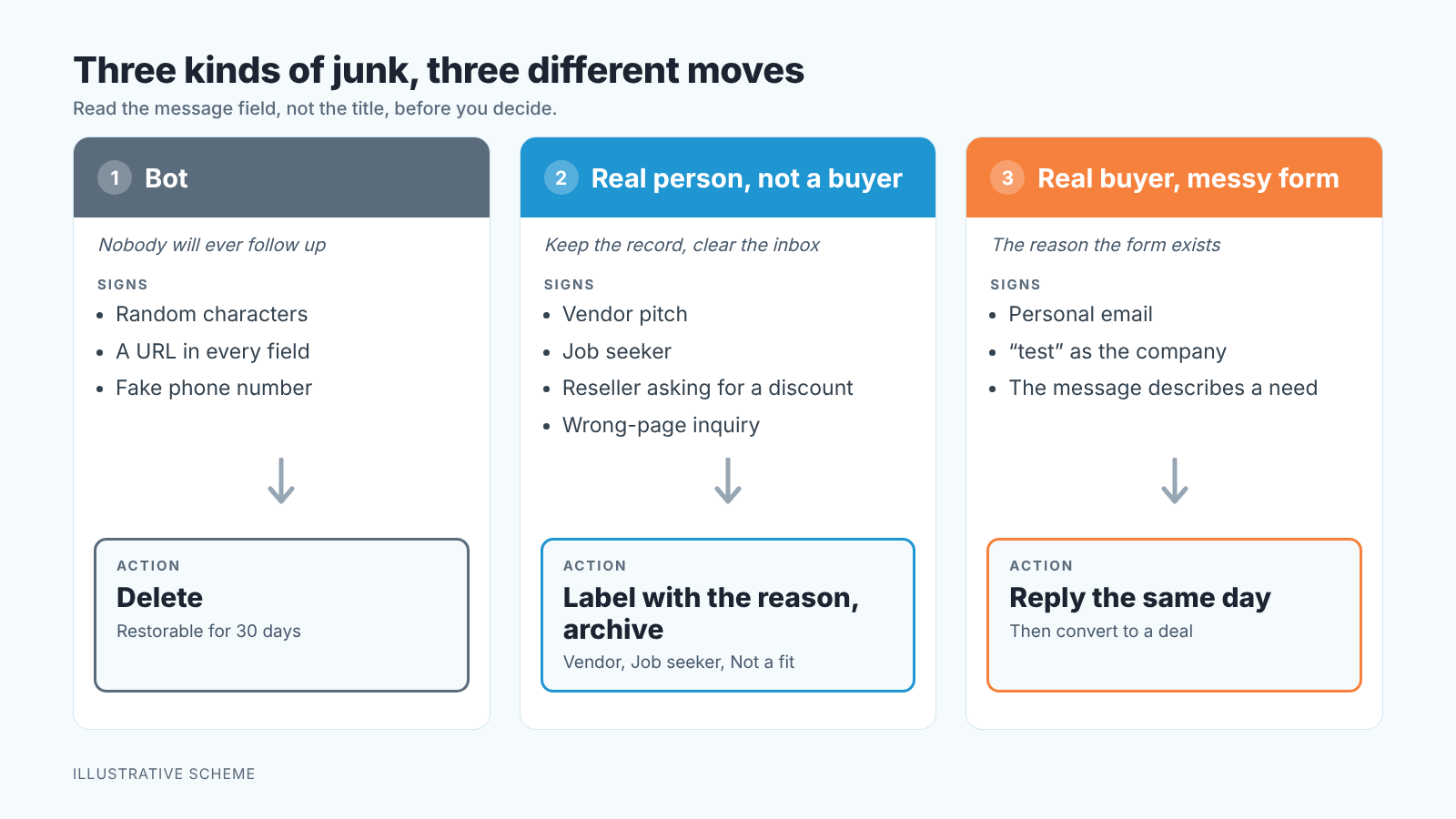
Treating everything that isn’t a buyer as “spam” is the first mistake. There are three distinct things in Tariq’s inbox and they need three different responses.
The first is a bot. Random characters, a URL in every text field, a phone number of twelve identical digits. No human will ever follow up on this, and nobody will ever ask “what happened to that lead”. Delete it. There is no history worth keeping, and keeping it in an archive just means someone scrolls past it later.
The second is a real person who is not a buyer and never will be. The agency pitching you services, the candidate who used the contact form instead of the careers page, the reseller fishing for a discount. Deleting feels right but is wrong, for one practical reason: in three months somebody will see the same name come back through the form and have no idea you already looked at it. Give it a label that names the reason (Vendor, Job seeker, Not a fit) and archive it. The record stays, the inbox is clean, and the next person who meets that name gets the answer in one glance.
The third is the one that costs money: a real buyer who filled the form badly. Lowercase everything, a personal email, “test” in the company field because the form wouldn’t let them skip it. These look like junk to a tired rep at 9:40 on a post-holiday Tuesday. They are the only reason the form exists. The rule we use: a lead is not junk until a person has read the message field, not the title. Bots don’t write “we have two warehouses and need something by January”. People do. A Pipedrive Chatbot fills the same inbox, so decide how to qualify chatbot leads before the playbook goes live.
Turn on the web form’s spam protection first
Start with the setting that costs nothing. Every Pipedrive Web Form ends with a Submit block, and that block is where you choose whether the form is spam-protected; with protection on, Pipedrive uses the latest version of reCAPTCHA (Pipedrive: Web Forms). If the form was built in a hurry a year ago, open it and switch this on. It is often off, because the person who built the form was thinking about fields, not about bots.
Two things to know before you go looking for the switch. Web form setup is only available to users with the deals admin permission, so a rep won’t see it; whoever administers the account has to make the change. And Web Forms are part of the LeadBooster add-on, together with Chatbot, Live Chat and Prospector. In Pipedrive’s words, “The LeadBooster add-on is included in the Premium and higher plans but can also be added to Lite and Growth plans” (Pipedrive: LeadBooster add-on).
If your form isn’t a Pipedrive Web Form at all but a third-party form pushing into Pipedrive through an integration or the API, the spam protection lives in that form builder (a CAPTCHA, a hidden honeypot field), and this section doesn’t apply.
The community threads exist because people turned this on and still saw junk arrive, so we won’t promise you a clean inbox from one checkbox. Still it is the only protection the form itself offers, it costs nothing, and whatever it removes is volume that would otherwise bury your three buyers. Turn it on first and judge the rest of the inbox afterwards.
Let doubtful submissions land as leads, not deals
The second setting is in the same place. The Submit options of a Web Form let you choose how a submission is saved in Pipedrive: as a lead or as a deal (Pipedrive: Web Forms, “Submit options”). Choose lead.
The reason is not tidiness. A deal sits in a pipeline stage, has a value, shows up in pipeline reports and in every rep’s view of what they are working on. A bot that becomes a deal is a fake number in your weekly pipeline review, and a vendor pitch that becomes a deal is a stage-one card someone has to actively lose. A lead in the Leads Inbox is a holding pen: it is linked to a person or an organization, it can be labelled, filtered and archived, and it becomes a deal only when someone presses the button (Pipedrive: Leads Inbox). Why a form should never get to make that call on its own is covered in when a Pipedrive lead should become a deal.
Delete, archive, or label?
Three buttons, and the choice is less dramatic than it feels, because Pipedrive gives you a safety net on the worst one.
Delete is for bots. The lead leaves the inbox, and if you deleted a real one by mistake, deleted leads can be restored for 30 days through “…” > Restore data (Leads Inbox).
Archive is for real people who will not buy. The lead leaves the active view but keeps it’s history and any files attached to it (Archive deals and leads). The same help page lists what an archived lead can’t do any more, and one item matters here: an archived lead can’t be converted to a deal. If a “vendor” turns out to be a buyer after all, unarchive first.
Label is the one people skip, and it should come first. A label leaves the lead where it is and puts a visible reason on the card, and Leads Inbox labels can be filtered on later.
Label before you archive, not instead, and there is a mechanical reason for the order: if you want to edit the details of an archived lead, Pipedrive makes you unarchive it first (Leads Inbox). Archive an unlabelled vendor and adding the reason later becomes a three-step chore nobody does. Labelled before it leaves, the same lead is a closed question, and a filter on “Vendor” gives you the full list of agencies that pitched you this year. How we keep labels down to a handful that mean something is in the hot, warm, cold rule for Pipedrive lead labels.
One more reason to archive instead of hoarding. Pipedrive’s help says the number of active (non-archived) leads and deals depends on your plan, and lists archiving as a way to stay under that limit (Archive deals and leads). The same page notes that “The Automations feature is only available on Advanced and higher plans”, and on those plans a change to the archived status can trigger an automation, for example to notify a user or log the change. We don’t think a three-person team needs that. A label and a weekly sweep do the job.
The account-wide version of this argument is in how to archive old deals and leads in Pipedrive, and the lead-versus-deal article above has its own short table for the no-fit cases. Here the point is narrower: three kinds of junk, three buttons, and only the bot gets delete.
The ten-minute weekly sweep
This is what Tariq does now, on the first working morning of each week, before anyone else opens the inbox. It takes about ten minutes once the labels exist.
- Open the Leads Inbox and filter to leads created in the last seven days with Source origin set to Web forms. Pipedrive fills Source origin in by itself and nobody can edit it, which makes it a safer filter than Source channel, an editable list that people change (Pipedrive: Lead source in deals).
- Sort by title and select every card that is obviously a bot: random strings, URLs where a name should be. Delete them in one bulk action. If you grabbed a real one by mistake you have 30 days to restore it.
- Read the message field of what’s left. Not the title. The message.
- For the real non-buyers, bulk-edit Labels to the reason (Vendor, Job seeker, Not a fit), then archive. Labels are among the fields bulk edit covers on leads (Leads Inbox), so the label step is one action for the whole selection.
- For the buyers, including the messy ones, set the Owner and convert to a deal. Then the rep’s normal response clock starts, and the lead stops being Tariq’s problem.
- Anything you genuinely can’t tell: leave it as a lead with a “Check” label and reply to it. A one-line email costs less than a wrong guess.
Bulk actions are fast and that is exactly why they bite. One filter a click too wide and you have archived a week of real inquiries. The safety habits are in how to bulk-edit in Pipedrive without breaking things; the one that matters here is filter first, count, then select all.
And the three buyers? They were never the hard part. A real buyer who filled the form badly still wrote a message a person can read, and once the the bots are gone there are only a dozen messages to read. The sweep doesn’t find buyers. It removes the reasons people stop looking.
The numbers junk quietly bends
Junk in the Leads Inbox costs more than time. It changes what a few numbers mean, and a manager who doesn’t know that will draw the wrong conclusion from a true report.
Response time is the obvious one. If your team tracks how fast a web lead gets a first reply, every bot that sits unanswered for a week is a week added to the average, and every bot that gets deleted on the sweep is a lead that was “handled” without anyone speaking to a buyer. We covered the speed side separately in speed to lead in Pipedrive; here the fix is upstream. Reply times should be measured on leads a person has read, not on everything the form produced.
Conversion by source is the quieter one. A web form that creates 27 leads and three deals looks like a weak channel. The same form, with the bots deleted and the vendors archived before anyone counts, looks like a channel that brings a dozen real conversations and turns a good share of them into deals. Both pictures are arithmetically correct. Only the second one tells you whether to spend more on the website. We wrote about reading the web form as a source in where Pipedrive web form leads actually come from; the point here is that the source field is only as honest as the inbox behind it.
Archiving helps the report too, as long as the report is told about it. Insights supports reporting with fields like “Archive status” and “Archived on” (Archive deals and leads), so you can filter the archived non-buyers out of a lead count instead of hoping they drop out on their own. The help page doesn’t say whether a given report leaves them out by default, so add the filter rather than assume. Deleted leads are a different matter, and we haven’t found anything in Pipedrive’s documentation about how they show up in Insights, so we won’t guess. The label is what makes all of this work: a reason applied before the lead leaves the inbox lets you exclude junk from any count later, in Pipedrive or in a spreadsheet, without re-reading the cards.
The sweep is a manual version of something we care about a lot: knowing that the records a report counts are records someone has actually looked at. We build SalesBond, a sales management layer on top of the CRM a team already uses; we started with Pipedrive. It analyses deal and customer data, finds risks and explains what needs attention, so that kind of checking doesn’t depend on someone remembering a weekly ritual. If you’d rather not keep that ritual alive by hand, check your CRM with SalesBond.
Tariq still comes back from long weekends to 27 new leads. He reads three of them properly, and the other 24 are gone by 9:55.


