
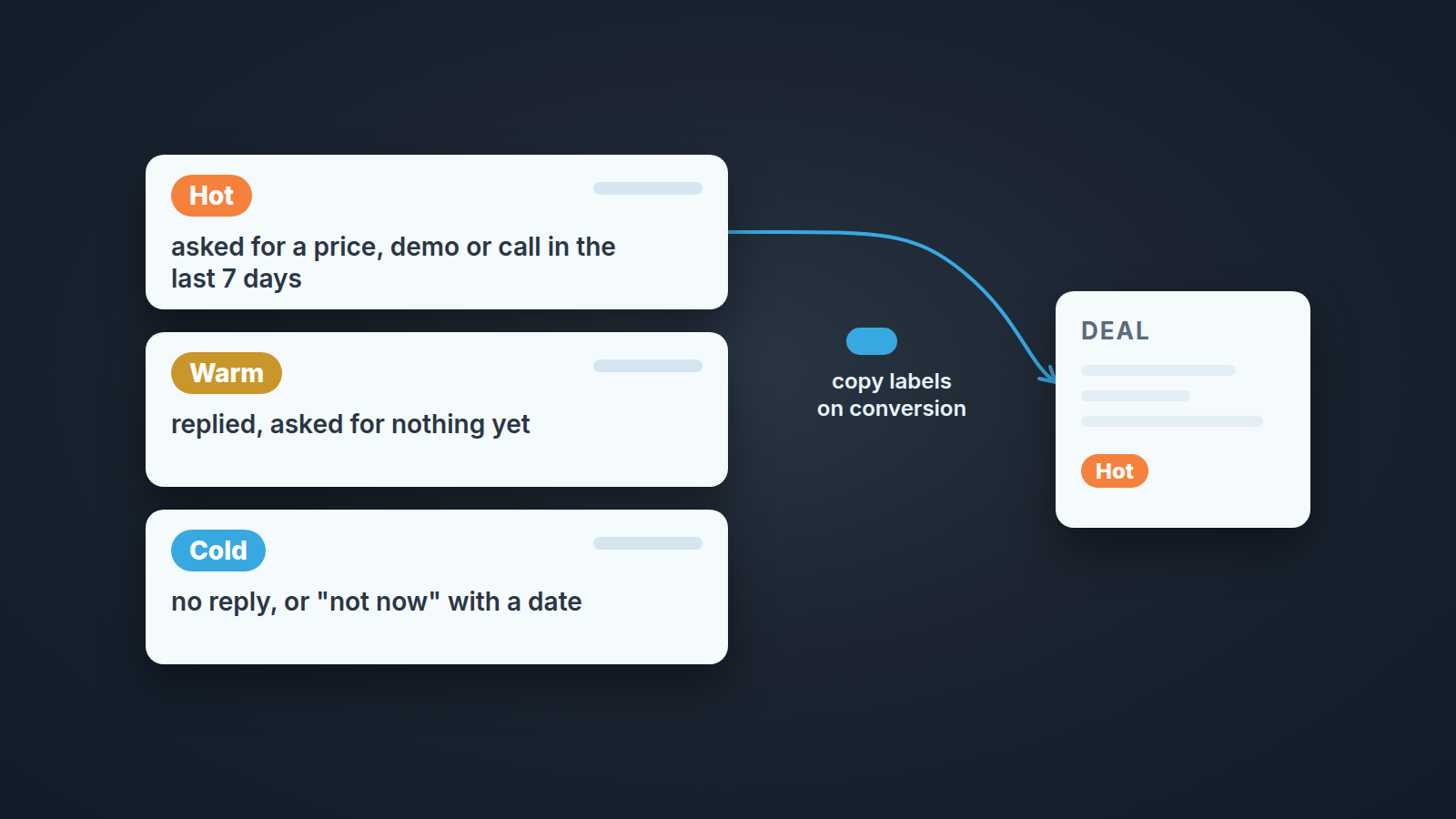
Lead labels in Pipedrive are set by hand in the Leads Inbox, one lead at a time or in bulk, and you can filter the inbox by them. What you cannot do is import them (Pipedrive: lead labels). When a lead becomes a deal, or a deal is turned back into a lead, the labels travel with it only if someone with account settings permission has switched on label copying under Settings > Company Settings > Labels, and only for conversions made after the switch. Anything converted before that keeps nothing.
So the mechanics take ten minutes. The reason most Hot/Warm/Cold schemes fall apart anyway is that nobody wrote down what Hot means. That is the part this piece is about.
A label nobody can define
The scene is invented, the shape is not. Rhea Castillo is covering Dmitri Vance’s Leads Inbox for a week while he is out. Five people on the team. She filters by Hot and gets 14 leads.
The first is a web form from six weeks ago, two emails sent, no reply. She asks in the team chat why it is Hot. Dmitri, from his phone: “Big company. If they ever answer, it’s a big deal.” The second lead replied yesterday asking for a price. Also Hot. The third she recognises: she called them herself two weeks ago and they said not before next year. Hot, because the founder tagged it after a trade-show chat and nobody touched it since.
Three people, three meanings: company size, a recent reply, a personal impression. Same colour, same word. The filter returns 14 leads and tells her nothing about which one to call first. By Wednesday she has stopped using it and is reading every lead from the top, which is exactly what the the label was supposed to save her from.
That is how labels usually die. Nobody deletes them. They get ignored, because the one time somebody relied on them, they lied.
What Hot, Warm and Cold can and can’t carry
A lead label is a name and a colour. When you create one, that is all Pipedrive asks for: click “+ Add new label” in the labels section of the lead’s details, pick a name and a colour, save (Pipedrive: lead labels). No date, no owner, no rule, no field for “what this means”. The label is exactly as meaningful as the agreement behind it.
That makes a label good at one job: making a decision visible. “Someone looked at this lead and put it in the Hot bucket” is the whole message. What it cannot carry is the reason. Why is it Hot? When was that decided? Does it still hold? None of that lives in the label, so it has to live in a team rule or it lives nowhere. When a label cannot carry enough meaning, a plain field can: we map four webinar groups onto one lead field at import, and the follow-up follows from it.
Our position: three temperature labels for a team of three to eight, one observable signal each, plus one written line on who may change a label and when it expires. Add more temperatures than that (“Very hot”, “Lukewarm”) and the inbox turns into a second pipeline with stages nobody reviews. Fewer, and you are back to reading every lead.
Hot, Warm and Cold are fine names. Everyone already knows them, and that is also the risk: everyone arrives with thier own meaning, which is what happened to Rhea. Keep the names. Replace the meanings.
One observable signal per label
A usable definition is one a second person can confirm from the lead record without asking the rep. “Seems interested” fails that test. “Replied to our email in the last 7 days” passes.
Here is the set we would start with for a small team that lives on inbound:
| Label | The one signal | Where you see it on the lead |
|---|---|---|
| Hot | In the last 7 days the lead asked for something concrete: a price, a demo slot, a call | The latest inbound email or call note, with its date |
| Warm | The lead has replied at least once but has not asked for anything yet | Any inbound reply logged on the lead |
| Cold | No reply to anything we sent, or an explicit “not now” | Only outbound activities, or a note with the date they told us to come back |
“Asked for” means asked for a next step with us. A lead who only asks questions (what does it cost, is there a free plan, do you integrate with X) and gives nothing back, no call, no timeline, no second person, is not Hot. That pattern has a name, and we wrote about tire kickers in your sales pipeline separately.
Two more things the table is doing on purpose. Hot is about the buyer’s action, never about the size of the company. A big logo with no reply is Cold with a note, and it is still worth working; how it gets to the right rep is a routing question, covered in lead routing for a small team, not a label question. And Cold is not dead. Cold means “we have no reason to call this one this week”.
The 7-day window suits a team where a Hot lead gets a call the same working day, which is the standard we argued for in speed to lead in Pipedrive. A longer sales cycle can stretch it to 14. What should not stretch is the kind of signal: something the buyer did, with a date on it, not something a rep feels.
Who sets a label, who changes it, and when it expires
Pipedrive will not enforce any of this for you, so be clear about what it does allow. Anyone working the inbox can click “+ Add labels” in a lead’s details section and add one or several at once. Clicking a label that is already on the lead removes it. The pencil icon next to a label edits its name and colour for everyone, and the trash can deletes the label from every lead that carried it (Pipedrive: lead labels). One click, two hundred leads relabelled. So the permission has to be a team agreement, said out loud.
The agreement we would write down, in this order: the lead’s owner sets the label when they first touch the lead. The owner or the manager may change it, and the manager does so during the Friday inbox pass, not in passing. Nobody renames or deletes a label without saying so in the team chat first.
Expiry follows the definition. Hot is a 7-day label (14 on a long cycle); if nothing new arrives from the buyer in that time, it drops to Warm at the Friday pass. Warm that goes 30 days without a reply drops to Cold. Those 7, 14 and 30 days are our working thresholds, not a Pipedrive setting: no label in Pipedrive expires on its own. Bulk edit only adds labels, so taking Hot off means clicking the label in each lead’s details. On a five-person inbox that is a few minutes on a Friday.
Cold with a “not before Q1” note needs a date somewhere a date can live, and a label is not that place. Schedule an activity on the lead for the day they said to come back. The label says what the lead is; the activity says when you look again.
If you already run the lifecycle labels from our leads vs deals piece (Waiting on them, Nurture, No fit, each with its own clock), keep them. Temperature tells you who to call this week. The lifecycle label tells you how long a lead may sit in the inbox before it is archived. Hot/Warm/Cold go on top of those labels and don’t replace them; a lead can be Cold and Waiting on them at the same time, and the 30-day clock on Waiting on them still decides when it leaves.
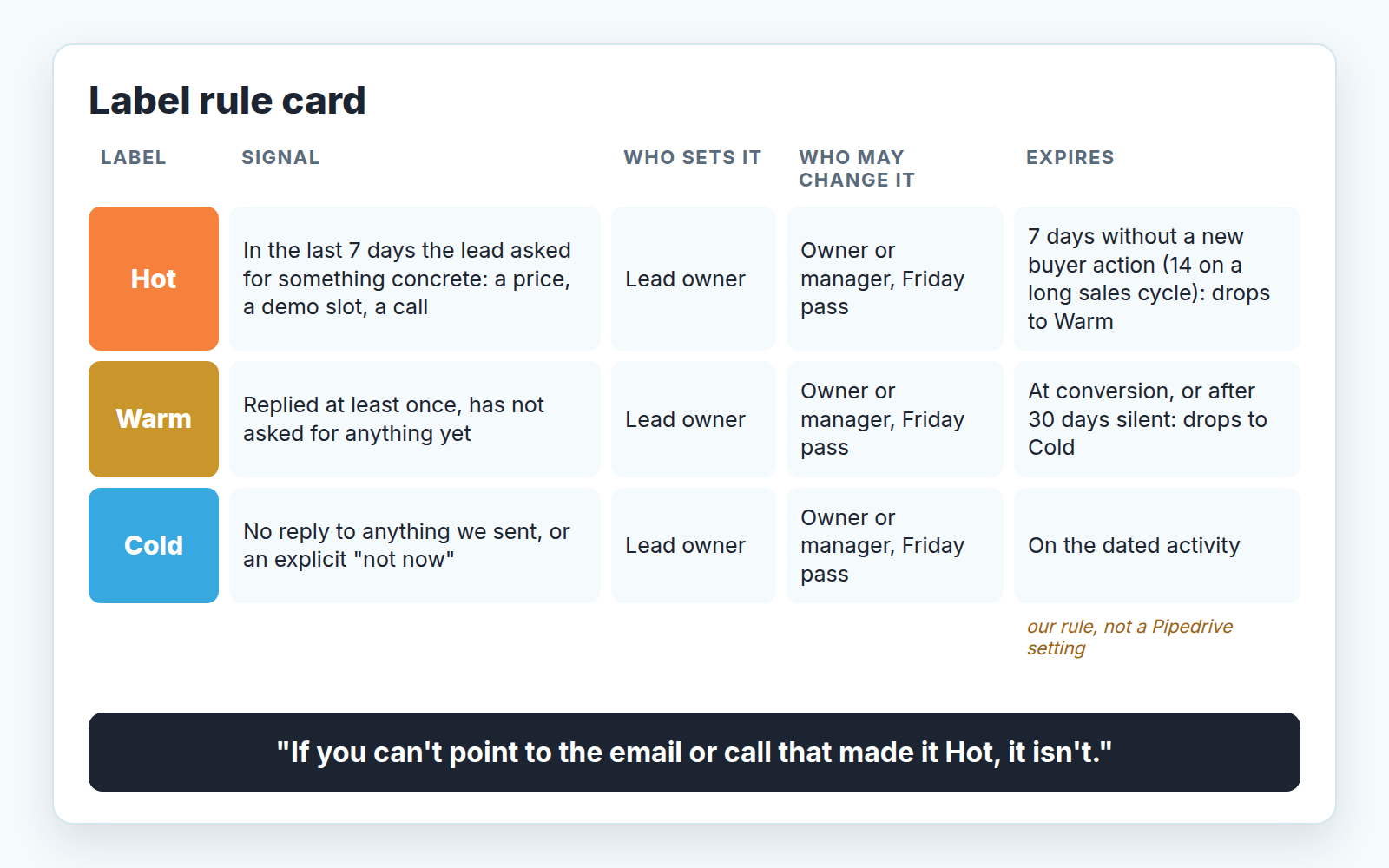
One sentence for the next team meeting: if you can’t point to the email or call that made it Hot, it isn’t.
What the Leads Inbox does with lead labels: filters, bulk edit, no import
The filter sits at the top right of the leads page as a labels dropdown, and you can pick one label or several. The behaviour that surprises people: filter by one label and you also see leads that carry that label alongside others. Reset with “All labels” (Pipedrive: lead labels).
That stays readable while every label belongs to a scheme with one clear job. It gets confusing when the inbox also carries “Partner”, “Enterprise” and “Expo 2026”. A Hot filter then shows each Hot lead wearing three or four tags, and someone starts reading the colours instead of the words. Our rule is one scheme per purpose: temperature for who to call, lifecycle for how long a lead may stay. Anything else you want to slice by belongs in a field. Where a lead came from already has its own field, which we covered in lead source tracking with Pipedrive web forms.
Bulk edit is where the scheme gets installed. Select leads in the Leads Inbox, the bulk editing menu opens, pick one or more labels, click “Update” (Pipedrive: lead labels). The same menu covers Title, Value, Owner, Visible to and Source channel (Pipedrive: leads vs deals). The first pass on an inbox that has never had a rule looks like this: sort by created date, select everything older than a month with no inbound reply, add Cold. Then work the rest by hand. Before you run a large pass, read our note on bulk edit safety in Pipedrive; a bulk change is as fast to get wrong as it is to get right.
Import is the gap to plan around. Lead labels cannot be imported, so a Temperature column in a spreadsheet will not turn into labels when the file lands (Pipedrive: lead labels). Import first, then label in the inbox with the filter and bulk edit. We think that is the honest order anyway: a “Hot” in a list bought from a vendor is nobody’s observed signal, and it would fail the definition the moment someone looked.
The conversion trap: labels that don’t follow the lead into the deal
A lead’s labels come along when it becomes a deal only if label copying is switched on. The switch is account-wide and lives with the people who hold account settings permission (Pipedrive: lead labels):
- Open Settings > Company Settings > Labels.
- Turn on the copy option.
- From that moment, converting a lead to a deal (or a deal back to a lead) shows its labels prefilled in the conversion modal, and they carry over to the new record.
Step three is the trap, and it is written on the help page in plain words: the setting is not retroactive. Every lead converted before you flipped it carried no labels into the deal, and nobody is going to backfill them. It gets worse from the inbox side. A converted lead leaves the open items in the Leads Inbox and counts as closed in your lead statistics, as we noted in Pipedrive leads vs deals. Without copying, the label stays on a closed lead nobody opens again, and the deal shows nothing. Accept that for the old deals, write the date of the switch in the team doc, and read labels on deals only from that date forward.
There is a limit of 1000 deal labels per company account. Three temperature labels will never get near it. What you will run into is different: a Hot label on a deal goes stale by definition, because the deal now has a stage, a next activity and an expected close date, and those say more than a colour does. We would let Hot/Warm/Cold ride along for the first week after conversion so whoever picks up the deal knows what kind of lead it was, and then stop reading it. The moment to convert at all, with the three conditions we hold to, is in the same leads vs deals piece.
Should you turn the copy on? Yes, if the person who converts is often not the person who worked the lead; the label is the one line of context that survives the handover. No, if your deal labels already mean something else, say a segment, and you do not want temperature words mixed into that list. Pick once. Flipping it back and forth gives you deals from three different eras of labelling.
When you don’t need labels at all
If one person reads the inbox and it holds a couple of dozen leads a week skip labels. That person already knows which three leads matter; sorting by created date and putting a next activity on each lead does the rest. A label is a coordination tool, and with one reader there is nobody to coordinate with. It also loses to a scheduled activity on the one thing that matters most for a lead, which is when you look at it again. An activity has a date and shows up in the calendar. A label sits there until somebody remembers it.
Labels start paying for themselves the moment a second pair of eyes needs the inbox: cover for a week off, a manager’s Friday pass, a new rep inheriting a batch. Or when volume forces you to triage in passes rather than lead by lead. When that day comes, do it in the slow order. Write the three definitions. Agree who may change them and when they expire. Then create the labels, which takes about thirty seconds. The definition was always the work.
Rhea’s week ended with a short message in the team doc: three labels, three signals, the 7-day rule, and a line saying nobody deletes a label without asking. She did not touch the 14 Hot leads from Monday. She reread them against the new definition on Friday and two were still Hot. Those two got called.


