
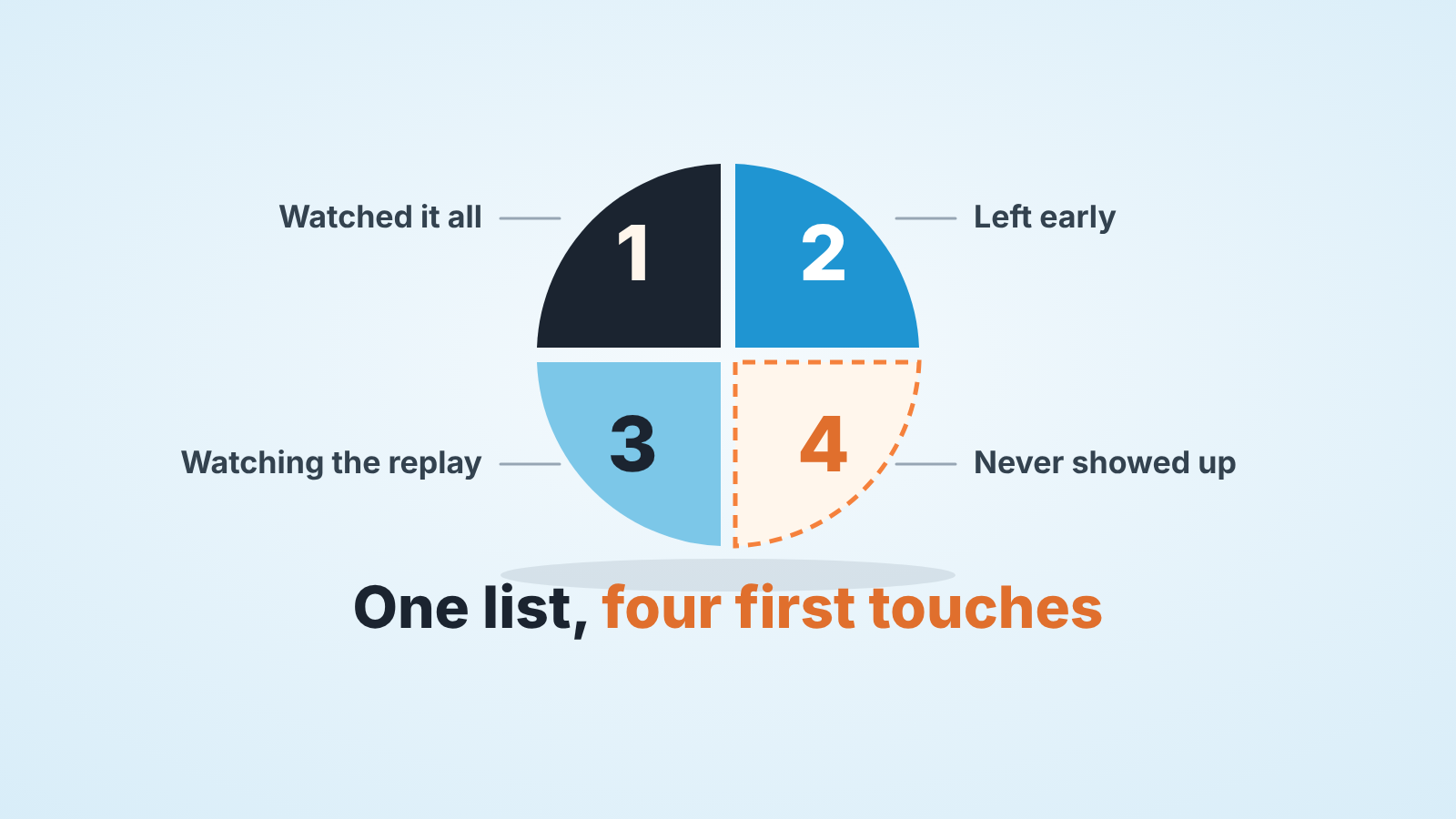
Webinar follow-up starts with not sending every registrant the same recording email. Split them into four groups (watched it all, left early, watching the replay, never showed up), give each a different first message within a day, and store the group on the lead in Pipedrive so the follow-up doesn’t live in your head. In Pipedrive that means one custom field mapped during the lead import, because lead labels can’t be imported (Pipedrive: lead labels), and one saved custom filter per group in the Leads Inbox (Pipedrive: Leads Inbox). Below: what each group should hear first, who gets a call and who doesn’t, and the one check we run on Friday.
Two hundred registrants, one email
A composite example; the people and the numbers are invented.
Two hundred people registered for a Tuesday webinar, and on Wednesday all two hundred got the same email with the recording link. Among them was a woman who stayed to the end and typed a question about pricing for a team of twelve into the Q&A. She got a recording of a session she had already sat through. There was also a man who dropped off at the twenty-minute mark, right when the demo started. Nobody mentioned the demo to him.
A registration list is not one audience. It is four, and the platform export already said which was which.
The four groups
Every webinar platform we have seen exports at least attendance, and most of them export how long someone stayed. That is enough to split the list:
- Watched it all. Attended live, stayed to the end or close to it. If they asked a question, the question is the best thing you own.
- Left early. Attended live, dropped off before the end. The timestamp of the drop-off is the interesting part, not the fact that they left.
- Watching the replay. Did not attend live but opened the recording afterwards, if your platform records that.
- Never showed up. Registered, did not attend, has not opened the replay.
Lantern, a vendor of AI follow-up agents, describes the same four segments and argues against one recording email for all registrants (Lantern: Build Webinar Follow-Up). Their page is for a marketing team with an agent running sequences. We are interested in what a closer does with the same split and no sequences.
One thing to settle before you touch the list: group 3 is a moving target. On Wednesday morning the replay group is empty. By Friday some of the the no-shows have watched it. So the group is assigned once at import and then only moves in one direction, from 4 to 3, when the platform shows a replay view. Nobody moves from 1 to anything.
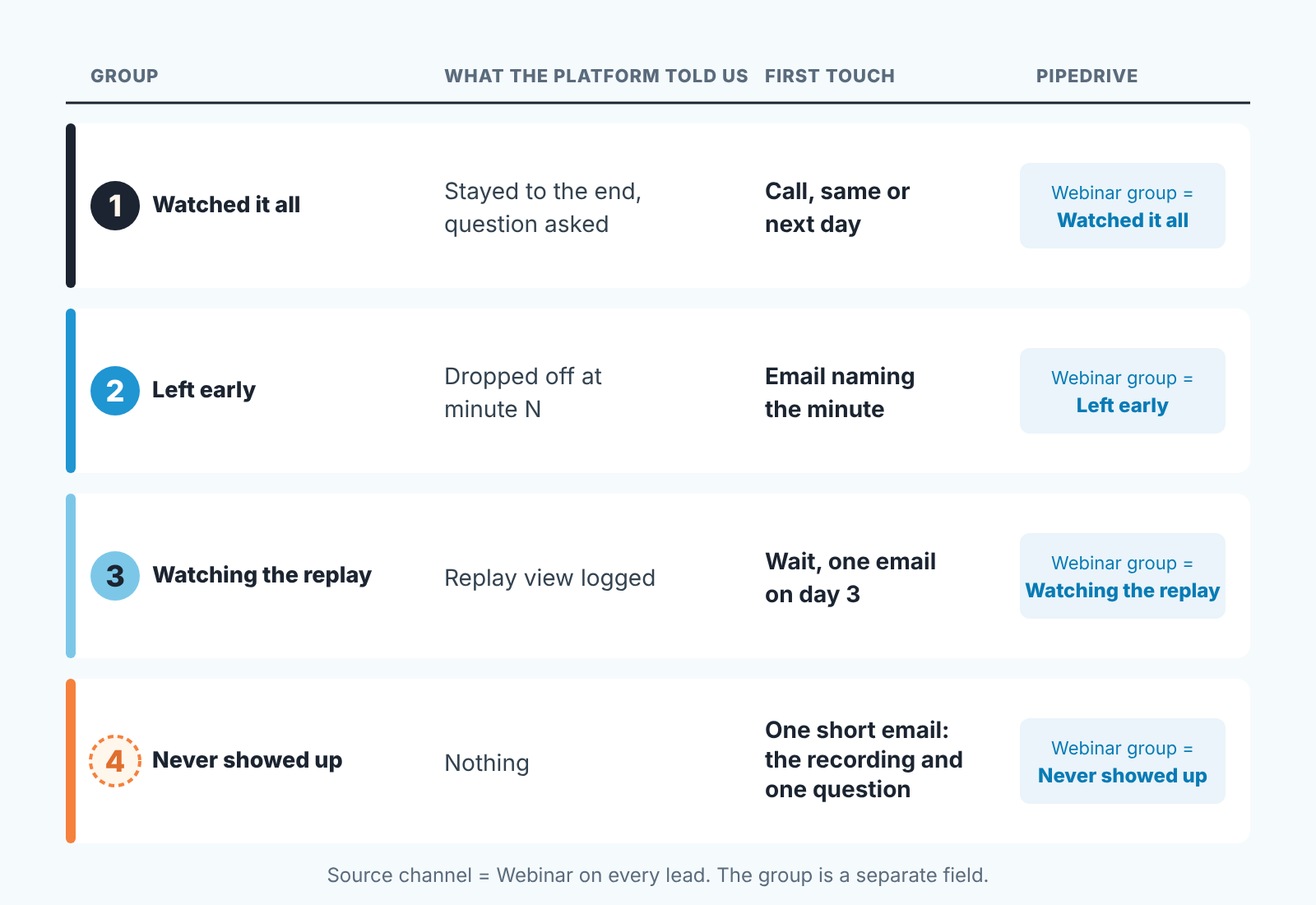
What each group hears first
The first message differs in kind. A template with a merge field for the group name is still one message.
Group 1 gets a call, and the call opens with their own question. “You asked during the session what the price looks like for twelve seats. I didn’t want to answer that in a chat box, so here it is.” If they didn’t ask anything open with the moment in the session that was about them: the slide they would have recognised, the objection the presenter handled that applies to their industry. The first thirty seconds should prove you were in the same room. Group 1 is the only group we call before they reply to anything.
Group 2 gets an email, and the email names the minute. “You dropped off around the twenty-minute mark, right before the part on importing from a spreadsheet, which is the bit most people ask about afterwards. Here’s that section on its own.” No question about why they left. People leave webinars because a meeting started, because the audio cut, because the first twenty minutes were slow. Asking why reads as a reproach. Pointing to teh exact moment reads as attention.
Group 3 gets wrong treatment in both directions: ignored because they weren’t “really there”, or called the same afternoon because a replay view looks like a buying signal. We wait. Someone who opened the recording on Thursday evening is still forming an opinion. One email on day three, asking one thing: “Was there a part worth a conversation, or was it background for now?” Both answers are useful. “Background for now” is a lead that gets archived with a reason, not a lead that gets three more emails.
Group 4 gets the shortest message of all. The recording, one sentence on what it covers, and one question. That’s it. Plenty of people in this group registered because the topic looked relevant on a Tuesday and will not watch forty minutes on a Thursday. The question is there so that the few who do care can answer it without watching anything. We have had people in group 4 book a call from that one question without ever opening the recording. Fine by us. The webinar was the excuse for the conversation.
One field, mapped at import
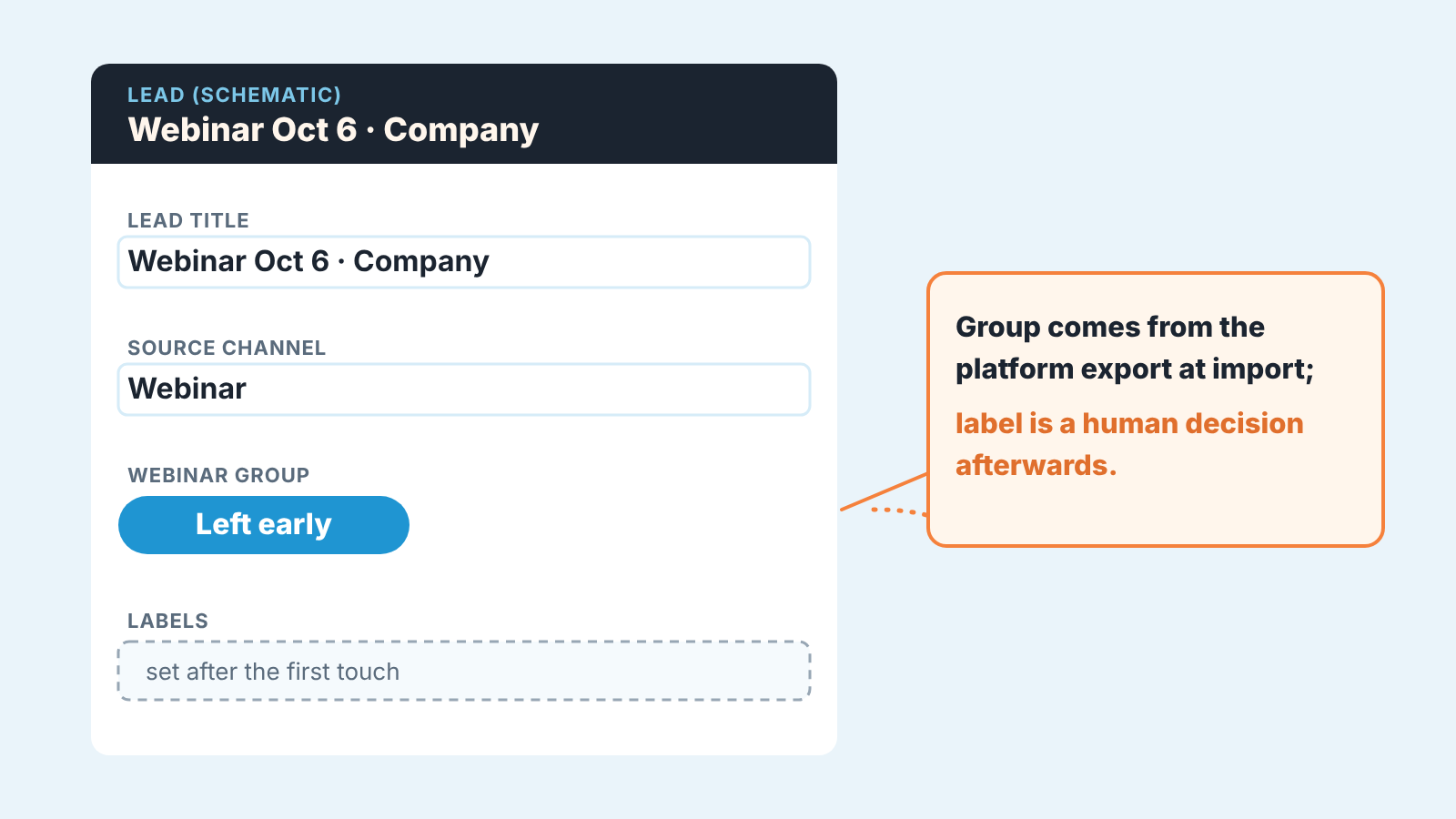
The obvious place for the group is a lead label, and it doesn’t work here: labels can’t be imported (Pipedrive: lead labels), so every webinar would end with four passes of hand-labelling. A custom field can be filled by the import itself.
So before the import, create one field. Leads use the same fields as deals in Pipedrive: a custom field created for deals appears on leads with the same name and properties, under the account menu, Personal preferences > Data fields (Pipedrive: custom fields). We call ours “Webinar group” with four options, named after the behaviour rather than a number, so that “Left early” means the same thing to whoever reads it in March. On the Growth plan and above, lead and deal fields can also carry a description that shows behind the info icon. Write the rule in there.
Then the import. From the Leads Inbox, the + Lead dropdown has “Import data”; a lead import needs a lead title and either a person name or an organization name, and during mapping you can select any lead/deal custom field (Pipedrive: how can I import leads). Map the group column from the platform export to “Webinar group”. Set the lead title to something a human can scan, like “Webinar Oct 6 · Company name”; a title that is just the person’s name tells you nothing in a list of two hundred.
Source channel is the other field worth setting, and the Leads Inbox lets you bulk edit it after the fact, along with labels, owner and visibility (Pipedrive: Leads Inbox). The webinar is the source. The group is what happened after. Keep them in separate fields or the next filter you build will be wrong. For an in-person event the same split gives you trade show ROI from a source tag.
If your webinar platform has a Pipedrive integration, some of this arrives on its own. Livestorm’s integration, for example, adds an event to the Pipedrive contact when someone registers, another when they attend, another for a replay or on-demand view, pushes the questions asked during the live session, and can create a deal in a pipeline and stage you choose (Livestorm help: Pipedrive integration). Note that it works on contacts, not leads, so “Webinar group” on the lead still comes from your import. That is one platform’s page; others document their own triggers. We would also switch off the deal-on-registration part. A registration is not a deal, and two hundred deals in stage one on Wednesday morning is a pipeline report nobody can read.
Labels still have a job, just a later one. Once the group field is in, Hot/Warm/Cold can carry the decision a person makes after the first touch, by the rule in one observable signal per lead label.
The first 24 hours
Our rule is a day: every registrant in groups 1, 2 and 4 has their first message by the same time tomorrow, and group 3 has a dated reminder for day three. The reason isn’t speed. On Wednesday the woman with the pricing question remembers asking it. By the following Monday the call about her question turns into a call about whether she remembers the webinar at all. Lantern pushes for two hours, which works when a sequence sends for you; a closer who also presented has the next morning, and that is fine for a call that opens with the person’s own words.
Who gets a call inside that day: group 1, in the order of who asked a question. Twenty calls is a morning; sixty is not. Groups 2 and 4 get email, written once per group and personalised only where the platform gave you something to personalise with (the drop-off minute, the question). Group 3 gets nothing on day one.
Sending forty near-identical emails one at a time is the step people quietly skip, and the plan collapses back into “I’ll send the recording to everyone.” Filter the group, then put an activity on every lead in it in one pass with bulk activities for follow-up batches; why same-day matters at all is in speed to lead in Pipedrive. If the webinar was run by someone who doesn’t close, settle whose leads these are before the day ends, with the lead handoff agreement.
A Friday check
Filter the Leads Inbox by “Webinar group” = Watched it all and go down the list. Does every lead have a logged call or a scheduled one? That’s the check.
Not “how many replied”, not “how many converted”, those take weeks and depend on the buyer. Whether every person in group 1 has been called or has a call booked by Friday depends only on us. The number should be all of them. When it isn’t, the reason is usually one of two: the import skipped the group mapping, so the filter is empty and the leads are invisible, or group 1 was bigger than one morning of calls and the overflow got no email either. Both are fixed in ten minutes on Friday and not at all in a month.
For group 3, look for leads that moved in from group 4 since Wednesday; each needs a reminder dated three days from the replay view, the one activity in this plan that nothing prompts.
Group 4 leads that got the short email and did nothing go to the archive with one reason, before they bury the next webinar’s list. How we archive leads without losing them is in lead recycling in Pipedrive.
The recording was never the point
A disclosure, since this is the part where tools come up: we build SalesBond, a sales management layer on top of the CRM a team already uses; we started with Pipedrive. Our guess is that webinar leads which become deals drift more than most, because they were created in a burst and worked in a burst. Deal Health checks every deal in the connected CRM against more than 20 rules, round the clock, and shows the specific violation, such as a deal with no next activity scheduled, with what to do about it. Check your CRM with SalesBond if that is the kind of drift you recognise.
The split itself needs nothing but a field. Create “Webinar group” before your next webinar goes live, so that Wednesday’s import is one mapping and the woman with the pricing question gets a call about her question, not a link to a session she already watched.


