
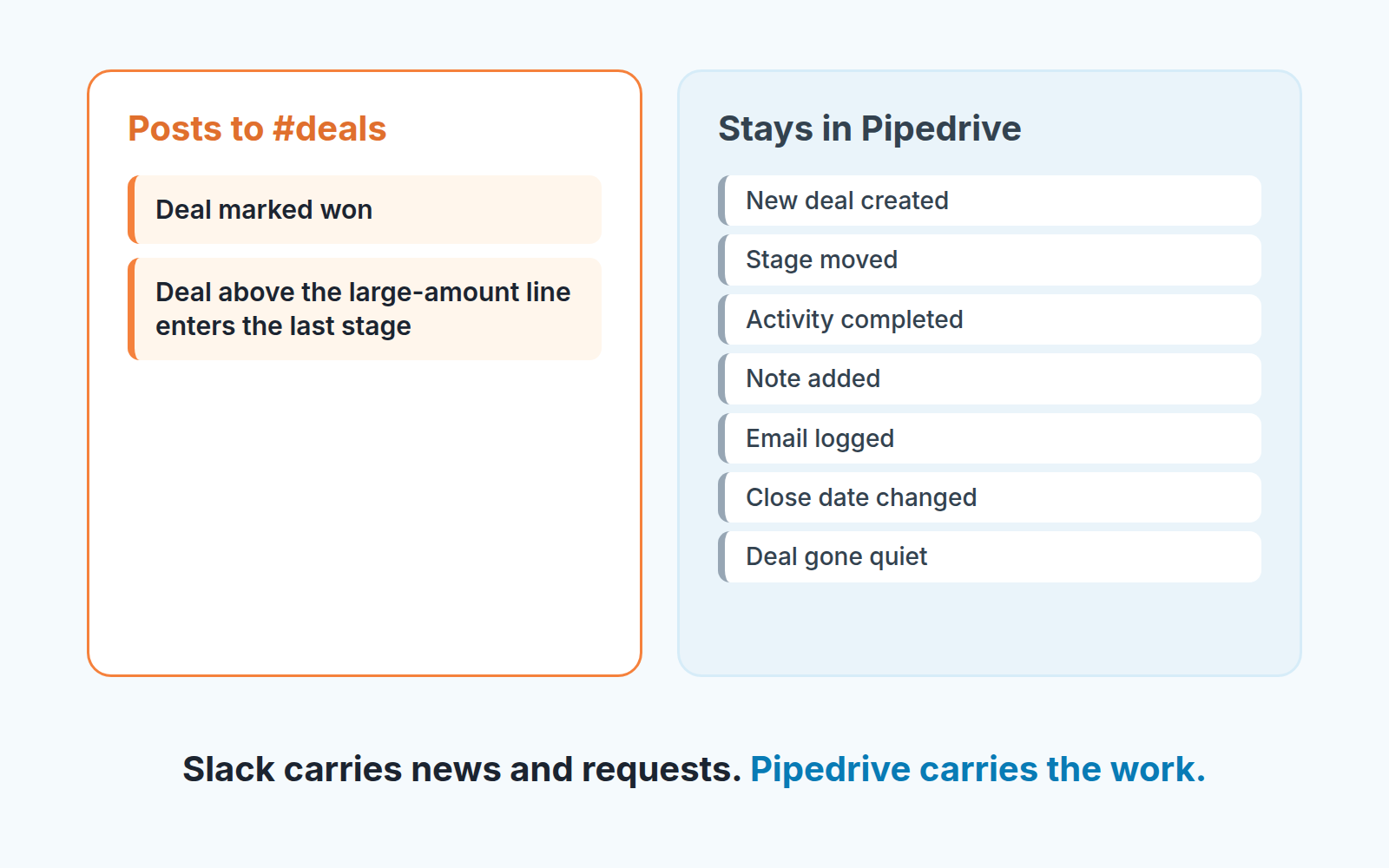
Connect Slack to Pipedrive through one of the two Slack automation templates, and let it post exactly two kinds of event to the team channel: a deal marked won, and a deal above your large-amount line entering the last stage before won. Every other event stays in Pipedrive. A Pipedrive Slack integration set up this way produces a channel people read, because something happens in it a few times a week and each time it is worth thirty seconds. Set it up the other way, with every stage move and every new deal, and the channel is muted inside a month. The won deals go unread along with the rest.
The channel nobody mutes, and the one everybody does
An invented team, a familiar shape. Six reps, one pipeline, a channel called #deals created by a manager who wanted to “see the pipeline move”. The automation posts on every stage change. Six reps who each move about five deals a day produce roughly 30 posts a day and 150 a week. In that same week the team wins three deals. Three posts out of 150 are the ones the founder opened Slack for, and they look exactly like the other 147.
By Friday, September 25, four of the six reps have muted the channel. The founder has not but she has stopped scrolling it. The following Tuesday a rep closes the largest deal of the quarter, and nobody reads the post about it until he mentions it at the Thursday stand-up. Nothing in Pipedrive is wrong. Nothing in Slack is broken.
The channel has simply become the thing people skip.
The scene is made up; the mechanism is not. A channel gets read in proportion to how rarely it posts and how much each post matters. The automation does not know that. It posts whatever its trigger fires on, so the manager has to decide what the channel is for. In a small team we think the honest answer is narrow: the channel exists so that the people who do not live in Pipedrive (the founder, whoever runs onboarding, the person who orders stock) hear about the deals that change their week. That is a short list of events.
Two events worth a post
Only two Pipedrive events earn a Slack post: a won deal and a large deal entering the final stage.
The won deal is the easy one. Everyone outside sales needs it, nobody outside sales will go to Pipedrive to find it, and it happens rarely enough to stay noticeable. One post, with the company, the amount and the owner.
The large deal is less obvious. Not every deal entering the last stage before won, only the ones above an amount you pick, and we would pick it so the post fires a few times a month, not a few times a day. This post does a different job. A won deal is news. A large deal one step from won is a request: the founder may want to join the final call, delivery may need to check capacity, finance may want to see the terms before anyone signs. Those people need a week’s notice, not a notification after the signature.
Everything else is the same kind of post as the 147 in the scene above. New deal created, stage moved from Qualified to Demo, activity completed, note added: real events, and each of them has a reader. That reader is the deal’s owner and the owner’s manager, and both of them are in Pipedrive already. Posting it to Slack tells people who did not need to know and trains the the people who did to stop looking.
We left a third candidate off the list on purpose. It is tempting to have Slack shout when something goes wrong in the pipeline, a stalled deal or a quiet rep. Pipedrive’s Slack templates are built for deal-related notifications, though, and a channel is a poor place to run a pipeline-health check. We come back to that below. On HubSpot the alerts are built differently; see the HubSpot Slack integration and its three deal alerts.
Setting up the Pipedrive Slack integration from a template
Order matters here, and Pipedrive’s help splits it across two pages. The integration comes first, the automation second:
- Go to Tools and apps > Marketplace apps, click “Explore marketplace”, search for Slack, pick “Dealbot for Slack” and click “Install now”. You need an existing Slack account before you start (Pipedrive: Slack integration).
- Authorize your Slack account under Tools and apps > Slack > Authorize Slack account (Pipedrive: automations and Slack notifications).
- Open Automations > Templates > Slack and choose one of the two templates: one posts deal-related information to a channel, the other sends it as a private message (same two sources).
- Specify the trigger when Pipedrive prompts you. The finished automation lands in your “Created by me” tab, where you edit it like any other. Each alert is an automation, so know how many automations your plan allows.
For the won-deal post, the trigger is the deal’s status changing to won. For the large-deal post, narrow it to the last stage before won, then use the condition step Pipedrive offers once a trigger is in place (Pipedrive: workflow automation). Put a condition on the trigger, for example on the deal’s value, so the post fires only above the amount you chose. One automation per event: two automations, two posts, one channel.
A detail that decides whether this works for a team: direct messages are not per-rep. Pipedrive is explicit that “the recipient of direct messages sent via automation will be the Slack user selected when setting up the integration” (Pipedrive: automations and Slack notifications), and the integration page adds that a “send direct message” choice delivers to the Dealbot by Pipedrive channel (Pipedrive: Slack integration). So “each rep gets a private ping about their own deal” is not what the direct-message option does. Use the channel option for anything the team should see, and treat direct messages as a private feed for the one person who connected Slack.
Already noisy before you build anything? Look at Dealbot itself. From your marketplace apps, the “…” next to the Slack integration opens settings where you “decide which Slack channels your updates are sent to, as well as which actions trigger Dealbot updates” (Slack integration page, above). Sometimes the noise is not an automation at all but Dealbot’s own channel settings.
Pipedrive’s Nova also talks to Slack, but only in private messages about meeting briefs and recaps, and “posting to public or shared channels isn’t supported” (Pipedrive: Nova and Slack), so it has nothing to do with the team channel.
Message text: what a reader needs in two lines
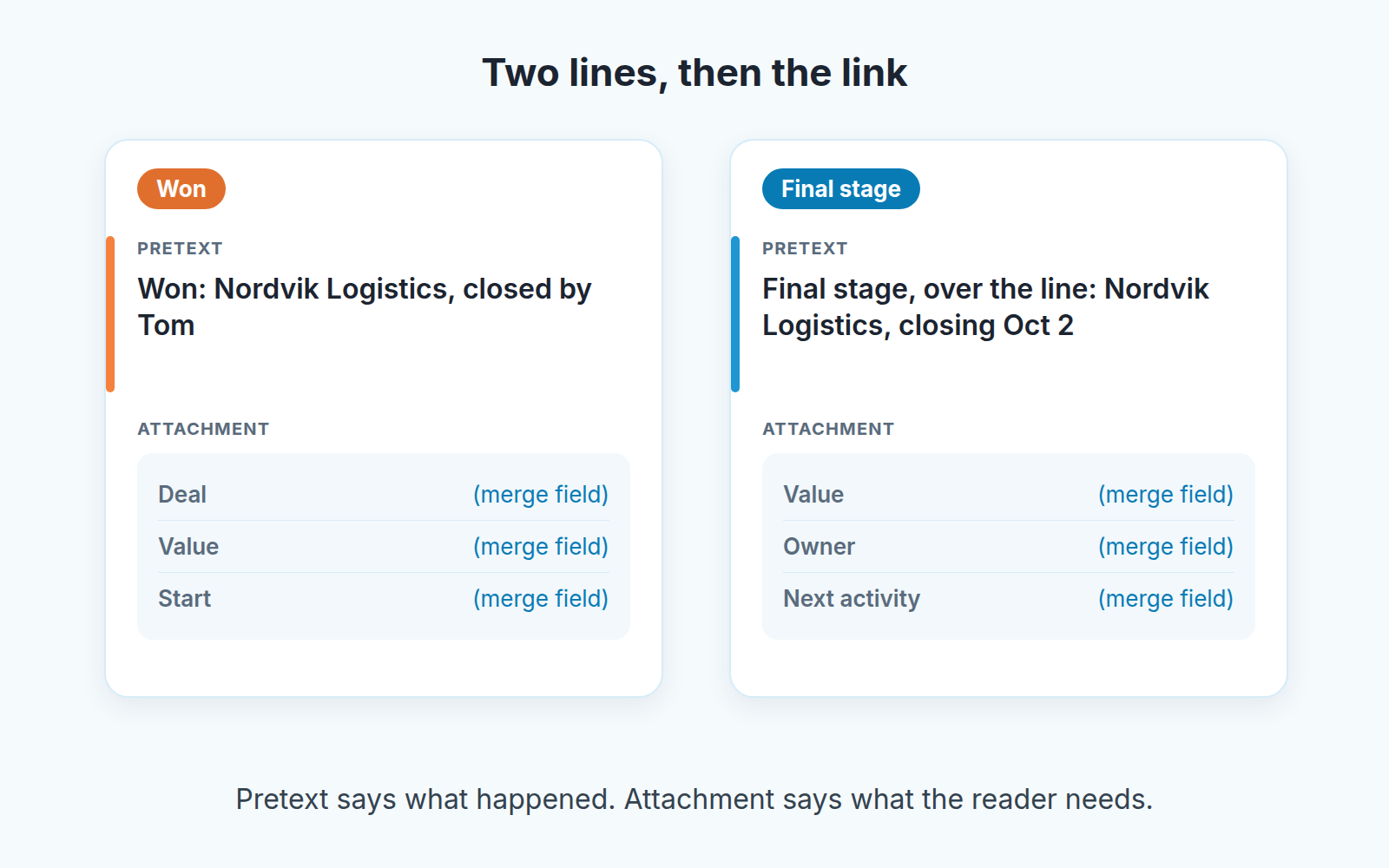
A Slack automation message has two parts. Pipedrive calls them the Pretext, “information that appears before the Attachment block in your Slack notification”, and the Attachment, “description or information related to the trigger event that occurred in your Pipedrive account”. Deal data goes into either one through the Merge fields icon (Pipedrive: automations and Slack notifications).
Our test for the text: a person reading it on a phone, without opening Pipedrive knows what happened and whether it concerns them. Two lines are enough.
For the won post, the pretext says what happened and who did it: “Won: Nordvik Logistics, closed by Tom.” The attachment carries the deal title, the value and the expected start, pulled in as merge fields. Add the deal link as a merge field if your template offers it. Nothing else. Not the stage history, not the number of activities, not a “great job team” that the automation says identically every time.
For the large-deal post, the pretext is a request, because that is what the post is for: “Final stage, over the line: Nordvik Logistics, closing Oct 2.” The attachment carries value, owner and the next activity, so the founder can see when the final call is without asking. Name the deal, not the stage. “Deal moved to Contract sent” is written from Pipedrive’s point of view; “Nordvik is one step from signing” is written from the reader’s.
Write the pretext so it reads as a sentence a colleague would type. Merge fields are good at values and names and bad at verbs, so the verb is yours: “Won”, “Closing”, “One step from signing”. Then read the two posts aloud with a rep. If either of you has to explain a field, remove it.
What stays in Pipedrive
Everything about how a deal is being worked. Stage moves, new deals, activities completed, notes, emails logged, close dates changed. Each of those matters to one or two people, and those people have Pipedrive open. The pipeline view shows the moves, the activity list shows the work, and the deal itself shows teh notes. A manager who wants to watch the pipeline move should open the pipeline, not a channel that reproduces it one line at a time.
The deal that has gone quiet stays out for a different reason. A stage-change or won trigger never fires on it, so the channel is silent about it in exactly the way the pipeline looked normal in the scene above. Adding more Slack posts to catch those deals mostly makes the channel louder. They need a different instrument. For the broader question of which steps belong to a person and which to a workflow, what not to automate in a sales process is where we work through it; this article only adds the rule that Slack gets outcomes and requests, never the day-to-day.
A disclosure, since this is the gap the channel cannot fill: we build SalesBond, a sales management layer on top of the CRM a team already uses; we started with Pipedrive. Its Deal Health checks every open deal against more than 20 rules and explains what lowered a deal’s score, so a deal that has gone quiet is flagged with the reason instead of being noticed when it is finally lost. It does not post to Slack for you, and it does not replace the two automations above. It covers the deals they will never mention. Check your CRM with SalesBond if that list is the one you are missing.
Two neighbors of this rule. The won post is a signal, not the handoff: what the next person needs lives in the deal fields, covered in the closed-won handoff. And both automations have an owner; if that person leaves, the posts can stop, which the owner audit for Pipedrive automations helps you catch.
The monthly mute test
Once a month, ask three people outside sales whether they have the channel muted. Not the reps; they would read it anyway, or not, and either way it was not built for them. Ask the founder, whoever runs onboarding, the one who handles invoices.
If all three say no, and can name the last won deal without checking, the channel is doing its job. Leave it alone.
If one of them has muted it find out which post made them do it. Usually it is not one of the two events above. It is something added since: a “new deal” post somebody thought would be nice, a change to Dealbot’s own channel settings, a second channel that forwards to the first. Remove the addition and ask again next month.
The same look is the moment to check the amount line on the large-deal automation. If the final-stage post fired more than a handful of times in the month, raise the line. If it fired on nothing, lower it, or ask whether the stage is being used at all, which is a pipeline question and not a Slack one. We run this check alongside the monthly look at reminders from Pipedrive activity reminders, since both tend to drift the same way, one extra rule at a time.
Your next step: open Automations, filter for the ones that post to Slack, and for each one ask whether it is a won deal or a large deal at the final stage. If it is neither, it belongs in Pipedrive.


