
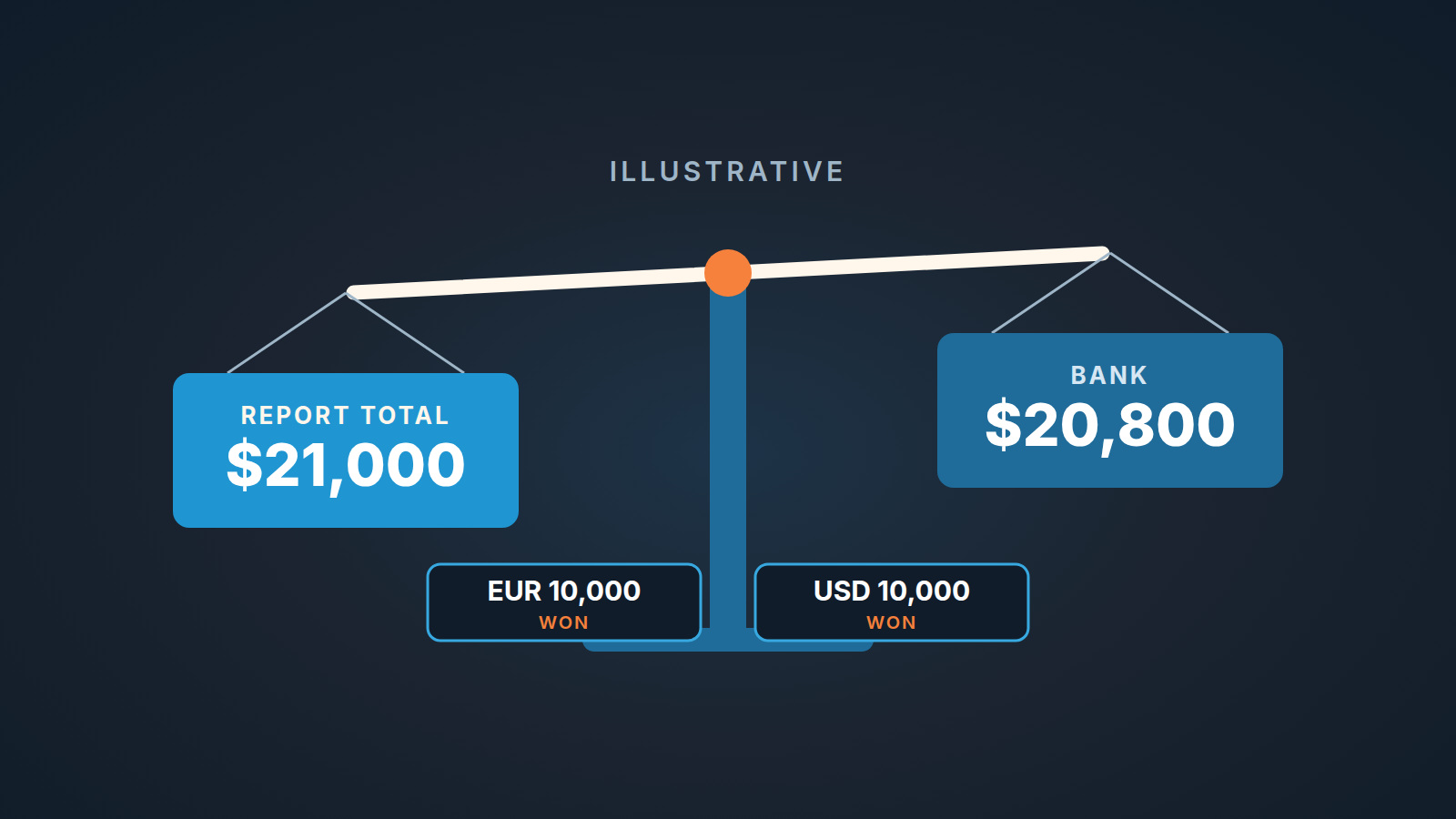
Pipedrive converts the value of deals won in other currencies into your default currency using rates from its partner Open Exchange Rates. It does this for reporting, it labels those rates “for statistical purposes only”, and it leaves custom currencies out of the conversion altogether (Pipedrive: how is currency converted). So the won total in a report is a statistical figure in one currency, not a bank statement, and it will not match one. Read it that way. Look at the “Value by currency” line in the summary box before you look at the grand total, and for quota and commission pick one currency and one rate yourselves, write both down, and stop expecting the CRM to agree with the bank.
Two deals of 10,000 and a total nobody can reproduce
A made-up scene, with made-up numbers, but the shape of it will be familiar. The company reports in US dollars. In September a rep closes two deals, each for 10,000 in the customer’s currency: one with a client in Berlin, entered in Pipedrive as EUR 10,000, and one with a client in Austin, entered as USD 10,000. Both are marked won.
On the first of October the founder sits down to write the monthly investor update. The won-deals report says 21,000 dollars for September. The bank account says less, and she can’t explain the difference to herself, let alone to investors.
Both numbers are right. They come from different rules. Give the example a rate of 1 euro = 1.10 dollars. That rate is invented; the help page does not publish the real one. At 1.10 the euro deal becomes 11,000 dollars in the report, the dollar deal stays 10,000, and the report shows 21,000. The Berlin client paid on a day when, in the same invented world, the bank converted at 1.08, so the account received 10,800 plus 10,000: 20,800. A gap of 200 dollars across two deals, and neither number is wrong. Pipedrive says as much: the conversion rate it shows “may differ from your bank or your customer’s banks, so the numbers demonstrated in reports may not reflect the amount received in your bank account” (Pipedrive help).
Twenty minutes of trying to rebuild 21,000 from the two invoices gets her nowhere, because the invoices were never the input.
Contract amount, report total, cash in the bank
Every multi-currency team has three figures in play, and meetings go sideways when one is called by another’s name.
The first is the deal value in the customer’s currency: the EUR 10,000 sitting in the deal’s value field. No rate touches it. It is the contract amount, the figure on the proposal and the invoice. The second is the report total in your default currency, what reports show after won deals are converted at Open Exchange Rates’ rates, “for statistical purposes only”. It is good for trends and for comparing one month with the last. The third is cash received, on the bank statement, at the bank’s rate on the day the money moved. That is the one you pay people from and close the books with.
When someone says “the pipeline is at 400k”, ask which of the three they mean. Usually they don’t know, and that is the whole problem. The first number is the only one a rep controls, and our position is that the value field should always hold the amount in the customer’s currency, exactly as it appears on the proposal. Typing a hand-converted dollar figure into a euro deal breaks the report (the converter will convert it again) and breaks the the invoice (finance has to reverse-engineer what the client actually signed). Which amount belongs in that field is a separate argument, made in deal value vs ACV in Pipedrive. Here the point is narrower: keep it in the client’s money. If you sell through Pipedrive products, recurring products and installments add their own ACV and TCV figures next to that field.
Pipedrive currency conversion: what it converts and with whose rates
The help article on this is a few sentences long, which is itself telling: conversion in reporting runs through Open Exchange Rates, covers deals won in different currencies, skips custom currencies, and uses rates meant for statistics, not for your bank (how is currency converted in Pipedrive).
Two words in there carry most of the weight. “Won”: the conversion the page describes is of won deals. “Statistical”: Pipedrive is telling you not to treat the result as money.
It says nothing about open deals in the summary box or a forecast, how often the rate moves, or pinning your own rate to a standard currency. The quota rule below deliberately depends on none of that. A rule that depends on converter behavior you cannot verify is a rule you will be relitigating every quarter.
One setting worth knowing the location of: the default currency dropdown is under Settings > Personal preferences > Account (creating a custom currency, last section). Note the word “personal”. Each user’s default currency is their own preference, and “your default currency” is where the won-deal conversion lands. For a team that reports in dollars, everyone sets the same one: USD.
The summary box: value by currency before the grand total
The same summary box appears wherever you look at deals in bulk. In the pipeline view, hover over a stage name to see that stage’s total, or click the “i” icon next to the pipeline dropdown for the whole pipeline. In the list view the “i” icon sits next to the sync button and opens the same box. It shows four things: Total value, Number of deals, Value by currency (a breakdown of deal values by currency), and Weighted total value, which adjusts for stage or deal probability. Whatever filter you have applied, the box reflects only the deals currently shown (how can I see the total value of my deals).
For a team selling in more than one currency, the reading order matters. Value by currency first. Number of deals second. The grand total last, if at all.
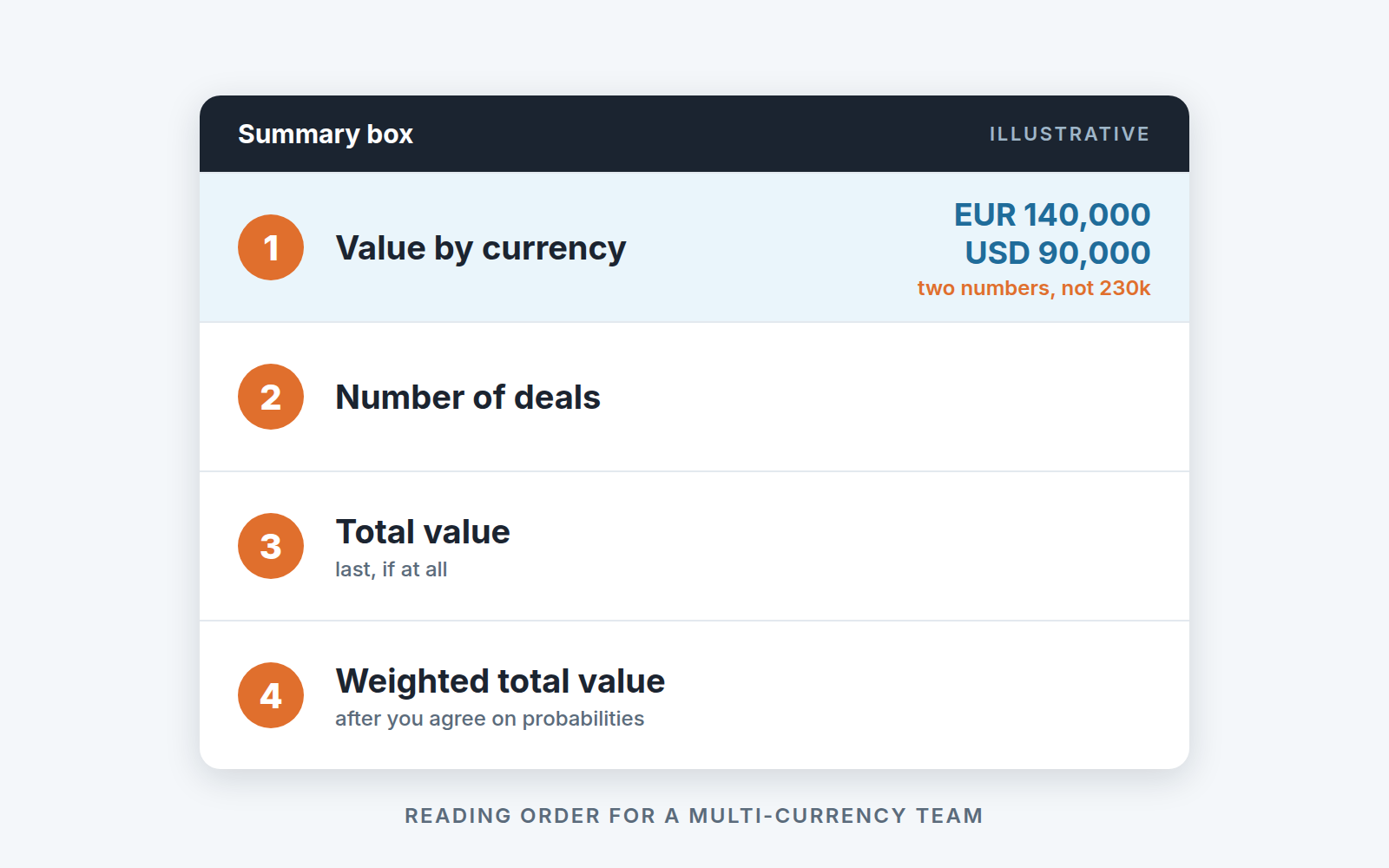
Continue the example into the current quarter. The rep’s open deals, filtered to this quarter and this owner, show Value by currency of EUR 140,000 and USD 90,000. Invented again, but the habit is real: say them as two numbers in the Monday meeting. “One-forty in euros and ninety in dollars.” Do not let anyone add them to “230k”, because 230 is not a number in any currency. The moment a manager says “so about 240 with the euros” out loud, a conversion has happened at a rate nobody chose, and that figure will be repeated upward.
The weighted row inherits every ambiguity of a mixed-currency total, plus it’s own question of whether your stage probabilities mean anything; we covered that in weighted pipeline forecasting and forecast accuracy for small teams.
Quota and commission: pick one currency and one rate, and write it down
Quota lives in the reporting currency, the same one everyone has set as their default. Commission is calculated from the same converted figure as quota attainment. The rate used for both is one the team chose, fixed for the period, and written where every rep can read it. Not the converter’s rate, and not the bank’s.
Why not the converter’s rate? Because Pipedrive tells you it is for statistics, and because nobody on your team picked it. A rep who misses quota by 300 dollars on a rate a third party supplied has a legitimate grievance, and you will spend a one-on-one on it. Why not the bank’s rate? Because it arrives when the client pays, which may be weeks after the deal was marked won and a rep’s attainment should not move because a client in Berlin paid in a different week than planned.
Back to the example. Finance publishes a quarter rate on the first of July, and for this made-up quarter it is 1.10. The Berlin deal counts 11,000 dollars toward quota on the day it is marked won, and it keeps counting 11,000 when the bank later settles the invoice at 1.08. The 200 dollars that go missing between the two are real money, and they belong in finance’s books, not in a deduction from the rep’s number.
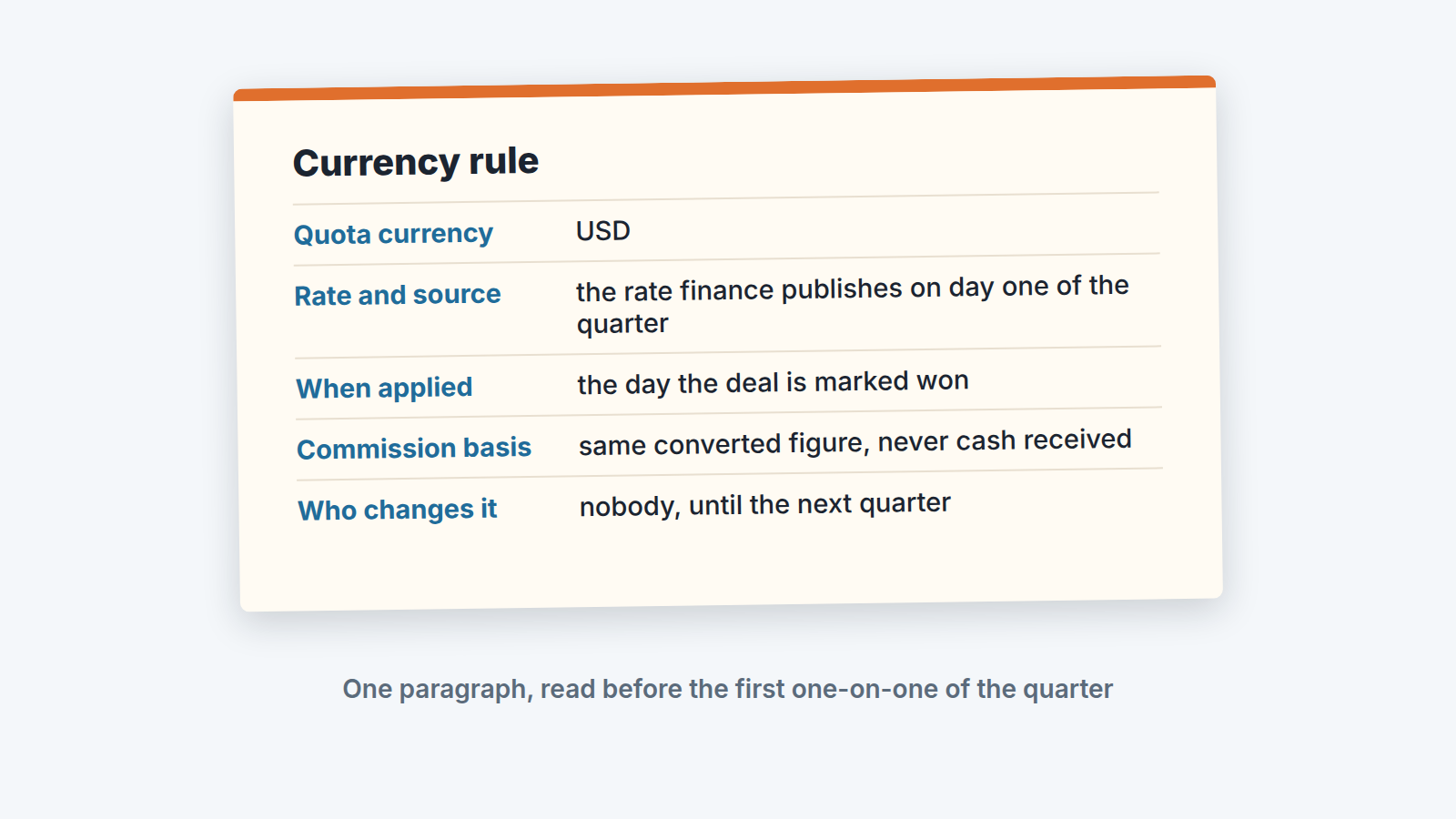
The written version fits in five lines, and the writing down is the part teams skip:
- Quota currency: USD, the default currency every user on the team has set.
- Rate: the rate finance publishes on day one of the quarter, one per currency, from the source finance already uses for the books.
- Applied on the day a deal is marked won, to the value in the customer’s currency as entered on the deal.
- Commission is calculated from that same converted figure. Never from cash received.
- Nobody changes the rate mid-quarter. If the market moves, the next quarter’s rate moves.
The converted figure lives in a spreadsheet, usually the one that holds the commission plan. Designing that plan is its own piece: commission structures for a small sales team.
A disclosure. We build SalesBond, a sales management layer on top of the CRM a team already uses; we started with Pipedrive. A quota with an unstated rate is a quota nobody can be measured against, whatever tool sits on top. If the 21,000-versus-20,800 question comes back every month end, check your CRM with SalesBond.
Custom currencies: handy for labels, wrong for money you need to add up
Pipedrive lets you create a currency of your own. Go to Company settings > Currencies, click “+ Custom currency”, give it a name and a symbol, and Pipedrive assigns it a unique code. You can ask for a different code but not type one in. Once saved, the currency appears in the lead, deal and product add modals, in detail views, and in webforms and automations. It can even be made the default currency (how can I create a custom currency).
What it cannot do is take part in the won-deal conversion. The conversion page is explicit: custom currencies are excluded (how is currency converted).
So a custom currency is for a unit the standard list lacks and you never need to roll up into dollars. The tempting misuse is the opposite: a team that dislikes the converter’s rate creates something like “EUR at our quarterly rate” and starts entering euro deals in it. Now the deal is in a currency the converter ignores, and the report’s converted won total no longer describes the deals the team actually closed. The quarterly rate belongs in the commission sheet; the deal belongs in standard EUR.
If your team has already done this, the fix is boring and worth doing: switch the affected deals back to the standard currency in the deal detail view (the pencil icon next to the value, then the currency dropdown), deactivate teh custom one so nobody picks it by habit, and move the rate into the sheet.
The next time the bank’s number disagrees with the report, the answer is one sentence. “That’s the report’s statistical conversion; the bank is cash; the quota figure is the third one, and it’s in the sheet.” For the founder in the opening scene, that means two honest lines in the investor update instead of one: September bookings at the quarter rate, and cash received as its own figure. And if your pipeline health reports already feel noisy, mixed currencies in the totals are often part of the noise.


