
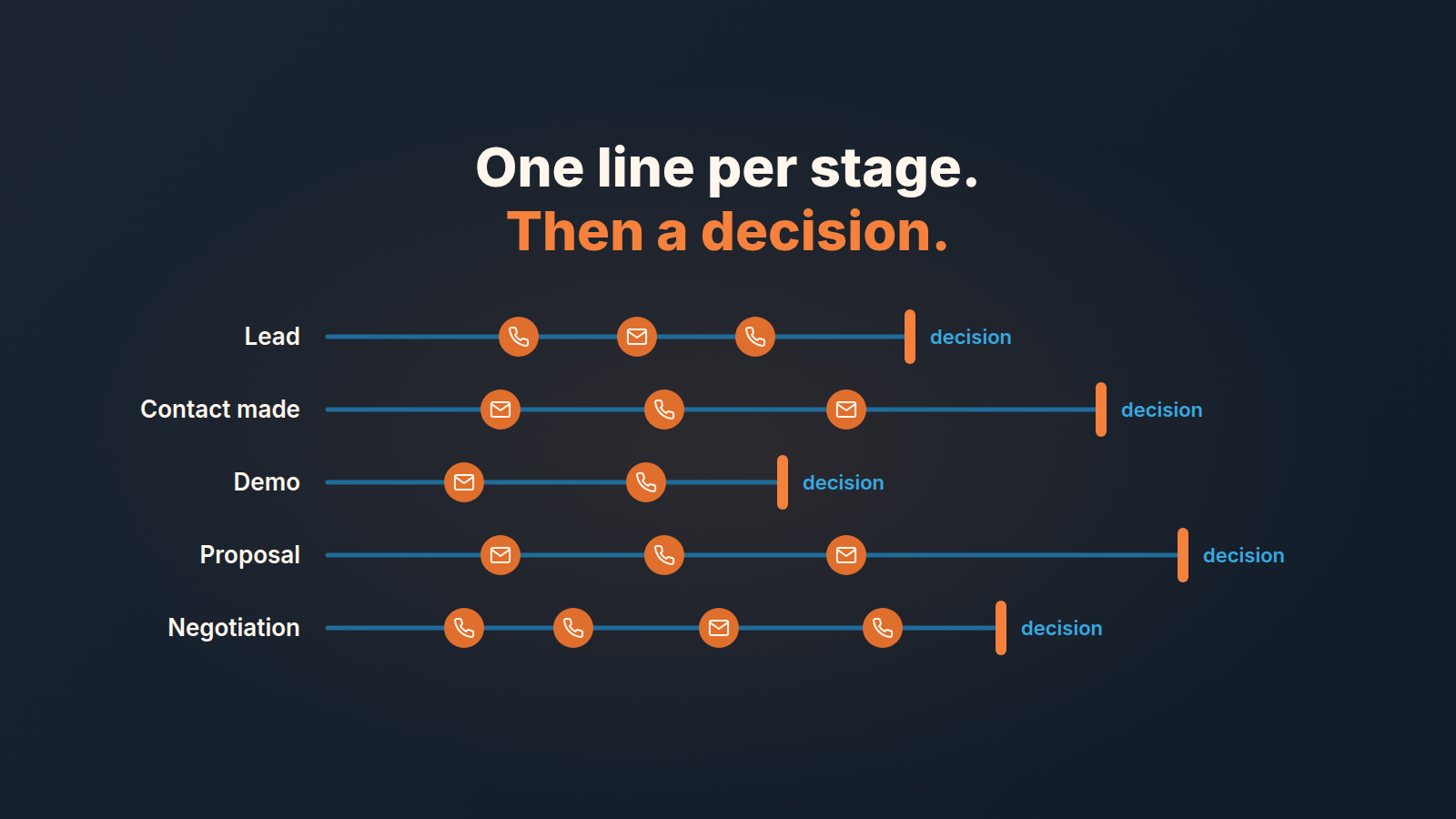
A sales cadence is the agreed pattern of touches a rep follows with a prospect: what, through which channel, how many days apart. For a small team the version that holds is not a script of twelve emails. It is a short team standard written per pipeline stage: how many days a deal in that stage may sit without a touch, which channel comes first, and the point where you stop following up and decide what happens to the deal. Each touch is a Pipedrive activity or sequence step, so the standard can be checked, not remembered. This is about touches on deals and warm leads, not the rhythm of your own team meetings; we covered that in sales meeting cadence for a small team.
Most sales cadence advice was built for cold outbound
Search “sales cadence” and the pages you get describe outbound sequences: a cold prospect, a dozen or so touches across email, phone and LinkedIn over a few weeks, and a count of how many touches it takes before someone answers. The counts vary by vendor. We are leaving them out, because none of the pages we read shows where they come from.
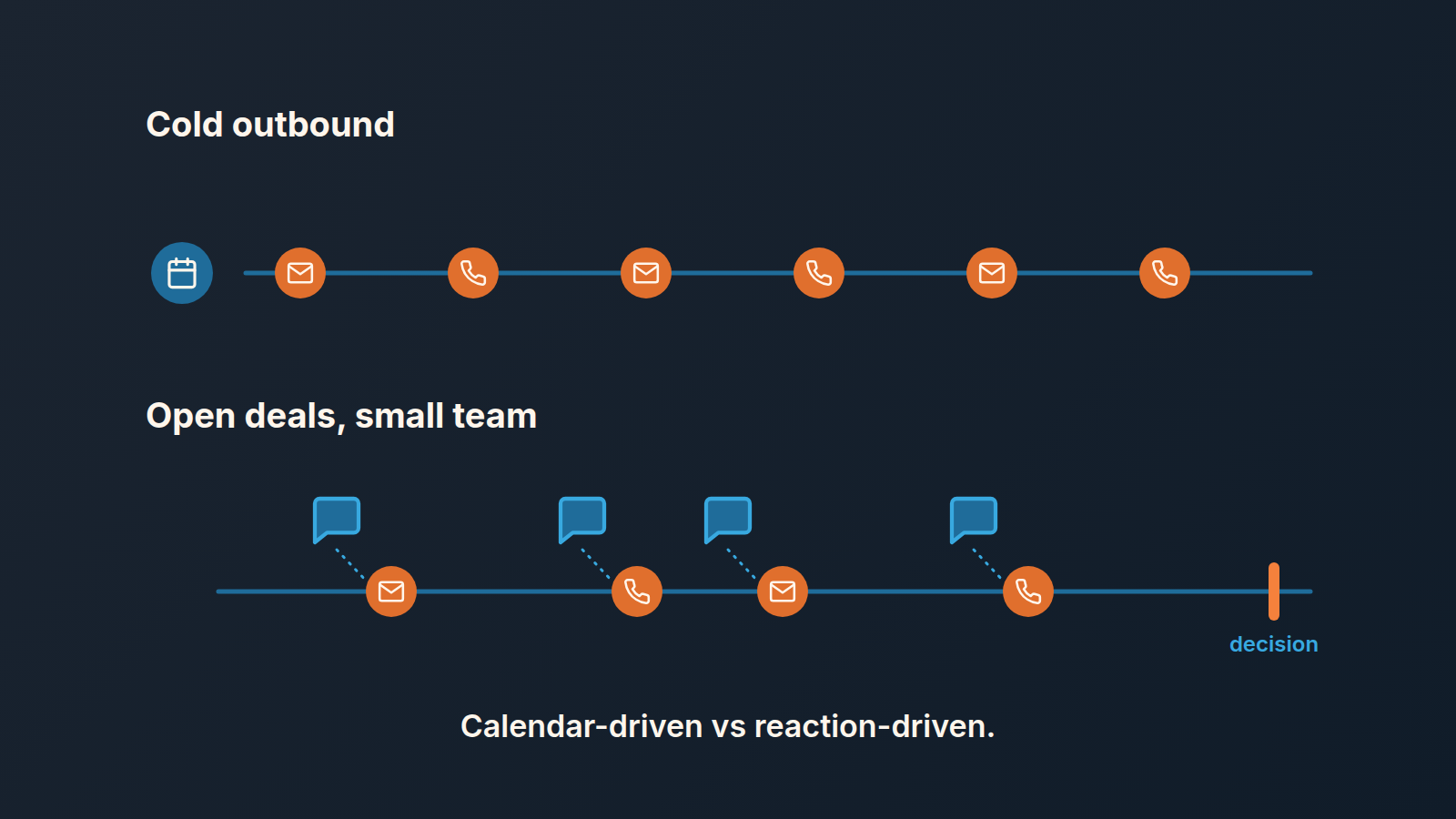
That model exists for a reason. A cold prospect gives you nothing to react to, so the only thing that can drive the next touch is the calendar.
A team of three to eight reps working open deals is somewhere else entirely. Thier prospects have already answered once. They sat through a demo or asked for a proposal. Treat them like cold names, with a fixed schedule that fires no matter what the buyer said yesterday, and a warm deal ends up with four identical “just checking in” emails and a buyer who stops opening them. What this team needs is a rule driven by the buyer’s last reaction, with a stop built in.
Three things people call a cadence
“We need a cadence” usually mixes up three different things, and the mix is what makes the standard impossible to enforce.
First, the rule itself: a sentence or a table the team agreed on, saying how long a deal may go untouched at each stage and when it stops being worked. The manager owns this. It should fit on a whiteboard.
Second, a Pipedrive sequence. That’s a fixed set of steps that run in order against the deals someone enrolled. It executes part of the rule. It doesn’t know the rule, and it doesn’t notice the deals nobody enrolled. How to build one is in Pipedrive Sequences for deal follow-up, so we’ll skip the setup here.
Third, automation: a field update or an enrollment that happens when a deal changes stage. Handy. Still plumbing, though, not cadence.
Keep the three apart and ownership gets simple. The manager writes the rule. The rep owns the next activity on each deal. The sequence owns the steps that are identical for every deal in a stage and nothing else.
One row per stage: the standard
This is the shape we use with teams on Pipedrive. These numbers are our standard, a starting point rather than data, so change them to fit your buying cycle. What shouldn’t change is the structure: a longest acceptable gap, a first channel, a point where the rhythm ends, and what happens then.
| Stage | Longest gap without a touch | First channel | Rhythm ends when | Then |
|---|---|---|---|---|
| Lead in, qualifying | 1 business day to the first touch, then 3 days | Phone, email as the fallback | 3 attempts with no answer | Archive the lead. Do not leave it open |
| Contact made | 5 days | Email, with a call if the email was the last touch | 2 weeks pass without a new fact from their side | Back to lead, or a dated call to decide |
| Demo done | 4 days | Whatever channel they answered on last | About 12 days after the demo | Out of the sequence; the deal is parked or lost |
| Proposal sent | 7 days (touches on day 2–3, 7 and 14) | Email; day 7 can be a short call | Around day 21 | Close-out message, deal to lost or nurture |
| Negotiation | 2 business days | Phone | A date the buyer named passes with no word | Manager joins the deal, or it is parked |
Two rows lean on rules we’ve already written up. The proposal row is the rhythm from following up after a proposal in Pipedrive, and the demo row is the four-step sequence from the Sequences article above. The first row’s one business day is the subject of speed to lead in Pipedrive.
Now our position. Most cadence advice treats more touches as the safer bet. On an open deal we think it’s the other way round: the third unanswered touch in a row is already a signal, and the fourth is noise. When one of those touches is a call that hits voicemail, what you say and log decides whether the next touch repeats it. A buyer who asked for a proposal and has gone quiet three times doesn’t need a fifth email. You need a decision about the deal, and the right-hand column is where that decision lives. Without a “then” column you don’t have a cadence. You have a reminder to keep emailing.
The gaps differ by stage on purpose. A lead goes cold in days; a negotiation can sit quiet for a week while legal reads the contract. “Touch every deal every five days” is easy to remember and wrong at both ends. Whatever the gap, when a gatekeeper answers the call, log who you spoke to, so the next touch starts from there.
What Sequences carry, and what they don’t
Sequences will carry the repeatable part of the standard. A sequence holds up to 10 steps; each step is either an activity (a call, a meeting, a visit) or an email that is created as a draft or sent automatically, and up to 250 deals or leads can be enrolled in one sequence. Whether you have the feature depends on your plan (Pipedrive: Sequences). Draft emails show up in the rep’s Pulse feed, so a step arrives as work to do, not as a message that already left.
That suits the demo and proposal rows, because the steps there are the same for every deal.
It doesn’t suit the moment the buyer answers. So the standard says it outright: when a reply comes in mid-sequence, the rep takes the deal out by marking it as completed in the sequence, which can’t be undone, and then works the deal by hand. A sequence that keeps sending “did you see my proposal” to a buyer who already said “yes, call me Thursday” does more damage than no sequence at all.
The first and last rows don’t belong in a sequence either: a new lead needs a human on the phone within a day, and a negotiation needs judgment about what the silence means. Zoho CRM has its own version, Zoho CRM Cadences, with exit rules you set before the first step.
After every reply, the rep books the next touch
No feature can hold this part: after every reply from the buyer, the rep books the next activity, dated, before closing the deal view. Not at the end of the day. Not on Friday during pipeline cleanup. Right then, because the reply tells you what the next touch should be, and by Friday that’s gone.
That is the whole difference between a reaction-driven cadence and a calendar one. In the calendar version the next touch was decided when the deal entered the stage. In the reaction version it gets decided each time the buyer says something. Say the buyer writes that their CFO is re-cutting next year’s budget and they’ll know where the project stands once that’s done. The next activity is a call timed to that, not an email on day 7 because the table said day 7. The table is the ceiling, the longest you let a deal go quiet. The reply sets the actual date, and it’s usually sooner.
It also means one dated next step per open deal, never a pile of them and never none; the next activity in Pipedrive explains why that field is the one thing worth being strict about. And if a reply lands while a sequence is still running on the deal, the order is fixed. Take the deal out, book what the reply calls for, then answer. Do it in any other order and old steps keep firing.
The manager’s part is small and a bit awkward. In the weekly review, for the deals past their gap, ask “what did they say last, and what did you book because of it?” Don’t book the activities for the rep.
How you notice the standard has slipped
Two signals, and you can see both in Pipedrive without extra tooling.
The first is a deal with no next activity scheduled. It’s the earliest sign. Either the rep closed the deal view after a reply without booking anything, or a sequence ended and nobody picked the deal up. A saved filter for open deals without a next activity is the most useful single view a manager of a small team can have (the next-activity article linked above walks through building it). Run it before the weekly review, not during.
The second is slower to spot: three or more outgoing touches on one deal with nothing coming back. Open the deal and read the timeline from the bottom. If the last three entries are all yours, the rhythm column has run out and nobody applied the “then” column. The deal stays open because closing it feels like giving up. It isn’t. That’s the standard doing it’s job.
One more thing, a diagnosis rather than a signal. If the team keeps breaking the table at the same stage, the problem is usually the stage itself. A “Contact made” that covers everything from a first call to a verbal yes can’t carry one gap rule. Split the stage, or tighten what it takes to enter it, before you blame anyone’s discipline.
Three questions before you make it the rule
Put the table on a whiteboard and, before anyone builds a sequence, ask three things out loud. Start with whether every row has a “then”. A stage with a gap and no stop will be read as “keep emailing until something happens”, so fill that column first.
Next ask whether a rep can tell from the deal alone which row applies. If they have to guess because the stage names are fuzzy, fix the stages before the cadence. The last one is the question teams skip: who takes a deal out of a sequence when the buyer answers, and when? If the honest answer is “the rep, at some point”, write down “the rep, before replying” and say it at Monday’s meeting.
Once all three have an answer, build the demo and proposal sequences, set the speed for new leads and leave the rest to the the next-activity habit. Give the table a quarter before you touch the numbers.
Where SalesBond fits
A disclosure, since this is the problem we work on: we build SalesBond, a sales management layer on top of the CRM a team already uses. Its Deal Health checks every deal in the connected CRM against more than 20 rules in categories such as Activity and Progression. You can switch rules on and off and set their thresholds, though you don’t write rules from scratch. A deal that breaks an activity rule shows up with a plain explanation and a recommended action, whether or not anyone enrolled it in a sequence, and the per-rep view shows each rep’s average score, their deals and their problem areas. If the deal that worries you is the one nobody put in a sequence, check your CRM with SalesBond.


