
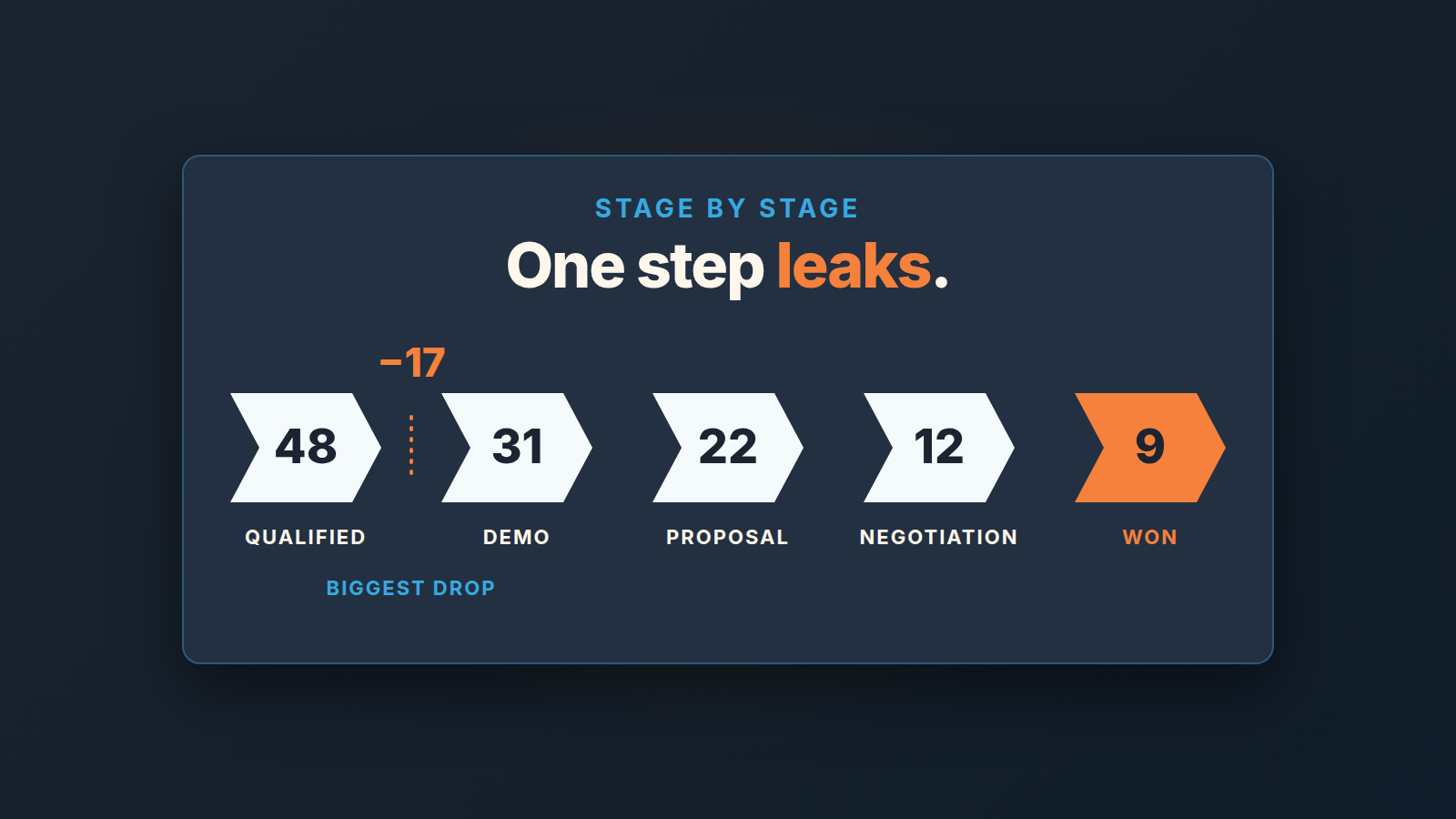
A pipeline stage conversion rate is the share of deals that entered one stage and later reached the next one. Count it on a cohort, for example every deal created in a single quarter, and keep the stalled and lost deals in the starting number. Drop them and the rate looks healthier than it is. The formula is short: deals that advanced ÷ deals that entered. The hard part is choosing which deals to count.
If you want the end-to-end number instead, that is win rate, a different question. Here we look at one transition at a time, because a pipeline rarely leaks evenly. It leaks at one step, and the point of the exercise is to name that step.
A snapshot of the board tells you nothing about conversion
Open the Pipeline view on a Tuesday and you see, say, 14 deals in Qualified, 9 in Demo, 6 in Proposal. It is tempting to divide 9 by 14 and call that a 64% Qualified-to-Demo rate. It is not a rate. Those 9 deals in Demo did not come from those 14 in Qualified. Some of them were created in August. Some of the 14 will still be sitting there in December, and a few will be lost next week.
A snapshot mixes deals of different ages. Fast deals have already left the early stages, slow ones pile up there, and the ratio between two columns says more about how long deals wait than about how many get through. ORM Tech’s guide warns that a snapshot consistently makes the ratios look rosier than reality. Outreach suggests a rolling 90- or 180-day window instead.
For a small team we’d skip the rolling window on the first pass and use a closed cohort, the approach ORM Tech also describes. Take every deal created in one quarter that is now old enough to have finished. Count how many of them ever reached each stage. That gives you a staircase, and the biggest step down is where deals die.
Calculate stage conversion rates from a Pipedrive export
Export your deals from Pipedrive to a spreadsheet. Per deal you need the stage, the status, the creation date and the date of the last stage change. Then:
- Filter to deals created in the quarter you are measuring. Pick a quarter that ended at least one sales cycle ago, otherwise a lot of deals are still in flight and the top of the staircase is honest while the bottom is not.
- For every deal, mark the furthest stage it reached. Won deals reached every stage. Lost deals reached the stage they died in, with the two exceptions in the next section. A deal that is still open is the awkward one: call it a failure and you understate the rate, leave it out and you overstate it. If more than a handful are open, your quarter is too recent.
- Count, per stage, how many deals reached it or went past it. Not how many are there now. How many ever got that far.
- Divide each count by the one before it.
Here is what that looks like for a hypothetical five-stage pipeline and 48 deals created in Q2:
| Stage | Deals that reached it | Conversion from previous stage | Deals lost at the step before |
|---|---|---|---|
| Qualified | 48 | n/a | n/a |
| Demo | 31 | 65% | 17 |
| Proposal | 22 | 71% | 9 |
| Negotiation | 12 | 55% | 10 |
| Won | 9 | 75% | 3 |
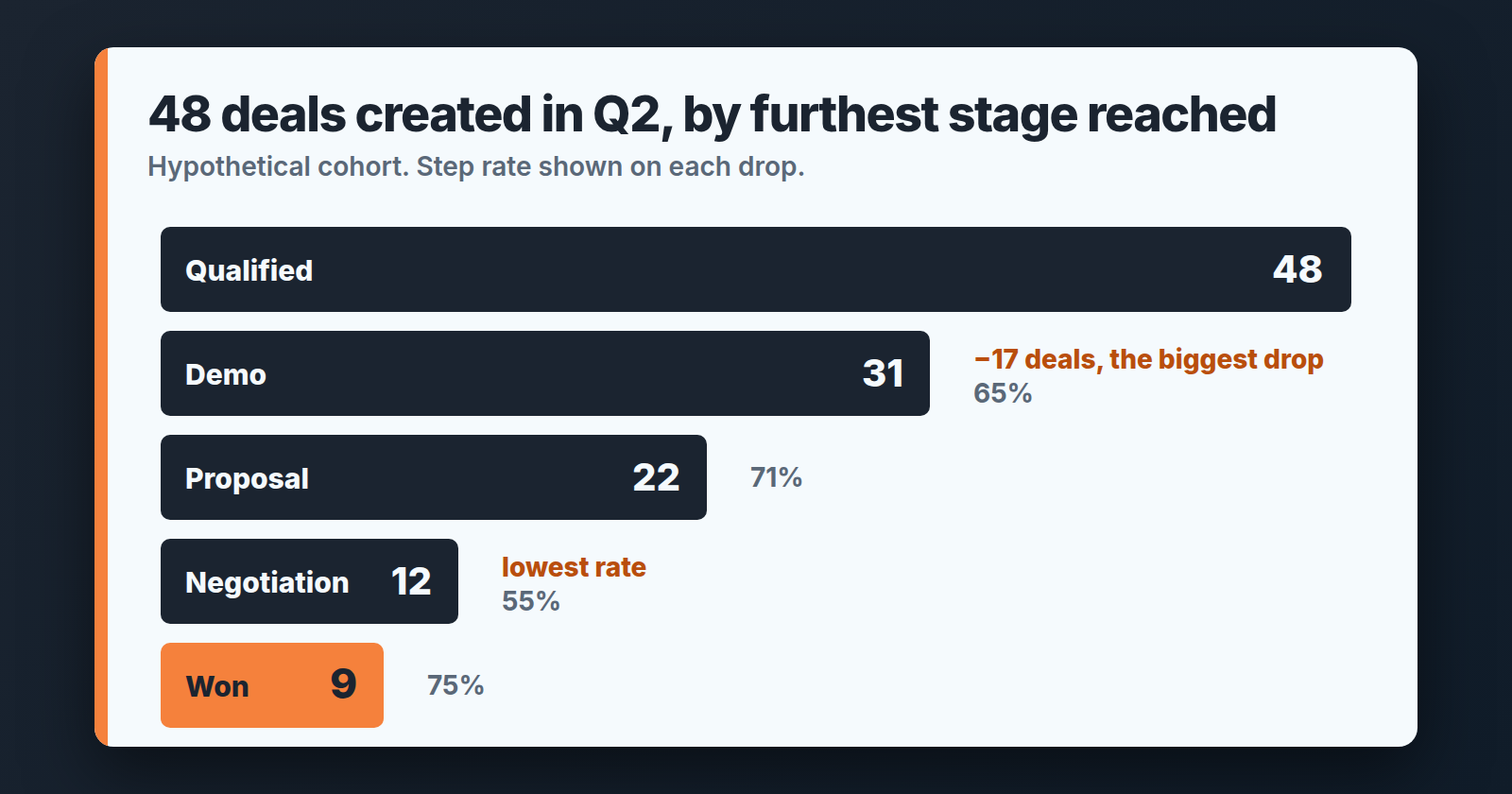
Two things jump out, and they are not the same thing. The lowest rate is Proposal to Negotiation at 55%. The biggest pile of bodies is between Qualified and Demo, 17 deals. Both are true. Which one you work on first comes later. For now the table has done it’s job: it replaced “our pipeline feels leaky” with two named steps.
Pipedrive’s Insights funnel conversion report builds a close cousin of this table on its own. By default it looks at deals created this year in one pipeline, with status Won or Lost, and each column shows the percentage of deals that reached that stage. Won deals count as having completed every stage no matter where they were closed, lost deals count at the stage where they stopped. That matches the cohort logic here. We still start with the spreadsheet because of step 2: you want to see the furthest-stage column with your own eyes before you trust any percentage built on it. The next section is why.
Two Pipedrive traps: skipped stages and deals that walked backwards
Pipedrive lets a deal land in a late stage without passing through the early ones. A rep adds a deal for a customer who already asked for a proposal and drops it straight into Proposal. The deal never entered Qualified or Demo. Now your Qualified count is short by one, and your Qualified-to-Demo rate is slightly understated: the easy deal that was always going to pass is missing from both counts.
Pipedrive’s deal progress report has a rule for a related case, stages skipped between two others: “the entered stage deal count also includes deals that have skipped that stage while moving on to a future stage.” A deal that jumps from stage two to stage five shows up in three and four as well. The help article says nothing about stages before the one a deal was created in, so for those we apply the same logic by analogy. A deal that sat in Proposal implicitly passed Qualified and Demo, so count it in both.
The second trap runs the other way. A deal reaches Negotiation, the buyer goes quiet, and the rep drags it back to Demo “to re-engage”. Six weeks later it is lost from Demo. In the export its current stage is Demo, so a naive count books it as a Demo loss. It was not. It reached Negotiation, and that is where it actually died. The deal progress report has the same blind spot by design: it uses the most recent stage updates, so a deal moved from Stage 2 back to Stage 1 is shown in Stage 1. For a progress report that is fine. For your cohort table it hides the real drop.
The fix is cheap. For any deal whose last stage change came suspiciously late in its life, open the deal history and find the furthest stage it ever reached, not the one it was parked in when it died. In a cohort of 48 this is ten minutes of work. It is also a quiet argument for a rule on the team: deals do not move backwards. If a deal needs re-engagement, that is an activity, not a stage. More on why each stage should mean one thing in how to design sales pipeline stages.
Twelve deals is not a rate. Read them.
Look at the Negotiation row again: 12 deals in, 9 won. Say two of those 9 had been lost instead. The conversion drops from 75% to 58%, and someone on the leadership call starts asking why closing got worse. Nothing got worse. Two deals went the other way. With a denominator of 12, every single deal moves the rate by about eight points.
So in a small-team cohort table the percentage column is a pointer, not a measurement. It tells you where to look. It does not tell you what is wrong.
What about a “good” stage conversion rate? Published benchmarks exist, but they come from vendors and from samples far bigger than yours. A team with 48 deals a quarter learns more by comparing this quarter’s table with the last one than with an industry average.
Take the step with the biggest drop and pull the lost deals from it. In the table above that means the 17 deals that reached Qualified and never got to Demo. Open them one by one. For each, write a single line: who the contact was, what the last activity was, how many days it sat and the lost reason if one was filled in. Ten deals is enough. You are looking for one thing: what did they have in common at that stage?
The answer is usually embarrassingly concrete. Say eleven of the seventeen had no activity scheduled after the first call. Or nine came from one lead source that sends people who were never going to buy. Or the demo invite went out and nobody followed up when it wasn’t accepted. You won’t see any of that in a percentage. You’ll see it after an hour with the deals open, and it gives you something to fix. Before you blame the stages, check the Pipedrive lead conversion rate by source, which shows how many leads ever became deals.
One fix per weak transition
Here is the discipline: one step, one fix, one quarter. Not a process overhaul. The transition you pick is the one where reading the deals gave you a sentence that starts with “most of them”. If both candidate steps gave you a sentence, pick the one with more deals behind it, because that is where a change will show up in next quarter’s table.
For an early-stage drop, where deals enter Qualified and never get to Demo, the fix is almost always about the next activity. A deal that leaves a call without a scheduled follow-up is going to sit, and sitting deals turn into lost deals without anyone deciding to lose them. The change is a rule, not a tool: no deal leaves Qualified without a dated activity on it, and the 15-minute weekly pipeline review checks exactly that.
For a late-stage drop, Proposal to Negotiation in our table, the pattern is often that proposals go out to people who cannot say yes. Reading the the ten lost deals tells you whether the decision maker was ever on a call. If not, the fix sits one stage earlier: no proposal until you have spoken to whoever signs. That moves some deals from “lost at Proposal” to “lost at Demo”. The Demo row looks worse and the business is better off, because reps stop writing proposals nobody was going to read.
A drop at the very last step, Negotiation to Won? Leave it alone here. With three lost deals in the whole quarter there is nothing to read. If the final step is what you care about, win rate is the number to track, and it needs a bigger sample than a single transition does.
Do it again next quarter
Write the fix down with the date you introduced it. Then put a reminder in your calendar for the week after the quarter closes, and build the same table for the next cohort. The export takes a couple of minutes, the table maybe twenty, and reading the deals about an hour. If the step you worked on moved and the others didn’t, you’ve learned something real about your pipeline, and you know which step to read next.


