
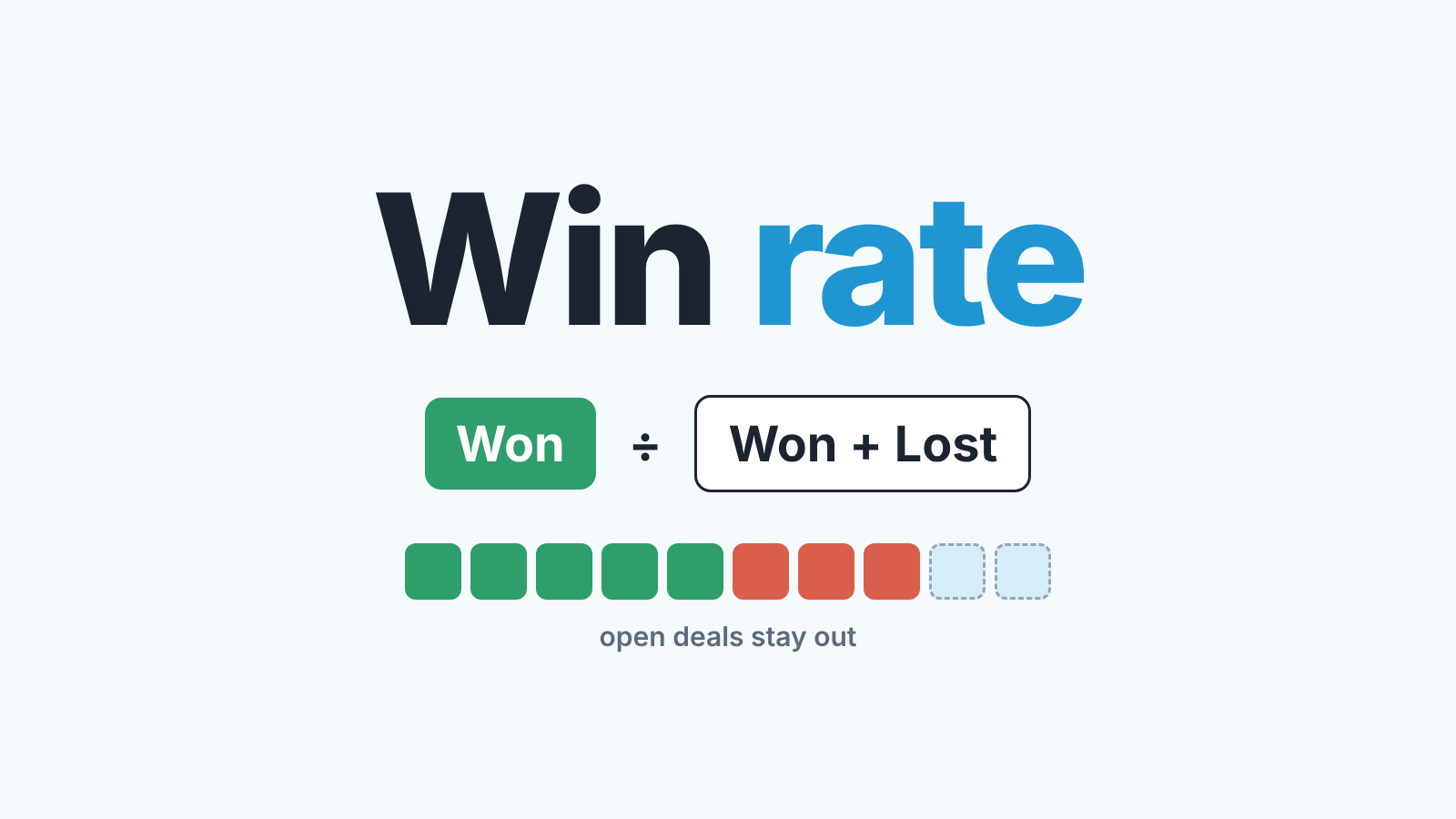
Win rate in Zoho CRM is closed-won deals divided by all closed deals, won plus lost, for the same period. The hard part is not the division. It is deciding, before you build the report, which Deals stages count as lost, whether open deals stay out of the denominator, and which date decides the period. Zoho Analytics ships a ready Win/Loss % report, but a standard Deals report grouped by Stage and Deal Owner gives you the counts for the same number without the add-on.
Win rate is a ratio: pick the denominator first
Picture two managers on the same Zoho CRM account reporting 31% and 52% (made-up numbers, real pattern). The first divided won deals by every deal created in the quarter, open ones included; the second divided won by closed. Both are right by their own definition, and the two can’t be compared.
We prefer won ÷ closed, for the reasons in sales win rate in Pipedrive: an open deal has not been decided yet. That also answers “what is a good win rate?” A good number is one built on a stated denominator and compared between owners on the same team, not against an industry figure counted some other way.
The second rule is the one Zoho teams skip most often: decide which lost deals are real losses. A duplicate, a deal nobody ever qualified, a test deal a new rep made to learn the layout: each lands in a lost stage if nobody cares, and each lowers its owner’s win rate.
Write the definition in one line and paste it into the report description: “Won ÷ (Won + Lost), by Closing Date, excluding Disqualified.” Everything below is how to make Zoho CRM honor that line.
Which Zoho CRM stages count as won, lost and neither
Zoho CRM does not treat a stage as lost because its name says “Lost”. It goes by the stage’s category. In Setup > Customization > Modules and Fields, open the More menu on the Deals module and choose Stage-Probability Mapping. Every stage sits in one of three Deal Categories: Open (“the deal is still in the sales cycle”), Closed Won and Closed Lost. Those categories feed the forecast as Pipeline, Closed and Omitted respectively (Zoho CRM: Creating Deals, Map Stage-Probability values).
Two things follow from that screen.
“Closed Lost to Competition” is one of only two default stages mapped to Closed Lost, so it belongs in your denominator. It is a real loss with a known reason, the most useful kind. Custom stages need a look one by one: an “On hold” stage someone mapped to Closed Lost two years ago is quietly counting as a loss today.
Open stages are “neither”. Qualification, Needs Analysis, Negotiation/Review and the rest stay out of both numerator and denominator until the deal moves into a closed category.
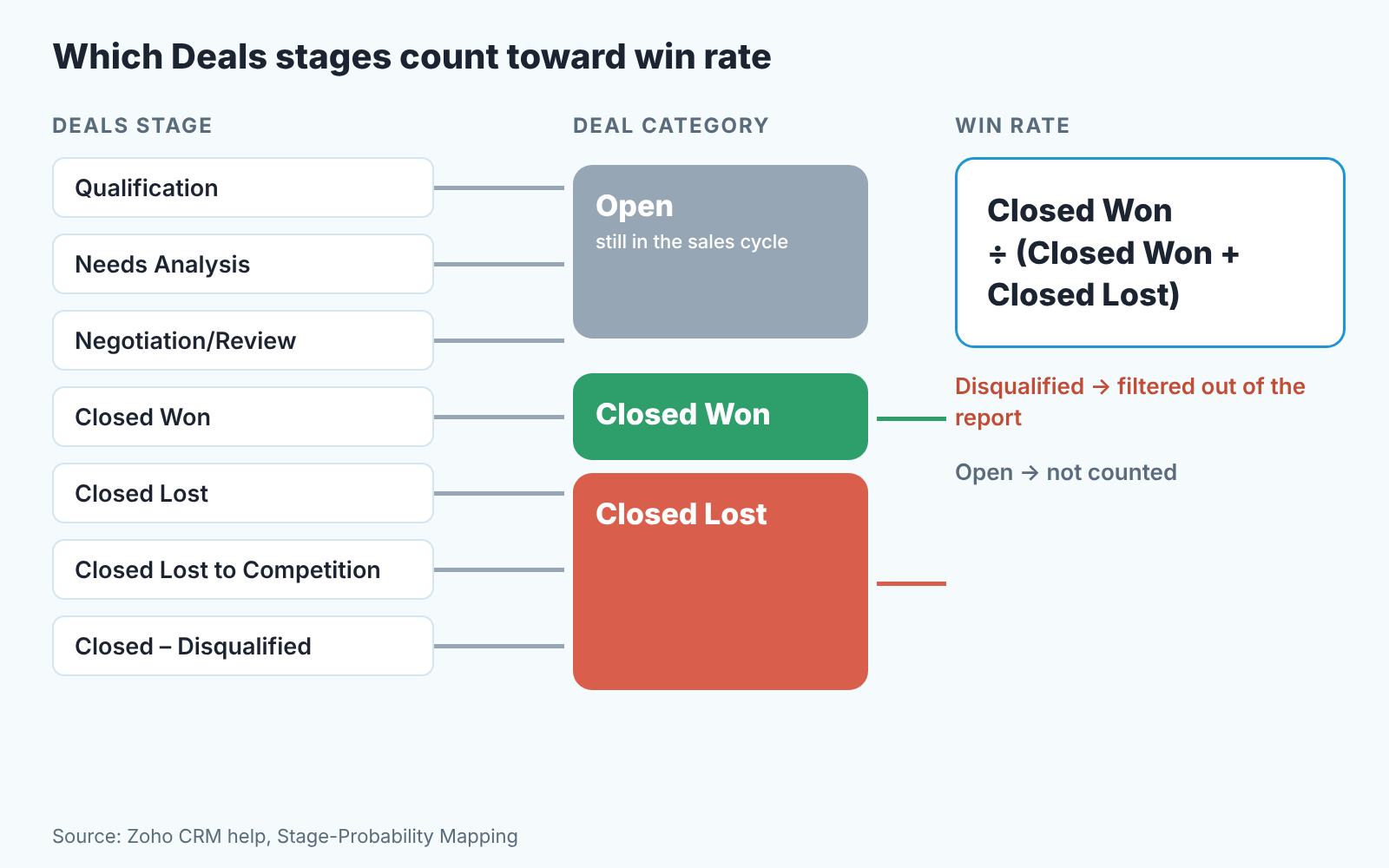
Now the disqualified deals. Our recommendation is a dedicated stage, “Closed – Disqualified” or whatever your team will actually say out loud, in the Closed Lost category, plus a report filter that leaves it out. The stage keeps the record (you’ll want to know how many junk deals a lead source produces), the filter keeps it out of the ratio. With several pipelines the logic is the same per pipeline, since each stage there gets its own record category (Zoho CRM: Multiple Sales Pipeline).
The Deals report: won and lost by owner
A standard Zoho CRM report will count won and lost deals per owner. The aggregate functions it offers are sum, average, largest value, lowest value and number of records (Zoho CRM: Understanding and building reports), and none of them is a ratio, so the last step happens in a spreadsheet. For a team of six that is a minute a month, a fair price for not buying the add-on. Report basics are in Zoho CRM reports for a sales manager.
- Open Reports, click Create Report and pick Deals as the primary module.
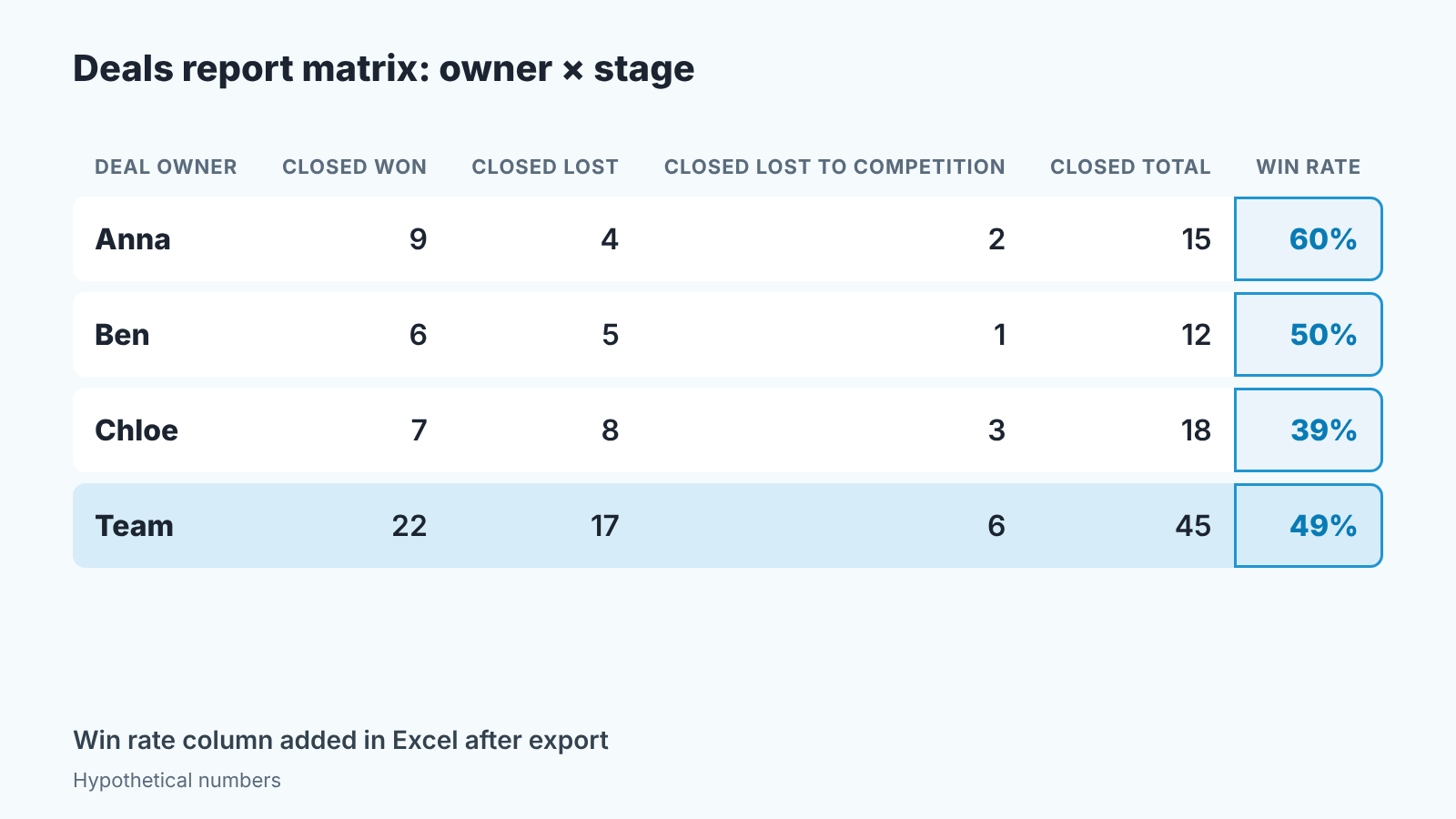
- Add a row grouping on Deal Owner and a column grouping on Stage. Two groupings turn the report into a matrix: one cell per owner per stage.
- Under Aggregate Columns add number of records, then under Show Details uncheck Detail Rows so you see the matrix and not the deal list.
- Set the filter criteria (a report takes up to four): Stage is Closed Won, Closed Lost or Closed Lost to Competition, which leaves Closed – Disqualified out, and Closing Date within the period you report on.
- Save and export as Excel. The formatted export keeps the groupings and goes up to 2,000 rows, far more than a month of closed deals. Add one column: Closed Won ÷ (Closed Won + the lost columns).
Why Closing Date and not Created Time: a deal created in March and lost in June is a June decision. Count by Created Time and this quarter’s number keeps changing until the last deal of that cohort closes.
The per-owner number is where the arguing starts. “Mine is lower because I get all the inbound junk.” Sometimes true. Clone the report with Lead Source as the row grouping to see whether inbound really closes worse, if it does, add Lead Source under Deal Owner and compare owners within a source. Keep the record count next to every percentage, too. Four closed deals is not a win rate, it’s four deals, and our own rule of thumb (a habit, not a statistical threshold) is to leave cells under ten closed deals out of the review.
Three ways the number lies: duplicates, reopened deals, deleted deals
Duplicates first, because they are teh most common. Two records for one opportunity: one gets won, the other is marked lost during a cleanup, and a 100% win became 50%. The fix is the disqualified stage plus a habit: when you find a duplicate, move it to Disqualified, never to Closed Lost.
Reopened deals move last quarter’s number, and we accept that and say so when presenting it. What we insist on is that reopening means moving the existing record back to an open stage, not creating a new one, because a new record makes the old loss permanent and counts the deal twice. If your stages are gated with Blueprint, the During settings of the transition out of a closed stage are the natural place to ask for a reason (Zoho CRM: Design a Blueprint); our setup is in Blueprint stage gates in Zoho CRM.
Deleted deals are the quiet one. A deleted lost deal leaves the denominator, and the win rate goes up without anyone winning anything. No report catches it. The control is a team rule that lost deals are not deleted, with the disqualified stage as the pressure valve. If your team is on HubSpot instead, see how we build the HubSpot win rate from closed deals only.
A disclosure: we build SalesBond, a sales management layer on top of the CRM a team already uses; we started with Pipedrive, and Zoho CRM is one of the CRMs it works with. It looks for problems like these in deals while the month is still running, so if that is the gap you keep hitting, check your CRM with SalesBond.
When you need Zoho Analytics for it
Zoho sells a ready Win/Loss % report in the Advanced Analytics add-on (Zoho Analytics: Win/Loss report). Before buying it, note that the CRM’s own Analytics module already shows a win rate.
The stage component (Enterprise and Ultimate editions) follows deals across the Stage picklist and reports conversions, drop-outs and an overall win rate (Zoho CRM: Stage Component). It takes up to 10 criteria so Disqualified can be filtered out, and it needs history tracking on the Stage field. The help page describes it as a view of the whole process flow and doesn’t spell out how the win-rate denominator is built, so we’d treat it as a trend line next to the matrix, not the number you argue about in a review.
A KPI component is the other near miss. It counts records (Count of Deals unless you pick another metric), takes up to 10 criteria and has a comparison indicator (Zoho CRM: Key Performance Indicators), so “Closed Won this quarter” and “Closed this quarter” can sit side by side on a Zoho CRM dashboard. The help page lists no setting that divides one by the other, the gap a Zoho user hit when asking the community for a 30-day win rate on a widget (Zoho community: how do I display opportunity win rate on widget and chart).
So: a monthly review of a few owners runs fine on the standard report; a live per-owner percentage with a twelve-month trend is where Analytics earns its price (the wider comparison is in Zoho Analytics vs Zoho CRM reports). Neither tool decides the denominator for you, and a Win/Loss report on a pipeline where duplicates go to Closed Lost just gives you the wrong number faster.
Start with the stage mapping. Open Stage-Probability Mapping this week, read the category of every stage, add the disqualified stage if there isn’t one, and put the one-line definition into the report description. Next month’s number will probably be lower than the one you have now. It will also be the first one you can defend.


