
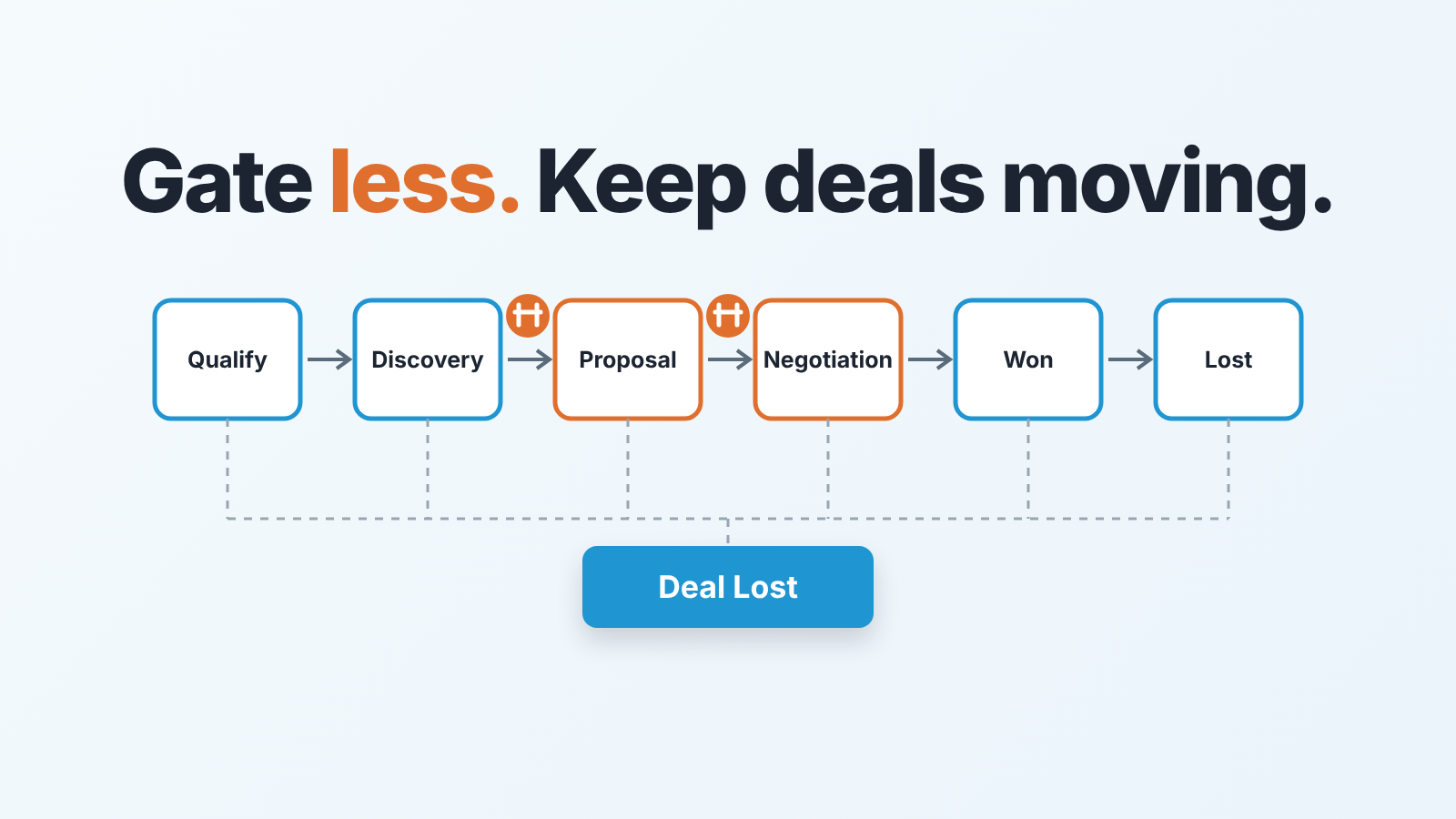
In Zoho CRM, put Blueprint gates on two or three transitions only: into Proposal, into Negotiation, and into Closed Lost. Require the fields your forecast depends on at those gates, leave every other stage change free, and mark the lost transition as a Common Transition so a deal can be closed out from any stage. That is the whole design. The rest of this article is about why three and not eight, and about the places where a Blueprint starts working against you without telling anyone.
What a Blueprint is, in one honest paragraph
A Blueprint is Zoho CRM’s way of turning the Stage field on a deal into a process with rules. You pick the module (Deals), a layout and the field the process runs on, usually Stage. From then on every stage is a State, and every allowed move between stages is a Transition that shows up as a button on the deal record (Zoho CRM: Designing a Blueprint). Each transition has three parts. Before decides who sees the button and under which criteria. During is the form the rep fills in after clicking it: fields, a checklist, a note, an attachment, a message from you. After is what Zoho does on its own once the form is saved: send an email, assign a task, update a field, trigger a webhook (same source). And while a deal is inside a Blueprint the rep cannot type a new value into Stage; the only way forward is a transition button. Zoho’s own wording: you “cannot manually update the Stage until the Blueprint has been executed completely” (Zoho CRM: Executing a Blueprint). That sentence is the whole point of the feature, and the the whole danger of it.
The cost nobody mentions: every gate is a click for your rep
Picture a rep on a Friday afternoon with eleven deals to update. In a plain pipeline that is eleven drags. In a Blueprint where every transition asks for two fields and a note, it is eleven forms, each with a mandatory field the rep may not have an answer to yet. Some of those deals will not get moved. The rep will tell you about the stage change on Monday instead, or not at all, and the pipeline report you read on Monday morning is already wrong.
We think the question is never “which fields would be nice to have at this stage”. It is “where does losing this piece of data cost more than the friction of asking for it”. For most small teams that comes down to two or three moments in the life of a deal. Put a gate on every stage change and you don’t get a cleaner CRM. You get reps who stop moving deals.
Zoho’s own limits point the same way. On the Professional edition a Blueprint can prompt for 4 fields in the During Transition form, hold 10 transitions and 2 common transitions; Enterprise allows 10 fields, 100 transitions and 10 common ones (Zoho CRM: Blueprint Updates). Four fields per transition is a budget, and a sensible one. If you find yourself wanting more than that at a single gate, the gate is in the wrong place. Blueprint limits are one reason to check which Zoho CRM edition a five-person team needs before you buy.
If your team runs on Pipedrive or Salesforce, the same thinking applies with different mechanics: we wrote it up as stage exit criteria for Pipedrive and exit criteria for Salesforce opportunity stages. Zoho is the strictest of the three. Elsewhere a missing field is a nag; in a Blueprint the deal simply stays where it is.
Three Blueprint transitions worth gating
-
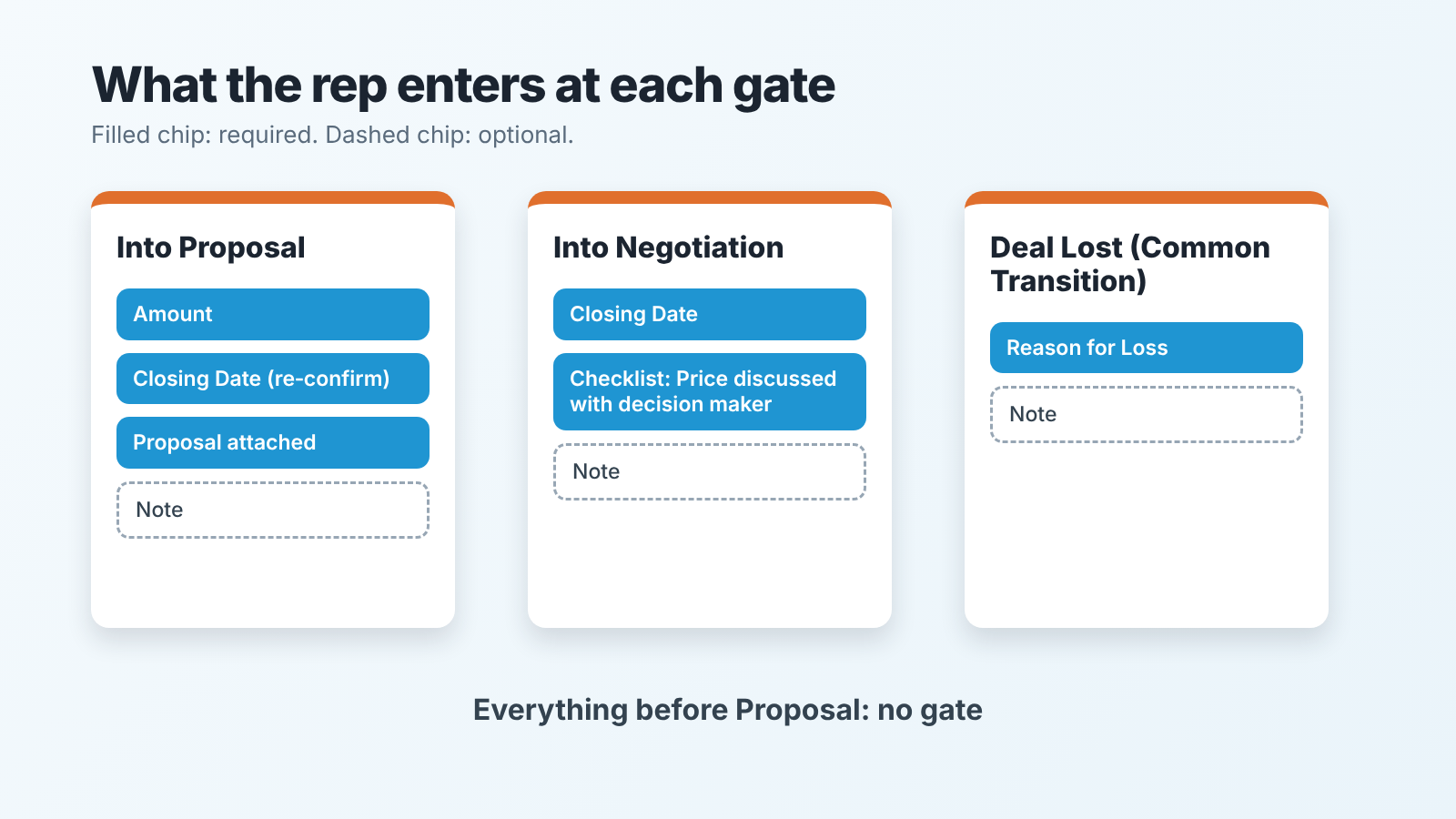
Into Proposal. This is the moment a deal starts to count. Before it, a deal is a conversation; after it, a number in the forecast. So the gate deals with the two things the forecast is made of. Amount gets asked for here. Closing Date is already mandatory on every Zoho deal (Standard Fields in Deals), so the gate makes the rep re-confirm it rather than fill it in for the first time. Add the proposal document as a mandatory attachment, because a deal “in Proposal” with no proposal attached is the most common fiction in a sales pipeline. The Designing a Blueprint page lets you add validation on a During field (Zoho’s example: “Discount cannot be greater than 20%”), and a validation on Closing Date that keeps reps from entering last week’s date is worth the two minutes. Leave the note optional here. The rep is about to write the proposal; they have nothing to say yet.
-
Into Negotiation. Short gate. Re-confirm Closing Date (it moved, it always moves) and tick one mandatory checklist item: “Price was discussed with the decision maker”. The checklist is enforced: “A transition cannot be saved until the mandatory checklist items are checked off” (Executing a Blueprint). One optional note for what the buyer pushed back on.
-
Into Closed Lost. One mandatory field, Reason for Loss, and nothing else. Reps will fill in one field on a deal they have just lost. They will not fill in four. The free-text “what happened” note stays optional and you will be surprised how often it gets written anyway when it is not forced. This transition has a second job, which gets its own section below: it must be reachable from every stage.
Everything before Proposal stays open. Qualification, discovery, demo, whatever your early stages are called: let the rep drag. The data you would collect there is guesswork anyway, and guesswork entered under duress is worse than a blank. The same restraint applies earlier in the funnel, where lead scoring rules in Zoho CRM should be short enough to audit.
Before, during, after: what goes where
A transition has three compartments, and it helps to decide what goes in each one before you open the editor. Here is how we would fill them for the three gates above.
Into Proposal is open to the deal owner, with no criteria. The During form asks for Amount and the proposal attachment, re-confirms Closing Date, and leaves the note optional. Add a one-line transition message explaining why the forecast needs these. After: nothing. Resist the urge.
Into Negotiation is also for the deal owner, but only shows up once Amount is filled in. During: Closing Date and the checklist item, both mandatory, plus an optional note. After: a follow-up task to the deal owner, due in a few days. When the after step is a run of follow-ups rather than one task, a follow-up cadence is the better fit.
Deal Lost is a Common Transition, so everyone sees it from every state. During: Reason for Loss mandatory, note optional. After: one email to the sales manager with the reason.
Two notes on this setup. The transition message in During is the most underused part of a Blueprint: a single sentence the rep sees when they click the button (“We forecast from Closing Date; please make it the date you actually believe”) does more for data quality than a second mandatory field. And After is where Blueprints get overbuilt. An email on every transition trains the manager to ignore email. One email, on the one event the manager should know about the same day, is enough.
On field names: Amount and Closing Date are standard Deals fields (Standard Fields in Deals). Reason for Loss is a system picklist, and Zoho shows it only when the deal’s stage falls in the Closed Lost category (Zoho CRM community: Reason for Loss is now a picklist). If you renamed your lost stage, check that mapping before you build the gate.
Why a field you made optional is still required
Until Zoho shipped optional transition fields, “every field in the transition form was mandatory”; now an admin can mark each field, checklist item, note, tag or attachment as optional, on Professional and above (Zoho CRM community: optional fields in transitions, updated 5 Sep 2024). That is the good news. The catch is in the same announcement: a field is mandatory on the transition form if it is mandatory in the module, if a layout rule makes it mandatory, or if the Blueprint says so. “If at least one of these is mandatory, then the field is marked as mandatory.” So you set a field optional in the transition, the rep still sees the asterisk, and you spend an afternoon wondering whether the setting saved. It did. A layout rule from two years ago is doing the requiring. Closing Date on the Proposal gate is the built-in version of this: the module requires it, so no transition setting will make it optional.
There is a second, less visible effect of layout rules. Save as Draft lets a rep save a half-finished transition form and come back later; the deal “will still be in the present stage” until everything required is entered. Zoho lists where the draft button is not available, and the first item is “Layout rules are executed” (Executing a Blueprint). The same rule that made your optional field mandatory also took away the rep’s way to save and leave. Two surprises from one setting.
Our rule: before publishing the Blueprint, open the layout rules on the Deals layout and the field properties for every field you put in a During form. Then create a test deal and click every transition yourself, reading the asterisks. Ten minutes, and it is the only way to see what the rep will see. If you want the same exercise for another CRM, the required fields in Pipedrive piece is the Pipedrive version of this problem, with its own set of ways a required field gets skipped.
The exit every Blueprint needs
Make Deal Lost a Common Transition, so it is reachable from every stage. By default a transition lives between two specific states, and Zoho itself describes Deal Lost as a transition “available only towards the end of the process”. The fix is the Common Transition: “a Transition that can be executed from all States in a process” (Designing a Blueprint).
Here is what happens without it. A deal in Qualification dies: the buyer went quiet, the budget vanished. The rep opens the record and finds no way to mark it lost, because the Blueprint only offers “Move to Discovery”. So the rep either leaves it open, forever, or drags the deal through four stages it never reached, dropping fake values into each gate on the way, to arrive at a Lost button. The first option fills your pipeline with ghosts. The second poisons your stage conversion numbers with deals that were never really in Proposal. We have seen both on the same team.
Related trap: “Transitions are made available only for the records meeting the Before Transition criteria” (Executing a Blueprint). Write a criterion wrong and the rep sees a deal with no buttons at all. Blueprint entry works the same way: with no criteria, “all records created in the layout will enter the process” (Designing a Blueprint). So test with an ugly deal, one with empty fields, before you test with a clean one.
What a Blueprint cannot tell you
A Blueprint knows which state a deal is in and what was typed on the way in. It does not know what has happened since. A deal that passed the Proposal gate with a clean Amount, a Closing Date three weeks out and the proposal attached looks perfect to the Blueprint on day forty, when the Closing Date is two weeks in the past and nobody has logged a call. The gate did it’s job. Nothing after the gate is the Blueprint’s business.
This is why we would not try to make a Blueprint carry the whole weight of pipeline hygiene. It is a good tool for the moment of transition and a blind one for everything between transitions: the deal that stopped moving, the close date that keeps getting pushed, the stage that has become a parking lot. Those need a weekly look at the pipeline, and a few CRM data quality metrics you check on a schedule rather than at a gate.
A disclosure, since this is the gap we work in: we build SalesBond, a sales management layer on top of the CRM a team already uses, and Deal Health exists for exactly this blind spot. It looks at the deals sitting in a stage with nothing happening, which a Blueprint, by design, cannot see. Check your CRM with SalesBond if you want that list without building the reports yourself.
Build the three gates. Switch the Blueprint on for new deals first, not the whole pipeline. Then watch for one thing in the first two weeks: deals that stop moving at a gate. The ones that fail a gate are fine; it’s the ones that never reach it you’re looking for, because the rep found it easier to leave them where they were. That is the signal a gate is too heavy, and the fix is almost always one field fewer.


