
Make a Pipedrive field required only at the stage where someone will use it to make a decision, and keep the list short: usually the next step and the close date before a deal enters the proposal stage, and a lost reason when it is marked lost. Every extra required field invites a placeholder answer, which looks like clean data in a report and behaves like noise when you try to act on it.
Below: how the setting works, a one-question test for each field, and how to catch the fields that have already gone bad.
What a required field does in Pipedrive
A required field is a gate. An admin marks a field as required (some teams call these mandatory fields) either for when a deal, person or organization is created, or for when a deal moves into a particular stage. Until it’s filled, the rep can’t add the record or can’t move the deal forward. Pipedrive stops them at the form.
Which admin that is, and who else may add or change fields, is worth deciding on purpose; see who gets to change fields in a small team’s Pipedrive.
Setting it up is a per-field choice. In the data fields settings, you open a deal field and pick where it’s required: specific pipelines and stages, or every pipeline and every stage. Deals that already exist with that field empty aren’t blocked retroactively; Pipedrive shows a reminder on them instead.
Two details matter before you touch the setting. Only a global admin with permission to change account settings can mark a field as required, and the feature is available on the Professional plan and higher. On a lower plan the rest of this article still applies. You run the same discipline as a team agreement and a weekly spot check instead of a hard gate, it just leans on people rather than the software. If you are weighing Notion as your CRM, our check of what a Notion CRM cannot enforce starts with this question: can you make a field required at a stage?
The scope is the part people underuse. A requirement can apply to one pipeline and one stage rather than to every deal everywhere, and that’s what makes required fields workable at all. A field required on deal creation taxes every lead, including the ones that die two days later. The same field required at the proposal stage taxes only the deals that have earned a proposal. By then the rep usually knows the answer anyway.
So the setting is simple. Choosing which fields, and at which stage, is where most teams go wrong. On HubSpot the same choice is made as required properties by deal stage in HubSpot.
The test: will anyone decide something from it?
Before you require a field, name the person who will look at it and the decision they’ll make differently depending on its value. Can’t name both? Don’t require it.
Two hypotheticals show how this plays out.
A sales manager wants “Industry” required on every new deal. Who looks at it? Marketing, maybe once a quarter, for a segmentation slide. What decision changes? Possibly which case study goes in a sequence six months from now. That’s a real use, but nobody decides anything on this deal at this moment, and the value doesn’t need to be exact. Fail. Let reps fill it when they know it, and let marketing clean it up in bulk later. Before you add a required field, audit the field list you already have; often the better move is to retire two fields, not require a third.
The same manager wants “Next step” required before a deal can enter the proposal stage. Who looks at it? The manager, in the weekly pipeline review, deal by deal. What decision? Whether the deal is actually moving or the rep is about to send a proposal into silence, and whether to coach that rep this week. Pass. A named person reads the field every week and treats the deal differently depending on what it says. It’s the same logic behind keeping a next activity on every open deal: a field earns its place by being read.
The Outcome field on a call passes the same test when a manager reads it every week; we covered when to make Outcome required before an activity is marked done.
What the test really does is tie every required field to a meeting, a report or a handoff that already happens. If the field would be filled but never read, the requirement is a cost with no buyer, and reps work that out within a week.
It also tells you the stage. Require the field at the last moment before the decision, not the first moment the rep could theoretically know it. The information is better then, and fewer deals have to pay. A required field is a promise that someone will read it: recorded now, read later.
Four fields that earn the requirement
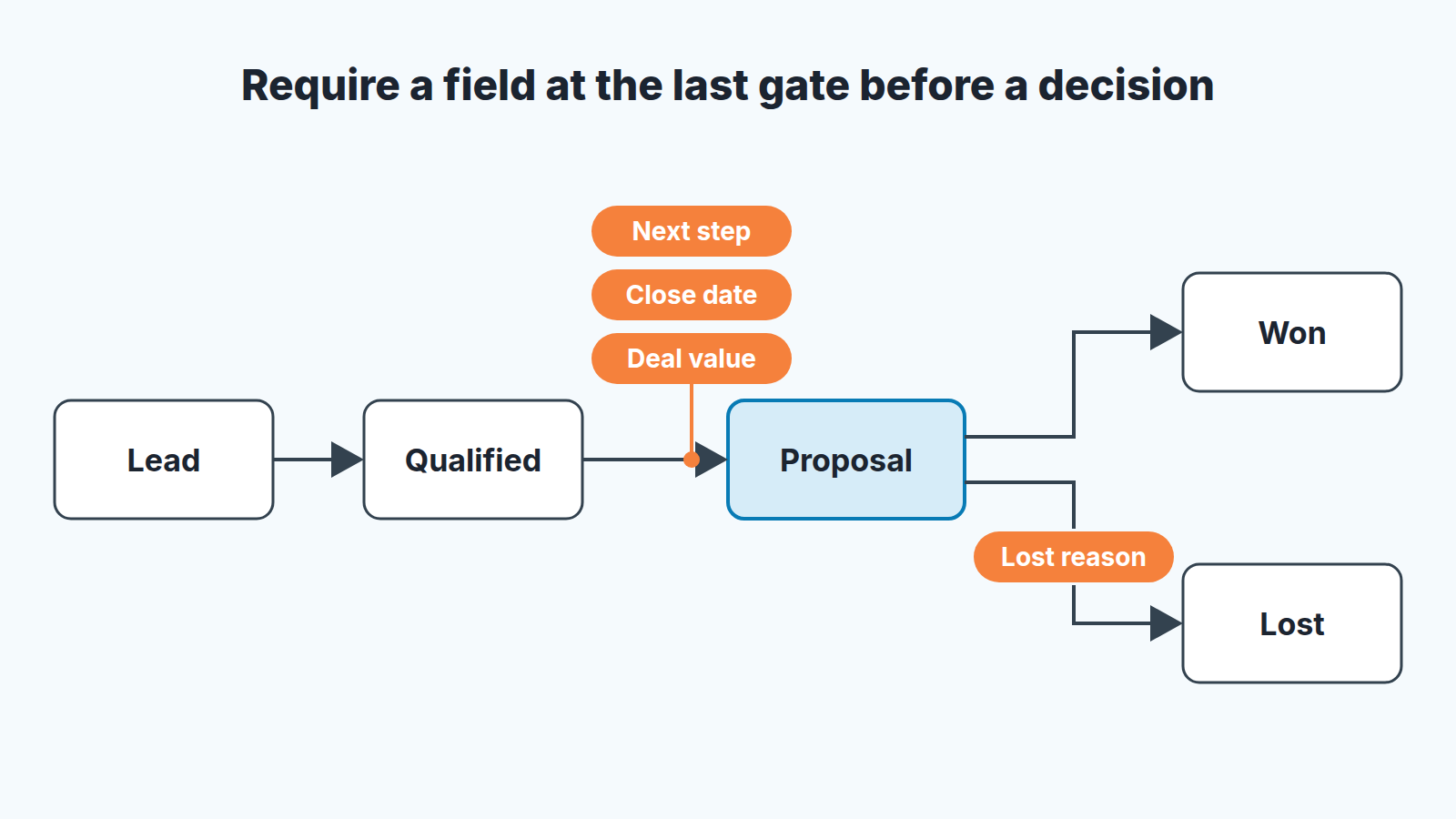
Most teams need three or four required deal fields: next step, close date and deal value to enter the proposal stage, and a lost reason on loss. If you have more than five or six required deal fields across a pipeline, we’d start by asking what each one is for.
- Next step, required to enter the proposal stage. Free text, one sentence, with a date in it. Your pipeline review runs on this field.
- The close date, also at the proposal stage and not on creation. A close date on a day-old lead is a guess that will get pushed again and again until nobody trusts it; by proposal, the rep has a real signal from the buyer.
- When a deal is marked lost, require the lost reason. Almost everyone agrees on this one, and it’s also the one that rots fastest, because “Other” is always an option. Building a list where the reasons actually say something is its own topic: see lost reasons in Pipedrive.
- Deal value, again at proposal, if you forecast from the pipeline. An empty value breaks the number. A placeholder breaks it worse, so pair this one with the audit below.
Everything else, from lead source to company size to decision-maker name, is nice to have. It can be filled when known, nudged in a one-on-one and corrected in bulk, and the data will be more honest for it.
How a forced field rots
Required fields fail silently.
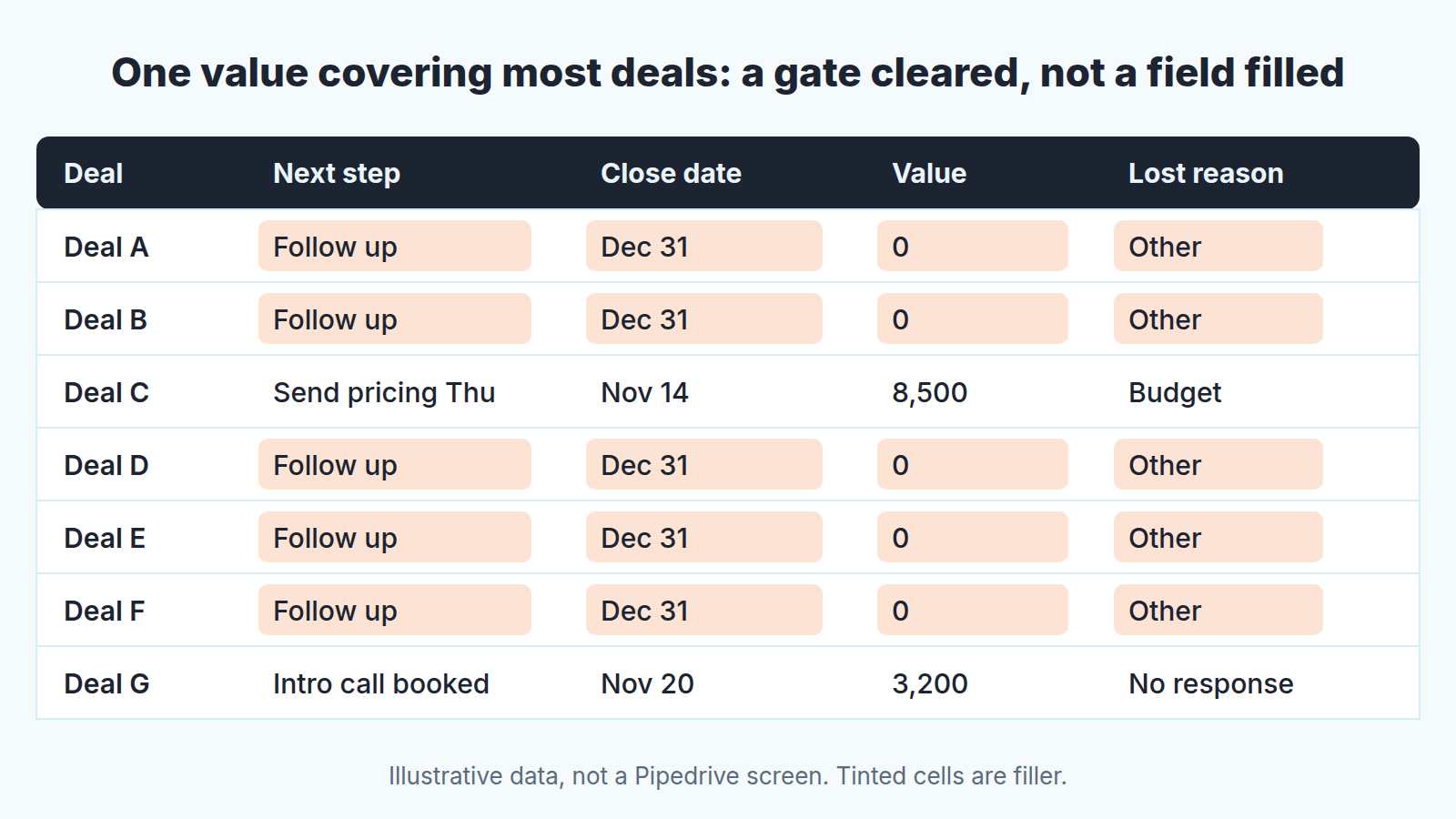
Picture a rep at the end of the the day with six deals to move and a required field they don’t have the answer to. The gate is in the way. They aren’t going to call the prospect to ask, and they aren’t going to leave the deal in the wrong stage, because the manager will see that. So they type something. “TBD.” “N/A.” A dash. A zero in the value field. The same close date for every deal, usually the last day of the quarter. “Follow up” as the next step, on every deal, forever.
Nobody did anything wrong by their own lights. The rep cleared the gate, the manager sees a full field, the report shows no blanks. And the data is now worse than when the field was empty, because an empty field at least told the truth: we don’t know. A placeholder tells a lie that reads as a fact.
We’ve seen this decay in a predictable order. One or two reps find a value that gets them through. It spreads, because reps copy whatever works. Eventually the field is free text with one dominant value, and any report built on it is built on that value. The manager who required the field to get visibility now has less of it than before, with a chart that says otherwise.
A stricter gate won’t fix it. Stricter formats and dropdown-only options just push the placeholder into a different shape; “Other” becomes the new “N/A”. What works is fewer gates, each tied to a decision someone visibly makes. When a rep watches the manager open the deal in the review and read the next step aloud, the field gets filled honestly without anyone being told to. When nobody reads the field, no amount of enforcement produces anything but filler. That’s a CRM adoption problem wearing a data-quality costume and it gets solved on the adoption side.
A five-minute audit for filler
You don’t need a data-quality program to find this. You need an export and a sort. The Pipedrive audit covers the fuller version across the whole account; this is the five-minute cut for required fields only.
- Export open deals from the pipeline in question with the required fields as columns. Add last quarter’s lost deals if you’re checking lost reason.
- For each required field, count how many deals share the single most common value. A dropdown with one option covering most of the deals is a placeholder, not a signal, however plausible the option sounds. For free-text fields sort alphabetically and look for runs of the same short string.
- Sort the close date column. Clusters on the last day of a month or quarter, across reps and deal sizes, mean the field is being filled to pass the gate.
- Scan the value column for zeros, round numbers repeated across unrelated deals, and the same figure on most of one rep’s deals.
- For anything that fails, ask the rep before you change the setting. You’ll usually hear one of two things: “I didn’t know what to put” or “nobody ever looks at it.” The first is a training note. The second means the field should stop being required.
Run it once a month. It takes less time than reading the report the filler would have poisoned. If you track broader data quality numbers, the audit feeds them too, but you can act on what you find here without them.
Fewer fields, filled honestly
Adding a gate to close a reporting gap feels free. The admin sets it in a minute, and the cost lands on reps in small increments nobody sees. So here’s a next step for this week: open your list of required deal fields and, next to each one, write the name of the person who reads it and the meeting where they do. Any field left without a name goes back to optional. The ones that stay, make sure somebody is seen using them, because that habit does more for pipeline hygiene than any setting in the admin panel.


