
Five Zoho CRM seats cost $840 a year on Standard, $1,380 on Professional and $2,400 on Enterprise with annual billing, before tax, according to Zoho’s Compare editions page on 2026-10-20 (Zoho CRM: Compare editions). Most five-person teams need Standard. Professional is for Blueprint (Zoho’s stage-by-stage process rules) and assignment rules.
One thing almost every price list skips: the manager is a seat too. Zoho prices per user, and we found no cheaper read-only seat on its pricing or comparison page, so “five reps plus me” is six seats and $1,008 a year on Standard. The rest of this article is about what each edition gives that manager, and where the line between Standard and Professional sits for a team this size.
The editions, and the two the pricing page does not show
The pricing page lists four editions: Free (“Forever free, for 3 users”), Standard (“Small team, getting started”), Professional (“Growing team, needs automation”) and Enterprise (“Running a mature sales org”) (Zoho CRM: Pricing and editions, opened 2026-10-20). Its prices load by script; the Compare editions page prints them in plain text and adds two more columns, Starter and Ultimate ($52 per user per month on annual billing). Neither is part of the five-person calculation.
Zoho CRM Plus (from $20 per user per month on the pricing page) is a bundle with marketing and support tools, and Bigin is Zoho’s pipeline tool for people moving off spreadsheets. Both are a different purchase. If you are weighing the wider Zoho suite instead, we compared Zoho One vs Zoho CRM for a five-person sales team.
Free covers three users, and that is the whole problem
Zoho CRM is free for up to three users, so a team of five cannot run on it. For you the Free edition is a trial with no clock, not a plan.
Free gives you contacts, follow-up reminders, workflow automation, tasks, meetings and calls, standard reports, data import, mobile apps and 5,000 API calls a day (Zoho CRM: Pricing and editions). The comparison page adds organisational roles, one web-to-lead form per module and 5,000 records of data storage. What it lacks is everything a manager touches weekly: no custom reports, no custom dashboards, no sales forecasting, one pipeline.
The honest use of Free is a two-week rehearsal with three of you before anyone pays. If three people won’t keep it current, five won’t either, and no edition fixes that. If you are still deciding which CRM to put the five of you on, start with how to choose a CRM for a sales team of five.
Standard: the first edition a manager can run a team from
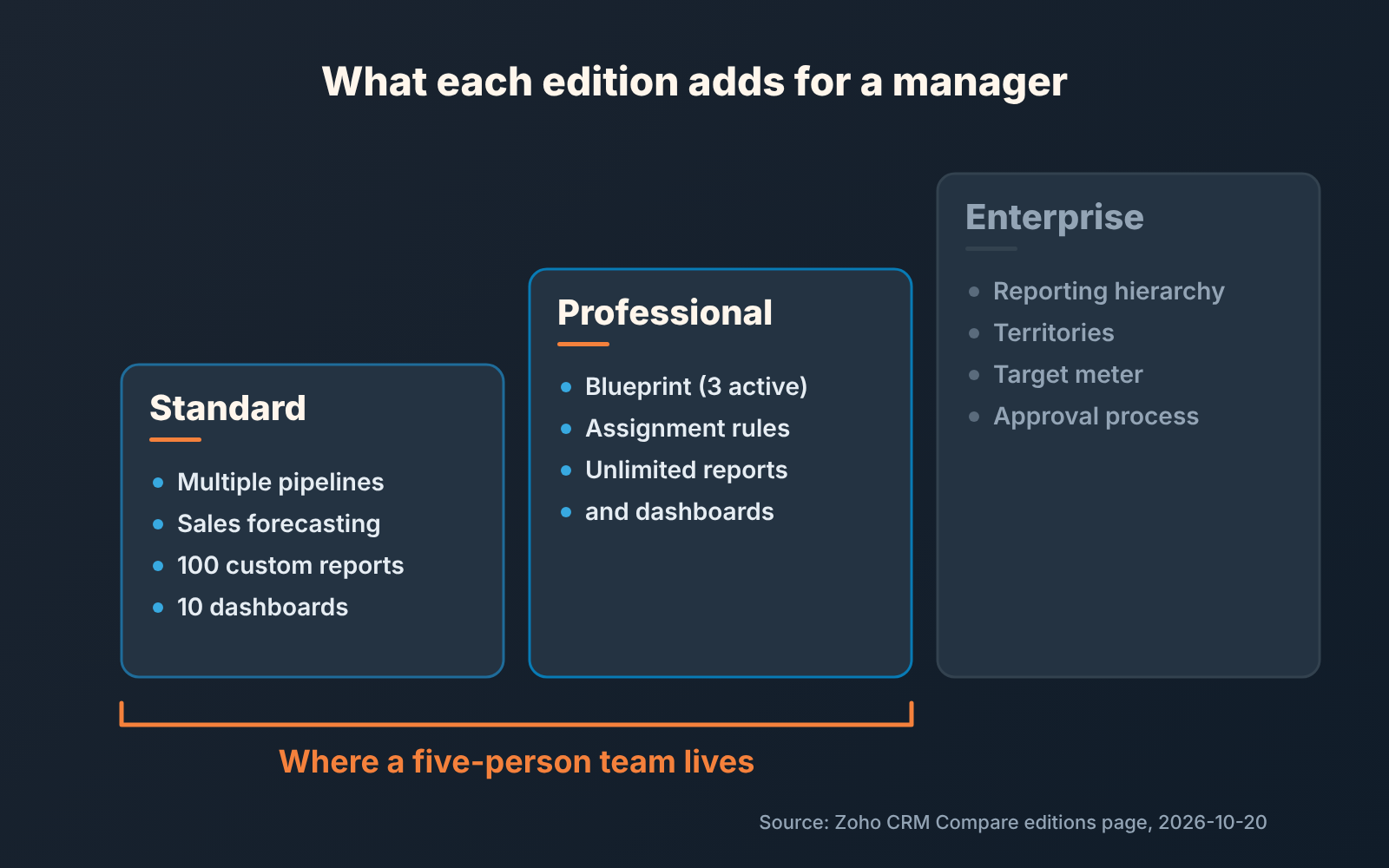
Standard is where the manager features begin, and for a lot of five-person teams it is where they end. On the comparison page it brings multiple pipelines, 100 custom reports, 10 custom dashboards, scheduled reports, scoring rules on 10 fields per module, 10 custom fields per module, five web-to-lead forms per module, multiple currencies and 100,000 records of storage; sales forecasting is there too (Zoho CRM: Compare editions). The pricing page puts email integration and mass email under Standard as well.
Read that list against a Monday. Pipeline review: yes, and two segments can finally get two pipelines instead of one stage list with “(partner)” in the deal names. Forecast: yes. Ten custom dashboards is more than one manager will maintain. Four of the five components in the Zoho CRM dashboard a sales manager checks on Monday work on Standard. The fifth, closed against target, is built there as a Target Meter, and the comparison page lists the Target Meter only from Enterprise up. On Standard, a chart of closed deals against a number you keep elsewhere does the job.
The cap that bites first is not reports. It’s ten custom fields per module. Take a hypothetical team that runs a light qualification method with three fields and also wants a lost reason, a competitor field and a next-step date: that is six already. Our view is that ten is enough for five people if the manager owns the field list and says no to the seventh. If nobody owns it you will outgrow Standard for the wrong reason.
What Standard doesn’t have: Blueprint, assignment rules, or any way to make a stage change conditional. Reps can skip stages and the CRM will let them.
Professional vs Standard: pay for process, not for size
The reason to pay the step from $14 to $23 per user per month is Blueprint. Professional is the first edition with it: three active Blueprints per organisation, against none in Standard and fifty in Enterprise (Zoho CRM: Compare editions). A Blueprint is a process you draw over the pipeline: which stage follows which, what a rep must fill in before a deal moves, who can move it. If “no deal reaches Proposal without a decision maker named” is a rule you want enforced rather than repeated at stand-up, this is the edition. The setup is in Zoho CRM Blueprint as stage gates. Three active Blueprints is plenty for five people: one for new business, one for renewals, one spare.
The second reason is assignment rules, which also start at Professional. An assignment rule hands each new lead or deal to a rep by a rule you set, round-robin or by criteria, without anyone touching it. Picture five reps and inbound leads from five web forms: without the rule, somebody does round-robin by hand, and it is usually the manager.
The rest of Professional mostly lifts caps: unlimited custom reports and dashboards, 155 custom fields per module instead of 10. The pricing page also lists AI agents, predictive intelligence, inventory and CPQ (Zoho CRM: Pricing and editions). The 155 fields might be a reason to upgrade. The predictions are not, yet; a model that predicts deal closing needs deal history, and five people don’t produce it fast.
So the framing for a team this size. Standard assumes the manager is the process. Professional lets the CRM be part of it. If you read every deal anyway, Standard loses you nothing.
Enterprise is built for more than one manager
Reporting hierarchy is the headline Enterprise feature, and the pricing page describes it precisely: “Give every manager a real-time view of only their team’s pipeline and performance” (Zoho CRM: Pricing and editions). Read the word every. A five-person team has one manager. The same page lists multi-team management, and the comparison page fills in the rest: territory management with up to 150 territories, 15 data-sharing rules per module, an approval process, the Target Meter and 50 active Blueprints (Zoho CRM: Compare editions).
The target meter and the approval process are the two that tempt small teams. A closed-deals chart covers most of the first on Standard; for the second, a Blueprint transition that only the manager can make does much the same on Professional.
When does a five-person team need Enterprise? When it is five today and will be fifteen with two team leads inside the year. If that is not you, you are paying $40 instead of $23 per seat for a second manager you do not have.
A disclosure. We build SalesBond, a sales management layer on top of the CRM a team already uses; it works with Zoho CRM. Deal Health checks every deal against more than 20 rules and gives a per-rep view of average score, deal list and problem areas; the Sales Dashboard shows per-rep execution on its Team Performance tab. It does not replace reporting hierarchy or territories inside Zoho CRM. Check your CRM with SalesBond if that per-rep view is what you were about to buy Enterprise for.
What Zoho CRM costs for five seats: billing cycle, the manager’s seat, storage
The formula is seats times price times twelve, and the trap is in the second term. Zoho prints two prices per edition, one billed annually and one billed monthly. On the page we opened 2026-10-20, Standard is $14 per user per month on annual billing and $20 on monthly; Professional $23 and $35; Enterprise $40 and $50 (Zoho CRM: Compare editions). Local taxes such as VAT or GST are charged on top.
For five seats, worked out from those numbers:
| Edition | Annual billing | Monthly billing |
|---|---|---|
| Standard | 5 x $14 x 12 = $840 a year | 5 x $20 = $100 a month, $1,200 a year |
| Professional | 5 x $23 x 12 = $1,380 a year | 5 x $35 = $175 a month, $2,100 a year |
| Enterprise | 5 x $40 x 12 = $2,400 a year | 5 x $50 = $250 a month, $3,000 a year |
Prices from Zoho’s Compare editions page, USD column, 2026-10-20, before tax. Check the page before you sign; this table will age.
Three things move the total. The manager’s seat, as above: six seats on Standard annual is $1,008, on Professional $1,656. Monthly billing on Professional costs $2,100 against $1,380 for the same five seats: a steep price for the right to cancel. Pay monthly for the first quarter if unsure, then switch. And storage: Standard carries 1 GB of file storage per organisation plus 512 MB per user licence, and 100,000 records. The comparison page prices extra storage in rupees even in its USD view, so budget a line and check it with Zoho. We have not seen a documented way to mix editions across users in the the same organisation, so plan on all seats at one edition.
A decision rule for five people
Ask three questions in order and stop at the first yes.
- Will there be a second manager or a territory split within twelve months? Yes means Enterprise, for reporting hierarchy and territories; budget $2,400 a year for five seats, knowing the seat count is about to grow.
- Do you need the CRM to block a stage move until a field is filled, or to route inbound leads without a human? Yes means Professional, for Blueprint and assignment rules. Five seats, $1,380 a year on annual billing.
- Neither? Standard: multiple pipelines, forecasting, 100 custom reports, ten dashboards. $840 a year for five seats, and a manager who owns the ten-field limit.
Still choosing the CRM itself? The checklists in Zoho CRM vs Pipedrive for a sales manager and Zoho CRM vs HubSpot for a sales manager ask the manager’s questions; Zoho CRM cadences for a sales manager covers follow-up once the edition is settled.
One last thing about the money. The gap between Standard and Professional for five people is $540 a year, less than one deal in most B2B pipelines. So the question isn’t whether you can afford Professional, its whether you have a process worth enforcing yet. If you don’t, start on Standard and let the first quarter tell you.


