
When comparing Zoho CRM and HubSpot, price is the last question. First check whether each lets you require fields before a stage change, what its forecast looks like, whether you can see what each rep did this week, and how next steps are tracked. Each of those can be answered in a trial account in under an hour, and the answers decide whether the CRM will run your sales process or just store it.
The comparison that starts with price
Most Zoho-versus-HubSpot pages on the first page of Google compare the same three things: the price per seat, how the interface feels, and how much marketing automation comes in the box. That is a fine comparison for a marketer or a founder buying thier first tool. It is a poor one for a sales manager, because none of those three things changes what happens on Monday morning when a rep moves a deal into Proposal with no amount on it.
We have written set-up guides for both of these CRMs, and we don’t sell either of them. So this is not a verdict. It is the list of questions we would want answered before the budget conversation, with what each vendor’s own pages say, and a table near the end you fill in yourself from your trial.
A note on the numbers: every price and limit below comes from a vendor page we opened on 15 October 2026, and the link sits next to it. Vendors change these pages without telling anyone, so the date matters as much as the figure. The Zoho CRM side of the bill is in our piece on Zoho CRM editions for a five-person sales team.
For the HubSpot half of this, see how HubSpot Sales Hub seats and tiers add up for five people.
Five questions to ask in a trial
Set up both trials with the same six deals, the same four stages and the same two reps. Then answer these, in order.
- Can I require a field before a deal changes stage, and what happens when a rep skips it? Not “does it have custom fields”. Whether the CRM refuses the move.
- What does the forecast add up, and from which fields? Find the number the forecast shows for this quarter, then find the deal that explains it.
- Can I see what one rep did last week in under a minute? Calls, emails, meetings, notes, by person, by day. Without exporting to a spreadsheet.
- Where does the next step live, and what does a deal with no next step look like? This one decides whether your weekly review is about the future or the past.
- What does it cost for six people, and which of the four answers above change at that price? Price last, because the first four tell you which tier you are actually buying.
The order is deliberate. Teams that start with question five pick the tier, then discover that the stage gate they wanted lives one tier up.
Required fields and stage gates
Both CRMs can stop a deal at a stage until a field is filled. They do it with different machinery, and the difference shows up in what the rep sees.
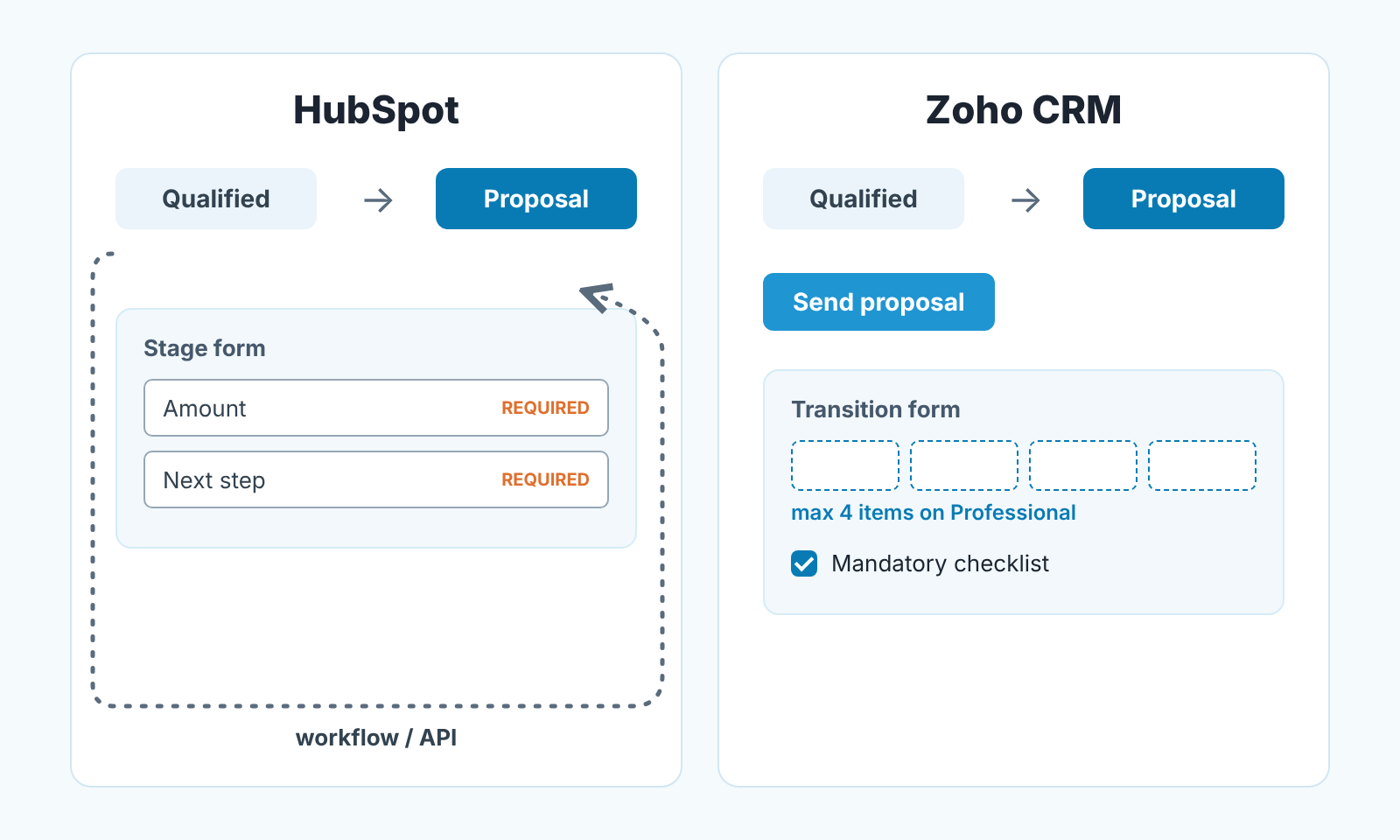
In HubSpot the feature is called conditional stage properties, and it lives on the pipeline. You open the pipeline in settings, add a rule in the stage’s row, pick the property and tick Required; from then on the property is asked for when a user manually creates a deal in that stage or moves one into it (HubSpot: set up and customize pipelines). The word to notice is manually. HubSpot’s page on property-level conditional logic says the logic “won’t apply when editing records with other HubSpot tools, such as workflows” (HubSpot: conditional logic for enumeration properties), and the neighbouring feature, pipeline rules, can be bypassed by Super Admins, by workflows and by API edits (HubSpot: set up rules for object pipelines). We wrote up which properties to require at each HubSpot stage and the side doors to watch.
In Zoho CRM the equivalent is a Blueprint. Every stage becomes a State, every allowed move becomes a Transition that appears as a button on the deal, and each transition can carry a form the rep fills in before the stage changes (Zoho CRM: Designing a Blueprint). The gate is stricter in one way: “a transition cannot be saved until the mandatory checklist items are checked off” (Zoho CRM: Executing a Blueprint). It is also budgeted. On Professional a transition can hold 4 items (fields, checklists and messages count together) and a Blueprint can have 10 transitions; Enterprise allows 10 items and 100 transitions (Zoho CRM: complete feature list, opened 2026-10-15). Our Zoho Blueprint stage gates article goes through where to put each gate.
So the honest comparison on question one is this. HubSpot’s gate is a property rule that a rep meets on the stage form and that automation can walk past. Zoho’s gate is a process with buttons, a per-transition budget, and no stage change without pressing the button. Which one you want depends on whether your team moves deals by hand or by workflow, and only your trial will tell you that.
Forecast and manager reports
HubSpot’s forecast is built from stage probability. The default sales pipeline has seven stages with a probability on each, from Appointment scheduled at 20% up to Closed won at 100%, and the weighted amount is the deal amount in each stage multiplied by that probability (HubSpot: set up and customize pipelines). The forecast tool itself needs a Sales Hub Professional or Enterprise seat (HubSpot: use the forecast tool). In practice a blank Amount and a pushed Close date are the two ways a HubSpot forecast lies. We spent a whole article on HubSpot deal stage probability and the forecast, including how a manual edit freezes a deal’s probability.
Zoho CRM builds its forecasts along the role hierarchy, top role down to the reps (Zoho CRM: Forecasts based on role hierarchy), and Sales Forecasting is listed from the Standard edition up (Zoho CRM: complete feature list, opened 2026-10-15). So in a Zoho trial the forecast question becomes: who types in the target for each rep, and will they keep doing it every quarter?
Question three, what a rep did this week, is a reporting question, and here the two CRMs are closer than their fans admit. Zoho ships a library of standard reports (Zoho CRM: Working with reports). We picked six Zoho reports for the Monday review and built a Zoho dashboard for a sales manager around them, with one caveat worth repeating: Zoho’s Last Activity Time also moves when someone edits a field, and Zoho has said there are “no immediate plans to change” that (Zoho community: Last Activity Time). The rep who tidies fields looks busy.
We haven’t written the HubSpot activity-report article yet, so we won’t pretend to have compared it. Build the same view in both trials: one rep, last seven days, every logged call, email and meeting. Time how long it takes to get there from the home screen. That number goes in the table.
Question four, next steps, is where the vendors’ feature names mislead. HubSpot has sequences, Zoho has Cadences, and both are automated follow-up for contacts, not next-step tracking for deals. A HubSpot sequence enrolls a person, and each contact can be in only one sequence at a time (HubSpot: enroll contacts in a sequence). A Zoho Cadence un-enrolls a record once the targeted response is achieved or an un-enrollment condition matches (Zoho CRM: Cadences). Both are useful. Neither answers “what is the next step on the Acme deal and when is it due”. For that you want a required Next step property at the stage gate in HubSpot, or a task created by the transition in Zoho. We covered the follow-up side in HubSpot sequences for a small team and Zoho Cadences for a sales manager.
HubSpot vs Zoho: a table to fill in yourself
Copy this into a doc before you start the trials. The first column is the question; the next two are for what you saw, not what the vendor’s sales rep told you. We filled in only what the vendors publish and left the rest blank on purpose.
| Question | HubSpot (Sales Hub) | Zoho CRM |
|---|---|---|
| 1. Field required before stage change, and what bypasses it | ||
| 2. What the forecast adds up (fields, period, who sets targets) | ||
| 3. Minutes to see one rep’s activity for the last 7 days | ||
| 4. Where the next step lives; how a deal with none looks | ||
| 5. Price for 6 seats per month, and the tier the first four answers need | Seat prices and billing terms change; see HubSpot Sales Hub pricing on the day you decide | Standard $14, Professional $23, Enterprise $40 per user per month billed annually; $20 / $35 / $50 billed monthly; free for 3 users (Zoho CRM pricing, opened 2026-10-15) |
Two things to notice about row five once you have filled in rows one to four.
In Zoho, the gate from question one is a Blueprint, and the feature list gives 3 Blueprints on Professional, 50 on Enterprise and none on Standard or Free (Zoho CRM: complete feature list, opened 2026-10-15). So a team that wants stage gates is pricing Professional at the lowest, not Standard. In HubSpot, the forecast tool from question two needs a Sales Hub Professional or Enterprise seat (HubSpot: use the forecast tool), not a Starter one. Six seats at those two tiers are different conversations, and the cheapest number on either pricing page is probably not the one you will pay.
Multiply by six yourself, with your own billing term. We are not going to publish a total that a pricing page will contradict next quarter.
What neither CRM does for you
Fill in the table honestly and you will find that both CRMs can be made to record what you need: a required field, a forecast number, an activity log, a next step. What neither of them does is tell you which of your six deals is the one to worry about today. A Blueprint confirms the rep filled in Amount; it does not notice that Amount was cut in half on Tuesday. A HubSpot weighted forecast sums stage probabilities; it does not flag the deal whose close date has been pushed three months running. Both record. Neither judges.
That judgement is the manager’s job, and it is the the part of the job that stops scaling once each rep carries a full pipeline. It is also why we build SalesBond, a sales management layer on top of the CRM a team already uses; it reads deals from Pipedrive, HubSpot, Salesforce or Zoho CRM and checks each one against rules a manager would apply by hand, so whichever CRM you pick in this comparison, the Monday list of deals that need attention comes out the same way. Check your CRM with SalesBond if you want to see that list on your own pipeline.
Pick the one your reps will fill in
Here is the thing the comparison pages skip. The CRM you choose matters less than the stage gate you set on day one, because a gate that is in place when the first deal is created is a habit, and the same gate added in month four is a fight. Run the two trials with the five questions above, write down what you saw, and choose the one where your reps hit the gate and filled in the field without asking you why. Then, and only then, look at the price row.


