
HubSpot Sales Hub pricing is per seat per month. In HubSpot’s product catalog, checked on 21 October 2026, a Sales Seat on Professional lists at $100 a month and a Starter Core Seat at $20. For five reps that is about $1,200 a year on Starter and $6,000 a year on Professional with Sales Seats.
Two caveats before the details. HubSpot’s CRM overview shows Starter “from $15”, and its footnote says that is a discount for new customers only, with no set end date, which can be discontinued at any time (HubSpot: CRM software). And the Sales Hub pricing page loads its numbers by script, so it gave us no text to check. Every figure below comes from the two HubSpot pages we could read that day. Prices change, so open the catalog on the day you buy.
How HubSpot packages its sales plans: Free, Starter, Professional, Enterprise
Four levels, and the names mean the same thing across every HubSpot product. The CRM overview lists what each one is known for (HubSpot: CRM software):
- Free: no credit card, contact management, deal pipelines, CRM import, Breeze Assistant and a reporting dashboard.
- Starter adds required fields, permission sets, multiple currencies and removes the HubSpot branding.
- Professional brings an AI customer agent, duplicate management, standard contact scoring, calculated properties and custom reporting.
- Enterprise: custom objects, team organisation, single sign-on, field-level permissions.
Free gives you a pipeline to look at. Starter gives you the first two controls over how reps fill it in. Professional lets you fix the data after the fact and report on it your own way. Enterprise is for locking individual fields or splitting the org into teams, which five people rarely do.
Before you pay for anything, check what the free tier really covers for a five-person team.
Most third-party pricing guides spend their pages on HubSpot’s bundles with marketing and service inside. If you only need sales, you only need Sales Hub.
A seat is not a login: Core seats, Sales seats and view-only seats
HubSpot sells three seat types that matter to a sales team: Core, Sales and View-Only. They are defined in HubSpot’s Product and Services Catalog, read on 21 October 2026 (HubSpot: Product and Services Catalog).
A Core Seat grants core access to every product you have bought, Breeze Assistant, enriched data and the Smart CRM. It exists on Starter, Professional and Enterprise. If you mix tiers across products, all your Core Seats are priced at the highest tier you own.
A Sales Seat grants complete access to Sales Hub Professional or Enterprise, including the features built for sellers, and includes Core Seat access. The catalog marks it “not available” on Starter, and a footnote says full Sales Hub Professional or Enterprise functionality requires a Sales Seat. In plain terms: on Professional, a rep with only a Core Seat does not get the whole of Sales Hub.
A View-Only Seat lets a user look at the account without changing anything, at no additional cost on all three tiers.
Why does this matter for five reps? The people who need Sales Seats are the the people who sell. The CEO who opens the dashboard on Friday afternoon needs a View-Only Seat and nothing else. Count seats by what each person does in the CRM, not by headcount.
One exception: the catalog says customers on HubSpot’s “flexible seats-and-credits” pricing don’t get Core or Sales Seats at all. If your quote uses that model, the table below doesn’t apply.
What five Sales Hub seats cost: the formula and the table
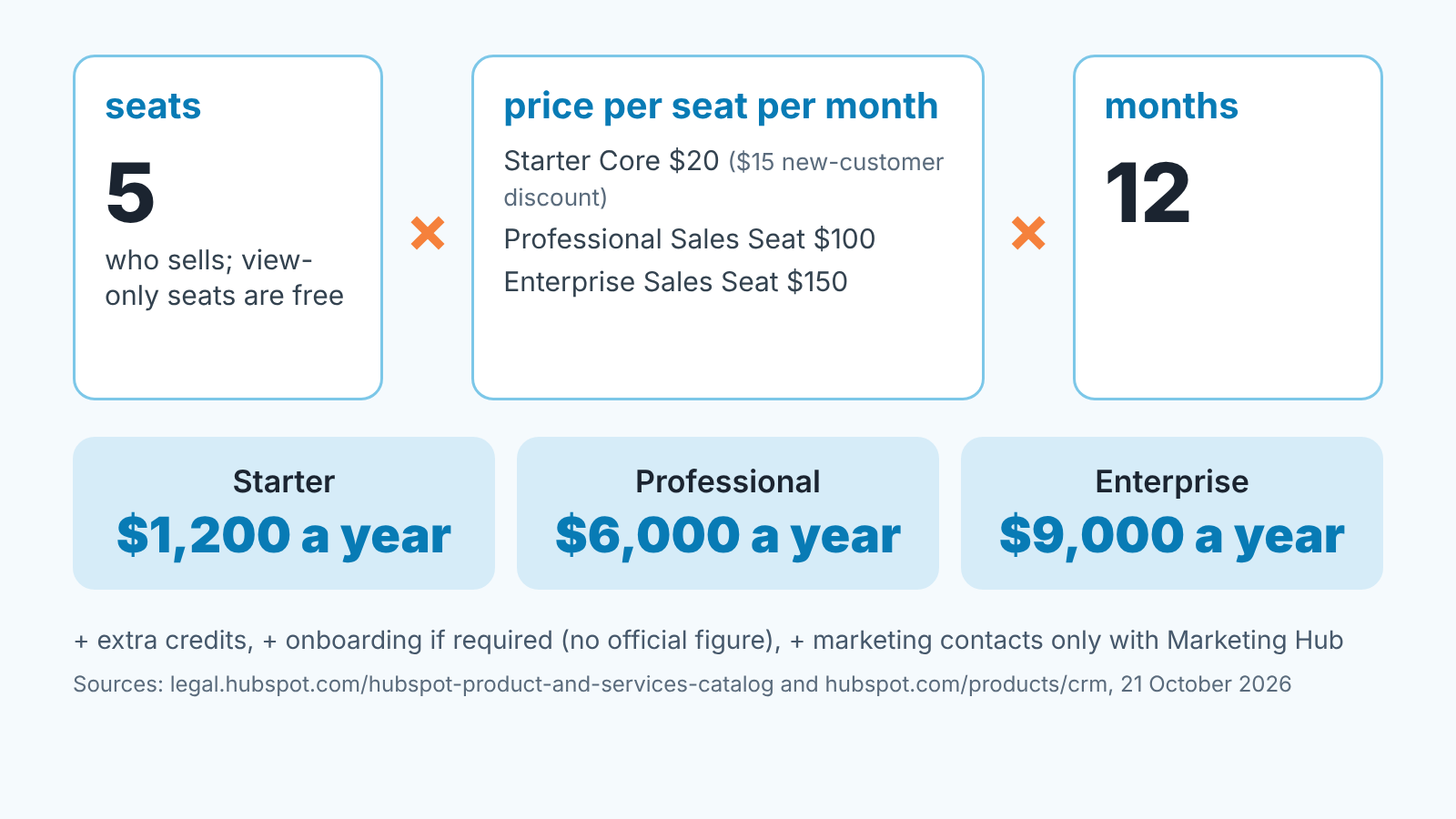
The formula is boring on purpose: seats × price per seat per month × 12. The hard part is which price, and the catalog answers that (HubSpot: Product and Services Catalog, list prices checked 21 October 2026):
| Tier | Seat type | Price per seat / month | 5 seats / month | 5 seats / year |
|---|---|---|---|---|
| Starter | Core Seat | $20 | $100 | $1,200 |
| Professional | Core Seat | $50 | $250 | $3,000 |
| Professional | Sales Seat | $100 | $500 | $6,000 |
| Enterprise | Sales Seat | $150 | $750 | $9,000 |
| Any paid tier | View-Only Seat | no additional cost | $0 | $0 |
The Starter row is where the two HubSpot pages disagree. The catalog lists a Starter Core Seat at $20; the CRM overview shows “from $15” and labels it a new-customer discount (HubSpot: CRM software). At $15 five seats come to $75 a month, $900 a year. We’d budget on $20 and treat the $15 as a discount you may or may not get, since HubSpot says it can end at any time.
The Professional Core Seat row is there for completeness. Five reps on Professional want Sales Seats; a quote built on Core Seats buys less than the whole of Sales Hub.
A sixth seat is the usual surprise. If you, the manager, also work deals, you are a seat too. If you only read reports, a View-Only Seat covers you and the formula stays at five.
HubSpot Starter plan for five reps: required fields and permission sets
Starter is the first tier where a manager can make a rule stick, through required fields and permission sets (HubSpot: CRM software).
Required fields are the one feature we would pay for on their own. On Free, a rep can drag a deal from Qualified to Proposal with an empty amount and no close date, and the pipeline report quietly absorbs it. On Starter you can make the amount, the close date and the next step mandatory at the stage where they should exist. How to set that up stage by stage is in required properties on HubSpot deal stages.
Permission sets are the second control. With five reps the question is rarely “who may delete a contact”. It’s “does Maria see Tom’s deals”. Permission sets answer it once instead of in every one-to-one; HubSpot user permissions for a sales manager walks through the deal visibility options.
If your five reps are in one country you are buying Starter for two features. That’s fine. Two features that keep the pipeline honest are worth more then ten that decorate it.
Professional: what actually changes for the manager
Not the price. The job.
On Starter you are preventing bad data. On Professional you are cleaning it and reporting on it. Of the five Professional features on the CRM overview, three matter on a five-person sales team (HubSpot: CRM software).
Duplicate management first. Five reps importing from LinkedIn, forms and their own spreadsheets will create duplicate companies within a month, and two “Acme Ltd” records mean two half-pipelines. On Starter you find them by hand. On Professional HubSpot helps you find them.
Custom reporting is the feature managers ask about and then underuse. A custom report answers “how many deals moved from Proposal to Negotiation in September, by rep, and how many moved backwards”. If you have ever exported HubSpot to a spreadsheet to answer a question, thats the feature you were missing.
Calculated properties are the quiet one: days in stage or a weighted amount is the raw material for a forecast you can argue about. How stage probability feeds the forecast is in deal stage probability and the HubSpot forecast.
On the forecast tool itself we have to be honest. Neither the CRM overview nor the catalog pricing section says which tier includes it, and the Sales Hub pricing page gave us no text. Before you sign for Professional because of forecasting, open that page in a browser and confirm the forecast is on the tier you’re buying. Two minutes, and it saves the upgrade regret we hear about most.
And remember the seat type: full Sales Hub Professional needs a Sales Seat, which is the $100 row in the table, not the $50 one.
The lines on the invoice that are not seats
There are three, and only one is likely to bite a sales-only team.
Start with credits, because that’s the one. HubSpot Credits power AI agents and automation, reset monthly and don’t roll over. Sales Hub includes 500 credits on Starter, 3,000 on Professional and 5,000 on Enterprise, and if you own several products you get the highest allotment, not the sum. Extra credits cost $0.010 each on pay-as-you-go, or $10 per pack of 1,000 credits a month for the rest of your term. Bulk and automated features burn credits faster, and with automatic upgrades switched on, going over the limit upgrades you for the remainder of the term (HubSpot: Product and Services Catalog). For five reps who use the AI agent sparingly this is noise. If you switch on every Breeze feature in week one, set per-feature credit limits first.
Marketing contacts come next, and you can probably skip them. The catalog says you pay for marketing contacts if you subscribe to Marketing Hub, and that contacts in the free contacts database carry no charge. This is the fee most “hidden HubSpot costs” articles warn marketers about.
Onboarding is the one nobody could give us a number for. HubSpot lists onboarding among its services, but neither page we read on 21 October 2026 says whether it’s required on a Sales Hub tier or what it costs, and we won’t quote a figure we haven’t seen on an official HubSpot page. Ask your HubSpot rep before the quote is final: is onboarding mandatory on this tier, and what is the fee? Get it in writing.
A decision rule for five reps
Stay on Starter while two things are true: the pipeline problems you have are about data going in, and you can still answer your Monday questions from the standard reports. Required fields fix the first. If the second holds, Professional means $100 instead of $20 per rep, $4,800 a year more for five people, for reporting you won’t use.
Move to Professional when either of these becomes true: you’re spending real time each week merging duplicates by hand, or you’ve exported to a spreadsheet twice in a month to answer a question the standard dashboard couldn’t. You can check both in your own calendar.
Don’t move for the forecast until you’ve confirmed, on HubSpot’s pricing page, that it’s on the tier you’re buying.
Whichever tier you pick, the plan doesn’t keep the data honest. Required fields stop an empty amount, not a close date pushed every Friday or a deal sitting in Negotiation for ninety days. We build SalesBond, a sales management layer on top of the CRM a team already uses; we started with Pipedrive. Its Deal Health checks every deal in the connected CRM against the rules you enable and shows the specific violation, such as an expected close date that has passed. Once the plan question is settled, check your CRM with SalesBond and see what the required fields let through.
Still weighing HubSpot against another CRM for the same five people? The cost side is in Pipedrive cost for a five-person sales team, and the manager’s checklists are in Pipedrive vs HubSpot for a sales manager and HubSpot vs Salesforce for a sales manager. Once the seats are bought, HubSpot Sales Workspace for a small team covers the setup.
FAQ
How much does a HubSpot seat cost?
It depends on the tier and the seat type. HubSpot’s catalog, checked on 21 October 2026, lists a Core Seat at $20 a month on Starter, $50 on Professional and $75 on Enterprise, and a Sales Seat at $100 on Professional and $150 on Enterprise; a View-Only Seat is available at no additional cost (HubSpot: Product and Services Catalog). The CRM overview shows Starter from $15 as a new-customer discount (HubSpot: CRM software).
Why is HubSpot so expensive?
Usually because of what sits outside the headline price. Professional is counted in Sales Seats at $100, not Core Seats at $50; AI and automation can use credits past the included allotment; Marketing Hub brings contact fees; onboarding may be added (ask your rep, we found no official figure). Five Starter seats at $1,200 a year is not expensive. Marketing Hub plus five Sales Seats is a different purchase.
Is HubSpot CRM actually free?
The free tier exists, and the overview says it needs no credit card (HubSpot: CRM software). Five reps can sell on it, but a manager can’t enforce required fields or permission sets until Starter.


