Salesforce Agentforce pricing for a sales team starts with Agentforce for Sales, an add-on listed at “From $125 USD/user/month” on top of the Salesforce seat (Sales Cloud pricing). The Agentforce pricing page describes that add-on tier as “Unmetered Agentforce usage for employees”, so for five reps it is a flat $625 a month. The cheaper-looking door is the Agentforce User License at $5 per user per month, which “Requires Flex Credits”: there, every agent action costs 20 credits, about $0.10 (Agentforce pricing). The price is the easy part. The question a manager should settle before signing is what the agent is allowed to write into opportunities, because every one of those writes is a line in your forecast, and on the metered door it is also a line on the bill.
Prices below are what both Salesforce pages showed on October 21, 2026. They have changed more than once this year, so treat the numbers as a snapshot and the method as the thing to keep.
What Agentforce for Sales is, and what it is not
Agentforce for Sales is not part of the Salesforce seat. A Sales Cloud license gives your reps the CRM; Agentforce for Sales is a separate line on the quote that sits under “related apps and add-ons” on the pricing page, with a “Contact us” button instead of a checkout. The page does not spell out which agents, prompts or actions come in the box. Anything else you read about what “is included” comes from a sales call, not a published list.
Check your edition first. In the Sales Cloud comparison matrix, Agentforce for Sales is “Available for purchase” only on Core and Advanced, included in Max, and not offered on Starter Suite or Pro Suite; the note under the editions reads “AI can be added to Core and above” (Sales Cloud pricing). A five-person team on Pro Suite ($100 a user) would first move to Core at $195 a user, which is another $475 a month for five seats before the add-on. On Starter Suite ($25) the step up is $850 a month.
It is also not the only way to buy Agentforce. For employees, two doors matter to a five-rep team, and your quote depends on which one the account executive opens first. One is the add-on per user, flat and unmetered. The other is the $5 user license, where the seat line is tiny and the agent draws down Flex Credits every time it does something.
Our position, for five reps: ask for both quotes side by side, and do not sign either until you have run the worked example below with your own numbers. Comparing the doors is your job, not theirs.
Salesforce Agentforce pricing models in one table
| How you pay | What the page says | What it means for five reps |
|---|---|---|
| Agentforce for Sales add-on | “From $125 USD/user/month”, on top of the Sales Cloud seat (Sales Cloud pricing); the add-on tier on the Agentforce page reads “Unmetered Agentforce usage for employees” (Agentforce pricing) | $625 a month, flat. Contents of the add-on: “Contact us” |
| Agentforce User License | “$5 USD/User/Month (Requires Flex Credits)”, with “Access to limited Salesforce CRM objects” and “Metered Agentforce usage for employees” (Agentforce pricing) | $25 a month for the seats, then every action is metered |
| Flex Credits | $500 per 100,000 credits. “Each Action” is “a specific function that an AI agent executes on the platform, such as updating a record”; the page’s examples price one action at 20 credits, $0.10 (Agentforce pricing) | Your bill scales with how often the agent touches a record, not with headcount |
| Max edition | From $550 per user per month, billed annually, Agentforce for Sales included, 2.75M Flex Credits per org per year (Sales Cloud pricing) | $2,750 a month for the seats alone. Built for teams that intend to run agents at volume |
One trap in the table’s second row. The same page lists a $50 per user per month license, and that one is the Agentforce Coworker User License, a separate SKU. If a quote or a blog post says “the Agentforce user license is $50”, it has mixed up the two.
The page also sells customer-facing agents by the conversation ($2 each) or on pay-as-you-go Flex Credits. Those are for agents that talk to your customers, not your reps, so we leave them aside.
A worked example for five reps
Five reps on the add-on is 5 x $125 = $625 a month, $7,500 a year, added to a Core, Advanced or higher edition (see the edition check above). If the add-on is unmetered, as the Agentforce page says, that is the whole Agentforce bill.
Now the metered door, and how Agentforce Flex Credits are counted. Five user licenses are 5 x $5 = $25 a month. On top of that, each action is 20 credits, and at $500 per 100,000 credits that is $0.10 an action. The action counts below are our assumptions; replace them with yours.
Assume the agent’s job is modest: after each logged call or email it updates the opportunity, writes a next step and adjusts a close date when the rep says so. Call that ten actions per rep per working day. Five reps, 21 working days, 1,050 actions a month, 21,000 credits, about $105. With the seats, $130 a month. Small.
Now assume the team lets it loose on pipeline cleanup, research before calls and record enrichment, and the count becomes fifty actions per rep per day. Same five reps, same month: 5,250 actions, 105,000 credits, roughly $525. With the seats, $550, and it moves with behaviour you have not yet observed.
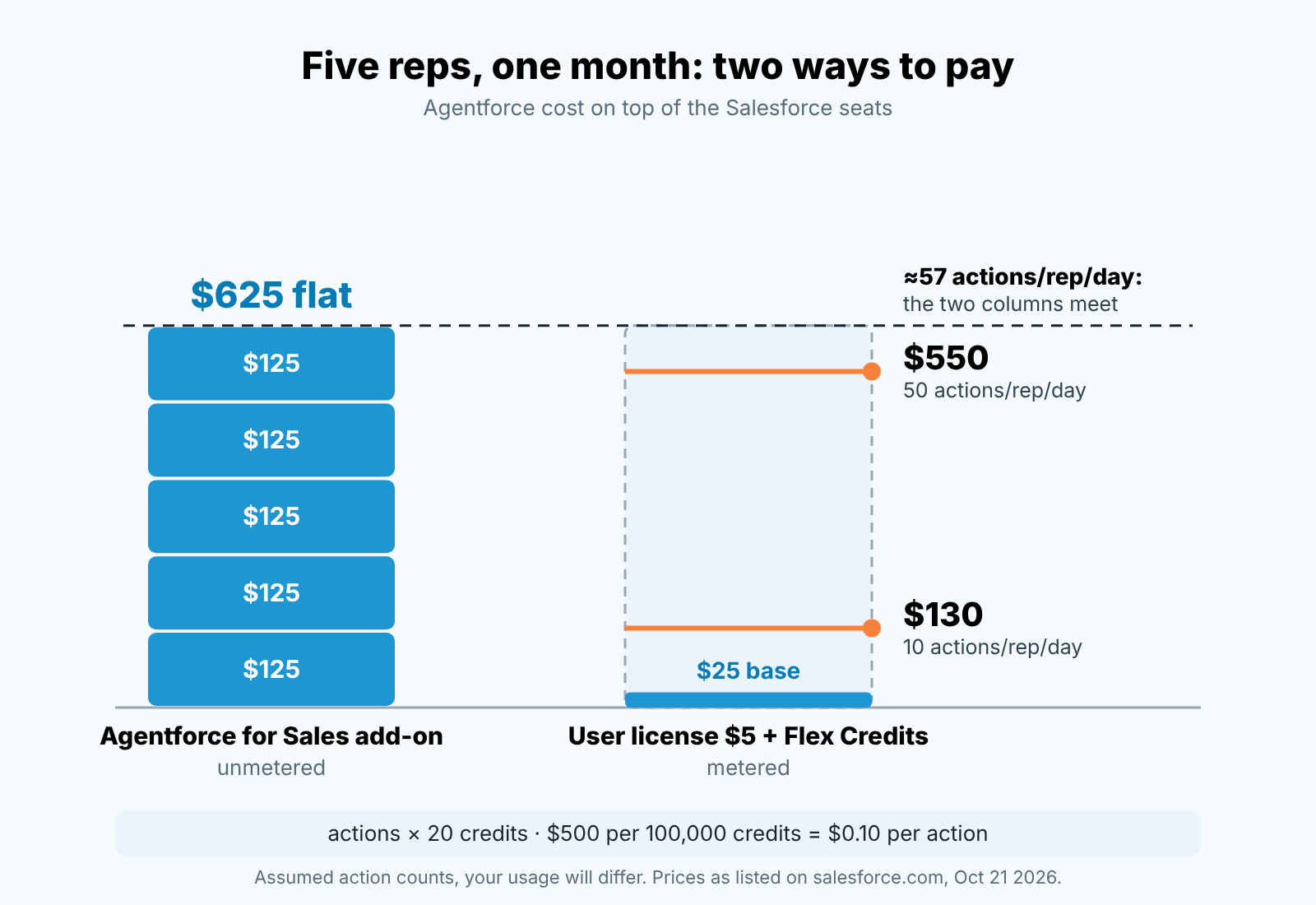
So where do the doors cross? The add-on costs $600 a month more than five user licenses, and $600 buys 120,000 credits, which is 6,000 actions. Spread over five reps and 21 working days, that is about 57 actions per rep per day. Below that the metered door is cheaper on paper. Above it, the flat add-on wins.
Two caveats about the cheap door. The user license lists “Access to limited Salesforce CRM objects”, and the page does not say which ones, so ask whether Opportunity is on the list before you plan an agent that writes to deals. The page also does not say whether the $5 license carries the same Core-and-above requirement as the add-on, so ask that too. And the Sales pricing page itself does not repeat the word “unmetered” for Agentforce for Sales; that comes form the Agentforce page. Get it in writing on the quote, not on the call.
What the agent writes to deals, and who checks it
Salesforce’s own definition of an action is the tell: “a specific function that an AI agent executes on the platform, such as updating a record”. Updating a record is the first example they chose. In a sales org, the records that get updated are opportunities, and the fields that get updated are the ones a forecast is made of: Stage, Close Date, Amount, Next Step.
That changes who owns the decision. Letting an agent write to Stage and Close Date belongs to the sales manager, not the admin who provisions the SKU. Our test: if a new hire did this, would you want to know? A rep who moved ten close dates on a Friday afternoon would get a question on Monday. An agent doing the same should get the same question, and it will not volunteer the answer. Unmetered usage makes this more urgent, not less, since nothing on the invoice tells you the agent has been busy.
The mechanics of catching it are the same as for any assistant with write access, and we have already walked through them field by field: turn on Field History Tracking for the four forecast fields, add Last Modified By and Last Modified Date to the pipeline view, and run a weekly report on close dates that moved (what an AI assistant wrote to your opportunities). If the agent is also booking meetings or creating leads, the handoff checks are in the CRM checks before a rep takes an AI-booked meeting. What those two do not cover: the report that shows what the agent changed is also your best count of what it did, and on the metered door that count is the bill.
We build SalesBond, a sales management layer on top of the CRM a team already uses; we started with Pipedrive. Our checks on an opportunity (a missing next step, a close date in the past, a stage that has not moved) do not care who made the record look that way. A human can leave a deal without a next step and so can an agent that was asked to “tidy up”. If you want the deals that need a second look surfaced regardless of author, check your CRM with SalesBond. It will not tell you your credit balance; it will tell you which agent-touched deals are still wrong.
Three controls a manager sets before turning it on
Not after the first invoice. Before.
The first control is a written list of fields the agent may change. Start it short: Next Step and the activity log, nothing else. Stage, Close Date and Amount stay human-only for the first month, because a wrong next step costs you a conversation and a wrong close date costs you the forecast review. Your admin configures it in the agent’s permissions; the point is that the the list exists on paper, with your name on it, first.
The second control is a named reviewer and a fixed time. One person reads the Opportunity Field History report every Monday before the pipeline meeting, filtered to the last seven days and grouped by who made the change. For five reps that is a twenty-minute job, and it fits next to the handful of Salesforce screens a manager already opens each week (the parts of Sales Cloud a manager actually opens). The signature of an agent batch is easy to see once you look: same minute, same new value, many records. It’s the same review you would run on a cadence that writes to opportunities on its own (what a Sales Engagement step leaves on the opportunity).
The third control is a meter you actually read. Salesforce says consumption shows up in Digital Wallet with “near-real time usage data”; ask your admin to give you a view of it. On the metered door it is the bill. On the add-on it shows if you picked the right door. Write the weekly figure next to the action count from the field history report. One more reason to look early: the FAQ on the same page says unused Flex Credits “do not roll over” into the next term. After four weeks you will have the number that matters at renewal: actions per rep per day, in your org. Put it next to the 57 from the worked example.
When it is not worth it for five people
If your reps are not logging calls and emails today, an agent that “updates the record after each interaction” has nothing to update. You will have paid $625 a month to make a quiet pipeline look busy. Fix the logging habit first; that one is free.
If nobody on the team has the Monday slot to read the field history, do not buy write access. Start one rep on the metered license, or keep the agent to read-only use cases, and revisit when someone owns the review. An unobserved agent is not cheaper because it is small, it is just unobserved.
What makes it worth it is narrow: five reps who log reliably, one manager who already reads the pipeline every week, and a single agent task (next step after every logged activity is a good first one) that you can measure in the field history report and switch off in an afternoon if the batches look wrong. That team will know within a month whether the money bought them anything.
FAQ
Is Agentforce included in Salesforce? Not in the standard seat: Agentforce for Sales is a separate add-on “From $125 USD/user/month”. The one Sales Cloud edition that bundles it is Max, from $550 a user, with 2.75 million Flex Credits per org per year (snapshot: October 21, 2026).
Is there a free option? Yes, with limits. The Agentforce pricing page lists Salesforce Foundations at $0, “Get started with Agentforce for free, for any use case”, and the Sales Cloud page notes that “Limited Flex Credits” are included in Foundations. The Sales add-on itself starts at $125 per user. If someone offers you Agentforce for free, ask what happens when the included credits run out.
Is Salesforce Agentforce Vibes free? The Agentforce pricing page lists Agentforce Vibes among the tools in the $0 Salesforce Foundations tier, next to Agentforce Builder and Prompt Builder, with a “Try for free” button (October 21, 2026). It is not the Sales add-on, and the page does not say how much use the free tier covers before credits are needed.