Revenue intelligence platforms read the data your reps already leave in the CRM: stages, close dates, amounts, next steps, logged emails and calls. If those fields are empty or stale, the platform will show a confident but wrong picture, so check data readiness before you compare vendors. For a team of five that takes about ten minutes, and it often settles whether you need a platform at all this year.
Most pages ranking for this query are vendor comparisons written for teams with a RevOps person. This one is about what has to be true in Salesforce, HubSpot or Pipedrive before any platform shows you something useful.
What revenue intelligence means in plain words
Revenue.io defines it as gathering sales and product-usage data across leads, prospects and customers, and analysing it with AI (Revenue.io: What is revenue intelligence). The same page’s FAQ names the inputs: calls, emails, meetings, the CRM and product usage. Out come deal risk, rep performance, lead priority and a forecast.
The category covers a few kinds of tool, and each wants something different from your CRM. Conversation intelligence transcribes calls and needs them tied to the right deal (more in conversation intelligence for small sales teams). Forecasting and pipeline-inspection tools live on stage, close date and amount. Activity capture logs emails and meetings automatically, but only from channels it can see.
Strip the category name away and the mechanism is simple. The platform compares a deal with deals you won and lost and tells you which ones it resembles. The skeleton is the CRM record: when the deal entered its stage, when it’s due to close, when a human last touched it.
The marketing implies the platform will see what your CRM doesn’t. It won’t. It sees what your CRM has, faster and across every deal at once. That gap is where small teams waste a licence.
The six CRM fields every revenue intelligence platform reads first
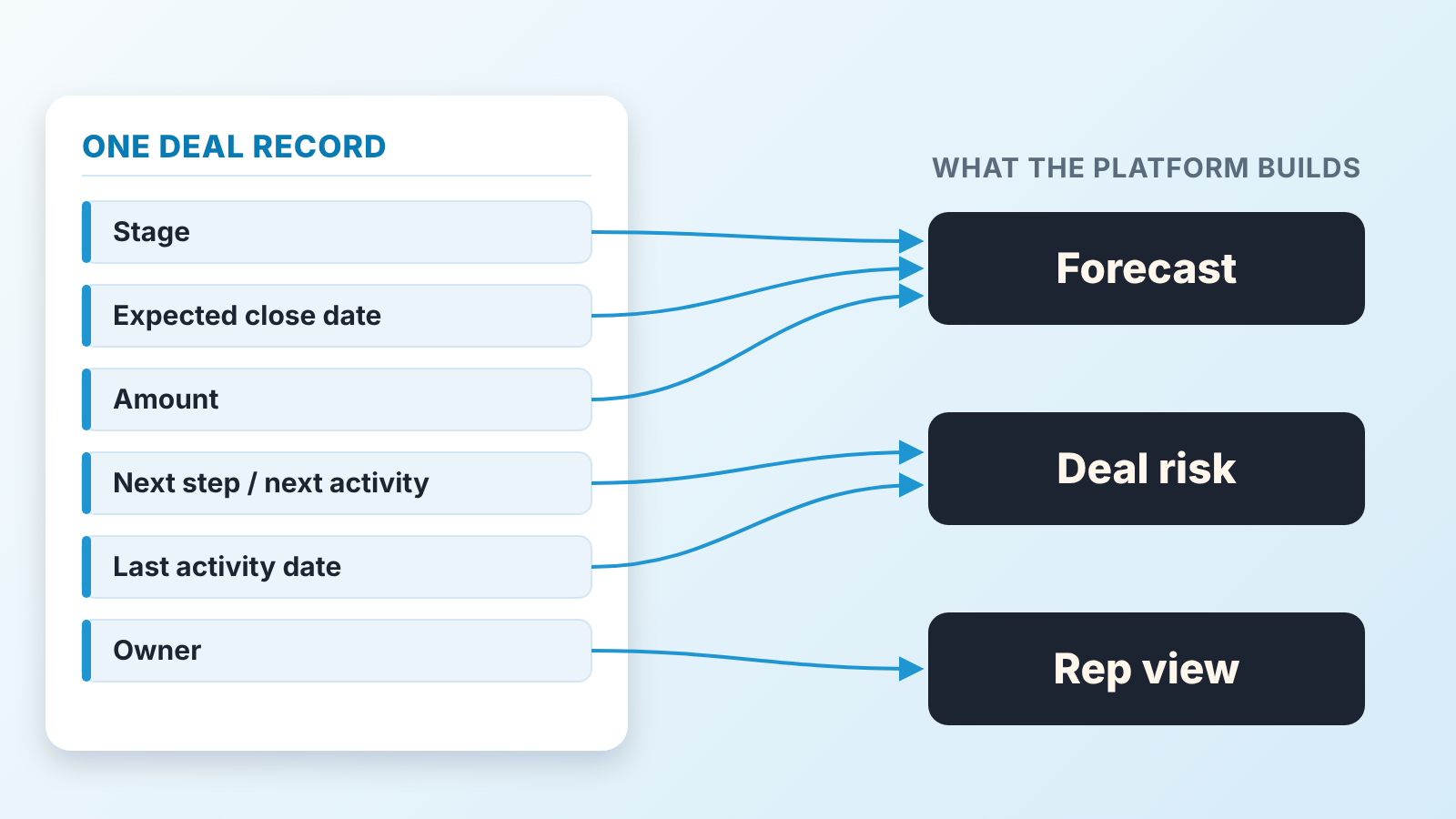
The stage comes first. Forecasts are built on stage probabilities or on how long deals sit in each stage, so a deal parked in “Proposal” for four months reads as a live proposal, not as a dead deal nobody closed out.
The expected close date is second. It decides which month a deal lands in. A rep who pushes the date every Monday produces a deal that is always closing next month, and a tool that reads only the current value believes him every time. The field’s history matters as much as its value: how often the date moved, when the stage last changed. Ask whether a platform reads it (question 5 below).
Amount is third, and small teams usually get it right because the manager asks. The common problem is a placeholder typed in at teh first call and never revisited.
The next step, or the next scheduled activity, is fourth. It separates a deal somebody is working from a deal somebody is hoping for. HubSpot, for example, has both: a free-text Next step property and a Next activity date it sets itself when someone logs a future call, email or meeting (HubSpot: default deal properties). Either works for a platform. Blank does not.
Last activity is fifth, and the rep never fills it by hand. It’s derived from logged calls, emails and meetings. If reps call from a mobile and never log it, every deal looks untouched and the whole pipeline reads as stalled. The platform isn’t wrong about the data. The data is wrong about the reps.
Owner is sixth. Obvious, until someone leaves and their deals stay assigned to a user who no longer logs in. Per-rep views hang on this field, and a departed owner turns them into nonsense.
None of this is exotic: on that HubSpot page all six are default deal properties. The question isn’t whether the field exists. It’s whether it’s filled, and filled with the truth.
What breaks when the fields are empty
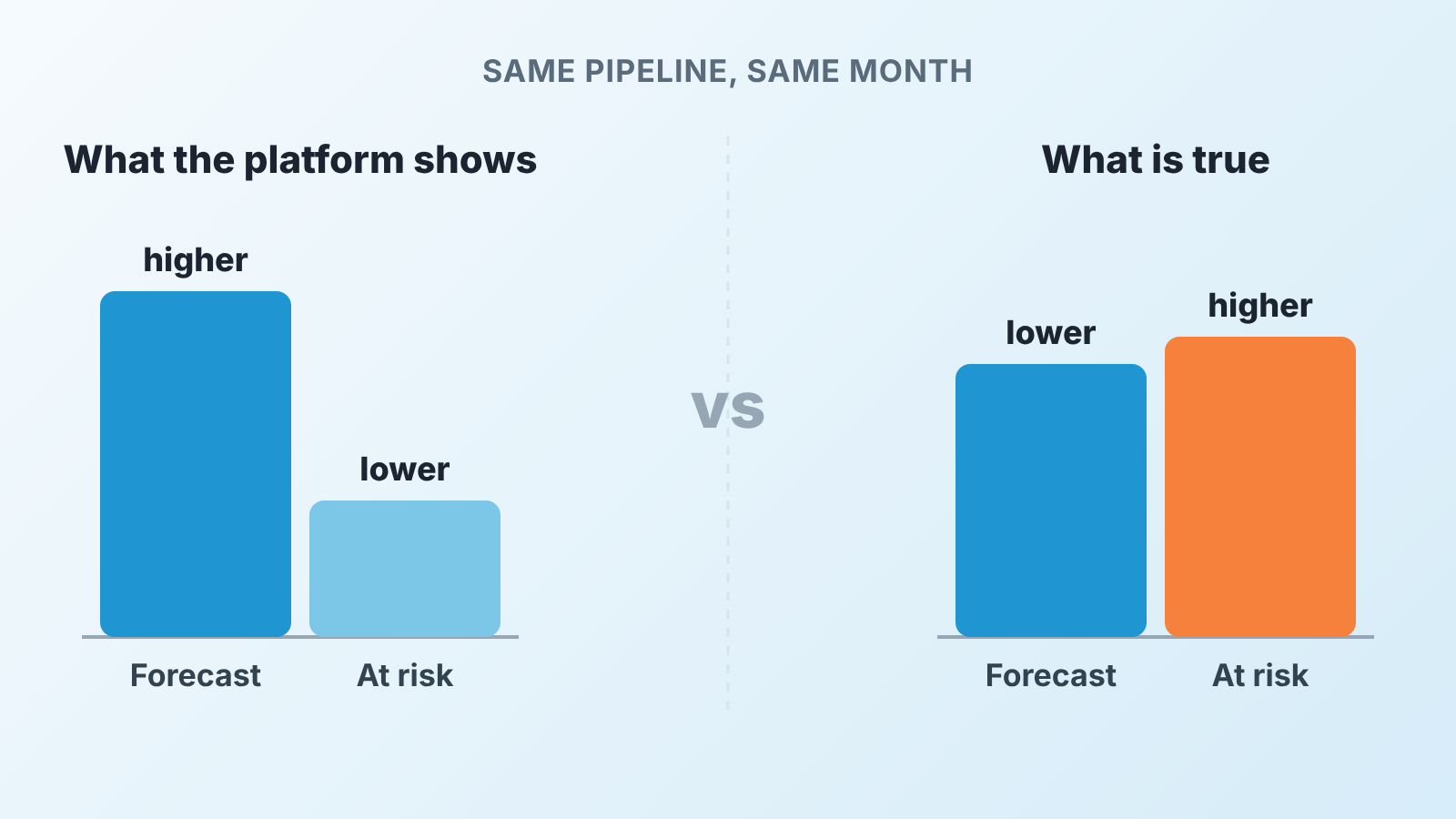
A wrong forecast is the first casualty, and it’s wrong in a specific direction. Deals with a stale close date pile up in the current month, so the forecast runs high. Deals that are progressing but have no logged activity get a low probability, hiding part of the real number. The two errors don’t cancel out. They make the total look plausible while the composition is fiction.
Deal risk breaks second. A risk model learns what a healthy deal looks like from your own history. If many closed-won deals last year had no next step and no logged calls, because reps closed them by phone and updated the CRM afterwards, the model learns that “no activity” is how you win. Then it stays quiet about the deal that is genuinely going cold. It’s the cold-start problem from AI deal scoring in small teams: a small team has little history to learn from.
The third break is quieter: the manager stops trusting the screen. After the second meeting where the “at risk” list contains a deal that closed yesterday the team treats the tool as noise, and you’re back to reading every deal by hand, now with a subscription.
Ten minutes in your CRM: the readiness check for five reps
Run this in the CRM, not a spreadsheet, so the reps see you doing it. Filter to open deals and count. The cutoffs are what we’d start with for five reps, not an industry standard; adjust them to your cycle.
- How many open deals have an expected close date in the past? We’d read more than a handful as a sign the date field is decorative.
- How many deals have sat in the same stage longer than your normal sales cycle? If you don’t know your cycle, take the median days from created to won on last year’s deals.
- How many deals have no next step and no scheduled activity?
- How many have no logged activity in the last two weeks?
- Sort by amount. How many deals carry a round placeholder amount nobody has touched since creation?
- How many belong to a user who no longer works here?
- Read five random deals. Could a new hire tell from the record alone where each stands and what happens next?
- Ask each rep which field they skip, and why. It’s usually a process problem, not laziness.
- Check whether emails are logged automatically or by hand. If by hand, treat your activity counts as optimistic.
- Write the numbers down with today’s date. You’ll want them again in a month.
Our rule of thumb: if the first four answers are mostly “a few”, a platform will have something to read. If any is “most of them”, fix that first. A platform bought now will tell you, at a price, what you just learned for free. For indicators a manager can track monthly, see our list of CRM data quality metrics.
What you can get without a platform
More than the vendor pages admit. Three of the readiness questions turn into saved views, and those three feed a weekly report.
Save a view of open deals with a close date in the past, one with no next step and no scheduled activity, and one with nothing logged in two weeks. Each is a filter you set once in Salesforce, HubSpot or Pipedrive; the clicks differ, the logic doesn’t. Put all three on the manager’s start screen. That’s the “deals at risk” list a platform would sell you, minus the probability score and the transcripts.
The weekly report is one page: open pipeline by expected close month, the three view counts under it, last week’s counts next to them. The manager reads it before the Monday meeting and asks about the deltas, not the totals. A question like “why did the past-due count go from, say, six to eleven?” beats any forecast number, because it has an owner and an answer. Where the forecast number itself goes wrong is in forecast accuracy for small teams; the deltas warn you earlier.
A disclosure, since you may be wondering whether we sell the next step. We build SalesBond, a sales management layer on top of the CRM a team already uses; we started with Pipedrive. It runs checks like these on every open deal continuously and shows a deal health score with the reasons. It depends on your fields too: when too few of its rules apply to a deal, it shows “not enough data” instead of a number. Honest, if not always welcome. Check your CRM with SalesBond if you want the check done for you; the saved views work either way.
What saved views can’t do is tell you what was said on a call, or rank fifty deals by likelihood to close. For five reps, ranking fifty deals is a Tuesday afternoon, not a software problem. In our view the ranking starts to earn its price when one manager can no longer read the pipeline in a week. That’s a size threshold, not a maturity badge, and its fine to be under it.
If you still buy: five questions for the vendor about your data
Say the fields are mostly clean and the pipeline has outgrown a weekly read. Now the the questions for the vendor are about your data, not their feature list.
- Which CRM fields does the model actually use, by name? A vendor who answers “all of them” hasn’t looked.
- What happens on a deal where the next step is blank and no activity is logged? You want to hear “we flag it as unknown”, not “we score it”.
- How much closed history do you need before the probabilities mean anything, and what do you show until then? For a small team a straight answer here matters more than any demo.
- Can we see the reasons behind a score, field by field? A number without reasons can’t be argued with at a pipeline review, and your reps will argue.
- If a rep moves the close date three times, how does the model treat that? Pushed dates are one of the easiest ways for a small-team pipeline to lie.
Write the answers next to your readiness numbers. If question 2 gets “we score it anyway”, go back to the saved views for another quarter.
FAQ
What is revenue intelligence? Software that reads your CRM, calls, email and meetings and turns them into a forecast, a risk flag per deal and a view of each rep. It doesn’t create data; it reads what your team records.
What is the difference between revenue intelligence and sales intelligence? Sales intelligence is data about buyers and companies before there is a deal: who to contact and which accounts fit. Revenue intelligence works on your own deals and activities once they are in the CRM. One finds the next account; the other tells you what’s happening with the ones you have.
Do small teams need a revenue intelligence platform? Not until two things are true: the six fields above are filled on most open deals, and the pipeline is too large for one manager to read weekly. Below that, saved views and a one-page weekly report give the same signals.
Can a platform fix bad CRM data? No. It can surface the gaps and nag reps, but the fill still comes from a person. If the manager doesn’t ask for the field today, software asking tomorrow won’t change much.
What should I measure before buying? The counts from the readiness check, written down with a date. Repeat them in a month. If the counts move without a platform, your problem was discipline; if they stay flat with a disciplined team, you have found the point where revenue at risk is worth automating.