
Salesforce Sales Engagement (formerly High Velocity Sales) runs multi-channel outreach as cadences, but a cadence step is not a next step on the opportunity. Cadences target people: a lead, a contact or a person account. Every completed step leaves a task, and if your admin turns on Relate Opportunities to Cadences, the rep can tie the deal to the person’s cadence, so the opportunity page shows the outreach and the cadence gets credit for the deal. What none of that gives you is a date on which a human will move the deal. So the manager’s job does not go away with the add-on: know what each step writes, separate automated touches from conversations, and keep one human-owned next step per open opportunity.
This is the Salesforce half of a set. We wrote the same question up for Zoho CRM Cadences and for HubSpot sequences on a small team, and compared the two HubSpot tools in workflows vs sequences. The rules we use there (exit rules first, Monday check second) carry over. What is different in Salesforce is where the data lands, and that is what this piece is about.
What a cadence step writes to Salesforce
Start with the plumbing, because the report is only as honest as the records behind it.
Salesforce pitches the add-on as one place that unifies “emails, phone calls, social touches, and tasks into a single to-do list” (Salesforce: Sales Engagement). Under that list sit two kinds of records, and a manager needs both.
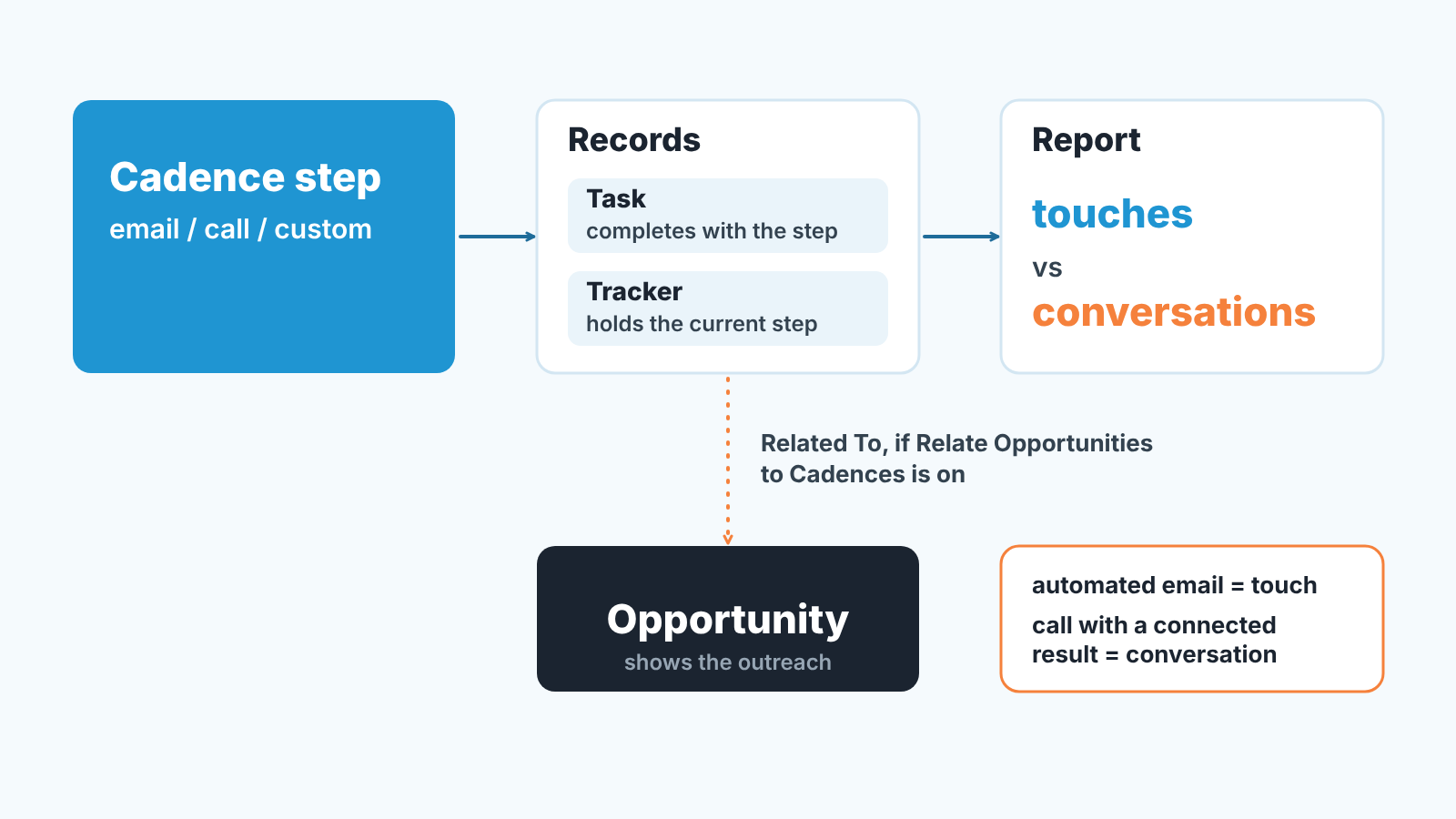
The first is the task. For the send-an-email, make-a-call, create-a-task, automated-email, LinkedIn InMail, LinkedIn connection request and platform screen flow steps, Salesforce creates a task record, reps can’t edit it, and it is marked complete when the rep completes the step (Sales Engagement Implementation Guide, “Cadences” considerations). LinkedIn steps log tasks only if the admin turns on Log Tasks from LinkedIn Steps. Wait steps leave nothing.
The second is the tracker. Each target in a cadence has a tracker record (ActionCadenceTracker) and a step tracker per step (ActionCadenceStepTracker): the current step, its state, whether action was taken, who completed it, when it was due and how overdue it is (Salesforce Developers: Cadence Object Relationships). This is where the cadence’s own memory lives. The task says something happened; the tracker says where the person is in the sequence.
So far all of it is about the person. The deal comes in through one setting. With Relate Opportunities to Cadences turned on, reps can associate an opportunity with a cadence target “so they can track which opportunities result from each cadence” (Implementation Guide, Sales Engagement features). The tracker then holds the opportunity in RelatedToId, and RelatedToAttributionType decides when the cadence gets credit: when the opportunity is created, or only when its stage advances. The admin can also put the Sales Engagements component on the opportunity page, which shows which cadence a prospect is in, their engagement activity and their progress.
That is a real link, and more of one than many teams assume. Read what it is, though. It answers “which deals did this cadence touch, and where is the outreach now”. A completed step is still a task closed by a send or a click, not a conversation. A cadence can run to the end, fully “completed”, attributed to the deal, and the opportunity has not heard a customer’s voice once.
If your team was on the one-open-task rule before the add-on, nothing about it changes. The cadence’s tasks close themselves as steps complete; none of them is the deal’s next step. We explain the rule in one open Salesforce task per opportunity.
Touches that are not conversations
Here is the failure we see within a month of switching cadences on. The activity report doubles. Every rep looks busy. The manager relaxes, because “activity is up”. Then the quarter closes and the won count did not move.
The report doubled because every step is a task, automated emails included. A five-step cadence on forty leads is two hundred tasks in a week, and the rep touched a keyboard for maybe ten of them.
We draw the line like this. A touch is anything the cadence could have done without the rep: a templated email, an automated send, a LinkedIn connection request. A conversation is a call with a connected result, a reply from the customer, or a meeting that happened. Only conversations count toward “the deal is being worked”. Touches count toward “the lead has not been forgotten”, which is a different and smaller claim.
The split has to live in the data or it doesn’t exist. The cheapest place is the step tracker, which already knows the step type, so automated emails can be counted apart from calls without anyone tagging anything. For calls, the admin maps your org’s call result values into categories in Sales Engagement Setup; the guide says this groups results “to easily display the data in reports” and is required before managers can branch a cadence on call outcomes. After that, “connected” versus “left voicemail” is a field, not a guess. For custom steps, agree that completing the step without notes in it means it was a touch, never a conversation.
Reading the Sales Engagement report like a manager
To track engagement in Salesforce from cadences, report on the cadence trackers and step trackers, which keep a history of every target and step even after the cadence ends, and join them to the opportunity through the related-opportunity field. The cadence objects are read-only and Salesforce documents them for queries and reports. An admin reads that data to see whether cadences run. A manager reads it to see whether deals move. Same records, different columns.
The columns we keep: target, cadence name, current step, tracker state, completion reason, the related opportunity, the last conversation date, and the opportunity’s close date. The first five come from the trackers; the last three come through the related opportunity. If the related-opportunity column is mostly empty, that is the finding. Either the setting is off or reps don’t link deals when they add people, and in both cases the deal page will not show the outreach.
What we look for, in order. Targets with a completed cadence and no conversation, because the cadence has done all it can and the the next move is human. Targets on an open opportunity whose close date is inside the month and whose last conversation is older than the cadence, because by now nothing but the cadence is touching a deal that is supposed to close. And reps whose touch count is high and whose conversation count is flat week over week, because that is the activity report lying with a straight face.
One trap. Step counts reward long cadences. A rep on an eight-step cadence shows more completed steps than a rep on a three-step cadence, with the same number of calls. Never rank reps by completed steps. Rank by conversations, and use steps only to answer “did the outreach actually run”.
Attribution has the same trap one level up. If RelatedToAttributionType credits the cadence when the opportunity is created, a cadence that ran on a contact the week before the deal was opened gets the deal. Crediting on stage advance is the stricter reading, and we’d use that one for anything a manager will quote in a pipeline review.
Stopping a cadence at the opportunity, not the contact
Exit rules in Sales Engagement are about the target. A global exit condition removes a person on an email hard bounce, a soft bounce or a call result that says not interested, and a rep can remove the target by hand. Those are good rules. They are not deal rules.
Picture a contact at an account with an open opportunity in negotiation. She is still in the prospecting cadence a rep put her in when she was cold, because nothing about the deal is a target exit condition. Now a “just checking in” template lands in her inbox the day after your rep sent her the revised quote. That is the cadence working as designed and the deal being damaged.
There’s a second, quieter version of this at lead conversion. When a lead converts, it’s completed cadence tasks aren’t transferred to the Activity Timeline of the new contact, account or opportunity (Implementation Guide, “Cadences” considerations). The six emails and two call attempts that warmed her up stay behind on the lead. The deal starts with a clean timeline, and whoever opens it next reads her as untouched.
The rule we use: once an opportunity is open past the qualification stage, every contact on that opportunity leaves prospecting cadences, and only nurturing or deal-specific cadences may touch them. In practice that is a weekly list: contacts in an active cadence whose related opportunity is at or beyond the stage you choose. Pull it, read it, remove them. Ask the admin whether Sales Engagement’s automated actions or a flow can do the removal in your org. If they can, let them, but keep the list anyway for the first quarter, because automation fails quietly.
And decide the reverse case too. A closed-lost opportunity does not mean the contact should be dropped from everything. It means the deal cadence stops and a long nurture may start. Writing that down once saves teh argument every month.
The manual next step a cadence cannot set
A cadence knows the next step for the person: “send email 3 on Thursday”. It does not know the next step for the deal, because the deal’s next step is a decision, not a schedule. “Confirm budget owner before the demo” is not a cadence step and never will be.
So the opportunity still needs its own open task with a date and an owner, exactly as it did before the add-on. The cadence is allowed to be the reason the task exists (“after step 4, if no reply, call the sponsor”), but the task is the thing the manager checks. When a rep says “she’s in a cadence” as the answer to “what’s the next step on this deal”, that is the signal to stop and ask again. The honest answer is one of three: a date and an action, “waiting on the customer until the 24th”, or “I don’t know”. All three are fine. “She’s in a cadence” is not an answer, even when the Sales Engagements component on the deal page shows her on step 4.
We also keep the Next Step text field out of this. A cadence step name in that field (“Email 3 of 5”) looks like progress and means nothing to a forecast review. If the field is used at all, it holds the human step.
A ten-opportunity audit
Twenty minutes, once, before you trust any engagement report in a pipeline review. Pick ten open opportunities with a close date in the next two months, mixed across reps.
- Open the opportunity. Count activities in the last thirty days. Write the number down.
- Of those, count conversations: calls with a connected result, customer replies, meetings. Write that down next to it.
- Find the contacts on the opportunity and check whether any of them are in an active cadence. Note the cadence name and the current step.
- Check whether that cadence is related to this opportunity. If not, the deal page and the attribution report are both missing it.
- If the deal came from a converted lead, open the lead and count the cadence tasks left there.
- Look for one open task on the opportunity with a due date and an owner, that the rep created rather than the cadence. Yes or no.
- If the cadence is a prospecting one and the deal is past qualification, mark it “should have exited”.
- Compare the rep’s spoken next step with what is on the record.
Then tally. If more than half of your ten have activity but no conversation, the activity report is counting touches as work and you adjust how you read it. If more than three have a cadence still running on a late-stage deal, your exit rule is missing. If fewer than half have an open dated task, the add-on did not fix the next-step problem, it hid it. The audit is the same one we run from the timeline in the Activity Timeline check before a 1:1; the cadence columns are the one addition.
This is also the moment to say what we build. SalesBond is a sales management layer on top of the CRM a team already uses, and the checks above (no conversation in thirty days, no open dated task, close date inside the period with nothing human scheduled) are the kind of rule it runs on every open deal instead of ten. It reads Salesforce activities whether or not a cadence created them, which is the point: it finds the deals where only a cadence is working. The decision about what to do with that deal stays with you. Check your CRM with SalesBond if you would rather not repeat the audit by hand every week.
What to agree with the admin
Most of what goes wrong here is a settings conversation that never happened. Sales Engagement is included in Unlimited Edition and Agentforce 1 Sales Edition, and otherwise sold as an add-on listed at $50 per user per month billed annually, with cadences, Einstein Activity Capture and Buyer Assistant on the pricing card (Salesforce: Sales Engagement pricing, checked 2026-10-18). Which reps have it decides whose outreach shows up in cadence reports at all. Confirm that first.
Then four decisions, in writing, with the admin in the room. Is Relate Opportunities to Cadences on, is the Sales Engagements component on the opportunity page, and who links the deal when a contact is added? Which attribution type counts: on creation or on stage advance? Are call results mapped into categories, so the report can split conversations from attempts? And at which opportunity stage do contacts exit prospecting cadences, by automation or by a weekly list?
One cadence rule, one task rule, one report. Reps get the cadence. Managers get the task and the report. Keep them apart and the engagement numbers become something you can read.


