
The HubSpot free CRM really is free, with no credit card and no expiration date, but it covers up to two users and 1,000 contacts. For five reps that makes it a two-person pilot, not the team’s CRM. HubSpot’s own FAQ puts it this way: “up to two users, 1,000 contacts, and no limits on customer data” (HubSpot: CRM software, FAQ “How much does CRM software cost?”, checked 2026-10-21). The paid tiers close the manager’s gaps: HubSpot lists required fields and permission sets under Starter, custom reporting under Professional. Below is what two people can prove on Free, and the signs that all five need to move up.
We write for the sales manager here, not for the marketer who picked HubSpot for the forms. Can five people log deals for free? Under the published cap, not all five at once. So the useful question is a different one: what can two of them prove on Free before you pay for five seats, and what will you be missing the day you do?
What the HubSpot free CRM gives a manager
HubSpot’s product page lists the free tier’s popular features as contact management, deal pipelines, CRM import, Breeze Assistant and a reporting dashboard (HubSpot: CRM software, 2026-10-21). That reads like a feature list. Translate it into what a team actually does with it in week one.
Deal pipelines mean a board with stages. Deals move left to right by drag, and each deal carries an amount, a close date and an owner. For reps selling one thing, that covers most of the daily job.
CRM import means the spreadsheet everyone kept before HubSpot goes in as contacts and deals. This is also where most of the later hygiene problems are born, because the import maps whatever columns the old sheet had, and the sheet had six versions of “Decision maker”.
The reporting dashboard is where a manager first feels the shape of the free tier. You see the board and the standard views of deals and activity. What you can’t build is the report you actually want, which is usually “deals in Proposal older than two weeks without a next step, by rep”. That one needs custom reporting, and HubSpot lists custom reporting under Professional, not Starter (HubSpot: CRM software, 2026-10-21).
If you are setting up the workspace for the first time, the view layout for a small team is a separate topic: HubSpot sales workspace for a small team.
Three things missing, and why only the manager notices
Reps on a free HubSpot portal rarely complain. Nothing is blocked for them. The gaps show up one level higher, in teh data the manager tries to read.
Required fields. HubSpot lists required fields as a Starter feature (HubSpot: CRM software, 2026-10-21), so on Free plan as if no stage can demand a value before a deal moves into it. A deal can land in Proposal with an empty Amount, and the weighted pipeline quietly ignores it. One rep remembers to fill the amount, another fills it on Friday and the third types it into the deal name. How stage-level requirements work once you have them is in HubSpot required properties by deal stage.
Permission sets. Also Starter on HubSpot’s list. Without them the manager has no way to package “sees own deals, edits own contacts, cannot delete” into a set and hand it to the new hire. With two people that’s a non-issue. With five, one of whom started last month, a deleted deal turns into a conversation about who deleted it. The visibility settings themselves are covered in HubSpot user permissions for deal visibility.
Custom reports. Professional. Managers underestimate this one because the standard dashboard looks like reporting. It answers HubSpot’s questions. Yours, the ones that come from your own sales process, stay in a spreadsheet you export to on Sunday evening.
A rep never touches any of the three. They are the manager’s tools for making five people’s data mean the same thing, which is why the free tier feels fine from below and thin from above.
When the free tier stops being enough, the next step is paid Sales Hub seats, and the tier and seat math for five people is in a separate piece.
Two free users, five reps: what the HubSpot free CRM is for
The published limits of the HubSpot free CRM fit in one sentence: up to two users, 1,000 contacts, no limit on customer data, and “no expiration date” (HubSpot: CRM software, FAQ “How much does CRM software cost?”, 2026-10-21). Read that as a sales manager and the decision is made for you. Free is not the five-person team’s CRM. It is a free pilot for two of the five, and the cheapest process test you will ever run.
So run it as one. Put the manager and one rep on it, or the two reps whose deal cards you trust least, because the pilot is more honest that way. Import only the live pipeline, not the whole history, so the the contact cap does not eat the test. Use the exact stages you intend to run with five people. Four weeks is enough to learn the two things that matter before you buy seats: which stage definitions the reps actually understand, and which fields they will fill without being forced.
Why test at two for a problem that bites at five? Two reps sharing a portal correct each other by talking. The manager hears both calls and knows which deals are real without opening HubSpot. Inconsistent fields cost nothing, because nobody is reading the fields.
Somewhere around the fourth or fifth rep the manager stops hearing the calls. The pipeline review becomes the only place the deals are seen together, and it runs on whatever the five of them typed. Now “Amount is sometimes blank” is a forecast error. “Close date is whatever was default” is a slipped quarter you find out about in the last week. The data did not get worse. It got read.
Five reps also means five ways of using the same field. Here is a composite example (details merged from several portals, not one client): the deal property “Source” holding “Inbound”, “inbound”, “Website”, “Web” and “Inbound (website)”. Five people, no picklist governance, eight months. A custom report would not have saved them, and the free tier did not cause it. Headcount did, and a paid tier alone won’t undo it.
Five signs your team has outgrown the free tier
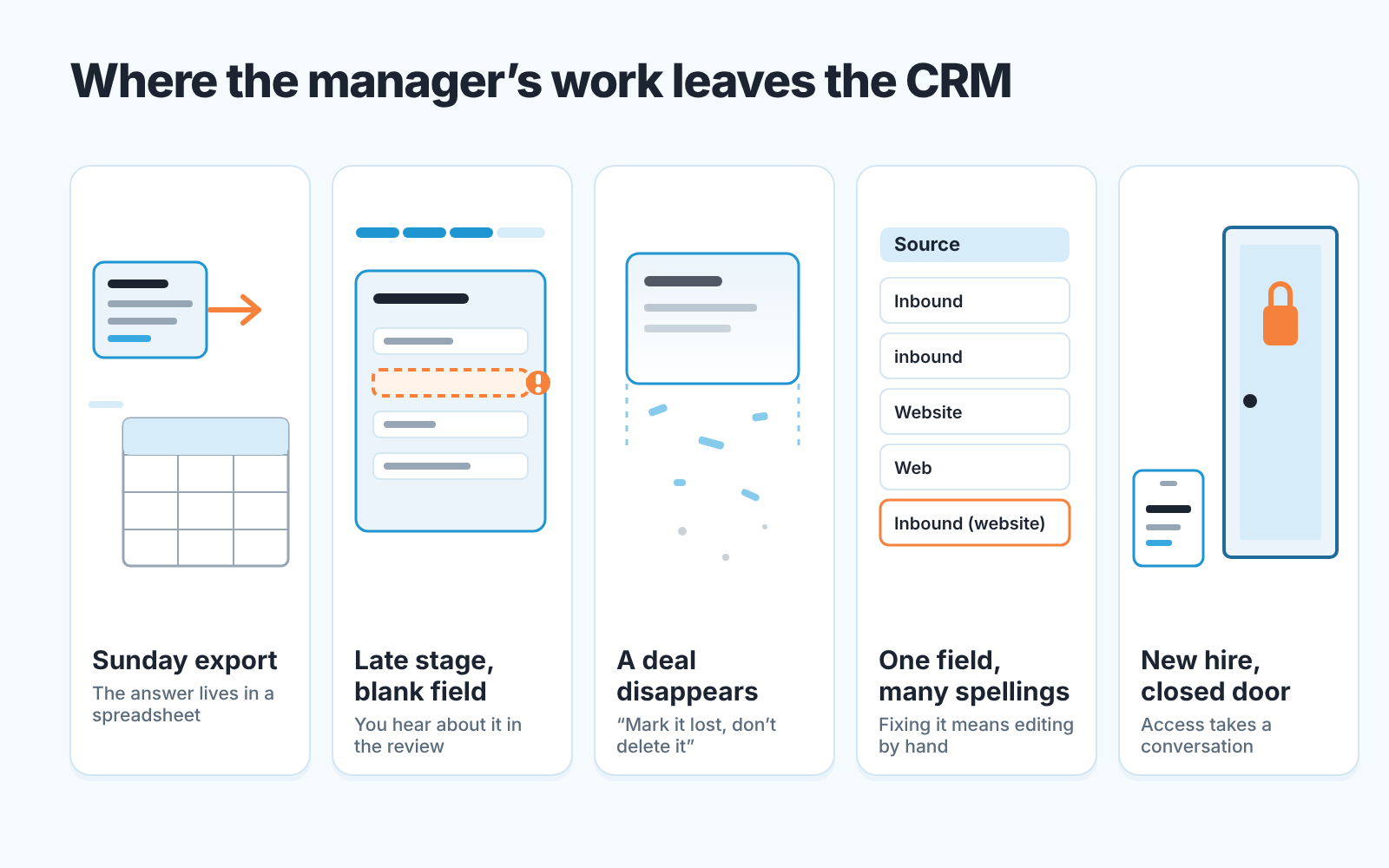
The first one usually shows up on a Sunday. You export deals to a spreadsheet to answer a question the dashboard can’t, and it is not the first time. That is the Professional gap: custom reporting.
The second shows up in the pipeline review. A deal reached Proposal or later with an empty Amount or a default close date, and you learned about it in the meeting rather than before it. Required fields, which HubSpot lists under Starter.
Then there’s the sentence you keep repeating: “please don’t delete deals, mark them lost instead.” If you have said it twice, a written rule is not working and a permission set would.
A new hire is the fourth sign. Someone started, and deciding what they should see and edit took a conversation instead of a click. Permission sets again.
The last sign is different. Two reps use the same property to mean different things, and fixing it means editing records by hand. That isn’t a tier problem at all, it is hygiene, and no upgrade fixes it for you. Before you commit to any tier, it helps to know how to choose a CRM for a sales team of five.
Fix these before you pay, because paying will not fix them
A paid tier gives you the lock. It does not clean the room. Do these on Free with the two pilot users, this week, and you will know what you are buying when you upgrade.
Agree on stage exit criteria in words, out loud, and write them into the stage name or description. “Proposal” becomes “Proposal sent, amount and decision date known”. Nothing enforces it, but a rep dragging a deal past a stage called that knows what they skipped. When you do move to Starter those sentences become your required properties list, already debated.
Trim the properties the import created. Every column from the old spreadsheet became a field and most are empty for most deals. Hide or delete the ones no decision depends on. Fewer fields, more filled.
Pick the four fields a pipeline review depends on (usually Amount, Close date, Next step and Deal owner) and make the Friday routine “no blanks in these four”. On Free that is a habit, not a rule. Habits are what you are testing. If two people cannot hold four fields for a month with reminders, five will not either, and the required-field setting on Starter will produce guesses instead of data.
A disclosure, since this is the part a tool helps with: we build SalesBond, a sales management layer on top of the CRM a team already uses, and it flags the deals where these steps were skipped, so the manager does not read every card to find the blank one. On a free portal that reading is otherwise entirely the manager’s job. If you want to see what your pipeline looks like through that lens, check your CRM with SalesBond. It does not replace the exit criteria conversation. Nothing does.
What Starter changes, in one paragraph
Starter is the paid tier directly above Free, priced per seat, and HubSpot’s popular features for it are required fields, permission sets, multiple currencies and no HubSpot branding (HubSpot: CRM software, 2026-10-21). For a manager of five, that closes two of the three gaps above and leaves custom reporting waiting in Professional. Starter is also where the two-user cap stops being your problem, since seats are bought per person. What five seats cost is a separate question; check HubSpot’s pricing page on the day you decide, because packaging and discounts change. If you are still choosing a CRM rather than a tier, we did the same five-person math for Pipedrive and Zoho CRM.
FAQ
Is HubSpot CRM really free?
Yes, as of our check on 2026-10-21. HubSpot’s product page says no credit card is required and, in its FAQ, that the free CRM functionality has no expiration date (HubSpot: CRM software). The same FAQ caps the free tools at “up to two users, 1,000 contacts”, so “free” means free within that cap. Check the page on the day you decide.
Is there a trial of the paid features?
We did not find a trial of Starter or Professional on the CRM product page we checked; the page offers a demo of the premium CRM and contrasts the free CRM with a free trial. Don’t plan around one. The honest test of whether you need Starter is the four-field habit above: run it on Free for a month and count the blanks.
Can five reps work in the free HubSpot CRM?
Not under the cap HubSpot publishes: “up to two users” on the free tools (HubSpot: CRM software, FAQ, 2026-10-21). Two can, and that is the pilot. Once all five are on a paid tier, the limits you feel next are the missing required fields at a stage, then the missing permission sets, then the report you cannot build.
Do I need Professional, or is Starter enough for a five-person team?
Starter closes the data-entry gaps: required fields and permission sets. Professional is where custom reporting lives. If your Sunday spreadsheet export is the pain, Starter will not end it. If blank amounts and deleted deals are the pain, it will.


