
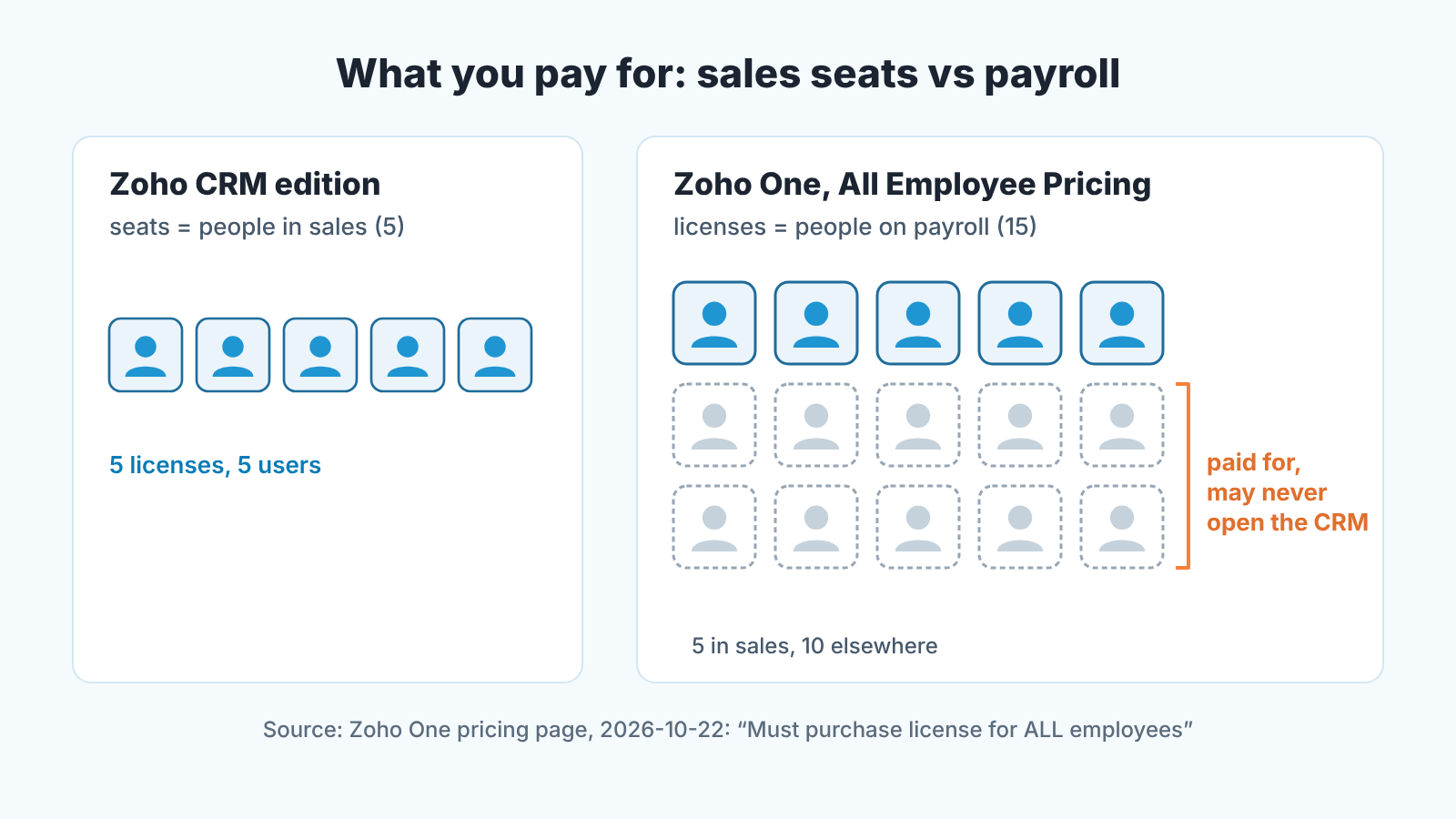
For a team of five reps whose company needs only a CRM, a Zoho CRM edition is the cheaper and simpler buy. Zoho One starts to make sense when the company will use three or more Zoho apps, because its main license is sold for every employee on payroll, not for the five people in sales. When we opened Zoho’s pricing page on 2026-10-22, All Employee Pricing was US$37 per employee per month billed annually (US$45 paid monthly), and the page adds that you “must purchase license for ALL employees” (Zoho One: Pricing). So the real question is not “One or CRM”. It is how many people work here, and what else they will run on Zoho.
The question behind “Zoho One vs Zoho CRM”: who in your company needs a license
The partner blogs that rank for this query add up three or four separate Zoho products and conclude that the bundle wins. That is the right arithmetic for a company that has already decided to run on Zoho. It is the wrong starting point for a sales manager who wants a CRM for five reps.
Zoho CRM is priced per user, so five reps means five seats. The editions and what each one gives a manager are in Zoho CRM cost for a five-person sales team, and we won’t repeat those numbers here. Zoho One’s headline price is per employee, and a footnote on the pricing page says that “your business will have to commit to purchase Zoho One licenses for ALL employees on payroll”. The small-business page carries the same condition under its “/employee/month billed annually” price (Zoho One: Small business software).
So before you look at a single feature, write down two numbers: people in sales and people on payroll. Five and six? The two purchases are nearly the same size, and the choice is about apps. Five and forty? Then One on the all-employee plan is a company purchase that happens to include a CRM, and the sales manager is one voice in that decision, not the buyer.
Zoho One pricing: what the license covers and what it does not
Zoho One comes in two editions, Essentials (“15+ unified business apps”) and Standard (“50+ unified business apps”). Standard can be licensed two ways. All Employee Pricing covers everyone on payroll at the per-employee price above. Flexible user pricing lets you “purchase license for any no. of users”, at a per-user price well above the all-employee rate. Both are quoted per month with annual billing, and the FAQ notes that the prices do not include VAT (Zoho One: Pricing, opened 2026-10-22).
Two lines in that FAQ matter more to a small team than the app count. First an edition change is all or nothing: to move between Essentials and Standard you “will have to upgrade all the users associated with your organization”, and the same goes for a downgrade. There’s no cheaper plan for the warehouse and a richer one for sales. Second, Essentials is described as “a CRM, Collaboration, finance management, marketing, customer service and HR tools”. That is the honest reason to look at One at all. You are buying the other departments’ software, and the CRM comes with it.
What One does not do is turn Zoho CRM into a different product. Your pipeline, stages, Blueprint and reports are the same tool a standalone edition gives you. Which edition it matches is a fair question, and Zoho’s pages don’t name one. The plan details page lists the CRM features included and notes that “CRM Ultimate edition is available as an add-on”, so the bundled CRM sits below Ultimate; partner blogs describe it as Enterprise. Put that feature list next to the edition table in the cost article before you compare totals. If reporting is the reason you are eyeing the bundle, read Zoho Analytics vs Zoho CRM reports first.
Three scenarios for five reps: CRM only, CRM plus two apps, whole company
Once headcount and seats are separated, the arithmetic is short. CRM edition prices live in the cost article; the One figure is from the pricing page on 2026-10-22.
| Your situation | What you are really buying | Our call |
|---|---|---|
| Five reps, a company of five to eight, no plans for Zoho Books, Desk or Campaigns | A CRM | A Zoho CRM edition, picked by manager features, not by price per seat |
| Five reps, a company of ten to fifteen, finance wants Books and support wants Desk | Three apps for part of the company | Price both: CRM seats plus the two apps’ seats, against One for everyone on payroll. Decide on the total |
| Five reps inside a company of thirty that runs or wants three or more Zoho apps | A company platform | One on All Employee Pricing: 30 × US$37 is US$1,110 a month, billed annually. Sales gets the CRM as a side effect |
| Five reps who want the bundle, in a company that will not license everyone | Five bundle seats | Flexible user pricing, at a higher per-user price. Compare it with five seats of the CRM edition you actually need |
Most five-person teams land in the second row, and it is where the partner rule comes from. Codroid IT Labs, a Zoho partner, writes that once a business uses three or more Zoho products, One “is almost always cheaper than individual apps — often by 30–60%” (Codroid IT Labs: Zoho One vs individual apps). That is a partner’s claim about a partner’s customers, not a Zoho price list. It breaks in one common case: fifteen people, three apps, and ten of those people will never open any of them. Under the all-employee condition you pay for the ten anyway.
The fourth row is the one people forget. Flexible pricing is a per-head premium for not licensing the warehouse. For five reps it only pays off if those five people use two or more apps beyond the CRM. A rep who logs calls and sends quotes from a template does not.
What a sales manager actually gets from the bundle
Strip away the app count and One gives a sales manager three things a standalone CRM seat does not. One invoice: the page sells “one integrated application suite for one price, billed on one invoice”,. Central administration, listed as “Centralized administrative control” and, for Essentials, “Central control of users and permissions”. And the other departments’ apps, if anyone uses them.
Notice what is missing. Nothing about the pipeline, forecasting, Blueprint, assignment rules or reports, because those come from the CRM inside the bundle, not from the bundle. If your current edition won’t let you build a report or enforce a stage, you need an edition upgrade, not a bundle.
We think managers misread “50+ apps” as “50 more things my team can do”. Five reps will open the CRM and maybe two other apps in a normal week. The rest belong to the company, and the manager’s job is to keep the the CRM from getting worse now that it is one tile among fifty.
Permissions and data: who sees deals once CRM sits next to finance and support
In a standalone Zoho CRM the sales manager is usually the admin, or sits next to one. In One, admin moves to whoever runs the company’s Zoho account. The CRM’s access model stays the same; the people touching it change. Zoho CRM uses roles that mirror the org chart, profiles that can restrict users “from deleting or exporting customer records”, and sharing rules that extend access to users in other roles (Zoho CRM: Role-based security). By default records are private, so that “the record owner and his/her manager” can see them, and sharing rules can “only extend the additional data visibility” (Zoho CRM help: Data Sharing Rules).
That last quote is the whole risk. The day finance gets a CRM license because One gave them one, somebody will ask to see deals to forecast cash. The quick fix is a sharing rule from the sales role to the finance role, and it is quick precisely because a rule can only widen access. Six months later a support agent is reading the discount a rep gave to a customer now on the phone complaining, and nobody remembers who opened that door.
Our position: before the bundle goes live, the sales manager writes one page. Which roles exist in the CRM, and which role every non-sales license holder lands in by default. Which modules stay private and which are shared, with whom. Who can change those settings, named, not a department. Hand it to the One admin and ask to be told before anything on it changes. It is a dull meeting. It’s also the only one that keeps the pipeline a sales tool rather then a company noticeboard.
There is a quieter effect too. Once reps know deal data is visible to other departments, some of them write less in the CRM. The discount field goes blank and every lost reason becomes “price”. If activity falls after a One rollout, look at sharing before you blame motivation.
A disclosure: we build SalesBond, a sales management layer on top of the CRM a team already uses, and it works with Zoho CRM. Deal Health checks every deal against more than 20 rules and gives a per-rep view of average score, deal list and problem areas, so you can see the deals with no next step whether the company bought a standalone edition or the bundle. It reads Zoho CRM only; it does not connect to the other apps in One. Check your CRM with SalesBond if that view is what you need from the purchase.
A decision rule, and when to re-check it at renewal
Three questions, in order. The first yes wins.
- Is payroll more than roughly twice the size of sales, with no plan for other Zoho apps? Buy a Zoho CRM edition. Every extra employee on an all-employee plan is a license nobody in sales asked for.
- Will the company run three or more Zoho apps within a year, with most employees using at least one? Price One on All Employee Pricing against the sum of the separate products, and match the bundle’s CRM feature list against the edition you need. If the total is lower and the features match, buy One.
- Do you want the bundle for five people only? Flexible user pricing, and only if those five will use two or more apps beyond the CRM. Otherwise, back to question one.
Put the two headcounts and the app list in the renewal note, because they move. A company that was six people at purchase and twenty at renewal has changed its answer to question one without anyone noticing. So has a company that bought One for Books and Desk and quietly stopped using Desk.
Still deciding whether Zoho CRM is the right CRM at all? Start with the manager’s checklists in Zoho CRM vs HubSpot, Zoho CRM vs Pipedrive and Zoho CRM vs Salesforce. The bundle question only makes sense after that one.


