
Lead scoring in Zoho CRM is a set of scoring rules that give a lead points for what it is (industry, company size, source) and for what it does (a call, an email reply, a form). Two or three rules are enough for a small team, and the part most teams skip is the check: once a quarter, compare the score with which leads actually became deals, and delete the rules that made no difference. This article is that check, written for a sales manager who does not have an admin on call.
Where a Zoho CRM score comes from, and where it stops
A score in Zoho CRM is a sum. Rules live under Setup > Automation > Scoring Rules, and each one says “if this is true about the record, add this many points”, or subtract them: Zoho lets a rule take points away, and keeps the positive and negative totals in separate fields next to the total score (Zoho CRM help: multiple scoring rules).
So how is the lead score calculated? Every active rule whose condition is true adds or subtracts its points, and the total is what you see on the record. There is no weighting beyond the numbers someone typed in. Several rules can run on one module at once, and Zoho’s own example for a sales team adds ten points if calls were attended in the last 20 days. The same mechanism works on contacts, accounts, deals and custom modules, not only leads.
Zia, Zoho’s assistant, can also score records on its own (Zoho CRM: lead nurturing). That is not the same thing as a scoring rule. Your rules are conditions a person wrote; Zia’s score is Zoho’s prediction from your data, a different number with a different problem, and we covered it in what a manager can take from Zia’s predictions. This article is about the rules you write yourself.
Here is what the sum does not know. It does not know whether the points it added ever mattered. A rule that gives twenty points to leads from the manufacturing industry was written by someone who believed manufacturing leads close more often. Maybe they did, two years ago, when the rule was written. The rule has been adding its twenty points to every new manufacturing lead since, and nobody has asked whether the belief is still true. The score cannot tell you. It is arithmetic, and arithmetic does not look back.
That is the gap a manager fills. Not by writing better rules, which is the admin’s job and a smaller job than it looks, but by asking each rule, four times a year, whether it still earns its points.
Two rules, not twelve
Our position: a small team should run two or three scoring rules in Zoho CRM, and the admin should resist every request to add a fourth until one of the existing ones has been checked and removed. Zoho allows up to ten rules per layout, five of them active. Treat that as a ceiling, not a target.
Twelve rules are easy to build, and that is exactly the problem. Every rule someone adds feels like free precision. Add five points for a job title with “director” in it. Add fifteen if they opened the pricing page. Subtract ten for a free email domain. Each one sounds right in the meeting where it was proposed. A year later the score is a number nobody on the team can take apart. A rep sees 85 and cannot say which conditions made it 85 rather than 60. So the rep stops reading it and sorts the lead view by created date, which is where they started.
Two rules can be read. “Points for a company over fifty people, points for a reply to our first email.” A rep who sees a high score knows what it means at a glance, and a manager who wants to check the score has two things to check, not twelve. We argued the same for HubSpot and Salesforce; the CRM changes, the habit doesn’t.
Where do the two come from? From the last ten deals you closed. Open them, and look at what the leads had in common at the moment they came in. Not what the sales process did to them, what they were. If eight of ten came from one source, or one industry, or one company size, that is your first rule. Then look at what those leads did in their first two weeks that the lost ones did not: a reply, a call picked up, a form filled in. That is your second rule and it is the one that will need the most attention.
If you cannot find a pattern in your last ten closed deals, do not write a rule for it. A rule that encodes a guess is worse than no rule, because it looks like knowledge.
Activity points are a date, not a fact
Points for what a lead is stay true; points for what it did go stale. A company does not stop being a manufacturer in April.
A lead who replied to your email in February earned their points in February. If the rule has no time window, the points are still on the record in October and the reply is eight months old. Two leads with the same score, one who replied last week and one who replied last winter, look identical in a list sorted by score, and the rep calls them in the order the list shows.
Zoho gives you one lever here. When a rule uses a duration-based factor such as “in last 15 days”, the help page says older records are updated automatically by default. That is why the call example above is written with “in the last 20 days”. Build activity rules with a window like that, and the score has a chance of keeping up with the lead.
The second habit costs nothing: name activity rules so the window is visible. “Replied to outreach” as a rule name tells the rep nothing. “Replied to outreach (last 30 days)” tells the rep what the points mean, and tells the manager, in the quarterly check, exactly which leads to pull. The condition inside the rule is for the admin; the name is for the people who read the number.
And when you do the check, be hardest on the activity rule. It is the rule most likely to look predictive and be nothing of the sort, because activity is what reps chase, and the leads reps chase are the ones that get activity. The score and the outcome can agree with each other because the same rep caused both.
The quarterly check: one scoring rule at a time
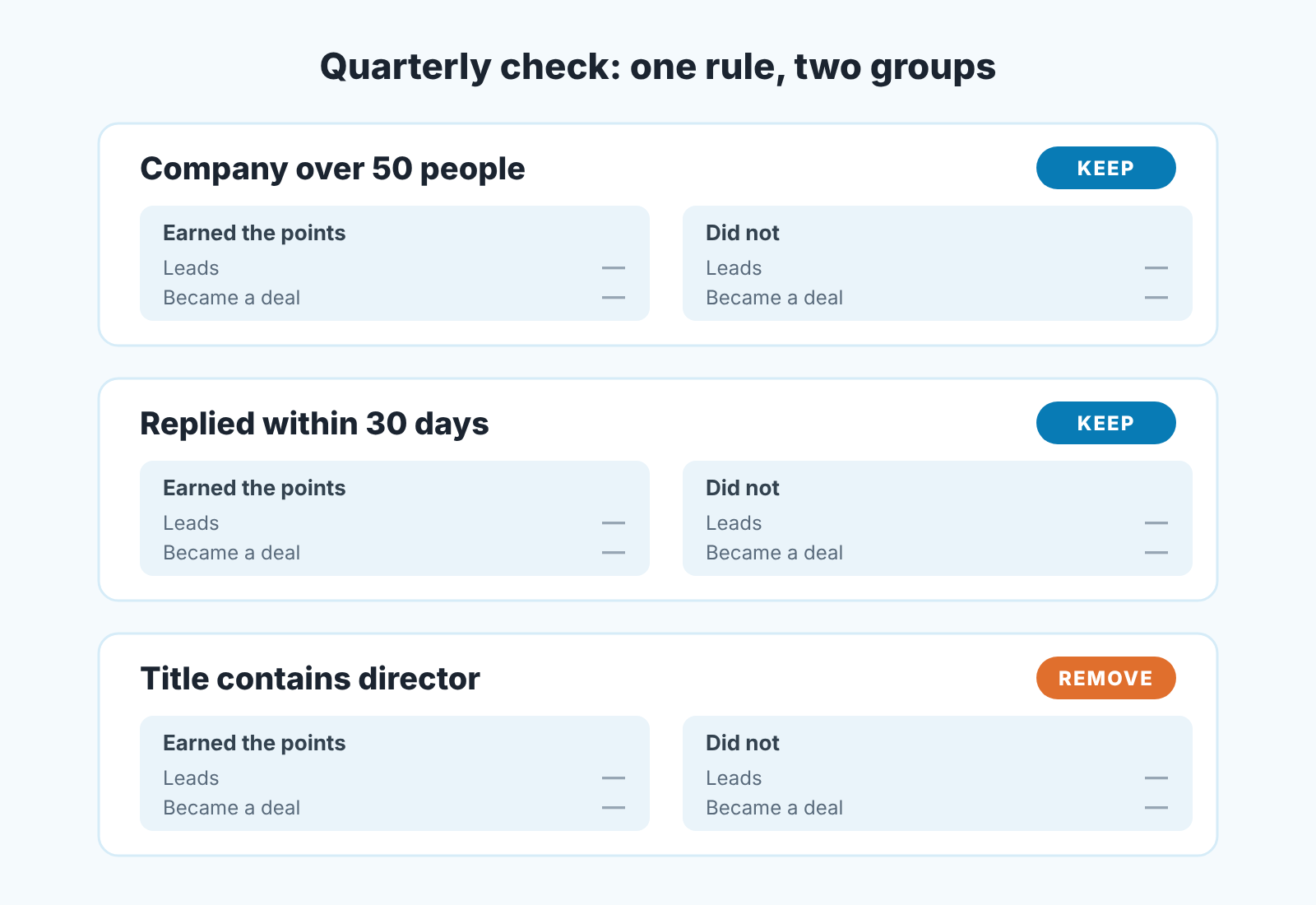
The check we run does not compare score bands. It compares rules. The question for each rule is the same: did the leads that earned these points become deals more often than the leads that did not? If yes, the rule stays. If the two groups look the same, the rule goes. A manager can run it without opening the rule setup at all, because it only reads records.
- Pick the window. Take the leads created in a quarter that ended at least one full sales cycle ago, so that each lead has had time to either become a deal or clearly not. Leads from last month have not had that time, and they will all look like failures.
- For each rule, split that quarter’s leads into two groups: the ones the rule’s condition was true for, and the rest. For attribute rules this is a filter on the field the rule reads. For activity rules it is a filter on the activity and its date, which is why the window belongs in the rule’s name.
- Count the deals in each group. Be strict about what counts. In Zoho, converting a lead creates an account and a contact, and creating a deal at that moment is optional. A lead converted with a deal is a yes; a lead converted without one is a new contact, not a buyer. A report does the counting faster than scrolling, and Zoho CRM reports for sales managers covers the ones worth building. Write down four numbers per rule: leads with, deals with, leads without, deals without.
- Read the pair. A rule earns its place when the group that earned the points became deals noticeably more often than teh group that did not. If the two shares are close, the rule is adding points for something that does not separate buyers from the rest. If the group without the points converted more often, the rule is pointing reps the wrong way, and it should go today.
- Remove, then stop. Keep your four numbers somewhere outside the CRM first: when a scoring rule is deleted, Zoho deletes the scores it gave and its scoring fields with them. Do not replace a removed rule with a new one in the same sitting. Run the smaller set for a quarter and check again.
Two things this check cannot do. It cannot tell you why a rule worked or failed; a rule for “replied within 30 days” might fail because reps followed up slowly that quarter, not because replies stopped predicting anything. And it cannot rescue a quarter with very few leads. With twenty leads in the window, one deal moves the share by five points, and you are reading noise. In that case, extend the window to two quarters and accept the slower answer.
When the score decides who gets the lead
The moment a score starts doing something (assigning leads, ordering a queue, deciding who gets a call back within an hour), the cost of a bad rule changes. Before, a wrong rule misled a rep who could still read the lead and ignore the number. After, the wrong rule chooses for the rep, and the rep never sees the lead it sent elsewhere.
So our rule for routing is strict: a score may route leads only after it has passed the quarterly check at least once, on a window the routing did not touch. If the routing is already live and the score has never been checked, run the check on the quarter before the routing started, because every quarter after it is contaminated. The high-score leads got the fastest reps and the fastest follow-up, so of course they converted. The score did not predict that; the routing caused it.
And if the check fails on a score that is already routing, switch the routing to something dumb and fair, round robin or territory, until the the rules have been cut back and re-checked. A dumb rule that treats every lead the same is better for the team than a clever one that quietly sends the best leads to the wrong place.
One more boundary. The score stops at the lead. Once a lead converts, the deal has its own life, its own stalls and its own silences, and a lead score that was right about who would buy says nothing about whether the deal is still moving. We build SalesBond, a sales management layer on top of the CRM a team already uses, Zoho CRM included. It reads deals, not leads: Deal Health checks each open deal against more than 20 rules and shows a manager which ones have gone quiet and why. Check your CRM with SalesBond once the leads your rules picked have become deals and you want to know which of those are already drifting.
For the lead side, your next step is small. Pick the quarter that ended a full sales cycle ago, filter its leads by your first rule, and write down the four numbers. Most lead scores in the wild have never been asked that question once.


