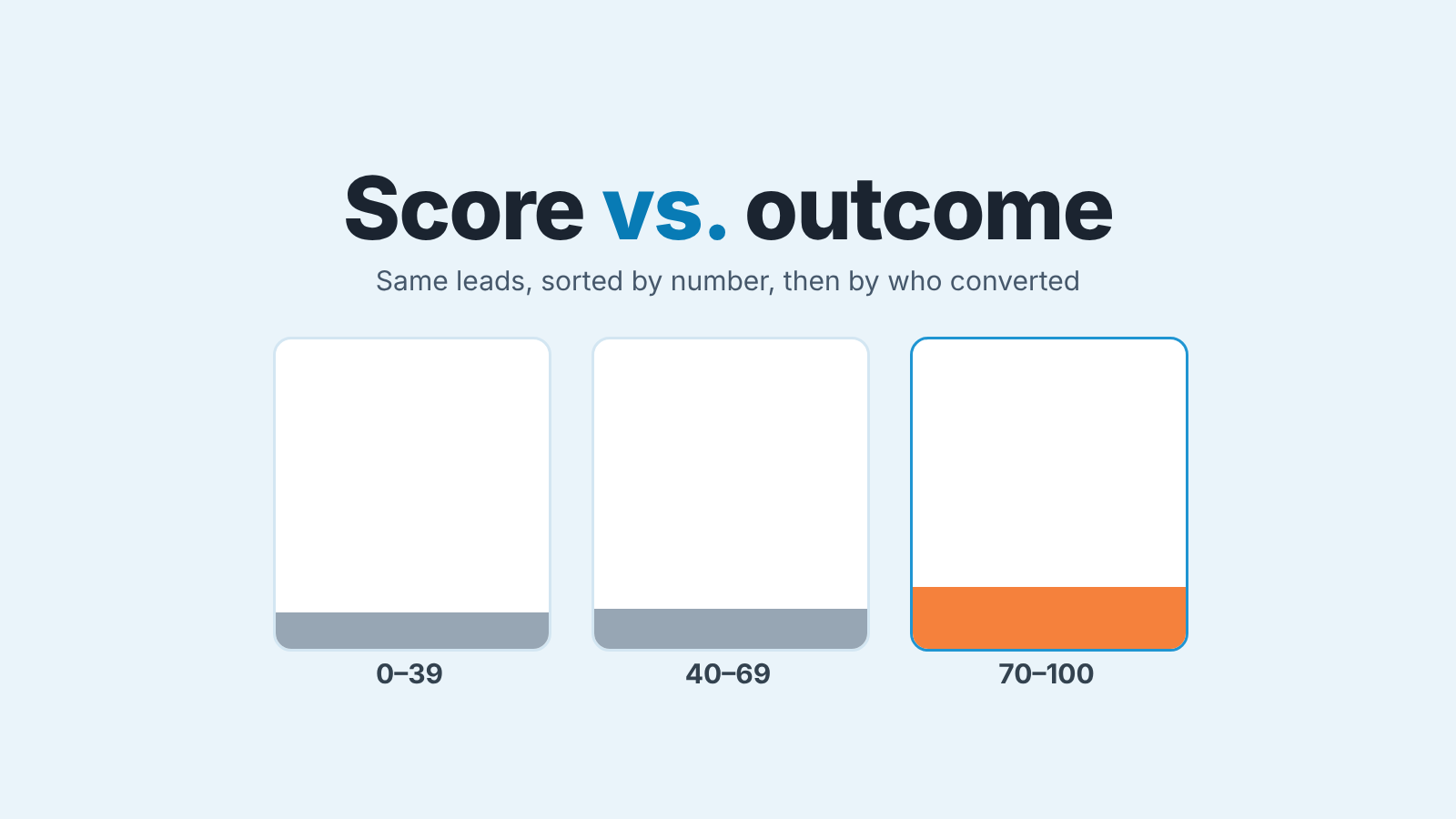
To check Salesforce lead scoring, take last quarter’s leads, group them by score into a few buckets, and compare the share that converted in each bucket. If the top bucket does not convert noticeably more often than the bottom one, the score is decoration, and your reps’ call order should not follow it. In Salesforce this is one Leads report with a bucket column on the score and a grouping on whether the lead was converted. It takes less time than the meeting where someone asks whether the score is any good.
We wrote the same kind of check for HubSpot lead scoring, and the principle carries over: a score is tested against your own outcomes or it is not tested at all. The mechanics in Salesforce are different enough to deserve their own walkthrough, so that is what this is.
The score says 87, the rep calls someone else
Picture a lead at 87. Mid-size company, right industry, filled the long form, visited pricing. The rep calls on Monday and gets a gatekeeper. Tuesday, voicemail. Thursday, a polite “we’re just researching.”
Two rows below sits a 34. A one-line web form, no company size, no title. Except the Lead Source says Referral, and the Description field reads “Tom from Hallway Co. said to call you.” That one closes in three weeks.
Nothing in the scoring broke. A formula field adds up the points it was given. Einstein weighs patterns it found in your history. Neither of them knows what “Tom said to call you” means, because nobody told them, and nobody could. The score did it’s job. The question is whether its job is the same as your reps’ job, which is to call the people most likely to buy this quarter.
That question has an answer in your own data, and most teams have never looked.
Two kinds of Salesforce lead scoring
Salesforce’s own definition is plain: lead scoring is “a way to rank potential customers by assigning values based on their behavior, demographics, and engagement” (Salesforce: lead scoring). In practice an org has one of two things.
The first is a score you built. Points for job title, points for company size, points for a demo request, stored in custom fields and added up by a formula field, or written by a flow when something happens. The same Salesforce piece puts the usual range at 1 to 100. Keeping it up by hand is work, but it has one virtue the second kind lacks: you can read the formula and say why a lead got 87.
The second is Einstein Lead Scoring. It looks at “your company’s past leads, including any custom fields, to find patterns in your successful lead conversion history” (Trailhead: Einstein Lead Scoring). Each lead gets a score, plus insights on which of its fields affect the score most, and the score keeps updating as data comes in. You cannot read the formula, because there isn’t one to read.
Setup differs as much as the scores do. The formula field is yours to build and maintain; Einstein is something you switch on, and Trailhead lists it for orgs with Sales Cloud Einstein or High Velocity Sales licenses.
For the check below it does not matter which you have. Both produce a number on the Lead record. Both can be bucketed. Both should be compared with whether the lead was converted before anyone sorts a list view by them.
The bucket test: a lead scoring report in Salesforce
Here is the whole test as a Salesforce report. Build it once, save it in a Sales Management folder, run it again next quarter.
-
Start a Leads report and limit it to one closed period. Report type: Leads. Set the Created Date filter to the last full fiscal quarter (the same filter that offers Current FQ, see Trailhead: create a simple custom report), and exclude the “fresh” Lead Status values, so you only count leads that someone has actually worked. Include all leads, not only your own. If your reps only touched leads above some score, say so in a filter note; it will matter in step 3.
-
Add a bucket column on the score. In the report builder, use Add Bucket Column on the score field, your formula field or the Einstein score (Trailhead: group and categorize your data), and split it into three ranges. Something like 0 to 39, 40 to 69, 70 to 100, or whatever cut-offs your routing already uses. Three is enough. Five looks scientific and leaves ten leads per bucket.
-
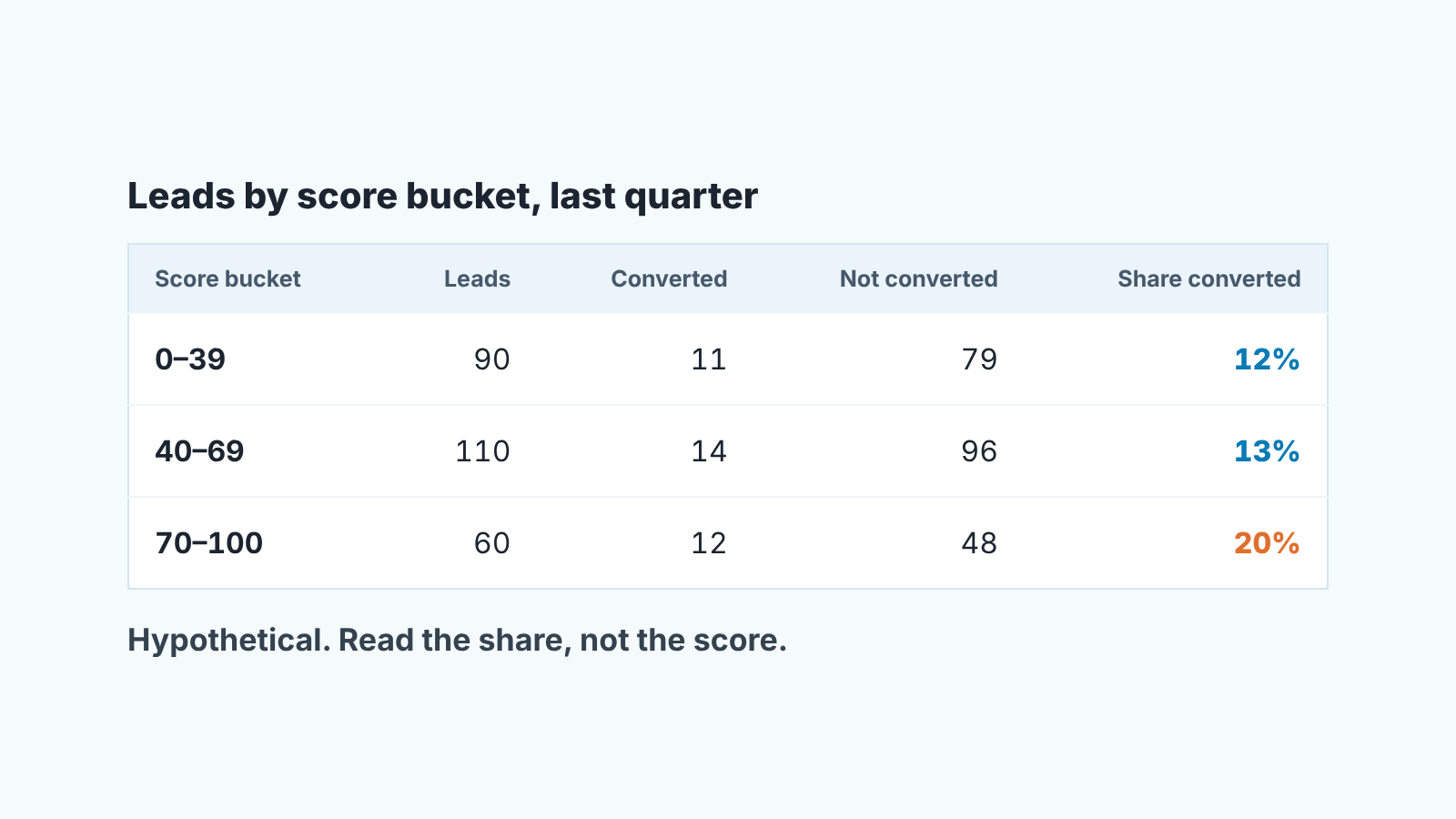
Group by the bucket, then by whether the lead converted. Rows grouped by your new bucket, with conversion as the second grouping, give you a count of converted and not-converted leads in each range. Read the share, not the average score. A hypothetical quarter: top bucket 60 leads, 12 converted, 20%. Middle bucket 110 leads, 14 converted, 13%. Bottom bucket 90 leads, 11 converted, 12%. The top bucket earns its place. The middle and bottom buckets are the same lead with a different number on it, and your routing treats them as different.
-
Decide, and write the decision on the report. Top bucket clearly ahead: keep the score, keep the queue, revisit next quarter. Buckets within a few points of each other: stop sorting by score until someone fixes the inputs. Bottom bucket ahead of the top one: it happens, usually because the model learned a channel that stopped working, and that is a reason to switch the field off today. The cut-offs and the numbers from this run go in the report description, so next quarter’s you has something to compare against.
One caveat for Einstein users. The score you see today on a converted lead is not necessarily the score the rep saw the day it came in, since the model keeps updating the score as data comes in. If you want the clean version of this test add a custom number field, “Score at first touch”, and have a flow copy the score into it on the first status change. Next quarter you bucket that field instead. For a formula score the same is true in a smaller way: change the formula and every old lead gets the new number, so snapshot it before you edit.
When the data is too thin
Einstein Lead Scoring “analyzes all historical field data on the Lead object” (Trailhead). That sounds like plenty. But a model learns only from conversions you already have, and a small team has few.
If your quarter has thirty converted leads in total, a three-bucket report has ten per bucket. One good referral moves a bucket by ten points. At that size the test above cannot tell a real score from a lucky one, and neither can a model trained on the same thirty.
Our position: below a few hundred worked leads a quarter, keep a formula field and skip Einstein. Not because the model is bad, but because you cannot check it, and a score you cannot check becomes a habit. A formula with four inputs can be argued about on a pipeline call. “Title contains VP” and “asked for a demo” are claims a rep can look at and disagree with. “The model says 87” is not.
The formula will be crude. That is fine. A crude score that matches who converts is a better sort key than a sophisticated one nobody has compared with conversions.
What the queue does to your calls
Scores do not stay in reports. They become the sort order of a list view, then a routing rule, then the reason a rep “hasn’t got to” a lead for nine days. That is the part we think managers underestimate, because the damage is quiet. No one reports “I skipped the 34.” The 34 just sits there.
Run one more report, cheap and worth it. Same leads, same quarter, but this time group by Lead Source and show the average days from Created Date to the first activity. If Referral and Partner leads wait longer than Web leads, the queue is doing what it was told, which is to put form-fillers first. Referrals rarely fill long forms. They arrive with a name and a sentence, score low on every demographic field, and convert because a human vouched for them. A score built on behavior will never see that.
The fix is not a bigger weight for Referral in the formula, though that helps. The fix is a rule reps can say out loud: referrals get called the same day regardless of score. A score decides the order within the pile. It does not decide who leaves the pile. Keep that distinction and the queue stops eating your best leads.
This is also where assignment and scoring blur. If the score drives who gets the lead as well as when it is called, check both; we covered the routing half in the lead assignment rules audit. And once a lead converts, the score goes quiet and the opportunity starts its own life; if your converted-lead fields land in the wrong place, the lead conversion field mapping is the next thing to fix, because the test in this article depends on leads being converted for the right reason.
A disclosure, since the article ends at the moment a lead becomes a deal: we build SalesBond, a sales management layer on top of the CRM a team already uses. It does not score leads. It watches the opportunity after conversion, with more than 20 Deal Health rules that flag a deal with no next step, a slipped close date, a stalled stage. The lead score tells you who to call first; what happens after the call is where we spend our time. Check your CRM with SalesBond if the second half is where your pipeline leaks. For scores on deals rather than leads, there is a separate piece on AI deal scoring for small teams.
Once a quarter, then leave it alone
A lead score is a hypothesis about your buyers, written down as a number. Hypotheses get tested, and Salesforce’s own advice is that both manual and predictive scores “must be consistently updated with new data” (Salesforce). Quarterly is often enough. Monthly and you will be chasing noise; yearly and the score has had time to become furniture. Put the saved report in the the calendar next to the pipeline review, read the three shares, change nothing unless the buckets tell you to, and if the top bucket stops earning its place, say so on the Monday call before anyone sorts by it again.